

With Cluster Toolkit, you can simplify the deployment of high performance computing (HPC), artificial intelligence (AI), and machine learning (ML) workloads on Google Cloud. This open-source tool provides customizable blueprints that help you provision infrastructure that aligns with Google Cloud best practices. You can tailor and extend the toolkit to address a broad range of deployment needs.
Features
Cluster Toolkit lets you do the following:
- Efficiently create and deploy turnkey HPC, AI, and ML clusters that follow Google Cloud best practices.
- Configure and extend an open source solution.
- Integrate seamlessly with various partners, such as Intel DAOS, DDN EXAscaler, and Slurm.
- Monitor and gain performance visibility through integration with Cloud Monitoring.
Components
Cluster Toolkit consists of the following components:
- Cluster blueprint: A YAML file that defines your cluster's architecture by specifying which modules to use and how to configure them.
- Modules: Reusable, configurable building blocks that define specific resources like schedulers, storage, or compute nodes.
- The
gclustertool: A command-line utility that compiles your blueprint and modules into a deployment folder. - Deployment folder: A generated directory containing the Terraform and Packer configurations needed to deploy your cluster to Google Cloud. You can deploy this folder directly or customize it further before deployment.
How Cluster Toolkit works
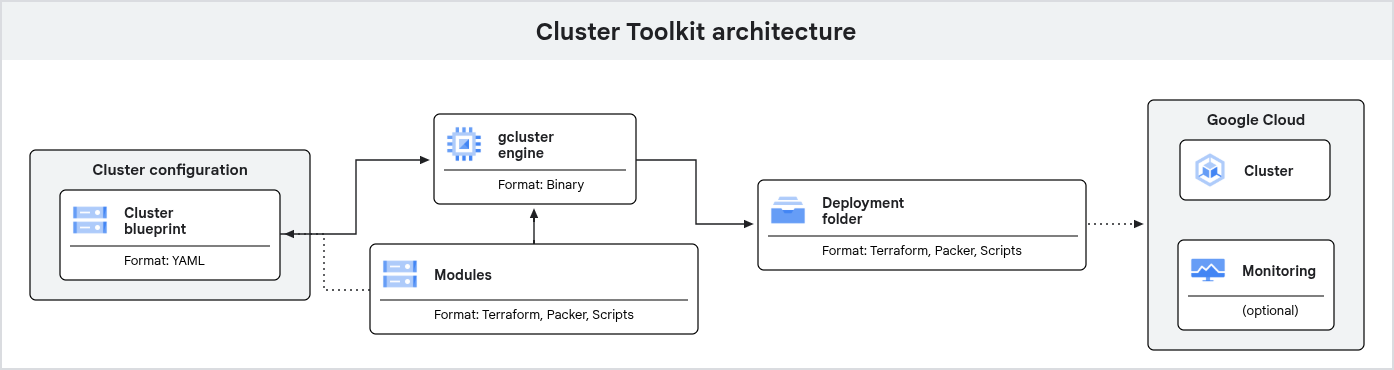
Figure 1. Cluster Toolkit architecture overview
To deploy clusters on Google Cloud by using Cluster Toolkit, do the following:
- Set up your environment by using Cloud Shell or a local Linux or macOS terminal. If you use a local terminal, then you must install a few dependencies.
- Clone the Cluster Toolkit repository. This repository contains the
gclusterbinary, modules, cluster blueprint examples, and other resources. - Use an editor to create your cluster blueprint file. Example blueprints are available in the Cluster Toolkit repository.
- Run
gcluster createto generate a deployment folder that contains the necessary Terraform and Packer configurations. - Run the commands provided by the
gclustertool. After you run these commands, Terraform or Packer then deploys the cluster on Google Cloud. For more information, see Deploy a cluster. - After your cluster is deployed, you can submit jobs to your HPC cluster. You can also use Cloud Monitoring to analyze and monitor the Google Cloud resources that are used by your cluster.
Telemetry data collection options
To help improve Cluster Toolkit, Google collects statistics about feature usage by default. You can opt out at any time. When telemetry is enabled, you let Google support and engineering teams use the data that is required to proactively identify and resolve deployment issues that might occur.
This enhanced visibility helps Google support your production environments and prioritize feature roadmaps based on patterns of usage. If you turn off telemetry, then it might limit the ability of Google to provide proactive assistance for your configurations.
Google handles Cluster Toolkit telemetry data in accordance with the Google Privacy Policy. When you use Cluster Toolkit to interact with Google Cloud services, Google handles your information in accordance with the Google Cloud Privacy Notice.
To turn off telemetry in your environment, use the gcluster telemetry command:
./gcluster telemetry off
To turn telemetry back on, use the gcluster telemetry command with the on argument:
./gcluster telemetry on
The system collects non-sensitive metrics that are similar to the metrics of other Google Cloud tools. To protect your privacy, the system automatically masks unrecognized names of blueprints or paths to deployment files as "Custom". The system collects only non-sensitive metrics and doesn't collect personally identifiable information (PII).
The system collects usage metrics like the following:
- Command names, such as the
create,deploy, ordestroycommands - Exit codes for commands
- Execution latency
- Names of standard blueprints and modules
- Machine types
- The version of the toolkit that you use
Limitations
Cluster Toolkit supports updating specific configurations of an active cluster, such as resizing a Slurm partition or updating a GKE node pool. For more information, see the following guides:
For fundamental architectural changes, such as switching to a new VPC or changing the scheduler, you must redeploy the cluster:
- Delete the cluster.
- Update the cluster blueprint.
- Create the deployment folder.
- Deploy the cluster.
What's next
- To try a quickstart tutorial, see Deploy an HPC cluster with Slurm.
- To learn how to quickly deploy clusters using blueprints, see Cluster blueprints.
- To learn about how to change the functionality of blueprints using modules, see Modules.
- To view the project on GitHub, see the Cluster Toolkit repository.