

This document provides an overview of modules for Cluster Toolkit. Modules are reusable, configurable building blocks that define the infrastructure and software resources in your Cluster Toolkit deployment. Modify blueprints by configuring modules for compute, networking, storage, and scheduling in your blueprint file.
Example module
Modules are declared in YAML format in the
deployment_groups section of
your blueprint file.
For example, the following code snippet configures a primary deployment group with a Compute Engine instance module:
deployment_groups:
- group: primary
  modules:
  - id: compute_nodes
    source: modules/compute/vm-instance
    settings:
      machine_type: c2-standard-60
Use modules to create flexible, repeatable deployments that adhere to infrastructure-as-code best practices.
Module structure
The following diagram shows the structure of a Cluster Toolkit blueprint. A deployment group within the blueprint acts as a container for your infrastructure modules, grouping together resources such as virtual machines (VMs), networks, file systems, and schedulers:
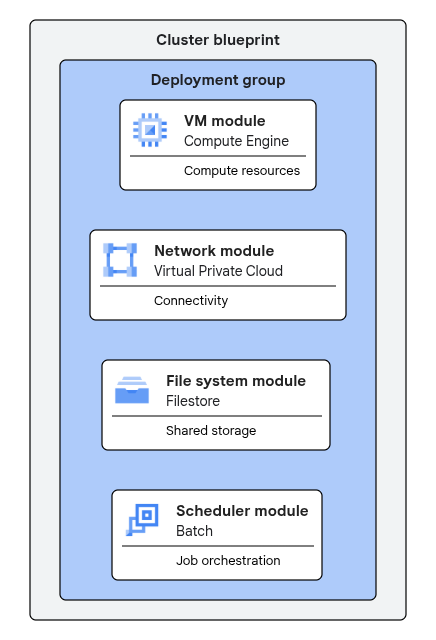
Figure 1. Modules are organized within a deployment group in a cluster blueprint.
Module categories
Provision and manage your cluster resources efficiently by using different categories of modules. These modules provide the building blocks to define and deploy infrastructure optimized for demanding workloads, such as high performance computing (HPC) or AI/ML training workloads.
Modules let you configure the following aspects of your cluster deployment:
- Compute resources: define VMs, autoscaling groups, GKE node pools, and specialized Slurm partitions and node sets.
- Scheduler deployment: configure workload managers, including controller and login nodes, to manage job queues.
- File systems: provision shared, high-performance storage solutions for data-intensive applications.
- Networking: establish connectivity, configure firewalls, and integrate your cluster into existing VPC networks.
- Observability: monitor cluster health and performance.
- Software and system setup: customize VM images and automate system configuration tasks.
What's next
- To start configuring modules, see Supported modules.
- To see how these modules work together in practice, view the Cluster blueprint catalog.
- For a complete list of modules, including experimental and community modules, see the Cluster Toolkit GitHub repository.