

למה כדאי לאמת דומיין באופן אוטומטי?
בעזרת Cloud Channel API אפשר להקצות זכויות ל-Google Workspace בהיקף נרחב, אבל הלקוח עדיין צריך לבצע את הפעולות הבאות כדי להפעיל שירותים.
- אישור התנאים וההגבלות
- אימות הבעלות על הדומיין
- הגדרת רשומות MX
לקוח חדש שייכנס למסוף Admin (בכתובת admin.google.com) בפעם הראשונה יקבל הנחיות לתהליך של הגדרת הדרישות.
אם יש לכם גישה פרוגרמטית לרשומות ה-DNS של הדומיין (לדוגמה, אם מכרתם את הדומיין ללקוח), אתם יכולים להפוך את שלבים 2 ו-3 לאוטומטיים כדי להגדיל את שיעורי ההפעלה, כי בדרך כלל הלקוח שקנה את הדומיין צריך ידע טכני כדי לבצע את השלבים האלה.
בשיעור Codelab הזה נסביר איך להשתמש ב-Site Verification API כדי להטמיע את האוטומציה הזו.
לפני שמתחילים
חשוב להשלים את ה-Codelab בנושא הגדרת API כדי להגדירGoogle Cloud פרויקט וליצור חשבון שירות להפעלת Cloud Channel API.
מומלץ להשתמש במסוף Partner Sales לניסויים לצורך ה-codelab הזה.
בנוסף, מניחים שסיימתם את ה-Codelab בנושא הקצאת משתמשים מקצה לקצה ב-Workspace.
סקירה כללית
אימות הדומיין לצורך קבלת הרשאה ל-Google Workspace כולל כמה קריאות ל-API.
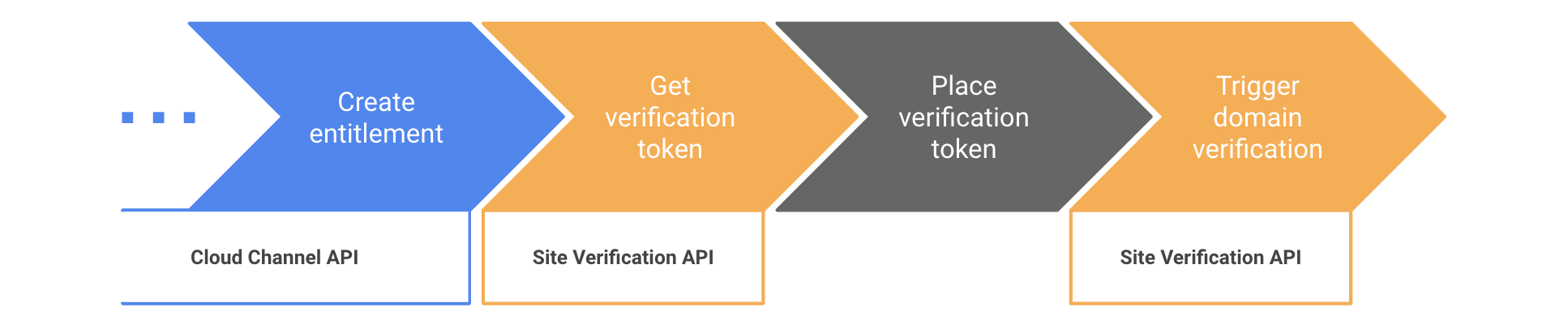
ממשק Site Verification API לא מיועד רק למפיצים. אימות הדומיין הוא אות שמשמש במוצרים שונים של Google (Search Console, Google Ads וכו'). התהליך שמתואר כאן מתבסס על הגדרת הסופר-אדמין של הדומיין של המפיץ כ'בעלים' של הדומיין, ועל הגדרת האדמין הראשון של הלקוח כבעלים משותף. מידע נוסף על המושגים האלה זמין בדף תחילת העבודה עם Site Verification API.
שלב 1: הכנה לשימוש ב-Site Verification API
- עוברים לקטע API Library במסוף Google Cloud ומפעילים את Site Verification API.
- עוברים אל הדף 'הענקת גישה ברמת הדומיין' באמצעות חשבון הסופר-אדמין בדומיין של המפיץ.
- בשורה עם חשבון השירות, לוחצים על עריכה.
- מזינים
https://www.googleapis.com/auth/siteverificationבשדה OAuth Scopes. - לוחצים על Authorize.
- מתקינים את ספריית הלקוח של Site Verification API.
שלב 2: מקבלים טוקן אימות
ב-Codelab הזה נתמקד בדרך הנפוצה ביותר לאימות דומיין: שימוש ברשומות DNS.TXT
ממשק Site Verification API תומך בשיטות אימות אחרות.
כדי לאחזר את האסימון שיוצב כרשומה TXT, צריך לקבל אסימונים עבור type=INET_DOMAIN ו-verificationMethod=DNS_TXT.
בקוד הבא, ממלאים את המשתנים האלה בפרטים שלכם.
-
jsonKeyFile: הנתיב לקובץ מפתח ה-JSON שנוצר כשיצרתם חשבון שירות. -
resellerAdminUser: כתובת האימייל של סופר-אדמין בדומיין של מפיץ.
customerDomain: הדומיין של לקוח הקצה. אם מריצים את ה-Codelab הזה במסוף תוכנית המכירות של שותפי YouTube לניסויים, צריך לוודא שהדומיין עומד במוסכמות למתן שמות לדומיינים.
C#
משתמשים בייבוא הבא:
using Google.Apis.Auth.OAuth2;
using Google.Apis.Services;
using Google.Apis.SiteVerification.v1;
using Google.Apis.SiteVerification.v1.Data;
יוצרים את לקוח ה-API ומביאים את הטוקן:
// Set up credentials with user impersonation
ICredential credential = GoogleCredential.FromFile(jsonKeyFile)
                             .CreateScoped("https://www.googleapis.com/auth/siteverification")
                             .CreateWithUser(resellerAdminUser);

// Create the API service
var verificationService = new SiteVerificationService(new BaseClientService.Initializer{
    HttpClientInitializer = credential,
});

// Fetch the token
var request = new SiteVerificationWebResourceGettokenRequest {
  VerificationMethod = "DNS_TXT",
  Site = new SiteVerificationWebResourceGettokenRequest.SiteData {
    Type = "INET_DOMAIN",
    Identifier = customerDomain
  }
};
var response = verificationService.WebResource.GetToken(request).Execute();
string token = response.Token;
Console.WriteLine("Site Verification token: " + token);
המשך
משתמשים בייבוא הבא:
import (
  "context"
  "fmt"
  "os"

  "golang.org/x/oauth2/google"
  "google.golang.org/api/option"
  "google.golang.org/api/siteverification/v1"
)
יוצרים את לקוח ה-API ומביאים את הטוקן:
ctx := context.Background()

// Set up credentials with user impersonation
jsonKey, _ := os.ReadFile(jsonKeyFile)
jwt, _ := google.JWTConfigFromJSON(jsonKey, "https://www.googleapis.com/auth/siteverification")
jwt.Subject = resellerAdminUser
tokenSource := jwt.TokenSource(ctx)

// Create the API Service
verificationService, _ := siteverification.NewService(ctx, option.WithTokenSource(tokenSource))

// Fetch the token
req := &siteverification.SiteVerificationWebResourceGettokenRequest{
  Site: &siteverification.SiteVerificationWebResourceGettokenRequestSite{
    Type:       "INET_DOMAIN",
    Identifier: customerDomain,
  },
  VerificationMethod: "DNS_TXT",
}
res, _ := verificationService.WebResource.GetToken(req).Do()
token := res.Token
fmt.Println("Site verification token: " + token)
Java
משתמשים בייבוא הבא:
import com.google.auth.http.HttpCredentialsAdapter;
import com.google.auth.oauth2.GoogleCredentials;
import com.google.auth.oauth2.ServiceAccountCredentials;
import com.google.api.client.googleapis.javanet.GoogleNetHttpTransport;
import com.google.api.client.json.jackson2.JacksonFactory;
import com.google.api.services.siteVerification.SiteVerification;
import com.google.api.services.siteVerification.SiteVerificationScopes;
import com.google.api.services.siteVerification.model.SiteVerificationWebResourceGettokenRequest;
import com.google.api.services.siteVerification.model.SiteVerificationWebResourceGettokenResponse;
import com.google.api.services.siteVerification.model.SiteVerificationWebResourceResource;
import java.io.FileInputStream;
import java.util.Arrays;
יוצרים את לקוח ה-API ומביאים את הטוקן:
// Set up credentials with user impersonation
FileInputStream jsonKeyFileSteam = new FileInputStream(JSON_KEY_FILE);
GoogleCredentials credentials = ServiceAccountCredentials.fromStream(jsonKeyFileSteam)
                                    .createScoped("https://www.googleapis.com/auth/siteverification")
                                    .createDelegated(RESELLER_ADMIN_USER);

// Create the API service
SiteVerification verificationService = new SiteVerification.Builder(
    GoogleNetHttpTransport.newTrustedTransport(),
    JacksonFactory.getDefaultInstance(),
    new HttpCredentialsAdapter(credentials)).build();

// Fetch the token
SiteVerificationWebResourceGettokenRequest request =
    new SiteVerificationWebResourceGettokenRequest()
        .setVerificationMethod("DNS_TXT")
        .setSite(new SiteVerificationWebResourceGettokenRequest.Site()
            .setType("INET_DOMAIN")
            .setIdentifier(CUSTOMER_DOMAIN));
SiteVerificationWebResourceGettokenResponse response =
    verificationService.webResource().getToken(request).execute();
String token = response.getToken();
System.out.println("Site Verification token: " + token);
Node.js
באמצעות הייבוא הבא:
const {google} = require('googleapis');
יוצרים את לקוח ה-API ומביאים את הטוקן:
// Set up credentials with user impersonation
const authJWT = new JWT({
  keyFile: jsonKeyFile,
  scopes: ['https://www.googleapis.com/auth/siteverification'],
  subject: resellerAdminUser,
});

// Create the API service
const verificationService = google.siteVerification({version: 'v1', auth: authJWT});

// Fetch the token
const { data } = await verificationService.webResource.getToken({
  requestBody: {
    site: {
      type: 'INET_DOMAIN',
      identifier: customerDomain,
    },
    verificationMethod: 'DNS_TXT',
  }
});
const token = data.token;
console.log(`Site Verification token: ${token}`);
PHP
יוצרים את לקוח ה-API ומביאים את הטוקן:
// Set up credentials with user impersonation
$client = new Google_Client();
$client->setAuthConfig($JSON_KEY_FILE);
$client->setSubject($RESELLER_ADMIN_USER);
$client->setScopes('https://www.googleapis.com/auth/siteverification');

// Create the API service
$verificationService = new Google_Service_SiteVerification($client);

// Fetch the token
$request = new Google_Service_SiteVerification_SiteVerificationWebResourceGettokenRequest([
  'verificationMethod' => 'DNS_TXT',
  'site' => [
    'type' => 'INET_DOMAIN',
    'identifier' => $CUSTOMER_DOMAIN
  ]
]);
$response = $verificationService->webResource->getToken($request);
$token = $response->token;
print 'Site Verification token: ' . $token . PHP_EOL;
Python
משתמשים בייבוא הבא:
from google.oauth2 import service_account
from apiclient.discovery import build
יוצרים את לקוח ה-API ומביאים את הטוקן:
# Set up credentials with user impersonation
credentials = service_account.Credentials.from_service_account_file(
    JSON_KEY_FILE, scopes=["https://www.googleapis.com/auth/siteverification"])
credentials_delegated = credentials.with_subject(RESELLER_ADMIN_USER)

# Create the API service
verification_service = build(serviceName="siteVerification", version="v1",
    credentials=credentials_delegated)

# Fetch the token
response = verification_service.webResource().getToken(
  body={
    "site": {
      "type": "INET_DOMAIN",
      "identifier": CUSTOMER_DOMAIN
    },
    "verificationMethod": "DNS_TXT"
  }).execute()
token = response["token"]
print("Site Verification token: " + token)
שלב 3: הצבת טוקן אימות
כותבים את הקוד כדי להוסיף את האסימון כרשומת TXT ברשומות ה-DNS של דומיין הלקוח.
אם מדובר בדומיינים חדשים, זה זמן טוב להגדיר את רשומות MX הנדרשות ל-Gmail.
שלב 4: הפעלת אימות הדומיין
אחרי שמוסיפים את האסימון כרשומת TXT, אפשר להפעיל את Site Verification API כדי להתחיל את האימות. כדי לעשות את זה, צריך להתקשר למספר webResource.insert().
אם לא נמצא הטוקן הצפוי, הקריאה נכשלת עם שגיאה 400. כדי לפצות על עיכובים בהפצת ה-DNS, אפשר להטמיע אסטרטגיה של השהיה מעריכית לפני ניסיון חוזר (exponential backoff) עד שהקריאה תצליח.
אם הקריאה מחזירה ללא שגיאות, API לאימות אתרים מחשיב את הדומיין כמאומת, וכל כתובת אימייל בשדה owners של webResource היא בעלים מאומת.
יכול להיות שיחלפו כ-3 שעות עד שסטטוס האימות יתעדכן בחשבון Google Workspace של הלקוח. כדי להחיל את הסטטוס באופן מיידי, צריך להגדיר את האדמין של הלקוח (שנוצר כשקוראים ל-provisionCloudIdentity) כ-owner של webResource.
C#
// Set the customer's admin user as an owner to make sure the domain
// verification status is instantly propagated to the Workspace account
string[] owners = { "admin@" + customerDomain };

var resource = new SiteVerificationWebResourceResource {
  Site = new SiteVerificationWebResourceResource.SiteData {
    Type = "INET_DOMAIN",
    Identifier = customerDomain
  },
  Owners = owners
};

resource = verificationService.WebResource.Insert(resource, "DNS_TXT").Execute();
Console.WriteLine("=== Domain has been verified");
Go
// Set the customer's admin user as an owner to make sure the domain
// verification status is instantly propagated to the Workspace account
resource := &siteverification.SiteVerificationWebResourceResource{
  Site: &siteverification.SiteVerificationWebResourceResourceSite{
    Type:       "INET_DOMAIN",
    Identifier: customerDomain,
  },
  Owners: []string{"admin@" + customerDomain},
}
resource, err := verificationService.WebResource.Insert("DNS_TXT", resource).Do()
if err != nil {
  fmt.Println(err)
} else {
  fmt.Println("=== Domain has been verified")
}
Java
// Set the customer's admin user as an owner to make sure the domain
// verification status is instantly propagated to the Workspace account
SiteVerificationWebResourceResource resource =
    new SiteVerificationWebResourceResource()
        .setSite(new SiteVerificationWebResourceResource.Site()
            .setIdentifier(CUSTOMER_DOMAIN)
            .setType("INET_DOMAIN"))
        .setOwners(Arrays.asList("admin@" + CUSTOMER_DOMAIN));

resource = verificationService.webResource().insert("DNS_TXT", resource).execute();
System.out.println("=== Domain has been verified");
Node.js
// Set the customer's admin user as an owner to make sure the domain
// verification status is instantly propagated to the Workspace account
await verificationService.webResource.insert({
  verificationMethod: 'DNS_TXT',
  requestBody: {
    site: {
      type: 'INET_DOMAIN',
      identifier: customerDomain,
    },
    owners: [`admin@${customerDomain}`],
  }
});
console.log('=== Domain has been verified');
PHP
// Set the customer's admin user as an owner to make sure the domain
// verification status is instantly propagated to the Workspace account
$resource = new Google_Service_SiteVerification_SiteVerificationWebResourceResource([
  'site' => [
    'type' => 'INET_DOMAIN',
    'identifier' => $CUSTOMER_DOMAIN,
  ],
  'owners' => ['admin@' . $CUSTOMER_DOMAIN]
]);

$resource = $verificationService->webResource->insert('DNS_TXT', $resource);
print '=== Domain has been verified' . PHP_EOL;
Python
# Set the customer's admin user as an owner to make sure the domain
# verification status is instantly propagated to the Workspace account
resource = verification_service.webResource().insert(
  verificationMethod="DNS_TXT",
  body={
    "site": {
      "type": "INET_DOMAIN",
      "identifier": CUSTOMER_DOMAIN
    },
    "owners": ["admin@" + CUSTOMER_DOMAIN]
  }).execute()
print("=== Domain has been verified")