Criar uma autoridade certificadora subordinada

Nesta página, descrevemos como criar autoridades certificadoras (ACs) subordinadas em um pool de ACs.

As ACs subordinadas são responsáveis por emitir certificados diretamente para entidades finais, como usuários, computadores e dispositivos. As ACs subordinadas são assinadas criptograficamente por uma AC mãe, que geralmente é a AC raiz. Como resultado, os sistemas que confiam na AC raiz confiam automaticamente nas ACs subordinadas e nos certificados de entidade final que as ACs subordinadas emitem.

Antes de começar

  • Verifique se você tem o papel do IAM de Gerente de operações do serviço de AC (roles/privateca.caManager) ou de Administrador do serviço de AC (roles/privateca.admin). Para mais informações, consulte Configurar políticas do IAM.
  • Criar um pool de CA.
  • Selecione sua AC raiz.

Criar uma AC subordinada

As ACs subordinadas são mais fáceis de revogar e girar do que as ACs raiz. Se você tiver vários cenários de emissão de certificados, poderá criar uma AC subordinada para cada um deles. Adicionar várias ACs subordinadas a um pool de ACs ajuda você a conseguir um melhor balanceamento de carga das solicitações de certificado e um QPS efetivo total mais alto.

Para criar uma AC subordinada, faça o seguinte:

Console

  1. Acesse a página Certificate Authority Service no Google Cloud console.

    Acesse Certificate Authority Service

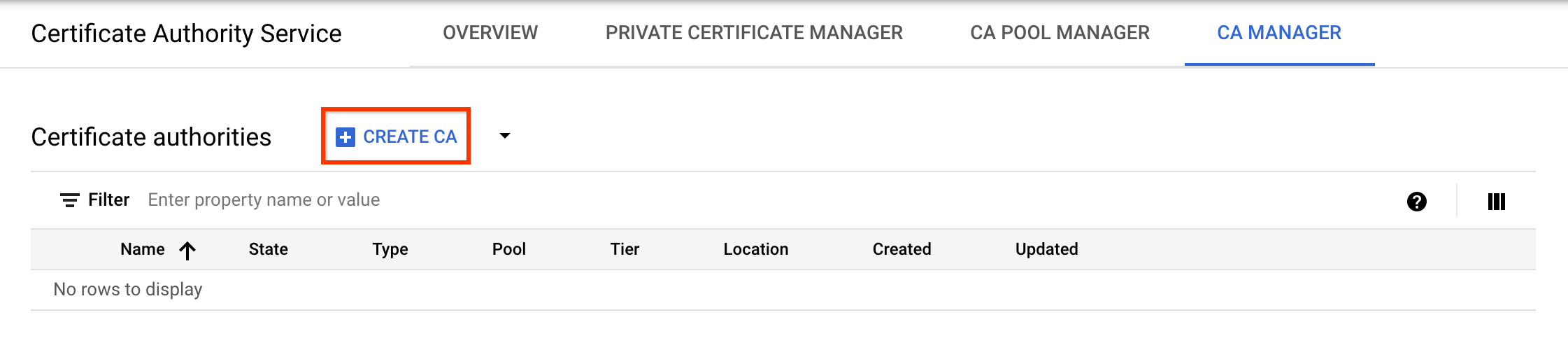
  2. Clique na guia Gerenciador de AC.

  3. Clique em Criar AC.

    Crie uma CA usando o console do Cloud.

Selecionar o tipo de AC

  1. Clique em AC subordinada.
  2. Clique em A AC raiz está no Google Cloud.
  3. No campo Válido por, insira a duração da validade do certificado da AC.
  4. Opcional: escolha o nível da AC. O nível padrão é Enterprise. Para mais informações, consulte Selecionar os níveis de operação.
  5. Clique em Região para selecionar um local para a AC. Para mais informações, consulte Locais.
  6. Opcional: em Estado inicializado, selecione o estado operacional para criar a AC.
  7. Opcional: em Configurar um cenário de emissão, clique em Perfil de certificado e selecione o perfil de certificado que melhor atende aos seus requisitos na lista. Para mais informações, consulte Perfis de certificado.
  8. Clique em Próxima.
Configurar o nome do assunto da AC
  1. Opcional: no campo Organização (O), insira o nome da sua empresa.
  2. Opcional: no campo Unidade organizacional (OU), insira a subdivisão da empresa ou a unidade de negócios.
  3. Opcional: no campo Nome do país (C), insira um código de país de duas letras.
  4. Opcional: no campo Nome do estado ou província, insira o nome do seu estado.
  5. Opcional: no campo Nome da localidade, insira o nome da sua cidade.
  6. No campo Nome comum da AC (CN), insira o nome da AC.
  7. Clique em Continuar.
Configurar o tamanho e o algoritmo da chave da AC
  1. Escolha o algoritmo de chave que melhor atende às suas necessidades. Para mais detalhes sobre as opções de chave de assinatura, consulte Configurar chaves de assinatura de AC.
  2. Para usar uma chave de assinatura gerenciada pelo cliente, selecione Chave gerenciada pelo cliente e forneça a versão da chave criptográfica do Cloud Key Management Service.
  3. Clique em Continuar.
Configurar artefatos de AC
  1. Escolha se você quer usar um bucket do Cloud Storage gerenciado pelo Google ou pelo cliente.
    1. Para um bucket do Cloud Storage gerenciado pelo Google, o serviço de AC cria um bucket gerenciado pelo Google no mesmo local da AC.
    2. Para um bucket do Cloud Storage gerenciado pelo cliente, clique em "Procurar" e selecione um dos buckets do Cloud Storage atuais.
  2. Clique em Continuar.
Adicionar rótulos

As etapas a seguir são opcionais.

Se você quiser adicionar rótulos à AC, faça o seguinte:

  1. Clique em Adicionar item.
  2. No campo Chave 1, insira a chave do rótulo.
  3. No campo Valor 1, insira o valor do rótulo.
  4. Se você quiser adicionar outro rótulo, clique em Adicionar item. Em seguida, adicione a chave e o valor do rótulo, conforme mencionado nas etapas 2 e 3.
  5. Clique em Continuar.
Revisar as configurações

Analise todas as configurações com atenção e clique em Concluído para criar a AC.

gcloud

  1. Crie um pool de ACs para a AC subordinada:

    gcloud privateca pools create SUBORDINATE_POOL_ID --location=LOCATION
    

    Substitua:

    • SUBORDINATE_POOL_ID: o nome do pool de ACs
    • LOCATION: o local em que você quer criar o pool de ACs. Para a lista completa de locais, consulte Locais.

    Para mais informações sobre como criar pools de ACs, consulte Criar um pool de ACs.

    Para mais informações sobre o comando gcloud privateca pools create, consulte gcloud privateca pools create.

  2. Crie uma AC subordinada no pool de ACs criado.

    gcloud privateca subordinates create SUBORDINATE_CA_ID \
        --pool=SUBORDINATE_POOL_ID \
        --location=LOCATION \
        --issuer-pool=ISSUER_POOL_ID \
        --issuer-location=ISSUER_LOCATION \
        --key-algorithm="ec-p256-sha256" \
        --subject="CN=Example Server TLS CA, O=Example LLC"
    

    Substitua:

    • SUBORDINATE_CA_ID: o identificador exclusivo da AC subordinada
    • SUBORDINATE_POOL_ID: o nome do pool de ACs
    • LOCATION: o local do pool de ACs
    • ISSUER_POOL_ID: o nome do pool de ACs que contém a AC emissora
    • ISSUER_LOCATION: o local do pool de ACs que contém a AC emissora

      A flag --key-algorithm especifica o algoritmo criptográfico que você quer usar para criar uma chave gerenciada do Cloud HSM para a AC.

      A flag --subject especifica o nome X.501 do assunto do certificado.

    Para criar uma AC subordinada usando uma chave de assinatura gerenciada pelo cliente, execute o seguinte comando:

    gcloud privateca subordinates create SUBORDINATE_CA_ID \
        --pool=SUBORDINATE_POOL_ID \
        --location=LOCATION \
        --issuer-pool=ISSUER_POOL_ID \
        --issuer-location=ISSUER_LOCATION \
        --kms-key-version=KMS_KEY_VERSION \
        --subject="CN=Example Server TLS CA, O=Example LLC"
    

    Substitua:

    • SUBORDINATE_POOL_ID: o nome do pool de ACs
    • LOCATION: o local do pool de ACs
    • ISSUER_POOL_ID: o nome do pool de ACs que contém a AC emissora
    • ISSUER_LOCATION: o local do pool de ACs que contém a AC emissora
    • KMS_KEY_VERSION: o ID do recurso completo de uma versão de chave criptográfica do Cloud KMS gerenciada pelo cliente a ser usada como chave de assinatura

    Para mais detalhes sobre as opções de chave de assinatura e como preparar uma chave de assinatura gerenciada pelo cliente, consulte Configurar chaves de assinatura de AC.

    A instrução a seguir é retornada quando a AC subordinada é criada.

    Created Certificate Authority [projects/my-project-pki/locations/us-west1/caPools/SUBORDINATE_POOL_ID/certificateAuthorities/SUBORDINATE_CA_ID].
    

    Para especificar URLs de acesso de Autoridade de Informações de Acesso (AIA, na sigla em inglês) e Ponto de Distribuição de CRL (CDP, na sigla em inglês) personalizados, use as flags --custom-aia-urls e --custom-cdp-urls. Se especificados, esses URLs serão incluídos em todos os certificados emitidos pela AC e substituirão os URLs de acesso padrão do bucket do Cloud Storage.

    Para conferir uma lista exaustiva de configurações, execute o seguinte comando gcloud:

    gcloud privateca subordinates create --help
    

    O comando retorna exemplos para criar uma AC subordinada cujo emissor está localizado no serviço de AC ou em outro lugar.

Terraform

resource "google_privateca_certificate_authority" "root_ca" {
  // This example assumes this pool already exists.
  // Pools cannot be deleted in normal test circumstances, so we depend on static pools
  pool                                   = "my-pool"
  certificate_authority_id               = "my-certificate-authority-root"
  location                               = "us-central1"
  deletion_protection                    = false # set to true to prevent destruction of the resource
  ignore_active_certificates_on_deletion = true
  config {
    subject_config {
      subject {
        organization = "ACME"
        common_name  = "my-certificate-authority"
      }
    }
    x509_config {
      ca_options {
        # is_ca *MUST* be true for certificate authorities
        is_ca = true
      }
      key_usage {
        base_key_usage {
          # cert_sign and crl_sign *MUST* be true for certificate authorities
          cert_sign = true
          crl_sign  = true
        }
        extended_key_usage {
        }
      }
    }
  }
  key_spec {
    algorithm = "RSA_PKCS1_4096_SHA256"
  }
  // valid for 10 years
  lifetime = "${10 * 365 * 24 * 3600}s"
}

resource "google_privateca_certificate_authority" "sub_ca" {
  // This example assumes this pool already exists.
  // Pools cannot be deleted in normal test circumstances, so we depend on static pools
  pool                     = "my-sub-pool"
  certificate_authority_id = "my-certificate-authority-sub"
  location                 = "us-central1"
  deletion_protection      = false # set to true to prevent destruction of the resource
  subordinate_config {
    certificate_authority = google_privateca_certificate_authority.root_ca.name
  }
  config {
    subject_config {
      subject {
        organization = "ACME"
        common_name  = "my-subordinate-authority"
      }
    }
    x509_config {
      ca_options {
        is_ca = true
        # Force the sub CA to only issue leaf certs.
        # Use e.g.
        #    max_issuer_path_length = 1
        # if you need to chain more subordinates.
        zero_max_issuer_path_length = true
      }
      key_usage {
        base_key_usage {
          cert_sign = true
          crl_sign  = true
        }
        extended_key_usage {
        }
      }
    }
  }
  // valid for 5 years
  lifetime = "${5 * 365 * 24 * 3600}s"
  key_spec {
    algorithm = "RSA_PKCS1_2048_SHA256"
  }
  type = "SUBORDINATE"
}

Java

Para autenticar o serviço de AC, configure o Application Default Credentials. Se quiser mais informações, consulte Configurar a autenticação para um ambiente de desenvolvimento local.


import com.google.api.core.ApiFuture;
import com.google.cloud.security.privateca.v1.CaPoolName;
import com.google.cloud.security.privateca.v1.CertificateAuthority;
import com.google.cloud.security.privateca.v1.CertificateAuthority.KeyVersionSpec;
import com.google.cloud.security.privateca.v1.CertificateAuthority.SignHashAlgorithm;
import com.google.cloud.security.privateca.v1.CertificateAuthorityServiceClient;
import com.google.cloud.security.privateca.v1.CertificateConfig;
import com.google.cloud.security.privateca.v1.CertificateConfig.SubjectConfig;
import com.google.cloud.security.privateca.v1.CreateCertificateAuthorityRequest;
import com.google.cloud.security.privateca.v1.KeyUsage;
import com.google.cloud.security.privateca.v1.KeyUsage.KeyUsageOptions;
import com.google.cloud.security.privateca.v1.Subject;
import com.google.cloud.security.privateca.v1.SubjectAltNames;
import com.google.cloud.security.privateca.v1.X509Parameters;
import com.google.cloud.security.privateca.v1.X509Parameters.CaOptions;
import com.google.longrunning.Operation;
import com.google.protobuf.Duration;
import java.io.IOException;
import java.util.concurrent.ExecutionException;

public class CreateSubordinateCa {

  public static void main(String[] args)
      throws InterruptedException, ExecutionException, IOException {
    // TODO(developer): Replace these variables before running the sample.
    // location: For a list of locations, see:
    // https://cloud.google.com/certificate-authority-service/docs/locations
    // poolId: Set it to the CA Pool under which the CA should be created.
    // subordinateCaName: Unique name for the Subordinate CA.
    String project = "your-project-id";
    String location = "ca-location";
    String poolId = "ca-pool-id";
    String subordinateCaName = "subordinate-certificate-authority-name";

    createSubordinateCertificateAuthority(project, location, poolId, subordinateCaName);
  }

  public static void createSubordinateCertificateAuthority(
      String project, String location, String poolId, String subordinateCaName)
      throws IOException, ExecutionException, InterruptedException {
    // Initialize client that will be used to send requests. This client only needs to be created
    // once, and can be reused for multiple requests. After completing all of your requests, call
    // the `certificateAuthorityServiceClient.close()` method on the client to safely
    // clean up any remaining background resources.
    try (CertificateAuthorityServiceClient certificateAuthorityServiceClient =
        CertificateAuthorityServiceClient.create()) {

      String commonName = "commonname";
      String orgName = "csr-org-name";
      String domainName = "dns.example.com";
      int caDuration = 100000; // Validity of this CA in seconds.

      // Set the type of Algorithm.
      KeyVersionSpec keyVersionSpec =
          KeyVersionSpec.newBuilder().setAlgorithm(SignHashAlgorithm.RSA_PKCS1_4096_SHA256).build();

      // Set CA subject config.
      SubjectConfig subjectConfig =
          SubjectConfig.newBuilder()
              .setSubject(
                  Subject.newBuilder().setCommonName(commonName).setOrganization(orgName).build())
              // Set the fully qualified domain name.
              .setSubjectAltName(SubjectAltNames.newBuilder().addDnsNames(domainName).build())
              .build();

      //  Set the key usage options for X.509 fields.
      X509Parameters x509Parameters =
          X509Parameters.newBuilder()
              .setKeyUsage(
                  KeyUsage.newBuilder()
                      .setBaseKeyUsage(
                          KeyUsageOptions.newBuilder().setCrlSign(true).setCertSign(true).build())
                      .build())
              .setCaOptions(CaOptions.newBuilder().setIsCa(true).build())
              .build();

      // Set certificate authority settings.
      CertificateAuthority subCertificateAuthority =
          CertificateAuthority.newBuilder()
              .setType(CertificateAuthority.Type.SUBORDINATE)
              .setKeySpec(keyVersionSpec)
              .setConfig(
                  CertificateConfig.newBuilder()
                      .setSubjectConfig(subjectConfig)
                      .setX509Config(x509Parameters)
                      .build())
              // Set the CA validity duration.
              .setLifetime(Duration.newBuilder().setSeconds(caDuration).build())
              .build();

      // Create the CertificateAuthorityRequest.
      CreateCertificateAuthorityRequest subCertificateAuthorityRequest =
          CreateCertificateAuthorityRequest.newBuilder()
              .setParent(CaPoolName.of(project, location, poolId).toString())
              .setCertificateAuthorityId(subordinateCaName)
              .setCertificateAuthority(subCertificateAuthority)
              .build();

      // Create Subordinate CA.
      ApiFuture<Operation> futureCall =
          certificateAuthorityServiceClient
              .createCertificateAuthorityCallable()
              .futureCall(subCertificateAuthorityRequest);

      Operation response = futureCall.get();

      if (response.hasError()) {
        System.out.println("Error while creating Subordinate CA !" + response.getError());
        return;
      }

      System.out.println(
          "Subordinate Certificate Authority created successfully : " + subordinateCaName);
    }
  }
}

Python

Para autenticar o serviço de AC, configure o Application Default Credentials. Se quiser mais informações, consulte Configurar a autenticação para um ambiente de desenvolvimento local.

import google.cloud.security.privateca_v1 as privateca_v1
from google.protobuf import duration_pb2


def create_subordinate_ca(
    project_id: str,
    location: str,
    ca_pool_name: str,
    subordinate_ca_name: str,
    common_name: str,
    organization: str,
    domain: str,
    ca_duration: int,
) -> None:
    """
    Create Certificate Authority (CA) which is the subordinate CA in the given CA Pool.
    Args:
        project_id: project ID or project number of the Cloud project you want to use.
        location: location you want to use. For a list of locations, see: https://cloud.google.com/certificate-authority-service/docs/locations.
        ca_pool_name: set it to the CA Pool under which the CA should be created.
        subordinate_ca_name: unique name for the Subordinate CA.
        common_name: a title for your certificate authority.
        organization: the name of your company for your certificate authority.
        domain: the name of your company for your certificate authority.
        ca_duration: the validity of the certificate authority in seconds.
    """

    ca_service_client = privateca_v1.CertificateAuthorityServiceClient()

    # Set the type of Algorithm
    key_version_spec = privateca_v1.CertificateAuthority.KeyVersionSpec(
        algorithm=privateca_v1.CertificateAuthority.SignHashAlgorithm.RSA_PKCS1_4096_SHA256
    )

    # Set CA subject config.
    subject_config = privateca_v1.CertificateConfig.SubjectConfig(
        subject=privateca_v1.Subject(
            common_name=common_name, organization=organization
        ),
        # Set the fully qualified domain name.
        subject_alt_name=privateca_v1.SubjectAltNames(dns_names=[domain]),
    )

    # Set the key usage options for X.509 fields.
    x509_parameters = privateca_v1.X509Parameters(
        key_usage=privateca_v1.KeyUsage(
            base_key_usage=privateca_v1.KeyUsage.KeyUsageOptions(
                crl_sign=True,
                cert_sign=True,
            )
        ),
        ca_options=privateca_v1.X509Parameters.CaOptions(
            is_ca=True,
        ),
    )

    # Set certificate authority settings.
    certificate_authority = privateca_v1.CertificateAuthority(
        type_=privateca_v1.CertificateAuthority.Type.SUBORDINATE,
        key_spec=key_version_spec,
        config=privateca_v1.CertificateConfig(
            subject_config=subject_config,
            x509_config=x509_parameters,
        ),
        # Set the CA validity duration.
        lifetime=duration_pb2.Duration(seconds=ca_duration),
    )

    ca_pool_path = ca_service_client.ca_pool_path(project_id, location, ca_pool_name)

    # Create the CertificateAuthorityRequest.
    request = privateca_v1.CreateCertificateAuthorityRequest(
        parent=ca_pool_path,
        certificate_authority_id=subordinate_ca_name,
        certificate_authority=certificate_authority,
    )

    operation = ca_service_client.create_certificate_authority(request=request)
    result = operation.result()

    print(f"Operation result: {result}")

Ativar uma AC subordinada

Para ativar uma AC subordinada, faça o seguinte:

Console

  1. Acesse a página Certificate Authority Service no Google Cloud console.

    Acesse Certificate Authority Service

  2. Clique na guia Gerenciador de AC.

  3. Em Autoridades certificadoras, selecione a AC que você quer ativar.

  4. Clique em play_circleAtivar.

gcloud

Para ativar uma AC subordinada recém-criada, execute o seguinte comando:

gcloud privateca subordinates enable SUBORDINATE_CA_ID \
--pool=SUBORDINATE_POOL_ID \
--location=LOCATION

Substitua:

  • SUBORDINATE_CA_ID: o identificador exclusivo da AC subordinada
  • SUBORDINATE_POOL_ID: o nome do pool de ACs que contém a AC subordinada
  • LOCATION: o local do pool de ACs. Para a lista completa de locais, consulte Locais.

Para mais informações sobre o gcloud privateca subordinates enable comando, consulte gcloud privateca subordinates enable.

Terraform

Defina o campo desired_state como ENABLED na AC subordinada e execute terraform apply.

Java

Para ativar a AC subordinada usando um certificado assinado, chame o RPC ActivateCertificateAuthority:


import com.google.api.core.ApiFuture;
import com.google.cloud.security.privateca.v1.ActivateCertificateAuthorityRequest;
import com.google.cloud.security.privateca.v1.CertificateAuthorityName;
import com.google.cloud.security.privateca.v1.CertificateAuthorityServiceClient;
import com.google.cloud.security.privateca.v1.SubordinateConfig;
import com.google.longrunning.Operation;
import java.io.IOException;
import java.util.concurrent.ExecutionException;
import java.util.concurrent.TimeUnit;

public class ActivateSubordinateCa {

  public static void main(String[] args)
      throws InterruptedException, ExecutionException, IOException {
    // TODO(developer): Replace these variables before running the sample.

    // location: For a list of locations, see:
    // https://cloud.google.com/certificate-authority-service/docs/locations
    // poolId: Set a unique id for the CA pool.
    // subordinateCaName: The CA to be activated.
    // pemCaCertificate: The signed certificate, obtained by signing the CSR.
    String project = "your-project-id";
    String location = "ca-location";
    String poolId = "ca-pool-id";
    String subordinateCaName = "subordinate-certificate-authority-name";
    String pemCaCertificate =
        "-----BEGIN CERTIFICATE-----\n" + "sample-pem-certificate\n" + "-----END CERTIFICATE-----";

    // certificateAuthorityName: The name of the certificate authority which signed the CSR.
    // If an external CA (CA not present in Google Cloud) was used for signing,
    // then use the CA's issuerCertificateChain.
    String certificateAuthorityName = "certificate-authority-name";

    activateSubordinateCa(
        project, location, poolId, certificateAuthorityName, subordinateCaName, pemCaCertificate);
  }

  // Activate a subordinate CA.
  // *Prerequisite*: Get the CSR of the subordinate CA signed by another CA. Pass in the signed
  // certificate and (issuer CA's name or the issuer CA's Certificate chain).
  // *Post*: After activating the subordinate CA, it should be enabled before issuing certificates.
  public static void activateSubordinateCa(
      String project,
      String location,
      String poolId,
      String certificateAuthorityName,
      String subordinateCaName,
      String pemCaCertificate)
      throws ExecutionException, InterruptedException, IOException {
    // Initialize client that will be used to send requests. This client only needs to be created
    // once, and can be reused for multiple requests. After completing all of your requests, call
    // the `certificateAuthorityServiceClient.close()` method on the client to safely
    // clean up any remaining background resources.
    try (CertificateAuthorityServiceClient certificateAuthorityServiceClient =
        CertificateAuthorityServiceClient.create()) {
      // Subordinate CA parent.
      String subordinateCaParent =
          CertificateAuthorityName.of(project, location, poolId, subordinateCaName).toString();

      // Construct the "Activate CA Request".
      ActivateCertificateAuthorityRequest activateCertificateAuthorityRequest =
          ActivateCertificateAuthorityRequest.newBuilder()
              .setName(subordinateCaParent)
              // The signed certificate.
              .setPemCaCertificate(pemCaCertificate)
              .setSubordinateConfig(
                  SubordinateConfig.newBuilder()
                      // Follow one of the below methods:

                      // Method 1: If issuer CA is in Google Cloud, set the Certificate Authority
                      // Name.
                      .setCertificateAuthority(
                          CertificateAuthorityName.of(
                                  project, location, poolId, certificateAuthorityName)
                              .toString())

                      // Method 2: If issuer CA is external to Google Cloud, set the issuer's
                      // certificate chain.
                      // The certificate chain of the CA (which signed the CSR) from leaf to root.
                      // .setPemIssuerChain(
                      //     SubordinateConfigChain.newBuilder()
                      //         .addAllPemCertificates(issuerCertificateChain)
                      //         .build())

                      .build())
              .build();

      // Activate the CA.
      ApiFuture<Operation> futureCall =
          certificateAuthorityServiceClient
              .activateCertificateAuthorityCallable()
              .futureCall(activateCertificateAuthorityRequest);

      Operation response = futureCall.get();

      if (response.hasError()) {
        System.out.println("Error while activating the subordinate CA! " + response.getError());
        return;
      }

      System.out.println(
          "Subordinate Certificate Authority activated successfully ! !" + subordinateCaName);
      TimeUnit.SECONDS.sleep(3);
      // The current state will be STAGED.
      // The Subordinate CA has to be ENABLED before issuing certificates.
      System.out.println(
          "Current State: "
              + certificateAuthorityServiceClient
              .getCertificateAuthority(subordinateCaParent)
              .getState());
    }
  }
}

Para ativar a AC subordinada para que ela possa emitir certificados, chame o RPC EnableCertificateAuthority:


import com.google.api.core.ApiFuture;
import com.google.cloud.security.privateca.v1.CertificateAuthority.State;
import com.google.cloud.security.privateca.v1.CertificateAuthorityName;
import com.google.cloud.security.privateca.v1.CertificateAuthorityServiceClient;
import com.google.cloud.security.privateca.v1.EnableCertificateAuthorityRequest;
import com.google.longrunning.Operation;
import java.io.IOException;
import java.util.concurrent.ExecutionException;

public class EnableCertificateAuthority {

  public static void main(String[] args)
      throws InterruptedException, ExecutionException, IOException {
    // TODO(developer): Replace these variables before running the sample.
    // location: For a list of locations, see:
    // https://cloud.google.com/certificate-authority-service/docs/locations
    // poolId: The id of the CA pool under which the CA is present.
    // certificateAuthorityName: The name of the CA to be enabled.
    String project = "your-project-id";
    String location = "ca-location";
    String poolId = "ca-pool-id";
    String certificateAuthorityName = "certificate-authority-name";
    enableCertificateAuthority(project, location, poolId, certificateAuthorityName);
  }

  // Enable the Certificate Authority present in the given ca pool.
  // CA cannot be enabled if it has been already deleted.
  public static void enableCertificateAuthority(
      String project, String location, String poolId, String certificateAuthorityName)
      throws IOException, ExecutionException, InterruptedException {
    try (CertificateAuthorityServiceClient certificateAuthorityServiceClient =
        CertificateAuthorityServiceClient.create()) {
      // Create the Certificate Authority Name.
      CertificateAuthorityName certificateAuthorityParent =
          CertificateAuthorityName.newBuilder()
              .setProject(project)
              .setLocation(location)
              .setCaPool(poolId)
              .setCertificateAuthority(certificateAuthorityName)
              .build();

      // Create the Enable Certificate Authority Request.
      EnableCertificateAuthorityRequest enableCertificateAuthorityRequest =
          EnableCertificateAuthorityRequest.newBuilder()
              .setName(certificateAuthorityParent.toString())
              .build();

      // Enable the Certificate Authority.
      ApiFuture<Operation> futureCall =
          certificateAuthorityServiceClient
              .enableCertificateAuthorityCallable()
              .futureCall(enableCertificateAuthorityRequest);
      Operation response = futureCall.get();

      if (response.hasError()) {
        System.out.println("Error while enabling Certificate Authority !" + response.getError());
        return;
      }

      // Get the current CA state.
      State caState =
          certificateAuthorityServiceClient
              .getCertificateAuthority(certificateAuthorityParent)
              .getState();

      // Check if the CA is enabled.
      if (caState == State.ENABLED) {
        System.out.println("Enabled Certificate Authority : " + certificateAuthorityName);
      } else {
        System.out.println(
            "Cannot enable the Certificate Authority ! Current CA State: " + caState);
      }
    }
  }
}

Python

Para ativar a AC subordinada usando um certificado assinado, chame o RPC ActivateCertificateAuthority:

import google.cloud.security.privateca_v1 as privateca_v1


def activate_subordinate_ca(
    project_id: str,
    location: str,
    ca_pool_name: str,
    subordinate_ca_name: str,
    pem_ca_certificate: str,
    ca_name: str,
) -> None:
    """
    Activate a subordinate Certificate Authority (CA).
    *Prerequisite*: Get the Certificate Signing Resource (CSR) of the subordinate CA signed by another CA. Pass in the signed
    certificate and (issuer CA's name or the issuer CA's Certificate chain).
    *Post*: After activating the subordinate CA, it should be enabled before issuing certificates.
    Args:
        project_id: project ID or project number of the Cloud project you want to use.
        location: location you want to use. For a list of locations, see: https://cloud.google.com/certificate-authority-service/docs/locations.
        ca_pool_name: set it to the CA Pool under which the CA should be created.
        pem_ca_certificate: the signed certificate, obtained by signing the CSR.
        subordinate_ca_name: the CA to be activated.
        ca_name: The name of the certificate authority which signed the CSR.
            If an external CA (CA not present in Google Cloud) was used for signing,
            then use the CA's issuerCertificateChain.
    """

    ca_service_client = privateca_v1.CertificateAuthorityServiceClient()

    subordinate_ca_path = ca_service_client.certificate_authority_path(
        project_id, location, ca_pool_name, subordinate_ca_name
    )
    ca_path = ca_service_client.certificate_authority_path(
        project_id, location, ca_pool_name, ca_name
    )

    # Set CA subordinate config.
    subordinate_config = privateca_v1.SubordinateConfig(
        # Follow one of the below methods:
        # Method 1: If issuer CA is in Google Cloud, set the Certificate Authority Name.
        certificate_authority=ca_path,
        # Method 2: If issuer CA is external to Google Cloud, set the issuer's certificate chain.
        # The certificate chain of the CA (which signed the CSR) from leaf to root.
        # pem_issuer_chain=privateca_v1.SubordinateConfig.SubordinateConfigChain(
        #     pem_certificates=issuer_certificate_chain,
        # )
    )

    # Construct the "Activate CA Request".
    request = privateca_v1.ActivateCertificateAuthorityRequest(
        name=subordinate_ca_path,
        # The signed certificate.
        pem_ca_certificate=pem_ca_certificate,
        subordinate_config=subordinate_config,
    )

    # Activate the CA
    operation = ca_service_client.activate_certificate_authority(request=request)
    result = operation.result()

    print("Operation result:", result)

    # The current state will be STAGED.
    # The Subordinate CA has to be ENABLED before issuing certificates.
    print(
        f"Current state: {ca_service_client.get_certificate_authority(name=subordinate_ca_path).state}"
    )

Para ativar a AC subordinada para que ela possa emitir certificados, chame o RPC EnableCertificateAuthority:

import google.cloud.security.privateca_v1 as privateca_v1


def enable_certificate_authority(
    project_id: str, location: str, ca_pool_name: str, ca_name: str
) -> None:
    """
    Enable the Certificate Authority present in the given ca pool.
    CA cannot be enabled if it has been already deleted.

    Args:
        project_id: project ID or project number of the Cloud project you want to use.
        location: location you want to use. For a list of locations, see: https://cloud.google.com/certificate-authority-service/docs/locations.
        ca_pool_name: the name of the CA pool under which the CA is present.
        ca_name: the name of the CA to be enabled.
    """

    caServiceClient = privateca_v1.CertificateAuthorityServiceClient()
    ca_path = caServiceClient.certificate_authority_path(
        project_id, location, ca_pool_name, ca_name
    )

    # Create the Enable Certificate Authority Request.
    request = privateca_v1.EnableCertificateAuthorityRequest(
        name=ca_path,
    )

    # Enable the Certificate Authority.
    operation = caServiceClient.enable_certificate_authority(request=request)
    operation.result()

    # Get the current CA state.
    ca_state = caServiceClient.get_certificate_authority(name=ca_path).state

    # Check if the CA is enabled.
    if ca_state == privateca_v1.CertificateAuthority.State.ENABLED:
        print("Enabled Certificate Authority:", ca_name)
    else:
        print("Cannot enable the Certificate Authority ! Current CA State:", ca_state)

A seguir