


本文說明如何啟用 Container Scanning API、將映像檔推送至 Artifact Registry,以及查看映像檔中發現的安全漏洞清單。
Artifact Analysis 會將安全漏洞資訊儲存為附註。系統會為與圖片相關聯的每個附註例項建立「例項」。詳情請參閱總覽和定價文件。
事前準備
- 登入 Google Cloud 帳戶。如果您是 Google Cloud新手,歡迎 建立帳戶,親自體驗產品的實際應用成效。新客戶還能獲得價值 $300 美元的免費抵免額,能用於執行、測試及部署工作負載。
-
In the Google Cloud console, on the project selector page, select or create a Google Cloud project.
Roles required to select or create a project
- Select a project: Selecting a project doesn't require a specific IAM role—you can select any project that you've been granted a role on.
-
Create a project: To create a project, you need the Project Creator role
(
roles/resourcemanager.projectCreator), which contains theresourcemanager.projects.createpermission. Learn how to grant roles.
-
Verify that billing is enabled for your Google Cloud project.
Enable the Artifact Registry and Container Scanning APIs, if any are not already enabled.
Roles required to enable APIs
To enable APIs, you need the
serviceusage.services.enablepermission. If you created the project, then you likely already have this permission through the Owner role (roles/owner). Otherwise, you can get this permission through the Service Usage Admin role (roles/serviceusage.serviceUsageAdmin). Learn how to grant roles.-
Install the Google Cloud CLI.
-
If you're using an external identity provider (IdP), you must first sign in to the gcloud CLI with your federated identity.
-
To initialize the gcloud CLI, run the following command:
gcloud init -
In the Google Cloud console, on the project selector page, select or create a Google Cloud project.
Roles required to select or create a project
- Select a project: Selecting a project doesn't require a specific IAM role—you can select any project that you've been granted a role on.
-
Create a project: To create a project, you need the Project Creator role
(
roles/resourcemanager.projectCreator), which contains theresourcemanager.projects.createpermission. Learn how to grant roles.
-
Verify that billing is enabled for your Google Cloud project.
Enable the Artifact Registry and Container Scanning APIs, if any are not already enabled.
Roles required to enable APIs
To enable APIs, you need the
serviceusage.services.enablepermission. If you created the project, then you likely already have this permission through the Owner role (roles/owner). Otherwise, you can get this permission through the Service Usage Admin role (roles/serviceusage.serviceUsageAdmin). Learn how to grant roles.-
Install the Google Cloud CLI.
-
If you're using an external identity provider (IdP), you must first sign in to the gcloud CLI with your federated identity.
-
To initialize the gcloud CLI, run the following command:
gcloud init - 在 Artifact Registry 中建立存放區,然後將含有應用程式程式碼的套件推送至該存放區。如果您不熟悉如何管理 Artifact Registry 中的套件,請參閱下列主題:
啟用這項 API 後,系統也會在 Artifact Registry 中掃描語言套件。請參閱支援的套件類型。
必要的角色
如要取得查看套件掃描結果所需的權限,請要求管理員授予您專案的下列 IAM 角色:
- Container Scanner 服務代理程式 (
roles/containerscanning.ServiceAgent) - 容器分析例項檢視者 (
roles/containeranalysis.occurrences.viewer) - 容器分析筆記檢視者 (
roles/containeranalysis.notes.viewer) - Artifact Registry 讀取者 (
roles/artifactregistry.reader)
如要進一步瞭解如何授予角色,請參閱「管理專案、資料夾和組織的存取權」。
查看套件安全漏洞
Artifact Analysis 會掃描上傳至 Artifact Registry 的新套件。這項掃描會擷取套件及其依附元件的相關資訊。
您可以使用 Google Cloud 控制台、Google Cloud CLI 或 Container Analysis API,在 Artifact Registry 中查看映像檔的安全漏洞事件。如果圖片有安全漏洞,您就能取得詳細資料。
只要映像檔和套件在過去 30 天內曾遭提取,Artifact Analysis 就會持續掃描。30 天後,系統將停止更新掃描過的映像檔和套件中繼資料,結果也會過時。
Artifact Analysis 會封存過時逾 90 天的中繼資料。您只能使用 API 評估這類封存的中繼資料。 如要重新掃描中繼資料過時或已封存的映像檔,請提取該映像檔。 重新整理中繼資料最多可能需要 24 小時才能完成。如果套件的中繼資料過時或已封存,就無法重新掃描。
在 Google Cloud 控制台中查看發生次數
如要查看套件中的安全漏洞,請按照下列步驟操作:
取得存放區清單。
在存放區清單中,按一下存放區。
在套件清單中,按一下套件名稱。
每個套件的安全漏洞總數會顯示在「安全漏洞」欄中。

如要查看套件的安全漏洞清單,請按一下「安全漏洞」欄中的連結。
「掃描結果」部分會顯示掃描的套件類型摘要、安全漏洞總數、有修正程式的安全漏洞、沒有修正程式的安全漏洞,以及實際嚴重性。
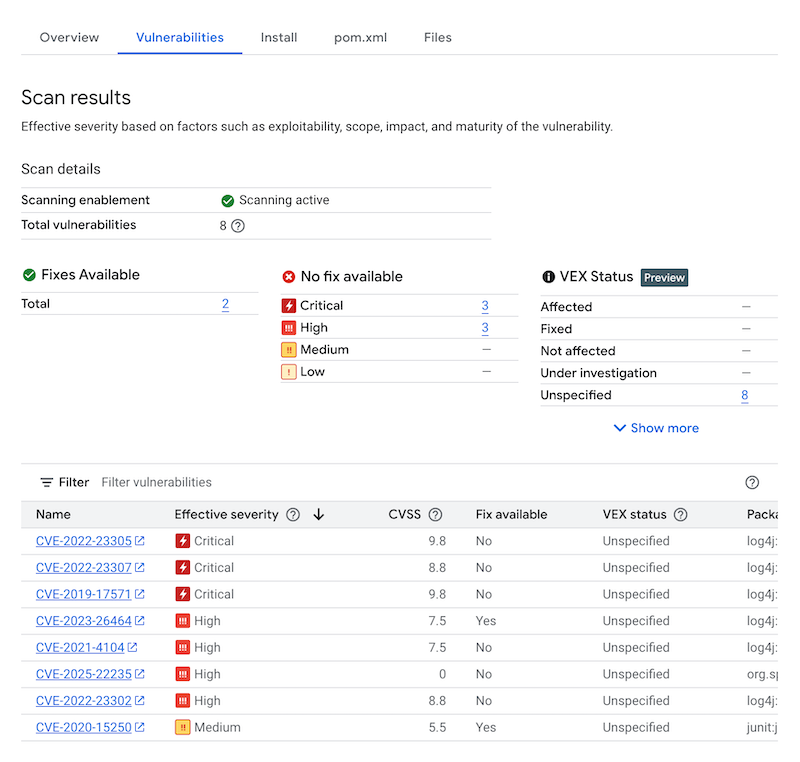
安全漏洞表格會列出每個安全漏洞的常見弱點與漏洞 (CVE) 名稱、實際嚴重性、通用漏洞評分系統 (CVSS) 分數、修正程式 (如有)、含有安全漏洞的套件名稱,以及套件類型。您可以篩選及排序這些檔案,依副檔名查看特定檔案、目錄或檔案類型。 Google Cloud 控制台在這個表格中,每頁最多顯示 1200 個安全漏洞。
如要查看特定 CVE 的詳細資料,請按一下 CVE 名稱。
如要查看安全漏洞發生詳細資料 (例如版本號碼和受影響的位置),請在安全漏洞名稱的資料列中,按一下「查看」或「查看已修正」。如果安全漏洞沒有修正,連結文字會顯示「查看」;如果安全漏洞已修正,連結文字則會顯示「查看已修正」。
使用 gcloud 查看發生項目
如要查看 Artifact Registry 中套件的發生事項,請執行 gcloud artifacts versions describe 指令:
gcloud artifacts versions describe VERSION \
    --location=LOCATION --repository=REPOSITORY --package=PACKAGE --show-package-vulnerability
其中:
- VERSION 是您正在查看出現次數的套件版本。
- LOCATION 是存放區的區域或多區域位置。
- REPOSITORY 是儲存套件的存放區名稱。
- PACKAGE 是存放區中的套件名稱。您無法使用這個指令指定套件標記。
使用 API 查看發生次數
如何取得專案的例項清單:
 curl -X GET -H "Content-Type: application/json" -H \
    "Authorization: Bearer $(gcloud auth print-access-token)" \
    https://containeranalysis.googleapis.com/v1/projects/PROJECT_ID/occurrences
如何取得專案的安全漏洞匯總資料:
 curl -X GET -H "Content-Type: application/json" -H \
    "Authorization: Bearer $(gcloud auth print-access-token)" \
    https://containeranalysis.googleapis.com/v1/projects/PROJECT_ID/occurrences:vulnerabilitySummary
如要取得特定事件的詳細資料,請按照下列步驟操作:
 curl -X GET -H "Content-Type: application/json" -H \
    "Authorization: Bearer $(gcloud auth print-access-token)" \
    https://containeranalysis.googleapis.com/v1/projects/PROJECT_ID/occurrences/OCCURRENCE_ID
篩選出現次數
您可以在 gcloud 指令和 Artifact Analysis API 中使用篩選字串,先篩選出要查看的事件,以下各節說明支援的搜尋篩選器。
查看特定類型的事件
您可以使用 kind 值,依發生類型篩選資料。查看可用的種類。
以下範例說明如何篩選套件安全漏洞發生次數:
gcloud
Google Cloud CLI 不支援以套件為基礎的掃描,因此無法篩選事件。
API
在 API 查詢中,使用下列篩選運算式:
kind="PACKAGE_VULNERABILITY" AND resourceUrl="RESOURCE_URL"
其中:
PACKAGE_VULNERABILITY是發生的類型。- RESOURCE_URL 是套件的完整網址,格式為
projects/PROJECT_ID/locations/LOCATION/repositories/REPOSITORY_ID/packages/PACKAGE_ID/PACKAGE_TYPE/VERSION_ID:
您可以使用 hasPrefix 函式,以更廣泛的範圍進行篩選。
舉例來說,下列篩選器會篩選出多個版本中特定種類的事件:
kind="NOTE_KIND" AND has_prefix(resourceUrl, "RESOURCE_URL_PREFIX")
其中:
- RESOURCE_URL_PREFIX 指定資源網址中的子字串。
- 如要篩選套件的所有版本,請省略版本。請使用以下格式:
projects/PROJECT_ID/locations/LOCATION/repositories/REPOSITORY_ID - 如要篩選專案中的所有套件,請只指定資源位置和專案。請使用以下格式:
projects/PROJECT_ID/locations/LOCATION
- 如要篩選套件的所有版本,請省略版本。請使用以下格式:
查看安全漏洞例項
您可以使用 gcloud CLI 或 Artifact Analysis API 查看安全漏洞發生次數清單。
gcloud
如要擷取套件的弱點發生次數清單,請使用 --show-package-vulnerability 旗標:
gcloud artifacts versions describe VERSION_ID --repository=REPOSITORY_ID
  --package=GROUP_ID:ARTIFACT_ID --show-package-vulnerability
其中:
- VERSION 是套件的版本號碼。
- REPOSITORY 是儲存套件的存放區名稱。
- GROUP_ID 是套件的群組 ID。
- ARTIFACT_ID 是套件的構件 ID。
API
在 API 查詢中,使用下列篩選運算式:
GET https://containeranalysis.googleapis.com/v1/projects/PROJECT_ID/occurrences?filter=kind%3D%22VULNERABILITY%22%20AND%20resourceUrl%3D%22ENCODED_RESOURCE_URL%22
其中:
- ENCODED_RESOURCE_URL 是圖片的編碼路徑。如要瞭解編碼,請參閱網址編碼。
如要進一步瞭解如何使用 API,請參閱 projects.occurrences.get。
查看與特定記事相關聯的圖片
您可以擷取與特定附註 ID 相關聯的資源清單。舉例來說,您可以列出含有特定 CVE 安全漏洞的映像檔。
如要列出專案中與特定註記相關聯的的所有映像檔,請使用下列篩選器運算式:
gcloud
Google Cloud CLI 不支援以套件為基礎的掃描,因此無法篩選事件。
API
GET https://containeranalysis.googleapis.com/v1/projects/PROJECT_ID/occurrences?filter=noteProjectId%3D%22goog-vulnz%22%20AND%20resourceUrl%3D%22ENCODED_RESOURCE_URL%22%20AND%20noteId%3D%22NOTE_ID%22
其中:
如要檢查特定附註的特定圖片,請使用下列篩選運算式:
gcloud
Google Cloud CLI 不支援以套件為基礎的掃描,因此無法篩選事件。
API
在 API 查詢中,加入下列篩選運算式:
resourceUrl="RESOURCE_URL" AND noteProjectId="goog-vulnz" \
AND noteId="NOTE_ID"
其中:
- RESOURCE_URL 是套件的完整網址,格式為
projects/PROJECT_ID/locations/LOCATION/repositories/REPOSITORY_ID/packages/PACKAGE_ID/PACKAGE_TYPE/VERSION_ID。 goog-vulnz是 Artifact Analysis 安全漏洞分析的PROVIDER_PROJECT_ID。- NOTE_ID 是註記的 ID。安全性相關附註通常會以
CVE-2019-12345格式呈現。
後續步驟
- 使用 Pub/Sub 通知,接收有關安全漏洞和其他中繼資料的通知。