


שימוש במשימה Vertex AI כדי להטמיע AI גנרטיבי
השילוב לדוגמה הזה מכיל תהליך שאפשר להשתמש בו כשילוב משני לאינטראקציה עם מודלים של Google Cloud Vertex AI. לפני שמשתמשים בדוגמת הקוד הבאה, צריך לוודא שמתקיימות כל הדרישות המוקדמות.
דוגמת קוד
{
  "triggerConfigs": [
    {
      "label": "API Trigger",
      "startTasks": [
        {
          "taskId": "1"
        }
      ],
      "properties": {
        "Trigger name": "vertex-ai-task_API_1"
      },
      "triggerType": "API",
      "triggerNumber": "1",
      "triggerId": "api_trigger/vertex-ai-task_API_1",
      "description": "As inputs, we are only adding TextPrompt and ModelId. You can set Model ID for different Google models, such as text-bison, chat-bison, etc.",
      "position": {
        "x": -210
      }
    }
  ],
  "taskConfigs": [
    {
      "task": "Vertex AI - Predict",
      "taskId": "4",
      "parameters": {
        "request": {
          "key": "request",
          "value": {
            "stringValue": "$`Task_4_request`$"
          }
        },
        "projectsId": {
          "key": "projectsId",
          "value": {
            "stringValue": "$ProjectId$"
          }
        },
        "endpoint": {
          "key": "endpoint",
          "value": {
            "stringValue": "$endpoint$"
          }
        },
        "locationsId": {
          "key": "locationsId",
          "value": {
            "stringValue": "$Region$"
          }
        },
        "response": {
          "key": "response",
          "value": {
            "stringArray": {
              "stringValues": [
                "$`Task_4_response`$"
              ]
            }
          }
        },
        "taskTemplateId": {
          "key": "taskTemplateId",
          "value": {
            "stringValue": "2b5513a2-f3f4-4ac6-918e-8ea55b53cbb8"
          }
        }
      },
      "nextTasks": [
        {
          "taskId": "3"
        }
      ],
      "taskExecutionStrategy": "WHEN_ALL_SUCCEED",
      "displayName": "Vertex AI - Predict (Preview)",
      "description": "This is the actual Vertex AI API call with the variables we\u0027ve previously setup. Notice that under authentication, you need to have a Service Account with Vertex AI Predict IAM permissions.",
      "taskTemplate": "Vertex AI - Predict",
      "externalTaskType": "NORMAL_TASK",
      "position": {
        "x": -208,
        "y": 256
      }
    },
    {
      "task": "FieldMappingTask",
      "taskId": "1",
      "parameters": {
        "FieldMappingConfigTaskParameterKey": {
          "key": "FieldMappingConfigTaskParameterKey",
          "value": {
            "jsonValue": "{\n  \"@type\": \"type.googleapis.com/enterprise.crm.eventbus.proto.FieldMappingConfig\",\n  \"mappedFields\": [{\n    \"inputField\": {\n      \"fieldType\": \"STRING_VALUE\",\n      \"transformExpression\": {\n        \"initialValue\": {\n          \"baseFunction\": {\n            \"functionType\": {\n              \"baseFunction\": {\n                \"functionName\": \"GET_PROJECT_ID\"\n              }\n            }\n          }\n        }\n      }\n    },\n    \"outputField\": {\n      \"referenceKey\": \"$ProjectId$\",\n      \"fieldType\": \"STRING_VALUE\",\n      \"cardinality\": \"OPTIONAL\"\n    }\n  }, {\n    \"inputField\": {\n      \"fieldType\": \"STRING_VALUE\",\n      \"transformExpression\": {\n        \"initialValue\": {\n          \"baseFunction\": {\n            \"functionType\": {\n              \"baseFunction\": {\n                \"functionName\": \"GET_REGION\"\n              }\n            }\n          }\n        }\n      }\n    },\n    \"outputField\": {\n      \"referenceKey\": \"$Region$\",\n      \"fieldType\": \"STRING_VALUE\",\n      \"cardinality\": \"OPTIONAL\"\n    }\n  }, {\n    \"inputField\": {\n      \"fieldType\": \"STRING_VALUE\",\n      \"transformExpression\": {\n        \"initialValue\": {\n          \"referenceValue\": \"$endpoint$\"\n        },\n        \"transformationFunctions\": [{\n          \"functionType\": {\n            \"stringFunction\": {\n              \"functionName\": \"CONCAT\"\n            }\n          },\n          \"parameters\": [{\n            \"initialValue\": {\n              \"referenceValue\": \"$ModelId$\"\n            }\n          }]\n        }]\n      }\n    },\n    \"outputField\": {\n      \"referenceKey\": \"$endpoint$\",\n      \"fieldType\": \"STRING_VALUE\",\n      \"cardinality\": \"OPTIONAL\"\n    }\n  }, {\n    \"inputField\": {\n      \"fieldType\": \"JSON_VALUE\",\n      \"transformExpression\": {\n        \"initialValue\": {\n          \"referenceValue\": \"$PalmPromptRequest$\"\n        },\n        \"transformationFunctions\": [{\n          \"functionType\": {\n            \"jsonFunction\": {\n              \"functionName\": \"RESOLVE_TEMPLATE\"\n            }\n          }\n        }]\n      }\n    },\n    \"outputField\": {\n      \"referenceKey\": \"$`Task_4_request`$\",\n      \"fieldType\": \"JSON_VALUE\",\n      \"cardinality\": \"OPTIONAL\"\n    }\n  }]\n}"
          }
        }
      },
      "nextTasks": [
        {
          "taskId": "4"
        }
      ],
      "taskExecutionStrategy": "WHEN_ALL_SUCCEED",
      "displayName": "Set Prompt Parameters",
      "description": "In here, we are setting the required variables for the Vertex AI task. The actual payload is set using the resolve_template function from a pre-defined Local Variable called PalmPromptRequest.",
      "externalTaskType": "NORMAL_TASK",
      "position": {
        "x": -210,
        "y": 126
      }
    },
    {
      "task": "FieldMappingTask",
      "taskId": "3",
      "parameters": {
        "FieldMappingConfigTaskParameterKey": {
          "key": "FieldMappingConfigTaskParameterKey",
          "value": {
            "jsonValue": "{\n  \"@type\": \"type.googleapis.com/enterprise.crm.eventbus.proto.FieldMappingConfig\",\n  \"mappedFields\": [{\n    \"inputField\": {\n      \"fieldType\": \"JSON_VALUE\",\n      \"transformExpression\": {\n        \"initialValue\": {\n          \"referenceValue\": \"$`Task_4_response`.predictions$\"\n        },\n        \"transformationFunctions\": [{\n          \"functionType\": {\n            \"jsonFunction\": {\n              \"functionName\": \"GET_ELEMENT\"\n            }\n          },\n          \"parameters\": [{\n            \"initialValue\": {\n              \"literalValue\": {\n                \"intValue\": \"0\"\n              }\n            }\n          }]\n        }, {\n          \"functionType\": {\n            \"jsonFunction\": {\n              \"functionName\": \"GET_PROPERTY\"\n            }\n          },\n          \"parameters\": [{\n            \"initialValue\": {\n              \"literalValue\": {\n                \"stringValue\": \"content\"\n              }\n            }\n          }]\n        }]\n      }\n    },\n    \"outputField\": {\n      \"referenceKey\": \"$Content$\",\n      \"fieldType\": \"STRING_VALUE\",\n      \"cardinality\": \"OPTIONAL\"\n    }\n  }]\n}"
          }
        }
      },
      "taskExecutionStrategy": "WHEN_ALL_SUCCEED",
      "displayName": "Map Prompt Response",
      "description": "Finally, we are mapping just the content of the Vertex AI task output as the final integration Output. ",
      "externalTaskType": "NORMAL_TASK",
      "position": {
        "x": -210,
        "y": 378
      }
    }
  ],
  "integrationParameters": [
    {
      "key": "TextPrompt",
      "dataType": "STRING_VALUE",
      "displayName": "TextPrompt",
      "inputOutputType": "IN"
    },
    {
      "key": "Region",
      "dataType": "STRING_VALUE",
      "defaultValue": {
        "stringValue": "us-central1"
      },
      "displayName": "Region"
    },
    {
      "key": "ProjectId",
      "dataType": "STRING_VALUE",
      "displayName": "ProjectId"
    },
    {
      "key": "`Task_4_request`",
      "dataType": "JSON_VALUE",
      "defaultValue": {
        "jsonValue": "{\n}"
      },
      "displayName": "`Task_4_request`",
      "isTransient": true,
      "producer": "1_4",
      "jsonSchema": "{\n  \"$schema\": \"http://json-schema.org/draft-07/schema#\",\n  \"type\": \"object\",\n  \"properties\": {\n    \"instances\": {\n      \"type\": \"array\"\n    },\n    \"parameters\": {\n      \"type\": \"object\"\n    }\n  }\n}"
    },
    {
      "key": "`Task_4_response`",
      "dataType": "JSON_VALUE",
      "displayName": "`Task_4_response`",
      "isTransient": true,
      "producer": "1_4",
      "jsonSchema": "{\n  \"$schema\": \"http://json-schema.org/draft-07/schema#\",\n  \"type\": \"object\",\n  \"properties\": {\n    \"deployedModelId\": {\n      \"type\": \"string\"\n    },\n    \"modelVersionId\": {\n      \"type\": \"string\"\n    },\n    \"model\": {\n      \"type\": \"string\"\n    },\n    \"predictions\": {\n      \"type\": \"array\"\n    },\n    \"modelDisplayName\": {\n      \"type\": \"string\"\n    }\n  }\n}"
    },
    {
      "key": "ModelId",
      "dataType": "STRING_VALUE",
      "defaultValue": {
        "stringValue": "text-bison@001"
      },
      "displayName": "ModelId",
      "inputOutputType": "IN"
    },
    {
      "key": "endpoint",
      "dataType": "STRING_VALUE",
      "defaultValue": {
        "stringValue": "publishers/google/models/"
      },
      "displayName": "endpoint"
    },
    {
      "key": "PalmPromptRequest",
      "dataType": "JSON_VALUE",
      "defaultValue": {
        "jsonValue": "{\n  \"instances\": [{\n    \"prompt\": \"$TextPrompt$\"\n  }],\n  \"parameters\": {\n    \"temperature\": 0.2,\n    \"maxOutputTokens\": 768.0,\n    \"topP\": 0.8,\n    \"topK\": 40.0\n  }\n}"
      },
      "displayName": "PalmPromptRequest",
      "jsonSchema": "{\n  \"$schema\": \"http://json-schema.org/draft-04/schema#\",\n  \"type\": \"object\",\n  \"properties\": {\n    \"instances\": {\n      \"type\": \"array\",\n      \"items\": {\n        \"type\": \"object\",\n        \"properties\": {\n          \"prompt\": {\n            \"type\": \"string\"\n          }\n        }\n      }\n    },\n    \"parameters\": {\n      \"type\": \"object\",\n      \"properties\": {\n        \"topK\": {\n          \"type\": \"number\"\n        },\n        \"temperature\": {\n          \"type\": \"number\"\n        },\n        \"maxOutputTokens\": {\n          \"type\": \"number\"\n        },\n        \"topP\": {\n          \"type\": \"number\"\n        }\n      }\n    }\n  }\n}"
    },
    {
      "key": "Content",
      "dataType": "STRING_VALUE",
      "displayName": "Content",
      "inputOutputType": "OUT"
    }
  ]
}
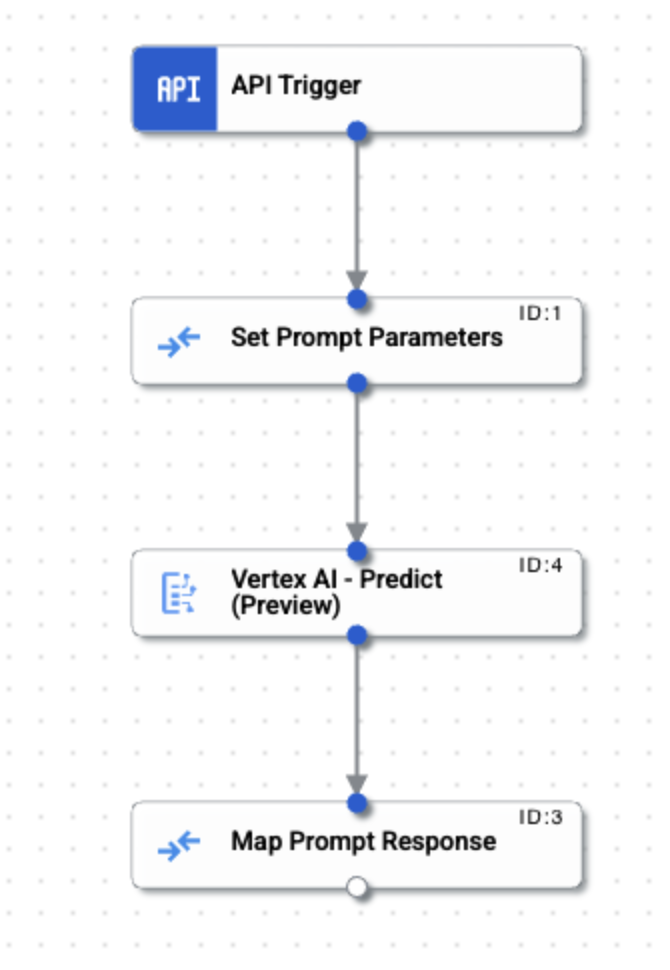
זרימת שילוב לדוגמה
בתמונה הבאה מוצגת פריסה לדוגמה של כלי העריכה של השילוב, עבור דוגמת הקוד הזו של השילוב.
העלאה והרצה של השילוב לדוגמה
כדי להעלות ולהריץ את השילוב לדוגמה:
- שומרים את הדוגמה לשילוב כקובץ .json במערכת.
- במסוף Google Cloud, עוברים לדף Application Integration.
- בתפריט הניווט שמימין, לוחצים על שילובים כדי לפתוח את הדף שילובים.
- בוחרים שילוב קיים או יוצרים שילוב חדש באמצעות לחיצה על יצירת שילוב.
אם יוצרים שילוב חדש:
- מזינים שם ותיאור בתיבת הדו-שיח יצירת שילוב.
- בוחרים אזור לשילוב.
- בוחרים חשבון שירות לאינטגרציה. אפשר לשנות או לעדכן את פרטי חשבון השירות של שילוב בכל שלב מחלונית info סיכום השילוב בסרגל הכלים של השילוב.
- לוחצים על יצירה.
השילוב ייפתח בכלי לעריכת שילובים.
- בכלי לעריכת שילובים, לוחצים על publishתפריט העלאה/הורדה ואז בוחרים באפשרות העלאת שילוב.
- בתיבת הדו-שיח של סייר הקבצים, בוחרים את הקובץ ששמרתם בשלב 1 ולוחצים על פתיחה.
נוצרת גרסה חדשה של השילוב באמצעות הקובץ שהועלה.
- בעורך השילובים, לוחצים על בדיקה.
- לוחצים על Test integration (בדיקת השילוב). הפעולה הזו מריצה את השילוב ומציגה את תוצאת ההרצה בחלונית Test Integration (בדיקת השילוב).