

You can decide the upper limit of the shared buffer on starting AlloyDB Omni. If you don't set the upper limit, AlloyDB Omni automatically sets the shared buffer backing size to 80% of system memory. The initial backing size of the shared buffer can be different from the upper limit.
AlloyDB Omni consists of an intelligent memory worker which constantly monitors the memory status, and tunes shared buffer backing size for best performance when caching data.
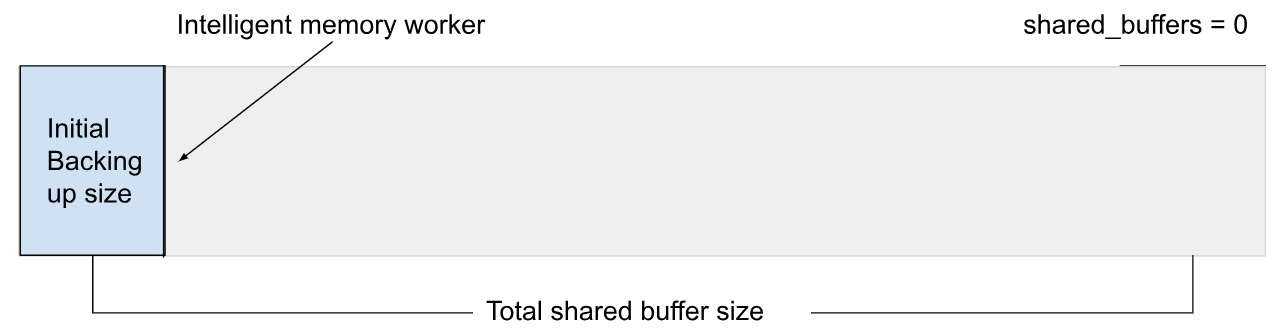
By default the shared_buffers parameter is set to 0, which is a special value that sets the upper limit of the size of the shared buffers cache to 80% of system memory. AlloyDB Omni starts at 10% of the shared_buffers upper limit. If shared_buffers is overridden by a custom value, then AlloyDB Omni respects the value as the upper limit of the shared_buffers size, and starts with that specified custom size.
To specify a custom size, you can set shared_buffers to 1GB. The method depends on your deployment type:
shared_buffers parameter using one of the following methods. After applying the change, you must restart the service.
Option 1: Edit the configuration file
Open the
postgresql.conffile for editing.Add or modify the following line:
shared_buffers = 1GBSave the file and restart the AlloyDB Omni service:
sudo systemctl restart alloydbomniMAJOR_VERSIONReplace
MAJOR_VERSIONwith the major version of your AlloyDB Omni installation, such as18.
Option 2: Use the
ALTER SYSTEMcommandConnect to your database instance using a SQL client.
Run the following command:
ALTER SYSTEM SET shared_buffers = '1GB';Restart the AlloyDB Omni service:
sudo systemctl restart alloydbomniMAJOR_VERSIONReplace
MAJOR_VERSIONwith the major version of your AlloyDB Omni installation, such as18.
Optimize query performance
The default value of the shared_buffers parameter works for common scenarios.
However, you can tune the value for best performance.
If you choose to rely on the default value of shared_buffers to deduce the shared buffer upper limit, then use the cgroup memory.max value to influence the computation.
Columnar engine memory
The dynamic shared_buffers is independent of the columnar engine memory. When the columnar engine is enabled, the dynamic shared_buffers size can be derived by subtracting the amount of memory used by the columnar engine from 80% of the total memory available to the system or cgroup.
Huge pages
Huge pages improve database performance. AlloyDB Omni manages huge pages explicitly if possible, otherwise it relies on the transparent huge pages (THP) feature of the operating system. If neither huge page type is supported, AlloyDB Omni falls back to 4k page, and prints a warning in the database logs with specific instructions to set up huge pages.The warning looks similar to the following:
HINT:  Please manually execute:
          echo within_size | sudo tee /sys/kernel/mm/transparent_hugepage/shmem_enabled
          sudo sysctl -w vm.nr_overcommit_hugepages="$(/usr/bin/awk '/MemTotal/ { printf "%.0f", $2/1024 }' /proc/meminfo)"
Automatic memory management at runtime
AlloyDB Omni constantly monitors the system load, and adjusts its memory consumptions for better performance. Specifically, you might observe the following:
- Dynamic
shared_bufferssize change - AlloyDB Omni increases the dynamic
shared_bufferssize when the system memory consumption is low, and decreases the size when the system memory consumption is high. The `g_memory` extension is included in the AlloyDB Omni distribution. To enable it and monitor the dynamic `shared_buffers` size, run the following commands:CREATE EXTENSION IF NOT EXISTS g_memory; SELECT g_dynamic_shared_size();
- Termination of a PostgreSQL connection when the system is extremely low on memory
-
When AlloyDB Omni detects that the system is extremely low on memory, it attempts to delete the most memory-consuming PostgreSQL connections until the load falls back to a reasonable level. When such an event happens, AlloyDB Omni logs an entry similar to the following example in the database logs:
WARNING: Sending SIGTERM to pid=12345 NSpid=67890 (VA size = 1024MB) (RSS size = 512MB)