

As an AlloyDB Omni customer, you are responsible for configuring and operating AlloyDB Omni to make sure that your workloads get the most value from the service.
| Layer | Google's responsibility | Customer responsibility | |
|---|---|---|---|
| Hardware and host | Physical infrastructure | Provide minimum and recommended requirements where applicable | Provision physical servers, VMs, or edge devices like power, cooling, and hardware. |
| Host operating system (OS) | Provide minimum and recommended requirements where applicable | Manage the Linux kernel, apply OS security patches, and harden the host nodes. | |
| Kubernetes | Cluster management | Provide minimum and recommended requirements where applicable | Manage the cluster on a daily basis—including upgrades—following industry-standard best practices. |
| Storage (CSI/PV) | Provide minimum and recommended requirements where applicable | Provision the storage class and manage the underlying appliances. AlloyDB Omni requires a block device, so be sure to choose a block device class. | |
| Networking (CNI) | Provide minimum and recommended requirements where applicable | Provision and manage the network layer—for example, pod networking, ingress controllers, load balancers, and firewall rules between nodes. | |
| Role-based access control (RBAC) | Provide the service accounts, roles, and role bindings required for the AlloyDB Omni Kubernetes operator. | Apply these role-based access control (RBAC) rules to the cluster and make sure that they align with internal security policies. To access AlloyDB Omni resources, create additional RBAC roles and role bindings. | |
| Secret management | Read standard Kubernetes Secrets to provision resources, such as the
initial postgres user. |
Create, secure, and rotate Kubernetes Secrets in the cluster. | |
| Certificate management | Rely on standard Kubernetes Secrets and cert-manager for
certificate integration. |
Install, configure, and manage the lifecycle of
cert-manager. |
|
| Operator software | Development and release | Develop the AlloyDB Omni operator logic and CRDs and publish container images, Helm charts, and OLM bundles. | None. You can use artifacts stored in Artifact Registry for your deployments. |
| Installation and lifecycle | Provide documentation and upgrade artifacts. | ||
| Database engine | Database binary | Provide the AlloyDB Omni container images with proprietary optimizations like the columnar engine and AI acceleration. | None. |
| Patching | Release security patches and minor and major version updates for the engine. Provide upgrade instructions. | Schedule upgrades as soon as possible, depending on the criticality of each release. | |
| User management |
|
|
|
| Data management | Backups | Provide the `BackupPlan` and `Backup` CRDs and logic to manage backups,
which are managed using pgBackrest with S3-compatible
integration. |
Configure backup schedules and retention, and provision the local, S3, or Cloud Storage target storage bucket. |
| High availability (HA) | Provide the auto-failover logic and healing mechanisms. | Provision sufficient nodes and zones to provide a standby target to support failover. | |
| Encryption (at rest) | Provides support for Transparent Data Encryption (TDE). | Manage storage layer encryption to make sure that it meets your requirements. | |
| Encryption (in transit) | Provide mTLS for internal operator components and to configure server-side TLS for user-to-database connections. | Connect to the database using secure TLS clients and manage the underlying certificate infrastructure. | |
| Observability | Metrics | Expose internal database metrics using a Prometheus-compatible endpoint. | Deploy and manage the scraper using Prometheus, Open Telemetry, or other compatible solutions and their storage stack. Monitor the overall health of the system. |
| Logging | Write PostgreSQL and audit logs to files on disk in the container, and rotate them. | Deploy log collectors—for example, Fluentd and Fluent Bit—to ship logs to a storage backend (like Splunk or ELK). Make sure that the log collectors are configured to preserve logs for a recommended minimum of one month. | |
| Visualization | Provide sample metrics and log dashboards to monitor standard workloads. | Deploy and monitor the health of the visualization tool, like Grafana. Create dashboards and incorporate them in your daily operational tasks. | |
| Alerting | None | Manage the alerting pipeline— for example, PagerDuty integration. | |
| Support | Troubleshooting | Provide support for software bugs and engine errors. To obtain this support, you need a license subscription. | Provide initial support through documentation and knowledge base. Debug infrastructure-related issues. |
Security and FIPS compliance
To secure your data, AlloyDB Omni uses Federal Information Processing Standards (FIPS) 140-2 or 140-3 validated cryptographic modules. FIPS compliance is a shared responsibility between Google and the customer.
The following diagram shows how the responsibility for FIPS compliance is divided between Google and the customer across architectural layers of AlloyDB Omni.
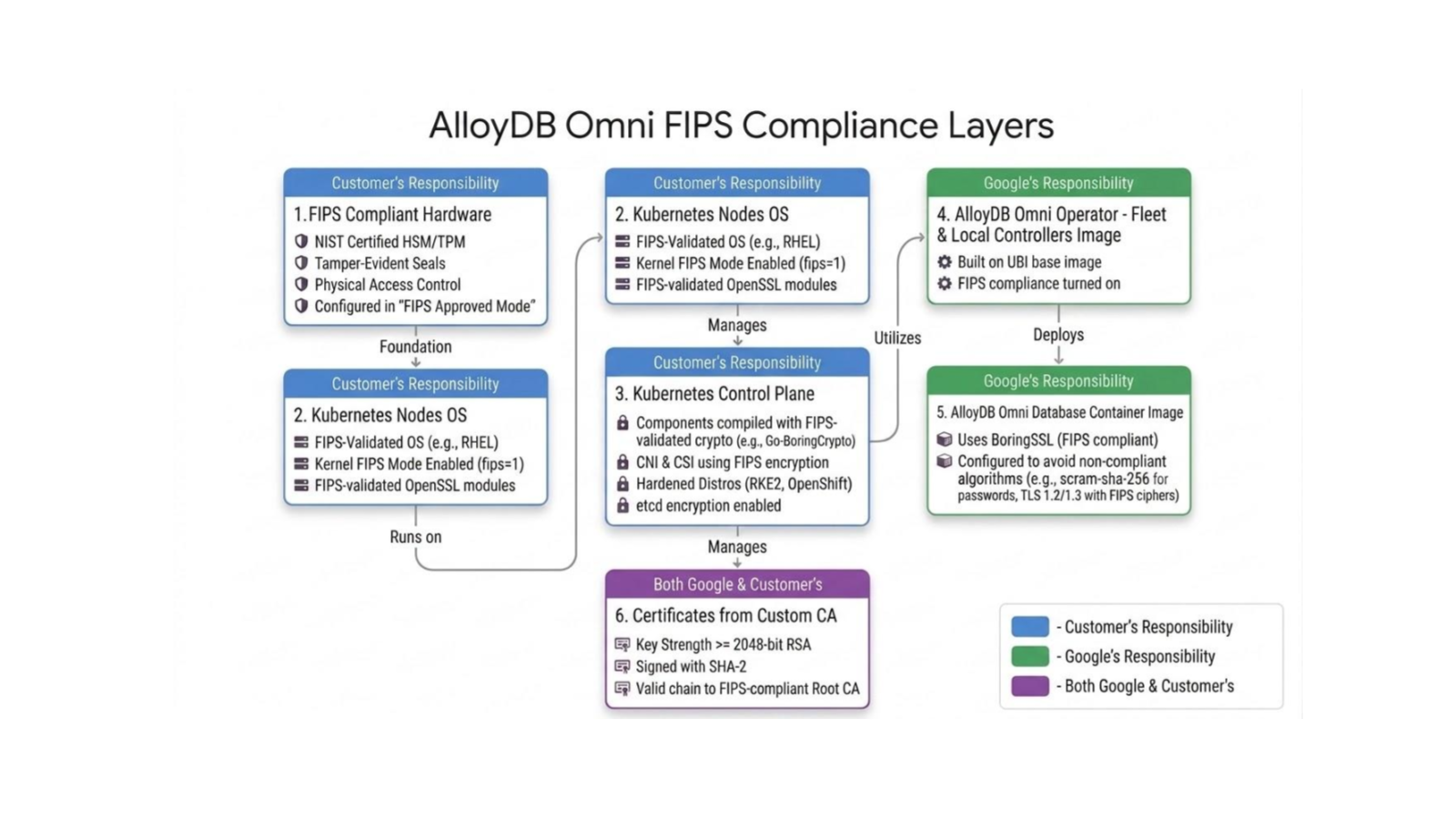
The following table describes the FIPS boundaries and responsibilities for AlloyDB Omni:
| FIPS boundary layer | Responsibility | Description |
|---|---|---|
| FIPS-compliant hardware | Customer | Physical hardware and cryptographic components must be NIST-certified and configured in a FIPS-approved state. |
| Kubernetes nodes OS | Customer | The worker node host operating system—for example, RHEL—must run in FIPS mode. FIPS state must be verified (cat /proc/sys/crypto/fips_enabled returns 1). |
| Kubernetes control plane | Customer | Control plane components like kubelet and networking and storage plugins must use FIPS-validated cryptographic modules—for example, built with Go-BoringCrypto. |
| AlloyDB Omni operator controllers | Developed by Google, built on a FIPS-compliant base image (Red Hat UBI), with FIPS compliance enabled on the container on which the database is running. | |
| AlloyDB Omni container image | Uses FIPS-compliant cryptographic libraries like BoringSSL and enforces FIPS-approved algorithms for password hashing (scram-sha-256) and TLS cipher suites. |
|
| Certificates from custom CA | Shared | Digital certificates must meet FIPS standards for key strength and signature algorithms. The certificate chain must trace back to a FIPS-compliant Root CA. |
STIG shared responsibility
The Defense Information Systems Agency (DISA) publishes Security Technical Implementation Guides (STIGs) to establish cybersecurity standards and hardening requirements for software, operating systems, and databases. These guides define specific security parameters to protect systems from vulnerabilities and cyber threats.
For a complete list of STIG rules, see AlloyDB Omni STIG compliance.
Hardening your environment according to STIG requirements is essential for obtaining an Authorization to Operate (ATO) in highly secure or government sectors. While AlloyDB Omni implements many database-level security controls by default, achieving full STIG compliance is a shared responsibility that requires the customer to configure and verify infrastructure-level settings.
The following table lists all STIG vulnerability IDs that require action, validation, or configuration by the customer. For comprehensive information, see the PostgreSQL 9.x on Red Hat Enterprise Linux Security Technical Implementation Guide (STIG) compliance checklist.
| STIG or SRG ID | Security control description | Platform and operator default behavior | Required customer action or configuration |
|---|---|---|---|
| V-233535 | Alert support staff immediately on audit log failures. | Standard error diagnostics are written to container stdout and stderr. |
Customer must configure SIEM or log forwarder metrics—for example, Splunk/Elastic alerts—to trigger when ingestion drops. |
| V-233599 | Alert support staff when audit storage reaches 75% capacity. | File system metrics are exposed through standard Prometheus endpoints. | Customer must set up alerting rules in Prometheus and Grafana to notify support when /obs/ disk space exceeds 75%. |
| V-233610 | Off-load audit data to a separate continuous log facility. | Audit logs are persistently written to the /obs/diagnostic/ volume. |
Customer must configure a log forwarder—for example, FluentBit and Vector—to stream log files continuously to a central SIEM. |
| V-233603 | Only trust end entity certs issued by Public Key Infrastructure (PKI) or approved Certificate Authorities (CA). | Operator uses cert-manager to configure local TLS configurations. |
Customer must supply their PKI Root and Intermediate CA certificates to the operator to establish the chain of trust. |
| V-233520 | Enforce approved logical access authorizations. | Rejects plain-text passwords and the Message-Digest algorithm 5 (MD5). Permits scram-sha-256 over SSL. |
Customer must configure clients to use SCRAM-SHA-256 with sslmode=verify-full in their connection strings. |
| V-233522 | Limit concurrent session thresholds per user. | Default database roles have infinite limits bounded by max_connections. |
Customer must explicitly alter connection limits (ALTER ROLE ... CONNECTION LIMIT) for custom application roles. |
| V-233584 | Use NSA-approved cryptography for classified information at rest. | Database container uses secure, hardened UBI9 base layers. | Customer must verify that the underlying Kubernetes host kernel has FIPS 140 mode enabled. |
| V-233515 | Integrate with Active Directory (AD) and Lightweight Directory Access Protocol (LDAP) organization-level authentication mechanisms. | Operator supports custom authentication configurations. | Customer must map AD and LDAP identities into the database cluster configuration. |
| V-233583 | Use FIPS-validated cryptographic modules for hashes. | Container relies on host OpenSSL FIPS modules for hashing functions. | Customer must activate FIPS mode on host VM nodes. |
| V-233585 | Use FIPS-validated crypto to protect unclassified information. | Encrypts communication and storage using FIPS-capable ciphers. | Customer must verify that host nodes are FIPS-validated. |
| V-233619 | Use FIPS-validated crypto modules for all operations. | Enforces UBI9 FIPS-ready container image binaries. | Customer must enable FIPS mode on the host kernel. |
| V-233623 | Make sure that DBMS runs on host with certified OpenSSL FIPS. | Database pods rely on host OpenSSL FIPS configurations. | Customer must verify that host OpenSSL matches NIST certified FIPS list. |
| V-233615 | Map PKI-authenticated identities to associated user accounts. | Operator uses secure SCRAM-SHA-256 password authentication for identities. |
Customer must map external organizational directory roles to database roles if they don't use direct password sign-in. |
| V-233540 | Restrict database installation account to authorized users only. | Container restricts file permissions and execution to the postgres user. |
Customer must lock down host node access (SSH/Kubectl) to prevent unauthorized terminal access to the pods. |