

AI Hypercomputer uses specific network services determined by the GPU machine type you choose. Understanding these services lets you optimize performance and goodput: the effective progress of a machine learning training task.
Networking by infrastructure
The network architecture for your deployment depends on your choice of infrastructure, General GPUs or Clustered GPUs.
Standard VPC networking for General GPUs
General GPUs use standard Google Cloud VPC networking.
- Architecture: relies on a standard, multi-tenant VPC design for inference, model serving, and exploratory research.
- Protocols: uses TCP/IP over the Google Virtual NIC (gVNIC).
High-performance fabrics for Clustered GPUs
AI Hypercomputer helps you deploy GPU machines that use a hierarchical, rail-aligned network architecture. This design's predictable, high-performance connectivity minimizes communication overhead, which directly improves goodput by allowing GPUs to spend more time on computation rather than waiting for data.
The rail-aligned arrangement of clustered GPUs includes three components:
- Sub-blocks: a group of hosts physically co-located on a single block. A top-of-rack (ToR) switch connects these hosts, enabling extremely efficient, single-hop communication between any two GPUs within the sub-block. RDMA over Converged Ethernet (RoCE) facilitates this direct communication. An enhanced NCCL library that's optimized for Google's rail-aligned topology handles GPU communication collectives.
- Blocks: a collection of sub-blocks interconnected by a non-blocking, high-speed network that provides high bandwidth. Any GPU within a block is reachable in a maximum of two network hops. The system exposes block and sub-block metadata to enable optimal job placement.
- Clusters: a collection of interconnected blocks that can scale to thousands of GPUs, enabling you to run large-scale training workloads. Communication across different blocks adds only one additional hop, maintaining high performance and predictability even at massive scale. To enable intelligent, large-scale job placement, cluster-level metadata is also available to orchestrators.
Technologies for GPU-to-GPU communication
GPU machines use a combination of technologies to provide high performance, high throughput, and low latency for workloads. These technologies include RDMA over Converged Ethernet (RoCE), NVIDIA NICs, and Google's datacenter-wide rail-aligned network topology.
NVIDIA's NVLink technology creates ultra-high-speed, direct data paths between the NVIDIA NICs on each machine. Additionally, RoCE enables efficient RDMA between GPUs on different machines.
GPU networking stacks
A networking stack is a collection of software protocols, drivers, and layers that work together to implement GPU-to-GPU communication. Different GPU machine types use different networking stacks. The following table defines the networking stacks and their associated machine types:
| Networking stack | Description | GPU machine type |
|---|---|---|
| GPUDirect RDMA | Enables a direct path for data exchange between a GPU and another device. For A4X Max and A4X instances, this networking stack uses RoCE. For more information, see Cluster configuration options with GPUDirect RDMA. | |
| GPUDirect-TCPXO | Improves on GPUDirect-TCPX by offloading the TCP protocol. Using GPUDirect-TCPXO, the A3 Mega machine type doubles the network bandwidth compared to the A3 High. For information on maximizing network bandwidth on GKE clusters that use GPUDirect-TCPXO, see Maximize GPU network bandwidth in Standard mode clusters and select the GPUDirect-TCPXO tab. | |
| GPUDirect-TCPX | Increases network performance by allowing data packet payloads to transfer directly from GPU memory to the network interface. For information on maximizing network bandwidth on GKE clusters that use GPUDirect-TCPX, see Maximize GPU network bandwidth in Standard mode clusters and select the GPUDirect-TCPX tab. |
|
| Standard TCP/IP | The baseline networking protocol for General (Standard) workloads. It provides high reliability and broad compatibility with standard VPC services. |
|
Host and storage data plane network
Multi-GPU instances require different network configurations for communication with the compute instance versus GPU-to-GPU information processing.
A separate network path (sometimes also referred to as the North-South network or Frontend network) handles all communication with the compute instance. This traffic includes disk access, intra-VM communication, internet access, access to Cloud Storage, host-level management, and communication with other Google Cloud services.
To manage this traffic, the GPU machine types use the Google Virtual NIC (gVNIC) configuration over Google Titanium NICs. Titanium NICs offload network processing tasks from the CPU, freeing the CPU to focus on your workloads. This separation helps ensure that general-purpose host traffic and dedicated GPU-to-GPU traffic use different physical interfaces, preventing them from competing for the same system resources.
Multi-VPC environment
All workloads operate within Google Cloud's Virtual Private Cloud (VPC).
High-performance accelerator machines feature a specialized hardware design that uses multiple physical network interfaces to handle different types of traffic. To handle this specialized hardware design, a multi-VPC environment is required, regardless of whether you use Slurm, GKE, or Compute Engine to run your workloads.
The specific multi-VPC configuration depends on the GPU machine type and its networking stack:
A4X Max, A4X, A4, and A3 Ultra with GPUDirect RDMA: These machines are backed by two physical NICs: one that supports general-purpose traffic and one that supports RDMA traffic. Instance vNICs that map to the general-purpose physical NIC (the
nic0interface and an additional network interface) are attached to regular VPC networks. RDMA vNICs that map to the RDMA-capable physical NIC are attached to a separate VPC network with an RDMA network profile to leverage GPUDirect RDMA. In total, these machine types require three VPC networks. To learn how to set up this network infrastructure, see Create VPCs and subnets.A3 Mega with GPUDirect-TCPXO: These machines require eight separate VPCs for the GPU NICs, which are dedicated to high-bandwidth communication. For detailed steps on how to complete this configuration, see Create VPCs and subnets.
A3 High with GPUDirect-TCPX: These machines require four separate VPCs for the GPU NICs, which are dedicated to high-bandwidth communication. For detailed steps on how to complete this configuration, see Create VPCs and subnets.
This multi-VPC configuration helps ensure that storage operations and other system tasks don't compete for bandwidth with critical GPU-to-GPU communications.
The required multi-VPC network configuration that you need to set up differs based on your GPU machine type. For a detailed guide on network arrangement, bandwidth speeds, and NICs for all supported GPU machine types, see Networking and GPU machines.
The following diagram shows the network architecture for a clustered GPU machine, highlighting the separation of general-purpose traffic and dedicated GPU-to-GPU traffic onto different network planes.
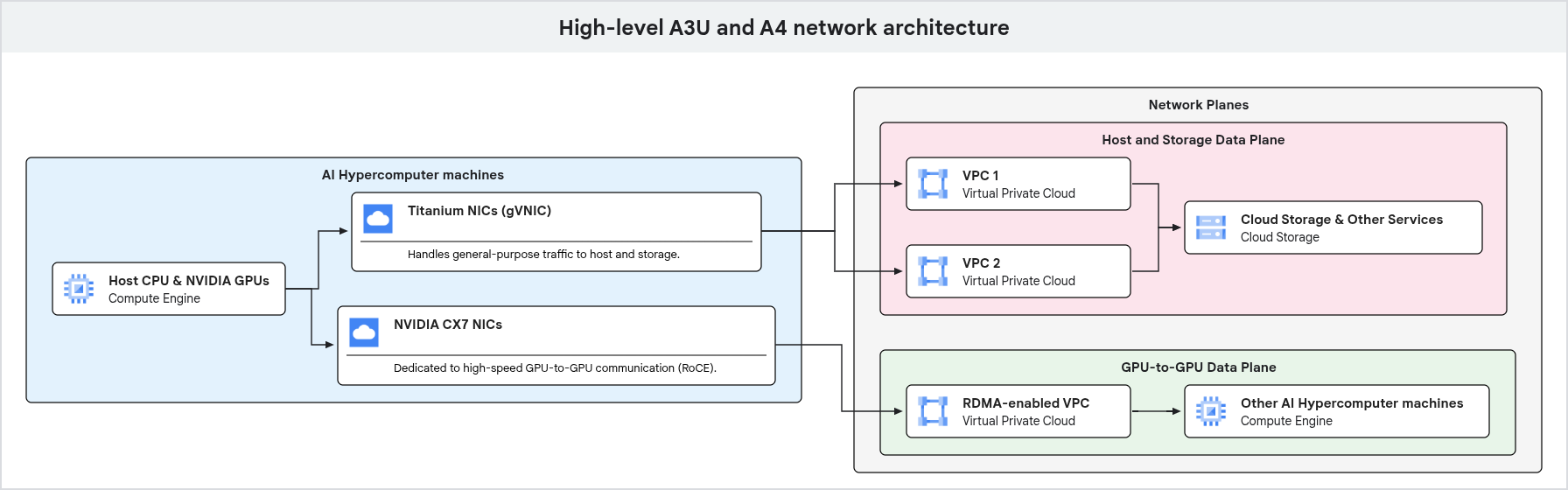 As shown in the
preceding diagram, these GPU machines use dedicated network paths for different
types of traffic. General-purpose traffic, including management and storage
access, flows through Google Titanium NICs connected to a
VPC. High-performance GPU-to-GPU communication uses separate
network interfaces and VPCs, optimized with technologies like
RDMA, helping ensure high bandwidth and low latency for AI and ML workloads.
As shown in the
preceding diagram, these GPU machines use dedicated network paths for different
types of traffic. General-purpose traffic, including management and storage
access, flows through Google Titanium NICs connected to a
VPC. High-performance GPU-to-GPU communication uses separate
network interfaces and VPCs, optimized with technologies like
RDMA, helping ensure high bandwidth and low latency for AI and ML workloads.
Networking libraries and components
To maximize network bandwidth and performance, the following networking libraries and components enable you to use GPUs with Google's networking stack:
- gVNIC: the Google Virtual NIC (gVNIC) is a virtual network interface designed specifically for Compute Engine. gVNIC enhances performance, increases consistency, and helps reduce noisy neighbor problems. gVNIC is recommended on all machine families and is the recommended vNIC for host-to-host communication. For more information, see Using Google Virtual NIC.
- NCCL: the NVIDIA Collective Communications Library (NCCL) provides optimized primitives for collective communication operations. NCCL is specifically designed for multi-GPU and multi-node environments using NVIDIA GPUs and networking. Run NCCL tests to evaluate the performance of deployed clusters. For more information, see Test network performance.
- GKE multi-networking: multi-network support for Pods enables multiple interfaces on nodes and Pods in a GKE cluster. For details on how to set up multi-networking in the context of GPUDirect, see Maximize GPU network bandwidth in Standard mode clusters and Cluster configuration options with GPUDirect RDMA.
For more details on the available software stacks, see OS and Docker images.
What's next
- To learn how to secure your deployments, see Best practices for using service accounts.
- To learn how to harden your network, see VPC firewall rules.
- To learn more about accelerator connectivity, see GPU networking overview.