

To efficiently run artificial intelligence (AI) or machine learning (ML) workloads, you must select both a workload orchestrator and a deployment platform. These components function as follows:
An orchestrator schedules and runs your jobs.
A deployment option manages an orchestrator.
After you identify which GPU infrastructure ( clustered GPUs or general GPUs) to use to run your workloads, follow the guidance in this document to identify the orchestrator and deployment that best fits your workload and level of management.
To review the GPU machine types that you can use to run your workloads, see GPU machines.
Compare orchestrators and deployment options
AI Hypercomputer offers several orchestrators and deployment options for your compute instances. These options range from fully managed clusters that let you focus on your workloads, to self-managed environments that offer granular control over how you maintain and update your compute instances.
The following table compares the orchestrators and deployment options that you can use when running AI workloads:
| Product | Orchestrator | Technical complexity | Recommended for | Key benefit |
|---|---|---|---|---|
| Cluster Director | Slurm | Low | AI researchers, Data scientists | Managed lifecycle for Slurm clusters |
| Google Kubernetes Engine (GKE) | Kubernetes | Medium to high | ML engineers, Platform engineers | Container orchestration and scaling |
| Cluster Toolkit | Slurm, Kubernetes | Medium | ML dZevOps, Platform engineers | Validated infrastructure-as-code blueprints |
| Compute Engine | Custom / None | High | Infrastructure architects | Granular control over OS and networking |
Choose an orchestrator and deployment option
To choose an orchestrator and deployment option, use the following flowchart:
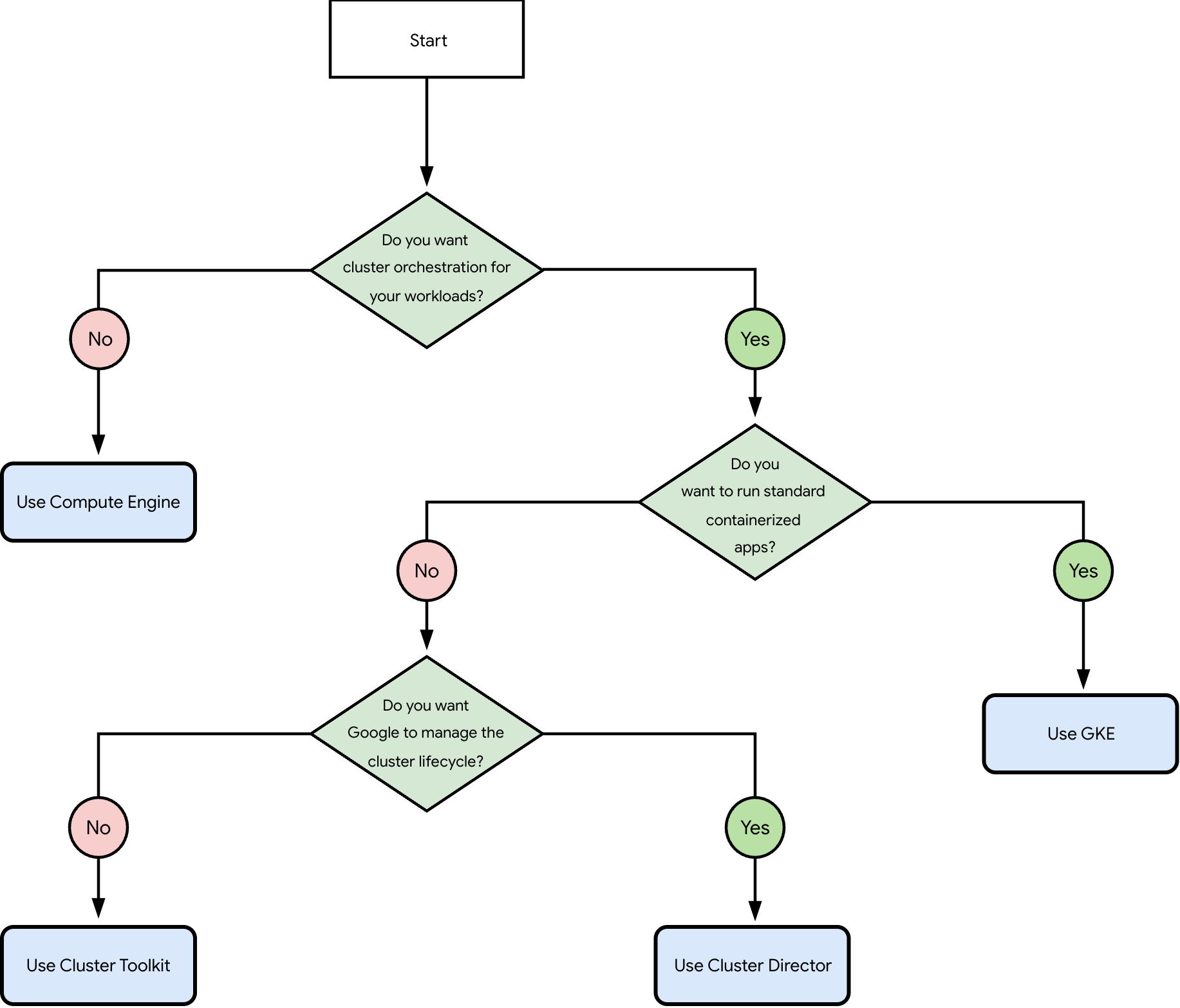
The preceding flowchart asks the following questions:
Do you want cluster orchestration for your workloads?
- Yes: go to question 2.
- No: use Compute Engine.
Do you want to run standard containerized apps?
- Yes: use GKE.
- No: go to question 3.
Do you want Google to manage the cluster lifecycle?
- Yes: use Cluster Director.
- No: use Cluster Toolkit.
Supported orchestrators
An orchestrator automates cluster management, and eliminates the need to manage each compute instance individually. Orchestrators like Slurm or Kubernetes handle job queueing, resource allocation, and autoscaling.
Slurm: an open source orchestrator commonly used for AI, ML, and HPC workloads. You can use Slurm with Cluster Toolkit or Cluster Director.
Kubernetes: an open source container orchestration platform. You can deploy Kubernetes by using GKE directly or through Cluster Toolkit.
Custom or none: use Compute Engine if you prefer a different orchestrator or want to manage your compute instances without one. This option provides the highest level of control, but requires you to manually set up, maintain, and update your compute instances.
Supported deployment platforms
After you identify the recommended orchestrator and deployment option for your use case, review their descriptions below to verify that their management levels and features meet your workload requirements.
Managed and automated platforms
If you want to avoid the overhead of managing a cluster and instead focus on running your workloads, then use one of the following managed platforms:
Cluster Director: a fully managed service that automates the lifecycle of Slurm clusters. Use Cluster Director to simplify the setup and configuration of your Slurm clusters. Cluster Director automates the lifecycle of your clusters so that you can focus on running your AI, ML, or HPC workloads. For more information, see Cluster Director overview.
GKE: a managed Kubernetes environment optimized for AI and ML workloads. Use GKE to orchestrate containerized workloads, integrate with specialized Compute Engine hardware, and leverage GKE-specific features like Topology Aware Scheduling (TAS). For more information, see GKE overview.
Semi-managed and self-managed platforms
If you require granular control over the operating system, kernel configurations, or driver versions, then use a semi-managed or self-managed platform:
Cluster Toolkit: an open source toolkit that provides validated, customizable blueprints for deploying reproducible AI and ML environments. It offers high flexibility and control using infrastructure-as-code (IaC) principles. For more information, see Cluster Toolkit overview.
Compute Engine: a customizable compute service that provides maximum control for building custom environments from the ground up. While not a standalone orchestrator, Compute Engine serves as the foundation for users who prefer to build and manage their own specialized custom stacks. For more information, see Compute Engine overview.
What's next
- To obtain capacity, see Consumption options.
- To deploy your cluster, see Cluster creation overview.