

Cross-project management boundaries (or boundaries) let you discover, manage, and govern AI agents, Model Context Protocol (MCP) servers, and tools across multiple Google Cloud projects. Agent Registry operates within a single governance project by default, but configuring a management boundary in Resource Manager lets a central management project aggregate agents, MCP servers, and tools across distributed member projects. Understanding how management boundaries structure project roles, resource aggregation, and access control helps you design scalable multi-project topologies.
To configure a management boundary, see Configure a management boundary for multiple projects.
Boundary model
You define a management boundary on a folder or an organization in Resource Manager:
- Folder-wide or organization-wide boundary: by default, if you create a boundary on a folder or an organization without configuring a tag filter, the boundary includes all child projects in that folder or organization as member projects.
- Tag-filtered boundaries (optional): optionally, to partition child
projects in a folder or an organization into multiple boundaries, you can
filter boundary membership by using
Resource Manager tags. For example,
you can separate
prodanddevenvironments. You attach tags to the Google Cloud projects that you want to include in each boundary. When a child project in the folder or organization has a tag that matches the boundary filter, that project becomes a member project of the management boundary.
When you use tags to partition management boundaries, tags provide the following benefits:
- Dynamic, automated enrollment: cloud environments frequently modify
projects. When you tag a project with an enrolled tag value, such as
env=prod, Agent Registry automatically includes that project as a member project in the boundary without requiring manual updates to boundary definitions. - Decoupling from folder hierarchies: Resource Manager folder structures are usually organized for billing or business purposes. Tags decouple boundary definitions from physical folder hierarchies, letting you establish cross-folder management perimeters in a parent folder or organization.
- Inheritance and scalability: tags applied to an organization or folder automatically propagate down the resource hierarchy to child folders and projects. This inheritance model lets you enroll entire branches of your resource tree with a single tag assignment.
- Centralized governance: tags are governed by centralized Identity and Access Management (IAM) permissions. By using tags to define management boundaries, you can prevent individual users from arbitrarily adding or removing projects from the boundary.
Architecture and key resources
A cross-project management boundary relies on the following Resource Manager resources:
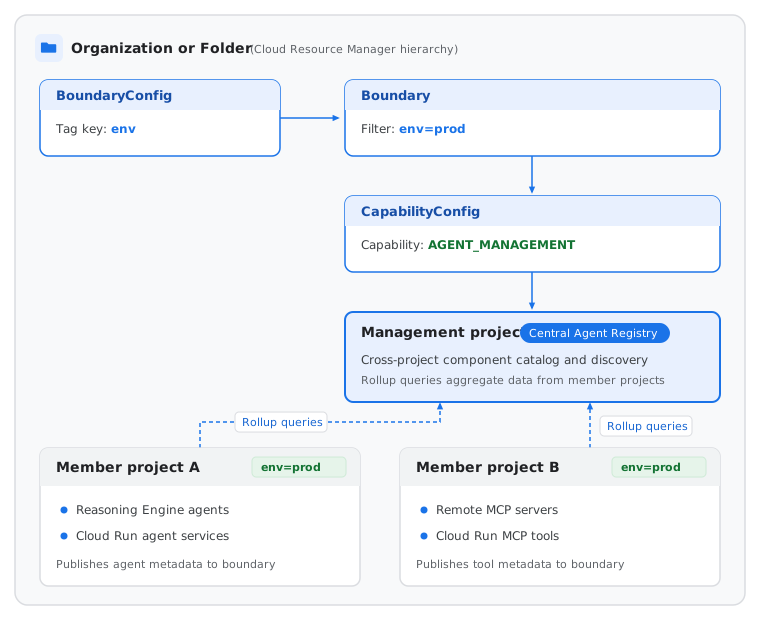
Boundary configuration (
BoundaryConfigresource): a configuration resource on an organization or folder in Resource Manager that establishes the boundary partitioning rules in that folder or organization. If you don't set a tag key on theBoundaryConfigresource, the organization or folder supports a single boundary that includes all of its child projects. To partition child projects into multiple tag-filtered boundaries, theBoundaryConfigresource specifies the single resource tag key, such as123456789012/env, used to evaluate project membership in that folder or organization.Boundary (
Boundaryresource): a perimeter of member projects in an organization or folder. Without a tag filter, the boundary includes all child projects in the parent organization or folder. When you configure a tag key on the parentBoundaryConfigresource, theBoundaryresource specifies a tag value filter, such asenv=prod, and child projects that inherit or attach that tag value belong to the boundary automatically. Because a parent'sBoundaryConfigresource uses a single tag key and a project can have only one effective tag value per tag key, a project can belong to at most one boundary per parent folder or organization.Capability configuration (
CapabilityConfigresource): a resource defined on an organization, folder, or project. At the organization or folder level, it binds one or more boundaries to a dedicated management project and specifies the management capabilities enabled across those boundaries. At the project level, it enables management capabilities for a single standalone project without boundaries. For Agent Registry, you configure theAGENT_MANAGEMENT(Google Cloud CLI:agent-management) capability, which enables centralized component discovery, search rollups, and cross-project governance in Agent Registry, and automatically enablesagentregistry.googleapis.comon the management project.
For more information about these Resource Manager resources, see Management boundaries and capabilities overview.
The following diagram illustrates how Resource Manager resources connect member projects to a central management project:
Multi-project management
A management boundary separates administrative governance from compute execution across two distinct project roles: a central management project and one or more member projects.
This decoupled structure enforces multi-tenant isolation. Teams build and deploy agents in their respective member projects without requiring direct access to other member projects, and administrators and orchestrators maintain unified visibility across the management boundary from the management project.
Management project
A management project is a Google Cloud project that serves as the central governance project for a management boundary. It centralizes API configuration, access control, billing, quota consumption, and aggregated component metadata across the boundary without needing to host underlying compute runtimes.
In Agent Registry, the management project performs the following functions:
- Boundary and capability binding: associates with one or more boundaries
in Resource Manager through a
CapabilityConfigresource with theAGENT_MANAGEMENTcapability enabled. For configuration steps, see Configure management boundaries. - Centralized discovery and search: serves as the target project for cross-project list and search requests, enabling orchestrators, developers, and client applications to interact with auto-discovered agents, MCP servers, and tools across all member projects in the boundary.
- Boundary-wide resource registration: hosts manually registered
Serviceresources, such as custom agents, external MCP servers, and endpoints, andBindingresources when you want those resources visible across the management boundary. - Centralized API, billing, and quota management: consolidates Agent Registry API activation, quota allocation, and billing for boundary-level discovery and governance operations.
When you configure a CapabilityConfig resource on a folder or organization in
Resource Manager, you can provision your management project in one of the following
ways:
- Self-managed management project: you designate an existing
Google Cloud project that you manage by passing the
--management-projectflag when you create theCapabilityConfigresource. The project must reside directly in the same parent folder or organization as theCapabilityConfigresource and can't already serve as a management project for anotherCapabilityConfigresource. If you later delete theCapabilityConfigresource, Resource Manager preserves your self-managed project and reverts it to a standard project. - Google-managed management project: you omit the
--management-projectflag when you create theCapabilityConfigresource, and Resource Manager automatically creates and manages a new project for you in the parent folder or organization. The generated project has a project ID prefix ofgoogle-mpforgoogle-mpo. If you later delete theCapabilityConfigresource, Resource Manager deletes this Google-managed project.
In both cases, creating the CapabilityConfig resource with agent-management
automatically enables agentregistry.googleapis.com on the management project.
Member projects
Member projects are the Google Cloud projects that belong to a management
boundary. They can be either all child projects in the boundary's parent folder
or organization, or the child projects that match an optional boundary tag
filter such as env=prod. Auto-discovered agents, MCP servers, and tools run in
member projects.
Member projects retain their own local compute resources, such as Agent Runtime reasoning engines, Cloud Run services, or GKE clusters. Auto-discovered resources are ingested locally within each member project and aggregated into the management project when you list or search the registry. By contrast, manually registered resources that you create in a member project are visible only when you send a request to that individual member project.
The association of member projects with a management project in a boundary is subject to system limits. Exceeding this limit can cause rolloup errors. For more information, see Quotas and system limits.
Registration and rollup
Cross-project discovery in Agent Registry distinguishes between auto-discovered resources deployed in member projects and manually registered resources scoped to the project where they are created.
Auto-discovered and registered resources
How a resource is scoped across a management boundary depends on how it is registered:
Auto-discovered agents and MCP servers: supported resources deployed in member projects, such as Agent Runtime reasoning engines, Cloud Run services, and GKE deployments, are automatically ingested in the member project where they are deployed and aggregated into the management project.
Manually registered resources and bindings: manually registered
Serviceresources, such as custom agents, external MCP servers, endpoints, andBindingresources are scoped to the project in which they are created:- Create them in the management project if you want them visible across the management boundary.
- Create them in a member project if you want them visible only within that single member project.
Standalone skills, publishers, and AI applications: custom standalone
Skill,SkillRevision,Publisher, andAiApplicationresources are scoped to the project in which they are created and aren't aggregated across member projects in a management boundary. Register custom standalone skills and AI applications in the project where your agents or developers need to discover them. Google-managed standalone skills are discoverable in any project automatically.
Centralized query rollup
How Agent Registry scopes locations depends on whether you query a standalone governance project, or a member project or management project in a management boundary:
- Standalone governance projects and member projects: queries in an
Agent Registry supported location, such as
us-central1,europe-west1,us,eu, orglobal, return only resources in that location for that single project, without cross-project rollup. Management project: when you enable a
CapabilityConfigresource withagent-managementon a management project, cross-project rollup is supported in all Agent Registry supported locations. Querying a location on the management project aggregates resources in that same location across the management project and all member projects in the management boundary. This rollup doesn't include resources across different locations:- Single regions: queries in a single region, such as
us-central1oreurope-west1, aggregate auto-discovered agents and MCP servers deployed in that single region across the management project and its member projects, alongsideServiceandBindingresources created in that region on the management project. - Multi-regions: queries in a multi-region, such as
usoreu, aggregate auto-discovered agents and MCP servers deployed in that multi-region across the management project and its member projects. Queries in multi-regions don't aggregate resources deployed in single regions. - Global: queries in the
globallocation aggregate auto-discovered agents and MCP servers deployed inglobalacross the management project and its member projects, alongsideServiceandBindingresources created inglobalon the management project. Queries inglobaldon't aggregate resources deployed in multi-regions or single regions.
- Single regions: queries in a single region, such as
When you list, search, or retrieve agentic components in a location on the management project, Agent Registry performs the following steps:
- Identifies all member projects associated with the management project
through the active
CapabilityConfigresource. - Queries auto-discovered agents and MCP servers in that location across the
management project and each member project, alongside any manually
registered
Serviceresources created in that location on the management project. - Aggregates matching resources into a unified result set.
- Returns the aggregated results to you.
If multiple boundaries are attached to the same CapabilityConfig resource,
Agent Registry aggregates member projects from all attached boundaries into
the same management project registry. To narrow list or search results on the
management project to a single member project, pass
--filter="project_id=MEMBER_PROJECT_ID". If two
environments require separate visibility, create a separate CapabilityConfig
resource and management project for each boundary.
Single-project discovery and cross-project discovery use identical API methods. The scope of the search depends on whether the targeted project is a member project or a management project.
Resource names across a management boundary
When a component is included in a member project, Agent Registry assigns it an
ID, such as AGENT_ID or
SERVER_ID. When you list, search, or get a component
across a management boundary, Agent Registry preserves that component's ID and
formats the associated
resource name based
on the project you use:
- Management project: when you list, search, or get components using the management project, each resource name uses the management project.
- Member project: when you list, search, or get components using the member project where the resource is deployed, each resource name uses that member project.
The following table shows the request URL and the associated resource name for auto-discovered resources deployed in a member project:
| Resource type | Request URL | Associated resource name |
|---|---|---|
| Agent | projects/MANAGEMENT_PROJECT_ID/locations/LOCATION/agents/AGENT_ID |
projects/MANAGEMENT_PROJECT_ID/locations/LOCATION/agents/AGENT_ID |
projects/MEMBER_PROJECT_ID/locations/LOCATION/agents/AGENT_ID |
projects/MEMBER_PROJECT_ID/locations/LOCATION/agents/AGENT_ID |
|
| MCP server | projects/MANAGEMENT_PROJECT_ID/locations/LOCATION/mcpServers/SERVER_ID |
projects/MANAGEMENT_PROJECT_ID/locations/LOCATION/mcpServers/SERVER_ID |
projects/MEMBER_PROJECT_ID/locations/LOCATION/mcpServers/SERVER_ID |
projects/MEMBER_PROJECT_ID/locations/LOCATION/mcpServers/SERVER_ID |
The associated resource name reflects the project in your request. However, the component's registry identifier and runtime reference remain immutable and always retain the member project where the underlying workload runs.
Topology visualization and traffic flows
Platform administrators and AI architects can visualize multi-agent relationships and cross-project traffic using the topology graph.
The topology graph visualizes the following architectural dimensions:
- Runtime reference correlation: correlates the logical agent identifier with its physical runtime reference. This correlation lets operators trace an agent in Agent Registry directly to its underlying Agent Runtime reasoning engine, Cloud Run service, or GKE deployment.
- Cross-project bindings: displays bindings between orchestrator agents in one project and MCP servers or downstream tools in another project.
- Perimeter verification: helps administrators verify that agent communication complies with VPC Service Controls perimeters and routes through designated Agent Gateway endpoints.
Access control
In a management boundary, you grant IAM discovery roles on the
management project so that users and orchestrators can search across the
boundary without requiring direct IAM access to individual member
projects. Because manually registered Service and Binding resources created
in a member project don't roll up to the management project, security
administrators can also restrict local Service and Binding creation in
member projects by using an organization policy constraint or an
IAM deny policy. When agents in member projects invoke tools or
communicate with agents in other projects across the boundary, traffic can route
through a central
Agent Gateway.
For resources in a management boundary, VPC Service Controls restrictions apply only to Agent Registry interactions in the management project. Agent Registry can discover agents and MCP servers across all member projects in the management boundary, even if those member projects aren't in the same service perimeter as the management project.
For more information about roles required for boundary setup, registry access, and member project write restrictions, see Roles for cross-project management boundaries.
What's next
- Configure management boundaries in Resource Manager.
- Learn about the Cross-project data model.
- Search across a management boundary.
- Review Roles and permissions for Agent Registry.