


במדריך הזה נסביר איך להשתמש בתכונה 'זיהוי אינטרנט' של Vision API באפליקציית Python כדי לזהות ישויות באינטרנט, דפים תואמים ותמונות דומות.
קהל
המטרה של המדריך הזה היא לעזור לכם לפתח אפליקציות באמצעות התכונה לזיהוי אינטרנט של Vision API. ההנחה היא שאתם מכירים מבנים וטכניקות בסיסיים בתכנות, אבל גם אם אתם מתכנתים מתחילים, תוכלו לעקוב אחרי ההדרכה הזו ולהריץ אותה בלי קושי, ואז להשתמש במסמכי העיון של Vision API כדי ליצור אפליקציות בסיסיות.
במדריך הזה נסביר איך ליצור אפליקציה ל-Cloud Vision API, ואיך לבצע קריאה ל-Cloud Vision API כדי להשתמש בתכונה שלו לזיהוי אינטרנט.
דרישות מוקדמות
- מגדירים פרויקט Vision API במסוף Google Cloud .
מגדירים את הסביבה לשימוש ב-Application Default Credentials.
Python
- מתקינים את Python.
- מתקינים את pip.
- מתקינים את ספריית הלקוח של Google Cloud.
סקירה כללית
במדריך הזה מוסבר איך ליצור אפליקציית Cloud Vision API בסיסית שמשתמשת בWeb detection בקשה. Web detection תשובה מוסיפה הערות לתמונה שנשלחה בבקשה עם:
- תוויות שהתקבלו מהאינטרנט
- כתובות URL באתר שכוללות תמונות תואמות
- כתובות URL של תמונות באינטרנט שתואמות באופן חלקי או מלא לתמונה שבבקשה
- כתובות URL של תמונות דומות
רשימת קודים
במהלך קריאת הקוד, מומלץ לעיין בהפניה ל-Vision API Python.
האפליקציה הזו מבצעת את המשימות הבאות:
- מייבא את הספריות שנדרשות להפעלת האפליקציה
- מקבלת נתיב של תמונה כארגומנט ומעבירה אותו לפונקציה
main() - שימוש ב-Google Cloud API Client כדי לבצע זיהוי באינטרנט
- מבצע לולאה על התגובה ומדפיס את התוצאות
- מדפיס רשימה של ישויות באינטרנט עם תיאור וציון
- מדפיס רשימה של דפים תואמים
- הדפסה של רשימת תמונות עם התאמה חלקית
- הדפסת רשימה של תמונות שתואמות באופן מלא
מבט מקרוב
בקטעים הבאים נבחן בפירוט את הרכיבים העיקריים של האפליקציה לדוגמה.
ייבוא ספריות
אנחנו מייבאים ספריות רגילות:
-
argparseכדי לאפשר לאפליקציה לקבל שמות של קובצי קלט כארגומנטים -
ioלקריאה מקבצים
ייבוא אחר:
- הסיווג
ImageAnnotatorClientבספרייהgoogle.cloud.visionלגישה אל Cloud Vision API. - מודול
typesבספרייהgoogle.cloud.visionליצירת בקשות.
הפעלת האפליקציה
כאן אנחנו מנתחים את הארגומנט שהועבר ומציין את כתובת ה-URL של תמונת האינטרנט, ומעבירים אותו לפונקציה main().
אימות ל-API
לפני שמתקשרים עם שירות Cloud Vision API, צריך לאמת את השירות באמצעות פרטי כניסה שהושגו קודם. בתוך אפליקציה, הדרך הכי פשוטה לקבל פרטי כניסה היא באמצעות Application Default Credentials (ADC). ספריית הלקוח מקבלת את פרטי הכניסה באופן אוטומטי. כברירת מחדל, הפעולה הזו מתבצעת באמצעות קבלת פרטי כניסה ממשתנה הסביבה GOOGLE_APPLICATION_CREDENTIALS, שצריך להיות מוגדר כך שיצביע על קובץ מפתח ה-JSON של חשבון השירות (מידע נוסף זמין במאמר בנושא הגדרת חשבון שירות).
יצירת הבקשה
עכשיו, אחרי שהשירות Cloud Vision API מוכן, אפשר ליצור בקשה לשירות.
קטע הקוד הזה מבצע את המשימות הבאות:
- יוצרת מופע
ImageAnnotatorClientכלקוח. - יוצר אובייקט
Imageמקובץ מקומי או מ-URI. - מעבירה את האובייקט
Imageאל השיטהweb_detectionשל הלקוח. - מחזירה את ההערות.
הדפסת התשובה
אחרי שהפעולה מסתיימת, אנחנו עוברים על WebDetection ומדפיסים את הישויות וכתובות ה-URL שכלולות בהערה (שני התוצאות הראשונות מכל סוג הערה מוצגות בקטע הבא).
הפעלת האפליקציה
כדי להפעיל את האפליקציה, אנחנו מעבירים את כתובת ה-URL של האינטרנט (http://www.photos-public-domain.com/wp-content/uploads/2011/01/old-vw-bug-and-van.jpg) של תמונת המכונית הבאה.
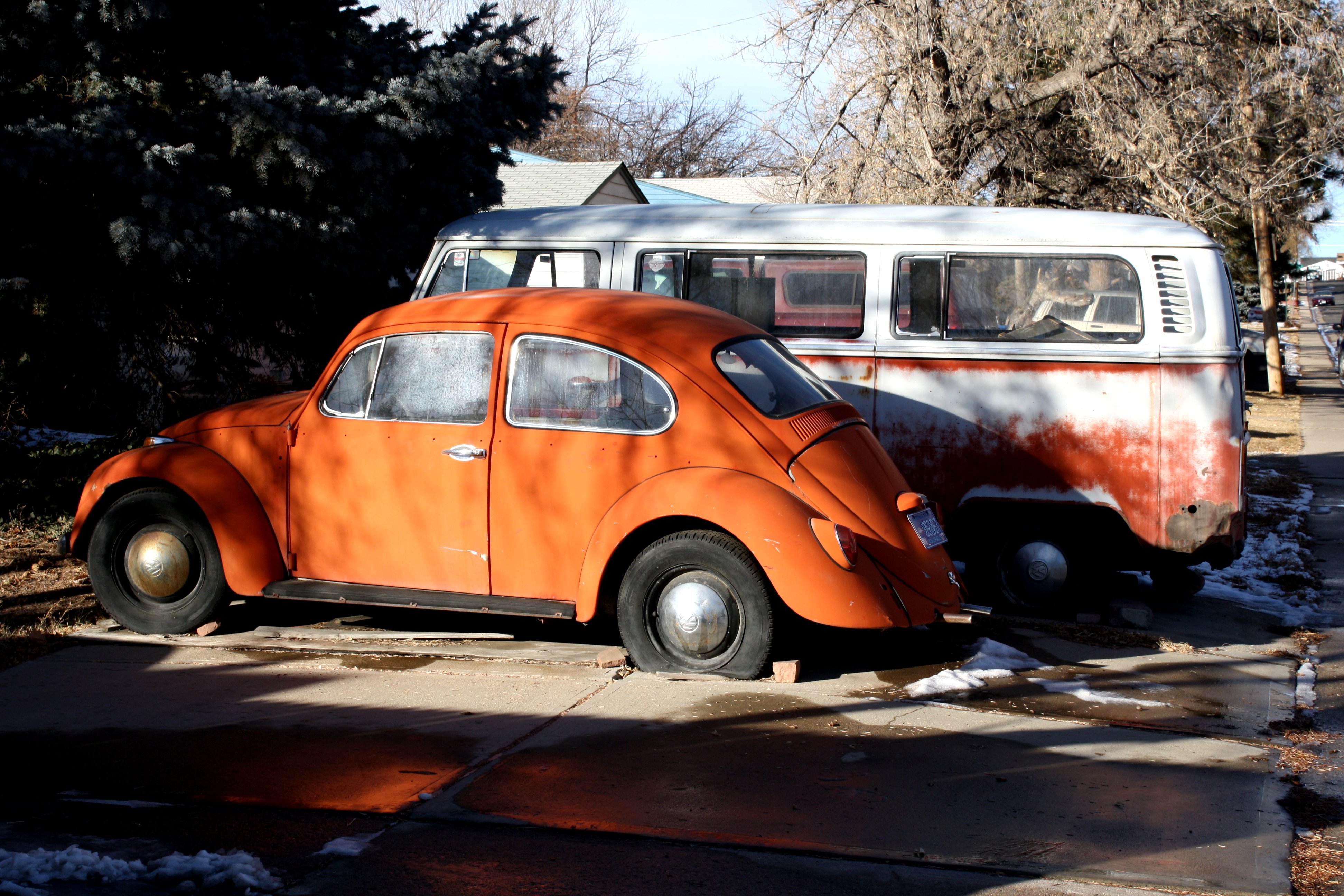
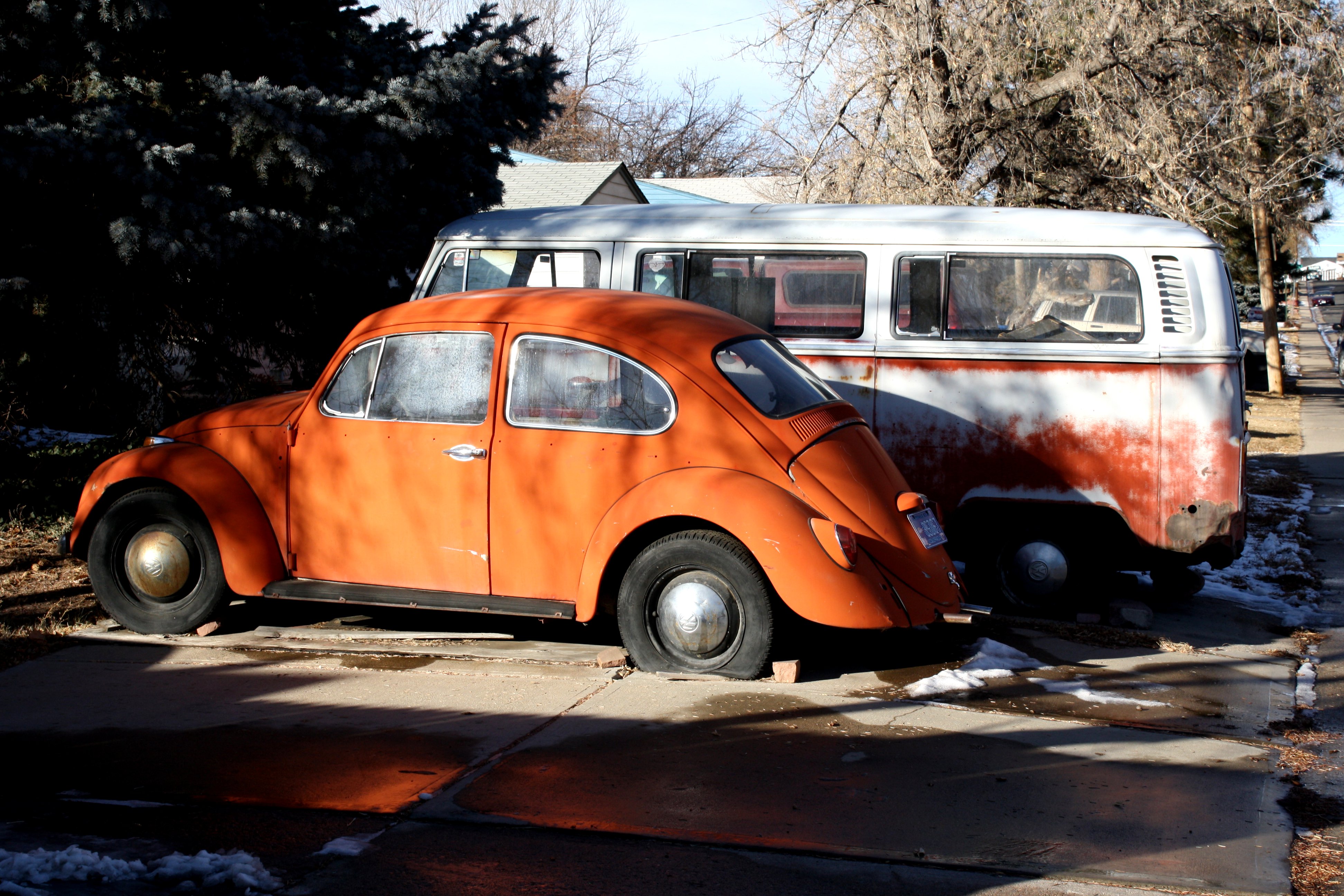
זוהי פקודת Python עם כתובת ה-URL של תמונת המכונית, ואחריה פלט המסוף. שימו לב: ציון הרלוונטיות מתווסף אחרי הישויות שמופיעות ברשימה. חשוב לזכור שהציונים לא עוברים נרמול ולא ניתן להשוות אותם בין שאילתות שונות של תמונות.
python web_detect.py "http://www.photos-public-domain.com/wp-content/uploads/2011/01/old-vw-bug-and-van.jpg"
5 Pages with matching images retrieved
Url   : http://www.photos-public-domain.com/2011/01/07/old-volkswagen-bug-and-van/
Url   : http://pix-hd.com/old+volkswagen+van+for+sale
...

2 Full Matches found:
Url  : http://www.photos-public-domain.com/wp-content/uploads/2011/01/old-vw-bug-and-van.jpg
Url  : http://www.wbwagen.com/media/old-volkswagen-bug-and-van-picture-free-photograph-photos-public_s_66f487042adad5a6.jpg

4 Partial Matches found:
Url  : http://www.photos-public-domain.com/wp-content/uploads/2011/01/old-vw-bug-and-van.jpg
Url  : http://www.wbwagen.com/media/old-vw-bug-and-vanjpg_s_ac343d7f041b5f8d.jpg
...

5 Web entities found:
Score      : 5.35028934479
Description: Volkswagen Beetle
Score      : 1.43998003006
Description: Volkswagen
Score      : 0.828279972076
Description: Volkswagen Type 2
Score      : 0.75271999836
Description: Van
Score      : 0.690039992332
Description: Car
כל הכבוד! ביצעתם זיהוי אינטרנט באמצעות Vision API.