הערות לקובץ קטן של נתונים אונליין

‫Vision API יכול לספק הערות (annotation) אונליין (מיידיות) של כמה דפים או פריימים מקובצי PDF,‏ TIFF או GIF שמאוחסנים ב-Cloud Storage.

אפשר לבקש זיהוי תכונות אונליין והוספת הערות ל-5 פריימים (GIF; ‏image/gif) או דפים (PDF; ‏application/pdf או TIFF; ‏image/tiff) שתבחרו בכל קובץ.

ההערות לדוגמה בדף הזה הן עבור DOCUMENT_TEXT_DETECTION, אבל הערות של קבוצות קטנות באינטרנט זמינות לכל התכונות של Vision.
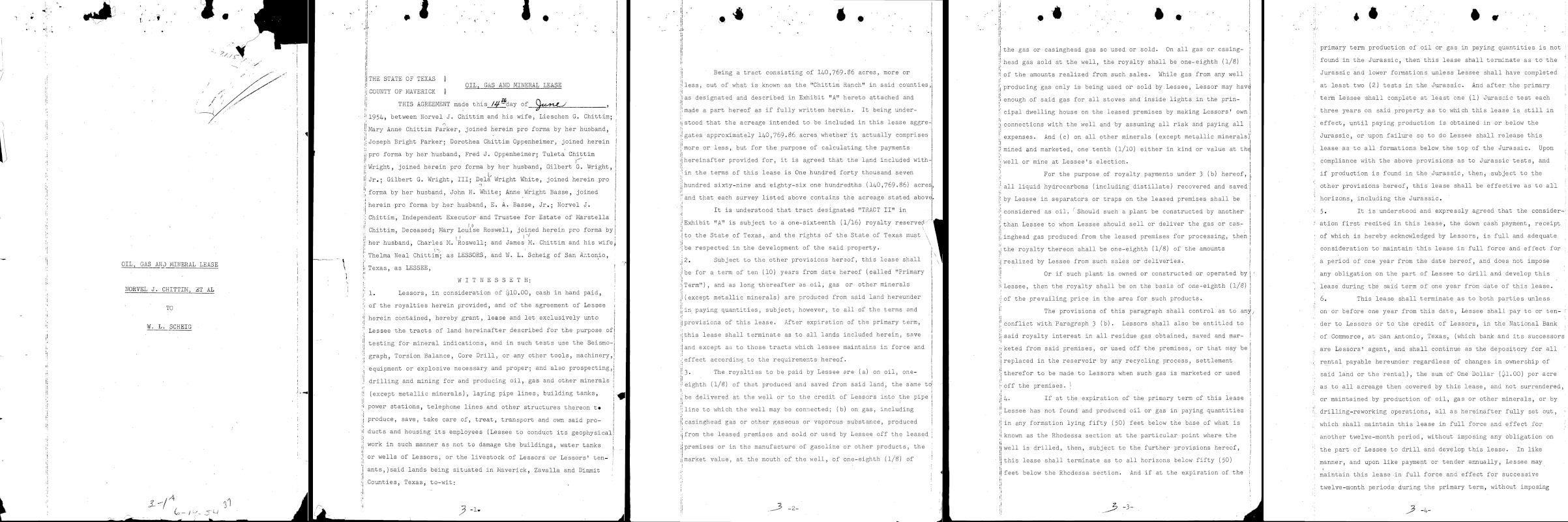
חמשת הדפים הראשונים של קובץ PDF
gs://cloud-samples-data/vision/document_understanding/custom_0773375000.pdf

דף 1

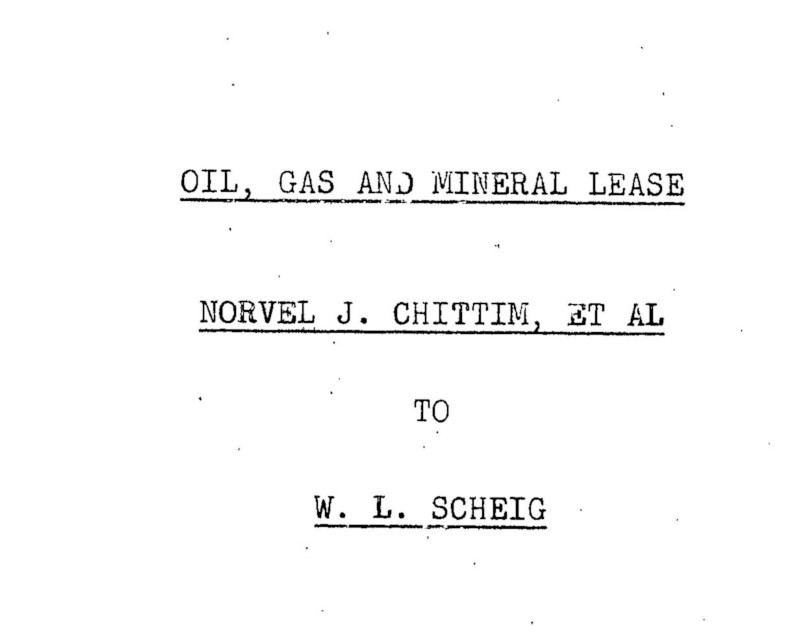
דף 1 מתוך קובץ PDF לדוגמה
...
"text": "á\n7.1.15\nOIL, GAS AND MINERAL LEASE
\nNORVEL J. CHITTIM, ET AL\n.\n.
\nTO\nW. L. SCHEIG\n"
},
"context": {"pageNumber": 1}
...

דף 2

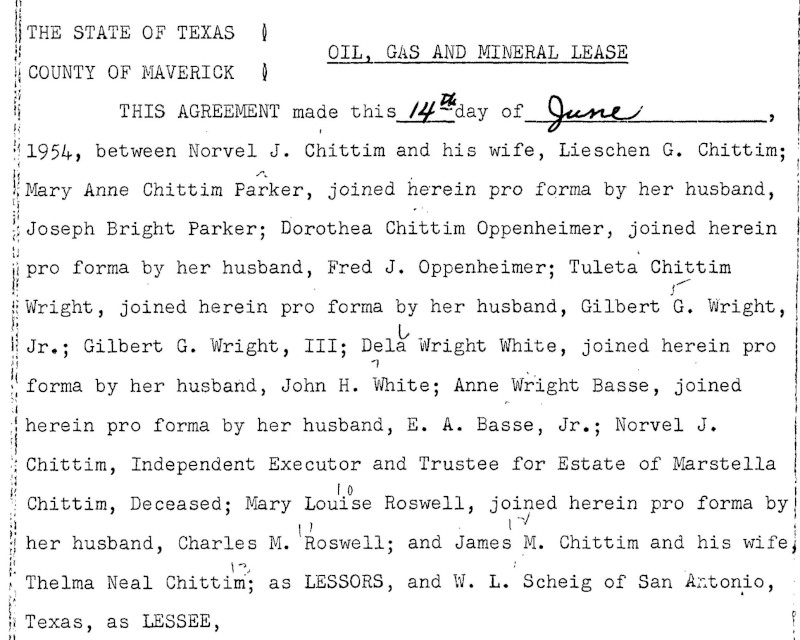
דף 2 (למעלה) בקובץ ה-PDF לדוגמה
...
"text": "...\n.\n*\n.\n.\n.\nA\nNY\nALA...\n7
\n| THE STATE OF TEXAS
\nOIL, GAS AND MINERAL LEASE
\nCOUNTY OF MAVERICK ]
\nTHIS AGREEMENT made this 14 day of_June
\n1954, between Norvel J. Chittim and his wife, Lieschen G. Chittim;
\nMary Anne Chittim Parker, joined herein pro forma by her husband,
\nJoseph Bright Parker; Dorothea Chittim Oppenheimer, joined herein
\npro forma by her husband, Fred J. Oppenheimer; Tuleta Chittim
\nWright, joined herein pro forma by her husband, Gilbert G. Wright,
\nJr.; Gilbert G. Wright, III; Dela Wright White, joined herein pro
\nforma by her husband, John H. White; Anne Wright Basse, joined
\nherein pro forma by her husband, E. A. Basse, Jr.; Norvel J.
\nChittim, Independent Executor and Trustee for Estate of Marstella
\nChittim, Deceased; Mary Louise Roswell, joined herein pro forma by
\nher husband, Charles M. 'Roswell; and James M. Chittim and his wife,
\nThelma Neal Chittim; as LESSORS, and W. L. Scheig of San Antonio,
\nTexas, as LESSEE,
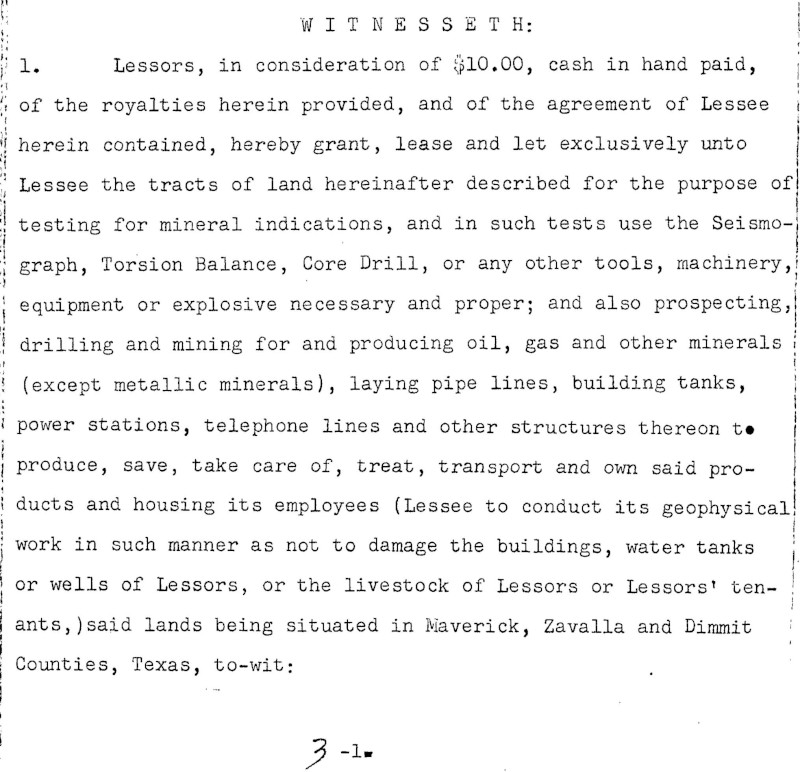
דף 2 (למטה) של קובץ ה-PDF לדוגמה
\nW I T N E s s E T H:
\n1. Lessors, in consideration of $10.00, cash in hand paid,
\nof the royalties herein provided, and of the agreement of Lessee
\nherein contained, hereby grant, lease and let exclusively unto
\nLessee the tracts of land hereinafter described for the purpose of
\ntesting for mineral indications, and in such tests use the Seismo-
\ngraph, Torsion Balance, Core Drill, or any other tools, machinery,
\nequipment or explosive necessary and proper; and also prospecting,
\ndrilling and mining for and producing oil, gas and other minerals
\n(except metallic minerals), laying pipe lines, building tanks,
\npower stations, telephone lines and other structures thereon to
\nproduce, save, take care of, treat, transport and own said pro-
\nducts and housing its employees (Lessee to conduct its geophysical
\nwork in such manner as not to damage the buildings, water tanks
\nor wells of Lessors, or the livestock of Lessors or Lessors' ten- !
\nants, )said lands being situated in Maverick, Zavalla and Dimmit
\nCounties, Texas, to-wit:\n3-1.\n"
},
"context": {"pageNumber": 2}
...

דף 3

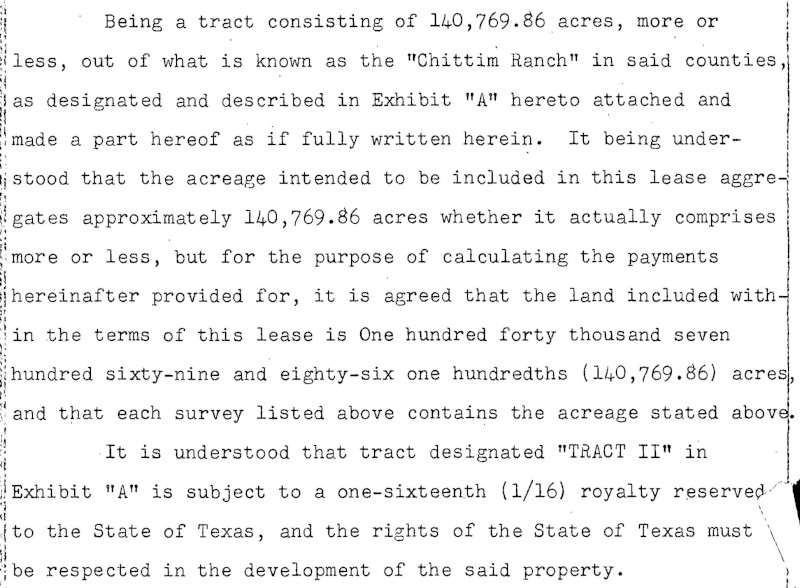
דף 3 (למעלה) של קובץ ה-PDF לדוגמה
...
"text": "Being a tract consisting of 140,769.86 acres, more or
\nless, out of what is known as the \"Chittim Ranch\" in said counties,
\nas designated and described in Exhibit \"A\" hereto attached and
\nmade a part hereof as if fully written herein. It being under-
\nstood that the acreage intended to be included in this lease aggre-
\ngates approximately 140,769.86 acres whether it actually comprises
\nmore or less, but for the purpose of calculating the payments
\nhereinafter provided for, it is agreed that the land included with-
\nin the terms of this lease is One hundred forty thousand seven
\nhundred sixty-nine and eighty-six one hundredths (140,769.86) acres,
\nand that each survey listed above contains the acreage stated above.
\nIt is understood that tract designated \"TRACT II\" in
\nExhibit \"A\" is subject to a one-sixteenth (1/16) royalty reserved.
\nto the State of Texas, and the rights of the State of Texas must
\nbe respected in the development of the said property.
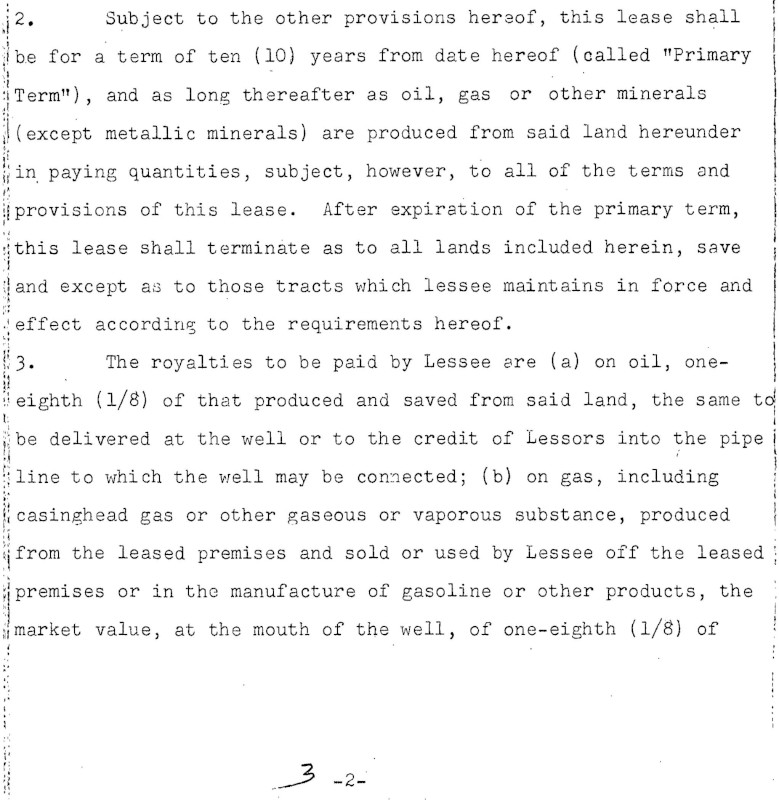
דף 3 (למטה) בקובץ ה-PDF לדוגמה
\n2. Subject to the other provisions hereof, this lease shall
\nbe for a term of ten (10) years from date hereof (called \"Primary
\nTerm\"), and as long thereafter as oil, gas or other minerals
\n(except metallic minerals) are produced from said land hereunder
\nin paying quantities, subject, however, to all of the terms and
\nprovisions of this lease. After expiration of the primary term,
\nthis lease shall terminate as to all lands included herein, save
\nand except as to those tracts which lessee maintains in force and
\neffect according to the requirements hereof.
\n3. The royalties to be paid by Lessee are (a) on oil, one-
\neighth (1/8) of that produced and saved from said land, the same to
\nbe delivered at the well or to the credit of Lessors into the pipe i
\nline to which the well may be connected; (b) on gas, including
\ni casinghead gas or other gaseous or vaporous substance, produced
\nfrom the leased premises and sold or used by Lessee off the leased
\npremises or in the manufacture of gasoline or other products, the
\nmarket value, at the mouth of the well, of one-eighth (1/8) of
\n.\n3-2-\n?\n"
},
"context": {"pageNumber": 3}
...

דף 4

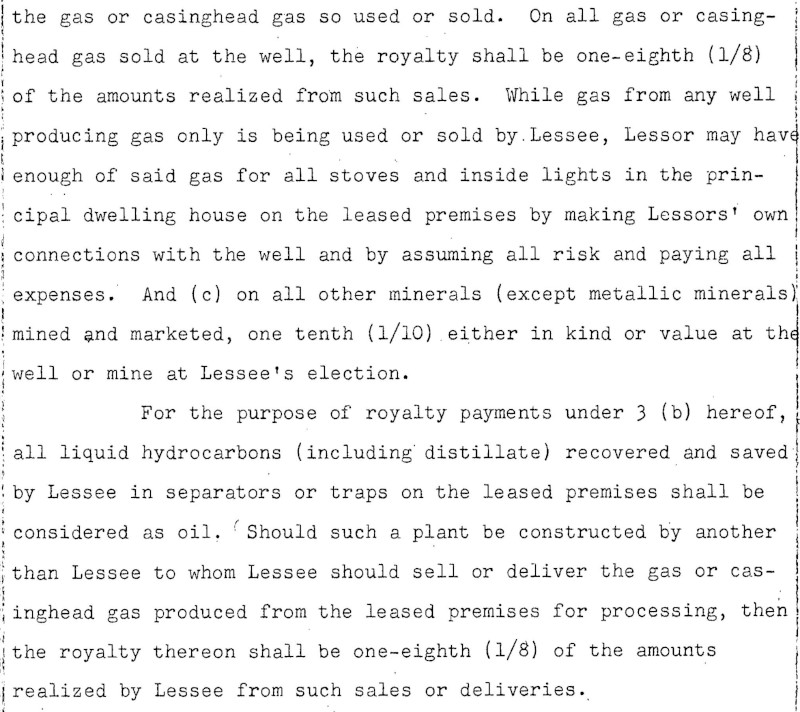
עמוד 4 (למעלה) בקובץ ה-PDF לדוגמה
...
"text": "•\n:\n.\nthe gas or casinghead gas so used or sold. On all gas or casing-
\nhead gas sold at the well, the royalty shall be one-eighth (1/8)
\nof the amounts realized from such sales. While gas from any well
\nproducing gas only is being used or sold by. Lessee, Lessor may have
\nenough of said gas for all stoves and inside lights in the prin-
\ncipal dwelling house on the leased premises by making Lessors' own
\nconnections with the well and by assuming all risk and paying all
\nexpenses. And (c) on all other minerals (except metallic minerals)
\nmined and marketed, one tenth (1/10). either in kind or value at the
\nwell or mine at Lessee's election.
\nFor the purpose of royalty payments under 3 (b) hereof,
\nall liquid hydrocarbons (including distillate) recovered and saved
n| by Lessee in separators or traps on the leased premises shall be
\nconsidered as oil. Should such a plant be constructed by another
\nthan Lessee to whom Lessee should sell or deliver the gas or cas-
\ninghead gas produced from the leased premises for processing, then
\nthe royalty thereon shall be one-eighth (1/8) of the amounts
\nrealized by Lessee from such sales or deliveries.
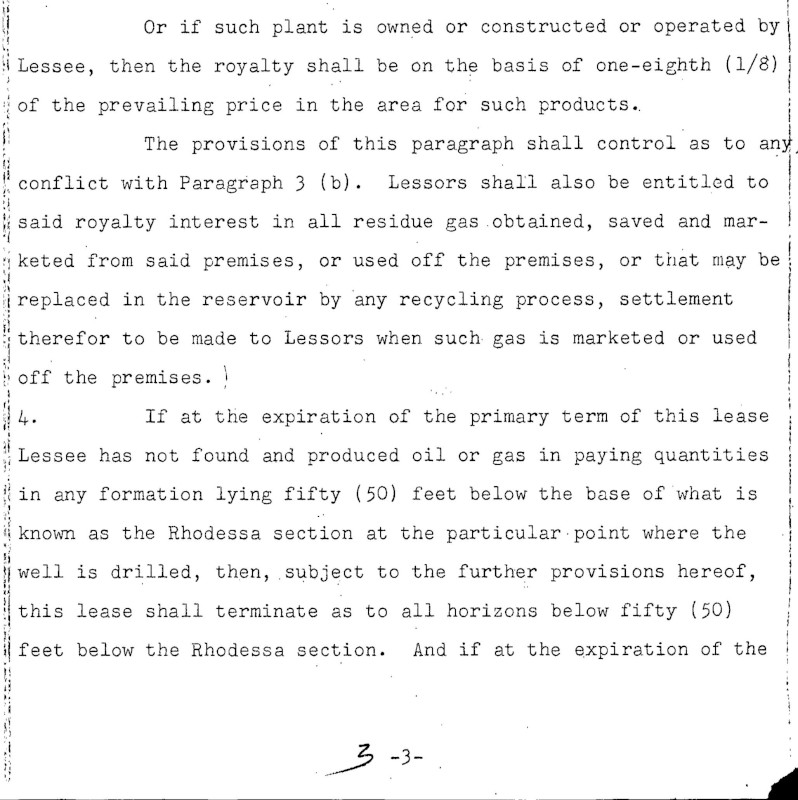
דף 4 (למטה) בקובץ ה-PDF לדוגמה
\nOr if such plant is owned or constructed or operated by
\nLessee, then the royalty shall be on the basis of one-eighth (1/8) |
\nof the prevailing price in the area for such products..
\nThe provisions of this paragraph shall control as to any
\nconflict with Paragraph 3 (b). Lessors shall also be entitled to
\nsaid royalty interest in all residue gas .obtained, saved and mar-
\nketed from said premises, or used off the premises, or that may be
\nreplaced in the reservoir by 'any recycling process, settlement
\ntherefor to be made to Lessors when such gas is marketed or used
\noff the premises. !
\nIf at the expiration of the primary term of this lease
\nLessee has not found and produced oil or gas in paying quantities
\nin any formation lying fifty (50) feet below the base of what is
\nknown as the Rhodessa section at the particular point where the
\nwell is drilled, then, subject to the further provisions hereof,
\nthis lease shall terminate as to all horizons below fifty (50)
\nI feet below the Rhodessa section. And if at the expiration of the
\n3 -3-\n"
},
"context": {"pageNumber": 4}
...

דף 5

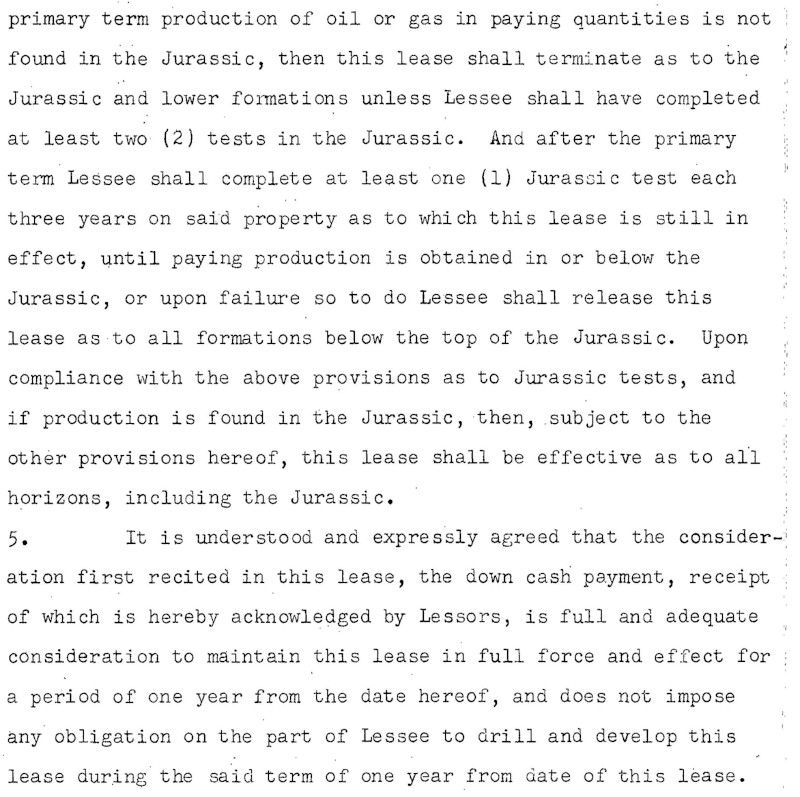
עמוד 5 (למעלה) בקובץ ה-PDF לדוגמה
...
"text": ".\n.\n:\nI\n.\n.\n.:250:-....\n.\n...\n.\n....\n....\n..\n..\n. ..
\n.\n..\n.\n...\n...\n.-\n.\n.\n..\n..\n17\n.\n:\n-\n-\n-\n.\n..\n.
\nprimary term production of oil or gas in paying quantities is not
\nfound in the Jurassic, then this lease shall terminate as to the
\nJurassic and lower formations unless Lessee shall have completed
\nat least two (2) tests in the Jurassic. And after the primary
\nterm Lessee shall complete at least one (1) Jurassic test each
\nthree years on said property as to which this lease is still in
\neffect, until paying production is obtained in or below the
\nJurassic, or upon failure so to do Lessee shall release this
\nlease as to all formations below the top of the Jurassic. Upon
\ncompliance with the above provisions as to Jurassic tests, and
\nif production is found in the Jurassic, then, subject to the
\nother provisions hereof, this lease shall be effective as to all
\nhorizons, including the Jurassic..
\n5. It is understood and expressly agreed that the consider-
\niation first recited in this lease, the down cash payment, receipt
\nof which is hereby acknowledged by Lessors, is full and adequate
\nconsideration to maintain this lease in full force and effect for
\na period of one year from the date hereof, and does not impose
\nany obligation on the part of Lessee to drill and develop this
\nlease during the said term of one year from date of this lease.
דף 5 (למטה) בקובץ ה-PDF לדוגמה
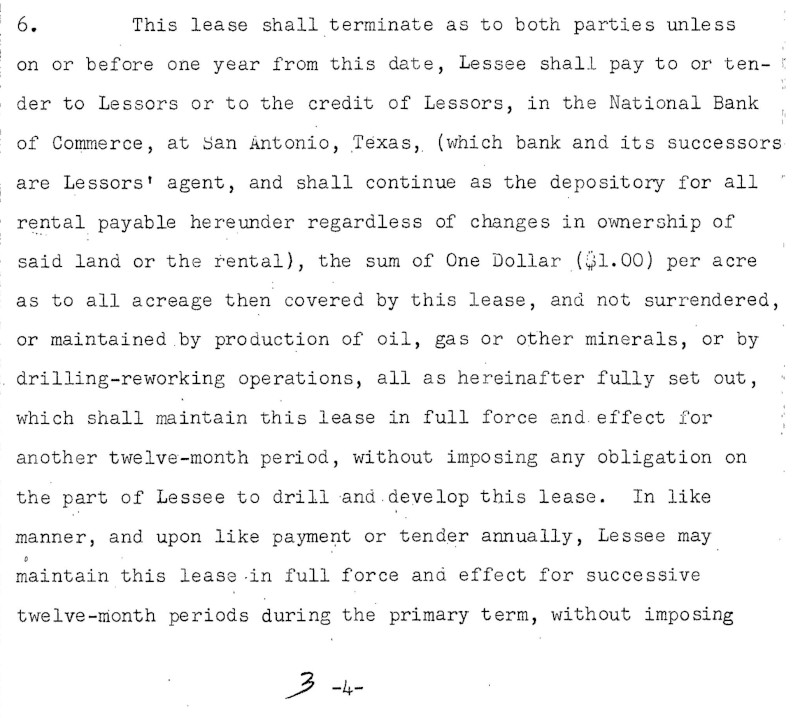
\n6. This lease shall terminate as to both parties unless
\non or before one year from this date, Lessee shall pay to or ten- !
\nder to Lessors or to the credit of Lessors, in the National Bank
\nof Commerce, at San Antonio, Texas, (which bank and its successors
\nare Lessors' agent, and shall continue as the depository for all \"
\nrental payable hereunder regardless of changes in ownership of
\nsaid land or the rental), the sum of One Dollar ($1.00) per acre
\nas to all acreage then covered by this lease, and not surrendered,
\nor maintained by production of oil, gas or other minerals, or by
\ndrilling-reworking operations, all as hereinafter fully set out, :
\nwhich shall maintain this lease in full force and effect for
\nanother twelve-month period, without imposing any obligation on
\nthe part of Lessee to drill and develop this lease. In like
\nmanner, and upon like payment or tender annually, Lessee may
\nmaintain this lease .in full force and effect for successive
\ntwelve-month periods during the primary term, without imposing
\n.\n--.\n.\n.\n.\n-\n::\n---
\n-\n3\n.\n..-\n-\n-\n:.\n.\n::\n.
\n3-4-\n"
},
"context": {"pageNumber": 5}
...

מגבלות

יוצגו עד 5 דפים עם הערות. המשתמשים יכולים לציין את 5 הדפים הספציפיים שרוצים להוסיף להם הערות.

אימות

הגדרה של Google Cloud הפרויקט והאימות

סוגי התכונות שנתמכים כרגע

סוג התכונה
CROP_HINTS קביעת קודקודים מוצעים לאזור חיתוך בתמונה.
DOCUMENT_TEXT_DETECTION ביצוע OCR על תמונות עם טקסט צפוף, כמו מסמכים (PDF/TIFF) ותמונות עם כתב יד. אפשר להשתמש ב-TEXT_DETECTION לתמונות עם טקסט דליל. מקבל עדיפות אם מופיעים גם DOCUMENT_TEXT_DETECTION וגם TEXT_DETECTION.
FACE_DETECTION זיהוי פנים בתמונה.
IMAGE_PROPERTIES חישוב של קבוצת מאפייני תמונה, כמו הצבעים הדומיננטיים בתמונה.
LABEL_DETECTION הוספת תוויות על סמך תוכן התמונה.
LANDMARK_DETECTION זיהוי ציוני דרך גיאוגרפיים בתמונה.
LOGO_DETECTION זיהוי לוגואים של חברות בתמונה.
OBJECT_LOCALIZATION זיהוי ושליפה של כמה אובייקטים בתמונה.
SAFE_SEARCH_DETECTION הפעלת החיפוש הבטוח כדי לזהות תוכן שעלול להיות לא בטוח או לא רצוי.
TEXT_DETECTION מבצעים זיהוי תווים אופטי (OCR) על הטקסט בתמונה. זיהוי הטקסט מותאם לאזורים עם טקסט דליל בתוך תמונה גדולה יותר. אם התמונה היא מסמך (PDF/TIFF), מכילה טקסט צפוף או כתב יד, עדיף להשתמש ב-DOCUMENT_TEXT_DETECTION.
WEB_DETECTION לזהות ישויות נושאיות כמו חדשות, אירועים או סלבריטאים בתמונה, ולמצוא תמונות דומות באינטרנט באמצעות היכולות של חיפוש תמונות Google.

קוד לדוגמה

אפשר לשלוח בקשת הערה עם קובץ ששמור באופן מקומי, או להשתמש בקובץ ששמור ב-Cloud Storage.

שימוש בקובץ שמאוחסן באופן מקומי

בדוגמאות הקוד הבאות אפשר לראות איך מקבלים הערה של תכונה לקובץ שמאוחסן באופן מקומי.

REST

כדי לבצע זיהוי תכונות של קובצי PDF,‏ TIFF או GIF באינטרנט עבור קבוצה קטנה של קבצים, שולחים בקשת POST ומספקים את גוף הבקשה המתאים:

לפני שמשתמשים בנתוני הבקשה, צריך להחליף את הנתונים הבאים:

  • BASE64_ENCODED_FILE: ייצוג base64 (מחרוזת ASCII) של נתוני הקובץ הבינארי. המחרוזת הזו צריכה להיראות כמו המחרוזת הבאה:
    • JVBERi0xLjUNCiW1tbW1...ydHhyZWYNCjk5NzM2OQ0KJSVFT0Y=
    מידע נוסף זמין בנושא קידוד base64.
  • PROJECT_ID: מזהה הפרויקט ב- Google Cloud .

שיקולים ספציפיים לשדה:

  • inputConfig.mimeType – אחד מהערכים הבאים: application/pdf,‏ image/tiff או image/gif.
  • pages – מציין את הדפים הספציפיים בקובץ שבהם יתבצע זיהוי התכונות.

ה-method של ה-HTTP וכתובת ה-URL:

POST https://vision.googleapis.com/v1/files:annotate

גוף בקשת JSON:

{
  "requests": [
    {
      "inputConfig": {
        "content": "BASE64_ENCODED_FILE",
        "mimeType": "application/pdf"
      },
      "features": [
        {
          "type": "DOCUMENT_TEXT_DETECTION"
        }
      ],
      "pages": [
        1,2,3,4,5
      ]
    }
  ]
}

כדי לשלוח את הבקשה עליכם לבחור אחת מהאפשרויות הבאות:

curl

שומרים את גוף הבקשה בקובץ בשם request.json ומריצים את הפקודה הבאה:

curl -X POST \
-H "Authorization: Bearer $(gcloud auth print-access-token)" \
-H "x-goog-user-project: PROJECT_ID" \
-H "Content-Type: application/json; charset=utf-8" \
-d @request.json \
"https://vision.googleapis.com/v1/files:annotate"

PowerShell

שומרים את גוף הבקשה בקובץ בשם request.json ומריצים את הפקודה הבאה:

$cred = gcloud auth print-access-token
$headers = @{ "Authorization" = "Bearer $cred"; "x-goog-user-project" = "PROJECT_ID" }

Invoke-WebRequest `
-Method POST `
-Headers $headers `
-ContentType: "application/json; charset=utf-8" `
-InFile request.json `
-Uri "https://vision.googleapis.com/v1/files:annotate" | Select-Object -Expand Content
תשובה:

בקשת annotate מוצלחת מחזירה מיד תגובת JSON.

במקרה של התכונה הזו (DOCUMENT_TEXT_DETECTION), תגובת ה-JSON דומה לתגובה של בקשה לזיהוי טקסט במסמך של תמונה. התשובה מכילה תיבות תוחמות לבלוקים שמחולקים לפסקאות, למילים ולסמלים בודדים. גם הטקסט המלא מזוהה. התגובה מכילה גם את השדה context שמציג את המיקום של קובץ ה-PDF או ה-TIFF שצוין, ואת מספר הדף של התוצאה בקובץ.

התגובה הבאה ב-JSON היא רק לדף אחד (דף 2) והיא קוצרה לשם הבהרה.

Java

לפני שמנסים את הדוגמה הזו, צריך לפעול לפי הוראות ההגדרה של Java במאמר התחלת העבודה עם Vision API באמצעות ספריות לקוח. מידע נוסף מופיע ב מאמרי העזרה של Vision API Java.

import com.google.cloud.vision.v1.AnnotateFileRequest;
import com.google.cloud.vision.v1.AnnotateImageResponse;
import com.google.cloud.vision.v1.BatchAnnotateFilesRequest;
import com.google.cloud.vision.v1.BatchAnnotateFilesResponse;
import com.google.cloud.vision.v1.Block;
import com.google.cloud.vision.v1.Feature;
import com.google.cloud.vision.v1.ImageAnnotatorClient;
import com.google.cloud.vision.v1.InputConfig;
import com.google.cloud.vision.v1.Page;
import com.google.cloud.vision.v1.Paragraph;
import com.google.cloud.vision.v1.Symbol;
import com.google.cloud.vision.v1.Word;
import com.google.protobuf.ByteString;
import java.io.IOException;
import java.nio.file.Files;
import java.nio.file.Path;
import java.nio.file.Paths;

public class BatchAnnotateFiles {

  public static void batchAnnotateFiles() throws IOException {
    String filePath = "path/to/your/file.pdf";
    batchAnnotateFiles(filePath);
  }

  public static void batchAnnotateFiles(String filePath) throws IOException {
    // Initialize client that will be used to send requests. This client only needs to be created
    // once, and can be reused for multiple requests. After completing all of your requests, call
    // the "close" method on the client to safely clean up any remaining background resources.
    try (ImageAnnotatorClient imageAnnotatorClient = ImageAnnotatorClient.create()) {
      // You can send multiple files to be annotated, this sample demonstrates how to do this with
      // one file. If you want to use multiple files, you have to create a `AnnotateImageRequest`
      // object for each file that you want annotated.
      // First read the files contents
      Path path = Paths.get(filePath);
      byte[] data = Files.readAllBytes(path);
      ByteString content = ByteString.copyFrom(data);

      // Specify the input config with the file's contents and its type.
      // Supported mime_type: application/pdf, image/tiff, image/gif
      // https://cloud.google.com/vision/docs/reference/rpc/google.cloud.vision.v1#inputconfig
      InputConfig inputConfig =
          InputConfig.newBuilder().setMimeType("application/pdf").setContent(content).build();

      // Set the type of annotation you want to perform on the file
      // https://cloud.google.com/vision/docs/reference/rpc/google.cloud.vision.v1#google.cloud.vision.v1.Feature.Type
      Feature feature = Feature.newBuilder().setType(Feature.Type.DOCUMENT_TEXT_DETECTION).build();

      // Build the request object for that one file. Note: for additional file you have to create
      // additional `AnnotateFileRequest` objects and store them in a list to be used below.
      // Since we are sending a file of type `application/pdf`, we can use the `pages` field to
      // specify which pages to process. The service can process up to 5 pages per document file.
      // https://cloud.google.com/vision/docs/reference/rpc/google.cloud.vision.v1#google.cloud.vision.v1.AnnotateFileRequest
      AnnotateFileRequest fileRequest =
          AnnotateFileRequest.newBuilder()
              .setInputConfig(inputConfig)
              .addFeatures(feature)
              .addPages(1) // Process the first page
              .addPages(2) // Process the second page
              .addPages(-1) // Process the last page
              .build();

      // Add each `AnnotateFileRequest` object to the batch request.
      BatchAnnotateFilesRequest request =
          BatchAnnotateFilesRequest.newBuilder().addRequests(fileRequest).build();

      // Make the synchronous batch request.
      BatchAnnotateFilesResponse response = imageAnnotatorClient.batchAnnotateFiles(request);

      // Process the results, just get the first result, since only one file was sent in this
      // sample.
      for (AnnotateImageResponse imageResponse :
          response.getResponsesList().get(0).getResponsesList()) {
        System.out.format("Full text: %s%n", imageResponse.getFullTextAnnotation().getText());
        for (Page page : imageResponse.getFullTextAnnotation().getPagesList()) {
          for (Block block : page.getBlocksList()) {
            System.out.format("%nBlock confidence: %s%n", block.getConfidence());
            for (Paragraph par : block.getParagraphsList()) {
              System.out.format("\tParagraph confidence: %s%n", par.getConfidence());
              for (Word word : par.getWordsList()) {
                System.out.format("\t\tWord confidence: %s%n", word.getConfidence());
                for (Symbol symbol : word.getSymbolsList()) {
                  System.out.format(
                      "\t\t\tSymbol: %s, (confidence: %s)%n",
                      symbol.getText(), symbol.getConfidence());
                }
              }
            }
          }
        }
      }
    }
  }
}

Node.js

לפני שמנסים את הדוגמה הזו, צריך לפעול לפי Node.jsהוראות ההגדרה שבמדריך לתחילת העבודה עם Vision באמצעות ספריות לקוח. מידע נוסף מופיע במאמרי העזרה של Vision Node.js API.

כדי לבצע אימות ב-Vision, צריך להגדיר את Application Default Credentials. מידע נוסף זמין במאמר הגדרת אימות לסביבת פיתוח מקומית.

/**
 * TODO(developer): Uncomment these variables before running the sample.
 */
// const fileName = 'path/to/your/file.pdf';

// Imports the Google Cloud client libraries
const {ImageAnnotatorClient} = require('@google-cloud/vision').v1;
const fs = require('fs').promises;

// Instantiates a client
const client = new ImageAnnotatorClient();

// You can send multiple files to be annotated, this sample demonstrates how to do this with
// one file. If you want to use multiple files, you have to create a request object for each file that you want annotated.
async function batchAnnotateFiles() {
  // First Specify the input config with the file's path and its type.
  // Supported mime_type: application/pdf, image/tiff, image/gif
  // https://cloud.google.com/vision/docs/reference/rpc/google.cloud.vision.v1#inputconfig
  const inputConfig = {
    mimeType: 'application/pdf',
    content: await fs.readFile(fileName),
  };

  // Set the type of annotation you want to perform on the file
  // https://cloud.google.com/vision/docs/reference/rpc/google.cloud.vision.v1#google.cloud.vision.v1.Feature.Type
  const features = [{type: 'DOCUMENT_TEXT_DETECTION'}];

  // Build the request object for that one file. Note: for additional files you have to create
  // additional file request objects and store them in a list to be used below.
  // Since we are sending a file of type `application/pdf`, we can use the `pages` field to
  // specify which pages to process. The service can process up to 5 pages per document file.
  // https://cloud.google.com/vision/docs/reference/rpc/google.cloud.vision.v1#google.cloud.vision.v1.AnnotateFileRequest
  const fileRequest = {
    inputConfig: inputConfig,
    features: features,
    // Annotate the first two pages and the last one (max 5 pages)
    // First page starts at 1, and not 0. Last page is -1.
    pages: [1, 2, -1],
  };

  // Add each `AnnotateFileRequest` object to the batch request.
  const request = {
    requests: [fileRequest],
  };

  // Make the synchronous batch request.
  const [result] = await client.batchAnnotateFiles(request);

  // Process the results, just get the first result, since only one file was sent in this
  // sample.
  const responses = result.responses[0].responses;

  for (const response of responses) {
    console.log(`Full text: ${response.fullTextAnnotation.text}`);
    for (const page of response.fullTextAnnotation.pages) {
      for (const block of page.blocks) {
        console.log(`Block confidence: ${block.confidence}`);
        for (const paragraph of block.paragraphs) {
          console.log(` Paragraph confidence: ${paragraph.confidence}`);
          for (const word of paragraph.words) {
            const symbol_texts = word.symbols.map(symbol => symbol.text);
            const word_text = symbol_texts.join('');
            console.log(
              `  Word text: ${word_text} (confidence: ${word.confidence})`
            );
            for (const symbol of word.symbols) {
              console.log(
                `   Symbol: ${symbol.text} (confidence: ${symbol.confidence})`
              );
            }
          }
        }
      }
    }
  }
}

batchAnnotateFiles();

Python

לפני שמנסים את הדוגמה הזו, צריך לפעול לפי Pythonהוראות ההגדרה שבמדריך לתחילת העבודה עם Vision באמצעות ספריות לקוח. מידע נוסף מופיע במאמרי העזרה של Vision Python API.

כדי לבצע אימות ב-Vision, צריך להגדיר את Application Default Credentials. מידע נוסף זמין במאמר הגדרת אימות לסביבת פיתוח מקומית.


from google.cloud import vision_v1


def sample_batch_annotate_files(file_path="path/to/your/document.pdf"):
    """Perform batch file annotation."""
    client = vision_v1.ImageAnnotatorClient()

    # Supported mime_type: application/pdf, image/tiff, image/gif
    mime_type = "application/pdf"
    with open(file_path, "rb") as f:
        content = f.read()
    input_config = {"mime_type": mime_type, "content": content}
    features = [{"type_": vision_v1.Feature.Type.DOCUMENT_TEXT_DETECTION}]

    # The service can process up to 5 pages per document file. Here we specify
    # the first, second, and last page of the document to be processed.
    pages = [1, 2, -1]
    requests = [{"input_config": input_config, "features": features, "pages": pages}]

    response = client.batch_annotate_files(requests=requests)
    for image_response in response.responses[0].responses:
        print(f"Full text: {image_response.full_text_annotation.text}")
        for page in image_response.full_text_annotation.pages:
            for block in page.blocks:
                print(f"\nBlock confidence: {block.confidence}")
                for par in block.paragraphs:
                    print(f"\tParagraph confidence: {par.confidence}")
                    for word in par.words:
                        print(f"\t\tWord confidence: {word.confidence}")
                        for symbol in word.symbols:
                            print(
                                "\t\t\tSymbol: {}, (confidence: {})".format(
                                    symbol.text, symbol.confidence
                                )
                            )

שימוש בקובץ ב-Cloud Storage

בדוגמאות הקוד הבאות מוסבר איך לקבל הערה של תכונה כלשהי של קובץ ב-Cloud Storage.

REST

כדי לבצע זיהוי תכונות של קובצי PDF,‏ TIFF או GIF באינטרנט עבור קבוצה קטנה של קבצים, שולחים בקשת POST ומספקים את גוף הבקשה המתאים:

לפני שמשתמשים בנתוני הבקשה, צריך להחליף את הנתונים הבאים:

  • CLOUD_STORAGE_FILE_URI: הנתיב לקובץ תקין (PDF/TIFF) בקטגוריה של Cloud Storage. צריכות להיות לכם לפחות הרשאות קריאה לקובץ. דוגמה:
    • gs://cloud-samples-data/vision/document_understanding/custom_0773375000.pdf
  • PROJECT_ID: מזהה הפרויקט ב- Google Cloud .

שיקולים ספציפיים לשדה:

  • inputConfig.mimeType – אחד מהערכים הבאים: application/pdf,‏ image/tiff או image/gif.
  • pages – מציין את הדפים הספציפיים בקובץ שבהם יתבצע זיהוי התכונות.

ה-method של ה-HTTP וכתובת ה-URL:

POST https://vision.googleapis.com/v1/files:annotate

גוף בקשת JSON:

{
  "requests": [
    {
      "inputConfig": {
        "gcsSource": {
          "uri": "CLOUD_STORAGE_FILE_URI"
        },
        "mimeType": "application/pdf"
      },
      "features": [
        {
          "type": "DOCUMENT_TEXT_DETECTION"
        }
      ],
      "pages": [
        1,2,3,4,5
      ]
    }
  ]
}

כדי לשלוח את הבקשה עליכם לבחור אחת מהאפשרויות הבאות:

curl

שומרים את גוף הבקשה בקובץ בשם request.json ומריצים את הפקודה הבאה:

curl -X POST \
-H "Authorization: Bearer $(gcloud auth print-access-token)" \
-H "x-goog-user-project: PROJECT_ID" \
-H "Content-Type: application/json; charset=utf-8" \
-d @request.json \
"https://vision.googleapis.com/v1/files:annotate"

PowerShell

שומרים את גוף הבקשה בקובץ בשם request.json ומריצים את הפקודה הבאה:

$cred = gcloud auth print-access-token
$headers = @{ "Authorization" = "Bearer $cred"; "x-goog-user-project" = "PROJECT_ID" }

Invoke-WebRequest `
-Method POST `
-Headers $headers `
-ContentType: "application/json; charset=utf-8" `
-InFile request.json `
-Uri "https://vision.googleapis.com/v1/files:annotate" | Select-Object -Expand Content
תשובה:

בקשת annotate מוצלחת מחזירה מיד תגובת JSON.

במקרה של התכונה הזו (DOCUMENT_TEXT_DETECTION), תגובת ה-JSON דומה לתגובה של בקשה לזיהוי טקסט במסמך של תמונה. התשובה מכילה תיבות תוחמות לבלוקים שמחולקים לפסקאות, למילים ולסמלים בודדים. גם הטקסט המלא מזוהה. התגובה מכילה גם את השדה context שמציג את המיקום של קובץ ה-PDF או ה-TIFF שצוין, ואת מספר הדף של התוצאה בקובץ.

התגובה הבאה ב-JSON היא רק לדף אחד (דף 2) והיא קוצרה לשם הבהרה.

Java

לפני שמנסים את הדוגמה הזו, צריך לפעול לפי הוראות ההגדרה של Java במאמר התחלת העבודה עם Vision API באמצעות ספריות לקוח. מידע נוסף מופיע ב מאמרי העזרה של Vision API Java.

import com.google.cloud.vision.v1.AnnotateFileRequest;
import com.google.cloud.vision.v1.AnnotateImageResponse;
import com.google.cloud.vision.v1.BatchAnnotateFilesRequest;
import com.google.cloud.vision.v1.BatchAnnotateFilesResponse;
import com.google.cloud.vision.v1.Block;
import com.google.cloud.vision.v1.Feature;
import com.google.cloud.vision.v1.GcsSource;
import com.google.cloud.vision.v1.ImageAnnotatorClient;
import com.google.cloud.vision.v1.InputConfig;
import com.google.cloud.vision.v1.Page;
import com.google.cloud.vision.v1.Paragraph;
import com.google.cloud.vision.v1.Symbol;
import com.google.cloud.vision.v1.Word;
import java.io.IOException;

public class BatchAnnotateFilesGcs {

  public static void batchAnnotateFilesGcs() throws IOException {
    String gcsUri = "gs://cloud-samples-data/vision/document_understanding/kafka.pdf";
    batchAnnotateFilesGcs(gcsUri);
  }

  public static void batchAnnotateFilesGcs(String gcsUri) throws IOException {
    // Initialize client that will be used to send requests. This client only needs to be created
    // once, and can be reused for multiple requests. After completing all of your requests, call
    // the "close" method on the client to safely clean up any remaining background resources.
    try (ImageAnnotatorClient imageAnnotatorClient = ImageAnnotatorClient.create()) {
      // You can send multiple files to be annotated, this sample demonstrates how to do this with
      // one file. If you want to use multiple files, you have to create a `AnnotateImageRequest`
      // object for each file that you want annotated.
      // First specify where the vision api can find the image
      GcsSource gcsSource = GcsSource.newBuilder().setUri(gcsUri).build();

      // Specify the input config with the file's uri and its type.
      // Supported mime_type: application/pdf, image/tiff, image/gif
      // https://cloud.google.com/vision/docs/reference/rpc/google.cloud.vision.v1#inputconfig
      InputConfig inputConfig =
          InputConfig.newBuilder().setMimeType("application/pdf").setGcsSource(gcsSource).build();

      // Set the type of annotation you want to perform on the file
      // https://cloud.google.com/vision/docs/reference/rpc/google.cloud.vision.v1#google.cloud.vision.v1.Feature.Type
      Feature feature = Feature.newBuilder().setType(Feature.Type.DOCUMENT_TEXT_DETECTION).build();

      // Build the request object for that one file. Note: for additional file you have to create
      // additional `AnnotateFileRequest` objects and store them in a list to be used below.
      // Since we are sending a file of type `application/pdf`, we can use the `pages` field to
      // specify which pages to process. The service can process up to 5 pages per document file.
      // https://cloud.google.com/vision/docs/reference/rpc/google.cloud.vision.v1#google.cloud.vision.v1.AnnotateFileRequest
      AnnotateFileRequest fileRequest =
          AnnotateFileRequest.newBuilder()
              .setInputConfig(inputConfig)
              .addFeatures(feature)
              .addPages(1) // Process the first page
              .addPages(2) // Process the second page
              .addPages(-1) // Process the last page
              .build();

      // Add each `AnnotateFileRequest` object to the batch request.
      BatchAnnotateFilesRequest request =
          BatchAnnotateFilesRequest.newBuilder().addRequests(fileRequest).build();

      // Make the synchronous batch request.
      BatchAnnotateFilesResponse response = imageAnnotatorClient.batchAnnotateFiles(request);

      // Process the results, just get the first result, since only one file was sent in this
      // sample.
      for (AnnotateImageResponse imageResponse :
          response.getResponsesList().get(0).getResponsesList()) {
        System.out.format("Full text: %s%n", imageResponse.getFullTextAnnotation().getText());
        for (Page page : imageResponse.getFullTextAnnotation().getPagesList()) {
          for (Block block : page.getBlocksList()) {
            System.out.format("%nBlock confidence: %s%n", block.getConfidence());
            for (Paragraph par : block.getParagraphsList()) {
              System.out.format("\tParagraph confidence: %s%n", par.getConfidence());
              for (Word word : par.getWordsList()) {
                System.out.format("\t\tWord confidence: %s%n", word.getConfidence());
                for (Symbol symbol : word.getSymbolsList()) {
                  System.out.format(
                      "\t\t\tSymbol: %s, (confidence: %s)%n",
                      symbol.getText(), symbol.getConfidence());
                }
              }
            }
          }
        }
      }
    }
  }
}

Node.js

לפני שמנסים את הדוגמה הזו, צריך לפעול לפי Node.jsהוראות ההגדרה שבמדריך לתחילת העבודה עם Vision באמצעות ספריות לקוח. מידע נוסף מופיע במאמרי העזרה של Vision Node.js API.

כדי לבצע אימות ב-Vision, צריך להגדיר את Application Default Credentials. מידע נוסף זמין במאמר הגדרת אימות לסביבת פיתוח מקומית.

/**
 * TODO(developer): Uncomment these variables before running the sample.
 */
// const gcsSourceUri = 'gs://cloud-samples-data/vision/document_understanding/kafka.pdf';

// Imports the Google Cloud client libraries
const {ImageAnnotatorClient} = require('@google-cloud/vision').v1;

// Instantiates a client
const client = new ImageAnnotatorClient();

// You can send multiple files to be annotated, this sample demonstrates how to do this with
// one file. If you want to use multiple files, you have to create a request object for each file that you want annotated.
async function batchAnnotateFiles() {
  // First Specify the input config with the file's uri and its type.
  // Supported mime_type: application/pdf, image/tiff, image/gif
  // https://cloud.google.com/vision/docs/reference/rpc/google.cloud.vision.v1#inputconfig
  const inputConfig = {
    mimeType: 'application/pdf',
    gcsSource: {
      uri: gcsSourceUri,
    },
  };

  // Set the type of annotation you want to perform on the file
  // https://cloud.google.com/vision/docs/reference/rpc/google.cloud.vision.v1#google.cloud.vision.v1.Feature.Type
  const features = [{type: 'DOCUMENT_TEXT_DETECTION'}];

  // Build the request object for that one file. Note: for additional files you have to create
  // additional file request objects and store them in a list to be used below.
  // Since we are sending a file of type `application/pdf`, we can use the `pages` field to
  // specify which pages to process. The service can process up to 5 pages per document file.
  // https://cloud.google.com/vision/docs/reference/rpc/google.cloud.vision.v1#google.cloud.vision.v1.AnnotateFileRequest
  const fileRequest = {
    inputConfig: inputConfig,
    features: features,
    // Annotate the first two pages and the last one (max 5 pages)
    // First page starts at 1, and not 0. Last page is -1.
    pages: [1, 2, -1],
  };

  // Add each `AnnotateFileRequest` object to the batch request.
  const request = {
    requests: [fileRequest],
  };

  // Make the synchronous batch request.
  const [result] = await client.batchAnnotateFiles(request);

  // Process the results, just get the first result, since only one file was sent in this
  // sample.
  const responses = result.responses[0].responses;

  for (const response of responses) {
    console.log(`Full text: ${response.fullTextAnnotation.text}`);
    for (const page of response.fullTextAnnotation.pages) {
      for (const block of page.blocks) {
        console.log(`Block confidence: ${block.confidence}`);
        for (const paragraph of block.paragraphs) {
          console.log(` Paragraph confidence: ${paragraph.confidence}`);
          for (const word of paragraph.words) {
            const symbol_texts = word.symbols.map(symbol => symbol.text);
            const word_text = symbol_texts.join('');
            console.log(
              `  Word text: ${word_text} (confidence: ${word.confidence})`
            );
            for (const symbol of word.symbols) {
              console.log(
                `   Symbol: ${symbol.text} (confidence: ${symbol.confidence})`
              );
            }
          }
        }
      }
    }
  }
}

batchAnnotateFiles();

Python

לפני שמנסים את הדוגמה הזו, צריך לפעול לפי Pythonהוראות ההגדרה שבמדריך לתחילת העבודה עם Vision באמצעות ספריות לקוח. מידע נוסף מופיע במאמרי העזרה של Vision Python API.

כדי לבצע אימות ב-Vision, צריך להגדיר את Application Default Credentials. מידע נוסף זמין במאמר הגדרת אימות לסביבת פיתוח מקומית.


from google.cloud import vision_v1


def sample_batch_annotate_files(
    storage_uri="gs://cloud-samples-data/vision/document_understanding/kafka.pdf",
):
    """Perform batch file annotation."""
    mime_type = "application/pdf"

    client = vision_v1.ImageAnnotatorClient()

    gcs_source = {"uri": storage_uri}
    input_config = {"gcs_source": gcs_source, "mime_type": mime_type}
    features = [{"type_": vision_v1.Feature.Type.DOCUMENT_TEXT_DETECTION}]

    # The service can process up to 5 pages per document file.
    # Here we specify the first, second, and last page of the document to be
    # processed.
    pages = [1, 2, -1]
    requests = [{"input_config": input_config, "features": features, "pages": pages}]

    response = client.batch_annotate_files(requests=requests)
    for image_response in response.responses[0].responses:
        print(f"Full text: {image_response.full_text_annotation.text}")
        for page in image_response.full_text_annotation.pages:
            for block in page.blocks:
                print(f"\nBlock confidence: {block.confidence}")
                for par in block.paragraphs:
                    print(f"\tParagraph confidence: {par.confidence}")
                    for word in par.words:
                        print(f"\t\tWord confidence: {word.confidence}")
                        for symbol in word.symbols:
                            print(
                                "\t\t\tSymbol: {}, (confidence: {})".format(
                                    symbol.text, symbol.confidence
                                )
                            )

אני רוצה לנסות

אפשר לנסות לזהות תכונות אונליין בקבוצות קטנות באמצעות ההנחיה שלמטה.

אתם יכולים להשתמש בקובץ ה-PDF שכבר צוין או לציין קובץ משלכם במקומו.

חמשת הדפים הראשונים של קובץ PDF
gs://cloud-samples-data/vision/document_understanding/custom_0773375000.pdf

יש שלושה סוגי תכונות שצוינו בבקשה הזו:

  • DOCUMENT_TEXT_DETECTION
  • LABEL_DETECTION
  • CROP_HINTS

אפשר להוסיף או להסיר סוגים אחרים של תכונות על ידי שינוי האובייקט המתאים בבקשה ({"type": "FEATURE_NAME"}).

לוחצים על Execute (הפעלה) כדי לשלוח את הבקשה.

גוף הבקשה:

{
  "requests": [
    {
      "inputConfig": {
        "gcsSource": {
          "uri": "gs://cloud-samples-data/vision/document_understanding/custom_0773375000.pdf"
        },
        "mimeType": "application/pdf"
      },
      "features": [
        {
          "type": "DOCUMENT_TEXT_DETECTION"
        },
        {
          "type": "LABEL_DETECTION"
        },
        {
          "type": "CROP_HINTS"
        }
      ],
      "pages": [
        1,
        2,
        3,
        4,
        5
      ]
    }
  ]
}

פותחים את Google APIs Explorer ושולחים את הבקשה.

  1. כדי לפתוח את Google APIs Explorer, לוחצים על Try it!‎.

  2. זה שינוי אופציונלי. משנים את גוף הבקשה הקיים.

  3. כדי לשלוח את הבקשה, לוחצים על Execute (ביצוע).