


Vision API יכול לזהות ולחלץ אובייקטים מרובים בתמונה באמצעות Object Localization.
זיהוי מיקום של אובייקט מזהה כמה אובייקטים בתמונה ומספק LocalizedObjectAnnotation לכל אובייקט בתמונה. כל רכיב LocalizedObjectAnnotation מציין מידע על האובייקט, המיקום שלו והגבולות המלבניים של האזור בתמונה שבו הוא מופיע.
לוקליזציה של אובייקטים מזהה אובייקטים חשובים וגם אובייקטים פחות בולטים בתמונה.
פרטי האובייקט מוחזרים באנגלית בלבד. Cloud Translation יכול לתרגם תוויות באנגלית לשפות אחרות.
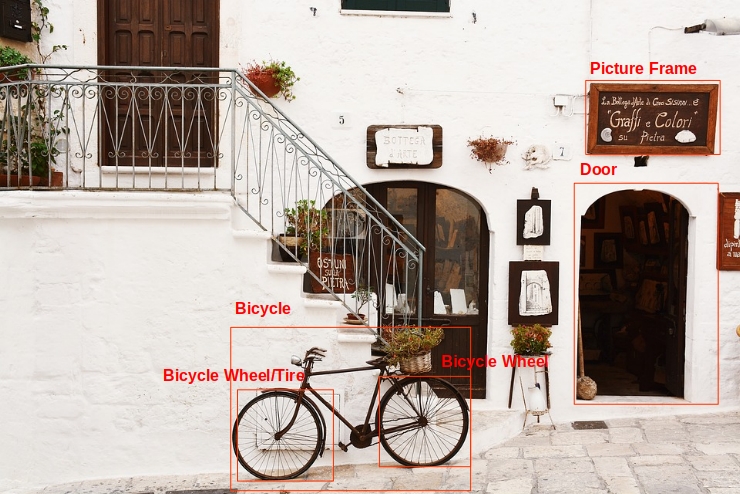
לדוגמה, ה-API מחזיר את הנתונים הבאים ואת נתוני המיקום של התיחום של האובייקטים בתמונה הקודמת:
| שם | mid | Score | Bounds |
|---|---|---|---|
| גלגל אופניים | /m/01bqk0 | 0.89648587 | (0.32076266, 0.78941387), (0.43812272, 0.78941387), (0.43812272, 0.97331065), (0.32076266, 0.97331065) |
| אופניים | /m/0199g | 0.886761 | (0.312, 0.6616471), (0.638353, 0.6616471), (0.638353, 0.9705882), (0.312, 0.9705882) |
| גלגל אופניים | /m/01bqk0 | 0.6345275 | (0.5125398, 0.760708), (0.6256646, 0.760708), (0.6256646, 0.94601655), (0.5125398, 0.94601655) |
| מסגרת לתמונה | /m/06z37_ | 0.6207608 | (0.79177403, 0.16160682), (0.97047985, 0.16160682), (0.97047985, 0.31348917), (0.79177403, 0.31348917) |
| צמיג | /m/0h9mv | 0.55886006 | (0.32076266, 0.78941387), (0.43812272, 0.78941387), (0.43812272, 0.97331065), (0.32076266, 0.97331065) |
| דלת | /m/02dgv | 0.5160098 | (0.77569866, 0.37104446), (0.9412425, 0.37104446), (0.9412425, 0.81507325), (0.77569866, 0.81507325) |
השדה mid מכיל מזהה שנוצר על ידי מכונה (MID) שמתאים לרשומה של תווית בKnowledge Graph של Google. מידע על בדיקת ערכי mid מופיע במאמרי העזרה של Google Knowledge Graph Search API.
נסו בעצמכם
אנחנו ממליצים למשתמשים חדשים ב-Google Cloud ליצור חשבון כדי שיוכלו להעריך את הביצועים של Cloud Vision API בתרחישים מהעולם האמיתי. לקוחות חדשים מקבלים בחינם גם קרדיט בשווי 300 $להרצה, לבדיקה ולפריסה של עומסי העבודה.
לניסיון חינם של Cloud Vision APIObject Localization requests
הגדרה של Google Cloud הפרויקט והאימות
זיהוי אובייקטים בתמונה מקומית
אתם יכולים להשתמש ב-Vision API כדי לבצע זיהוי תכונות בקובץ תמונה מקומי.
בבקשות REST, שולחים את תוכן קובץ התמונה כמחרוזת מקודדת ב-Base64 בגוף הבקשה.
בבקשות של gcloud וספריית לקוח, מציינים בבקשה את הנתיב לתמונה מקומית.
REST
לפני שמשתמשים בנתוני הבקשה, צריך להחליף את הנתונים הבאים:
- BASE64_ENCODED_IMAGE: ייצוג base64 (מחרוזת ASCII) של נתוני התמונה הבינאריים. המחרוזת הזו צריכה להיראות כמו המחרוזת הבאה:
/9j/4QAYRXhpZgAA...9tAVx/zDQDlGxn//2Q==
- RESULTS_INT: (אופציונלי) ערך של מספר שלם של תוצאות להחזרה. אם משמיטים את השדה
"maxResults"ואת הערך שלו, ה-API מחזיר את ערך ברירת המחדל של 10 תוצאות. השדה הזה לא רלוונטי לסוגי התכונות הבאים:TEXT_DETECTION,DOCUMENT_TEXT_DETECTIONאוCROP_HINTS. - PROJECT_ID: מזהה הפרויקט ב- Google Cloud .
ה-method של ה-HTTP וכתובת ה-URL:
POST https://vision.googleapis.com/v1/images:annotate
גוף בקשת JSON:
{
  "requests": [
    {
      "image": {
        "content": "BASE64_ENCODED_IMAGE"
      },
      "features": [
        {
          "maxResults": RESULTS_INT,
          "type": "OBJECT_LOCALIZATION"
        },
      ]
    }
  ]
}
כדי לשלוח את הבקשה עליכם לבחור אחת מהאפשרויות הבאות:
curl
שומרים את גוף הבקשה בקובץ בשם request.json ומריצים את הפקודה הבאה:
curl -X POST \
     -H "Authorization: Bearer $(gcloud auth print-access-token)" \
     -H "x-goog-user-project: PROJECT_ID" \
     -H "Content-Type: application/json; charset=utf-8" \
     -d @request.json \
     "https://vision.googleapis.com/v1/images:annotate"
PowerShell
שומרים את גוף הבקשה בקובץ בשם request.json ומריצים את הפקודה הבאה:
$cred = gcloud auth print-access-token
$headers = @{ "Authorization" = "Bearer $cred"; "x-goog-user-project" = "PROJECT_ID" }

Invoke-WebRequest `
    -Method POST `
    -Headers $headers `
    -ContentType: "application/json; charset=utf-8" `
    -InFile request.json `
    -Uri "https://vision.googleapis.com/v1/images:annotate" | Select-Object -Expand Content
אם הבקשה תתבצע בהצלחה, השרת יחזיר קוד סטטוס 200 OK של HTTP ואת התשובה בפורמט JSON.
תשובה:
Go
לפני שמנסים את הדוגמה הזו, צריך לפעול לפי Goהוראות ההגדרה שבמדריך לתחילת העבודה עם Vision באמצעות ספריות לקוח. מידע נוסף מופיע במאמרי העזרה של Vision Go API.
כדי לבצע אימות ב-Vision, צריך להגדיר את Application Default Credentials. מידע נוסף זמין במאמר הגדרת אימות לסביבת פיתוח מקומית.
Java
לפני שמנסים את הדוגמה הזו, צריך לפעול לפי הוראות ההגדרה של Java במאמר התחלת העבודה עם Vision API באמצעות ספריות לקוח. מידע נוסף מופיע ב מאמרי העזרה של Vision API Java.
Node.js
לפני שמנסים את הדוגמה הזו, צריך לפעול לפי Node.jsהוראות ההגדרה שבמדריך לתחילת העבודה עם Vision באמצעות ספריות לקוח. מידע נוסף מופיע במאמרי העזרה של Vision Node.js API.
כדי לבצע אימות ב-Vision, צריך להגדיר את Application Default Credentials. מידע נוסף זמין במאמר הגדרת אימות לסביבת פיתוח מקומית.
Python
לפני שמנסים את הדוגמה הזו, צריך לפעול לפי Pythonהוראות ההגדרה שבמדריך לתחילת העבודה עם Vision באמצעות ספריות לקוח. מידע נוסף מופיע במאמרי העזרה של Vision Python API.
כדי לבצע אימות ב-Vision, צריך להגדיר את Application Default Credentials. מידע נוסף זמין במאמר הגדרת אימות לסביבת פיתוח מקומית.
שפות נוספות
C#: צריך לפעול לפי הוראות ההגדרה של C# בדף של ספריות הלקוח ואז לעבור אל מאמרי העזרה של Vision ל- .NET.
PHP: Please follow the PHP setup instructions on the client libraries page and then visit the מאמרי עזרה של Vision עבור PHP.
Ruby: פועלים לפי הוראות ההגדרה של Ruby בדף של ספריות הלקוח ואז עוברים אל מאמרי העזרה של Vision בנושא Ruby.
זיהוי אובייקטים בתמונה מרוחקת
אתם יכולים להשתמש ב-Vision API כדי לבצע זיהוי תכונות בקובץ תמונה מרוחק שנמצא ב-Cloud Storage או באינטרנט. כדי לשלוח בקשה לקובץ מרוחק, מציינים את כתובת ה-URL של הקובץ או את ה-URI של Cloud Storage בגוף הבקשה.
REST
לפני שמשתמשים בנתוני הבקשה, צריך להחליף את הנתונים הבאים:
- CLOUD_STORAGE_IMAGE_URI: הנתיב לקובץ תמונה תקין בקטגוריה של Cloud Storage. צריכות להיות לכם לפחות הרשאות קריאה לקובץ.
דוגמה:
https://cloud.google.com/vision/docs/images/bicycle_example.png
- RESULTS_INT: (אופציונלי) ערך של מספר שלם של תוצאות להחזרה. אם משמיטים את השדה
"maxResults"ואת הערך שלו, ה-API מחזיר את ערך ברירת המחדל של 10 תוצאות. השדה הזה לא רלוונטי לסוגי התכונות הבאים:TEXT_DETECTION,DOCUMENT_TEXT_DETECTIONאוCROP_HINTS. - PROJECT_ID: מזהה הפרויקט ב- Google Cloud .
ה-method של ה-HTTP וכתובת ה-URL:
POST https://vision.googleapis.com/v1/images:annotate
גוף בקשת JSON:
{
  "requests": [
    {
      "image": {
        "source": {
          "imageUri": "CLOUD_STORAGE_IMAGE_URI"
        }
      },
      "features": [
        {
          "maxResults": RESULTS_INT,
          "type": "OBJECT_LOCALIZATION"
        },
      ]
    }
  ]
}
כדי לשלוח את הבקשה עליכם לבחור אחת מהאפשרויות הבאות:
curl
שומרים את גוף הבקשה בקובץ בשם request.json ומריצים את הפקודה הבאה:
curl -X POST \
     -H "Authorization: Bearer $(gcloud auth print-access-token)" \
     -H "x-goog-user-project: PROJECT_ID" \
     -H "Content-Type: application/json; charset=utf-8" \
     -d @request.json \
     "https://vision.googleapis.com/v1/images:annotate"
PowerShell
שומרים את גוף הבקשה בקובץ בשם request.json ומריצים את הפקודה הבאה:
$cred = gcloud auth print-access-token
$headers = @{ "Authorization" = "Bearer $cred"; "x-goog-user-project" = "PROJECT_ID" }

Invoke-WebRequest `
    -Method POST `
    -Headers $headers `
    -ContentType: "application/json; charset=utf-8" `
    -InFile request.json `
    -Uri "https://vision.googleapis.com/v1/images:annotate" | Select-Object -Expand Content
אם הבקשה תתבצע בהצלחה, השרת יחזיר קוד סטטוס 200 OK של HTTP ואת התשובה בפורמט JSON.
תשובה:
Go
לפני שמנסים את הדוגמה הזו, צריך לפעול לפי Goהוראות ההגדרה שבמדריך לתחילת העבודה עם Vision באמצעות ספריות לקוח. מידע נוסף מופיע במאמרי העזרה של Vision Go API.
כדי לבצע אימות ב-Vision, צריך להגדיר את Application Default Credentials. מידע נוסף זמין במאמר הגדרת אימות לסביבת פיתוח מקומית.
Java
לפני שמנסים את הדוגמה הזו, צריך לפעול לפי הוראות ההגדרה של Java במאמר התחלת העבודה עם Vision API באמצעות ספריות לקוח. מידע נוסף מופיע ב מאמרי העזרה של Vision API Java.
Node.js
לפני שמנסים את הדוגמה הזו, צריך לפעול לפי Node.jsהוראות ההגדרה שבמדריך לתחילת העבודה עם Vision באמצעות ספריות לקוח. מידע נוסף מופיע במאמרי העזרה של Vision Node.js API.
כדי לבצע אימות ב-Vision, צריך להגדיר את Application Default Credentials. מידע נוסף זמין במאמר הגדרת אימות לסביבת פיתוח מקומית.
Python
לפני שמנסים את הדוגמה הזו, צריך לפעול לפי Pythonהוראות ההגדרה שבמדריך לתחילת העבודה עם Vision באמצעות ספריות לקוח. מידע נוסף מופיע במאמרי העזרה של Vision Python API.
כדי לבצע אימות ב-Vision, צריך להגדיר את Application Default Credentials. מידע נוסף זמין במאמר הגדרת אימות לסביבת פיתוח מקומית.
gcloud
כדי לזהות תוויות בתמונה, משתמשים בפקודה gcloud ml vision detect-objects כמו בדוגמה הבאה:
gcloud ml vision detect-objects https://cloud.google.com/vision/docs/images/bicycle_example.png
שפות נוספות
C#: צריך לפעול לפי הוראות ההגדרה של C# בדף של ספריות הלקוח ואז לעבור אל מאמרי העזרה של Vision ל- .NET.
PHP: Please follow the PHP setup instructions on the client libraries page and then visit the מאמרי עזרה של Vision עבור PHP.
Ruby: פועלים לפי הוראות ההגדרה של Ruby בדף של ספריות הלקוח ואז עוברים אל מאמרי העזרה של Vision בנושא Ruby.
התנסות בתכונה באמצעות Google APIs Explorer
אפשר לנסות זיהוי אובייקטים ולוקליזציה באמצעות Google APIs Explorer. אתם יכולים להשתמש בתמונה שכבר צוינה (https://cloud.google.com/vision/docs/images/bicycle_example.png) או לציין תמונה משלכם במקומה. לוחצים על Execute (הפעלה) כדי לשלוח את הבקשה.

גוף הבקשה:
{
  "requests": [
    {
      "features": [
        {
          "maxResults": 10,
          "type": "OBJECT_LOCALIZATION"
        }
      ],
      "image": {
        "source": {
          "imageUri": "https://cloud.google.com/vision/docs/images/bicycle_example.png"
        }
      }
    }
  ]
}
פותחים את Google APIs Explorer ושולחים את הבקשה.
כדי לפתוח את Google APIs Explorer, לוחצים על Try it! (כדאי לנסות!).
זה שינוי אופציונלי. משנים את גוף הבקשה הקיים.
כדי לשלוח את הבקשה, לוחצים על Execute (ביצוע).