Vision API dapat mendeteksi dan mengekstrak beberapa objek dalam gambar dengan Pelokalan Objek.
Pelokalan objek mengidentifikasi beberapa objek dalam gambar dan
menyediakan LocalizedObjectAnnotation
untuk setiap objek dalam gambar. Setiap LocalizedObjectAnnotation mengidentifikasi
informasi tentang objek, posisi objek, dan batas persegi panjang
untuk region gambar yang berisi objek.
Pelokalan objek mengidentifikasi objek yang signifikan dan kurang terlihat dalam gambar.
Informasi objek hanya ditampilkan dalam bahasa Inggris. Cloud Translation dapat menerjemahkan label bahasa Inggris ke dalam berbagai bahasa lain.
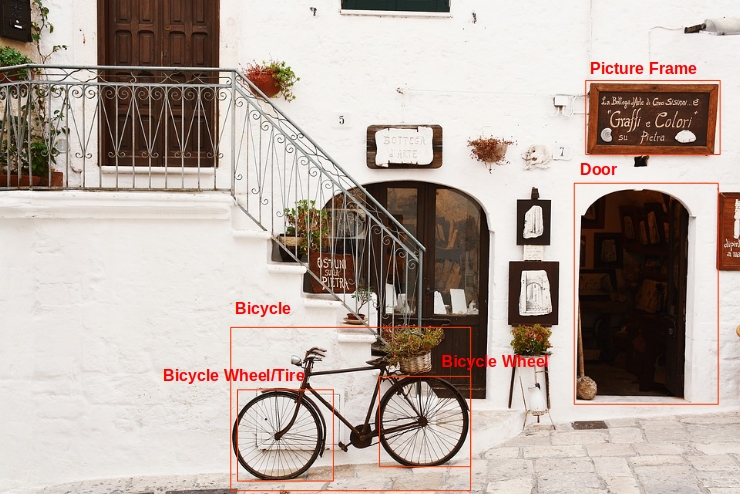
Misalnya, API menampilkan informasi berikut dan data lokasi pembatas untuk objek dalam gambar sebelumnya:
| Nama | mid | Skor | Batas |
|---|---|---|---|
| Roda bersepeda | /m/01bqk0 | 0.89648587 | (0.32076266, 0.78941387), (0.43812272, 0.78941387), (0.43812272, 0.97331065), (0.32076266, 0.97331065) |
| Bersepeda | /m/0199g | 0.886761 | (0.312, 0.6616471), (0.638353, 0.6616471), (0.638353, 0.9705882), (0.312, 0.9705882) |
| Roda bersepeda | /m/01bqk0 | 0.6345275 | (0.5125398, 0.760708), (0.6256646, 0.760708), (0.6256646, 0.94601655), (0.5125398, 0.94601655) |
| Bingkai foto | /m/06z37_ | 0.6207608 | (0.79177403, 0.16160682), (0.97047985, 0.16160682), (0.97047985, 0.31348917), (0.79177403, 0.31348917) |
| Ban | /m/0h9mv | 0.55886006 | (0.32076266, 0.78941387), (0.43812272, 0.78941387), (0.43812272, 0.97331065), (0.32076266, 0.97331065) |
| Pintu | /m/02dgv | 0.5160098 | (0.77569866, 0.37104446), (0.9412425, 0.37104446), (0.9412425, 0.81507325), (0.77569866, 0.81507325) |
mid berisi ID yang dihasilkan mesin (MID) yang sesuai dengan entri Pustaka Pengetahuan Google label. Untuk mengetahui informasi tentang pemeriksaan nilai mid lihat dokumentasi API Penelusuran Grafik Pengetahuan Google.
Coba sendiri
Jika Anda baru menggunakan Google Cloud, buat akun untuk mengevaluasi performa Cloud Vision API dalam skenario dunia nyata. Pelanggan baru juga akan mendapatkan kredit gratis senilai $300 untuk menjalankan, menguji, dan men-deploy workload.
Coba Cloud Vision API gratisPermintaan Pelokalan Objek
Menyiapkan project dan autentikasi Google Cloud
Jika Anda belum membuat Google Cloud project, lakukan sekarang. Luaskan bagian ini untuk menampilkan petunjuk.
- Sign in to your Google Cloud account. If you're new to Google Cloud, create an account to evaluate how our products perform in real-world scenarios. New customers also get $300 in free credits to run, test, and deploy workloads.
-
In the Google Cloud console, on the project selector page, select or create a Google Cloud project.
Roles required to select or create a project
- Select a project: Selecting a project doesn't require a specific IAM role—you can select any project that you've been granted a role on.
-
Create a project: To create a project, you need the Project Creator role
(
roles/resourcemanager.projectCreator), which contains theresourcemanager.projects.createpermission. Learn how to grant roles.
-
Verify that billing is enabled for your Google Cloud project.
-
Enable the Vision API.
Roles required to enable APIs
To enable APIs, you need the Service Usage Admin IAM role (
roles/serviceusage.serviceUsageAdmin), which contains theserviceusage.services.enablepermission. Learn how to grant roles. -
Install the Google Cloud CLI.
-
Jika Anda menggunakan penyedia identitas (IdP) eksternal, Anda harus login ke gcloud CLI dengan identitas gabungan Anda terlebih dahulu.
-
Untuk melakukan inisialisasi gcloud CLI, jalankan perintah berikut:
gcloud init -
In the Google Cloud console, on the project selector page, select or create a Google Cloud project.
Roles required to select or create a project
- Select a project: Selecting a project doesn't require a specific IAM role—you can select any project that you've been granted a role on.
-
Create a project: To create a project, you need the Project Creator role
(
roles/resourcemanager.projectCreator), which contains theresourcemanager.projects.createpermission. Learn how to grant roles.
-
Verify that billing is enabled for your Google Cloud project.
-
Enable the Vision API.
Roles required to enable APIs
To enable APIs, you need the Service Usage Admin IAM role (
roles/serviceusage.serviceUsageAdmin), which contains theserviceusage.services.enablepermission. Learn how to grant roles. -
Install the Google Cloud CLI.
-
Jika Anda menggunakan penyedia identitas (IdP) eksternal, Anda harus login ke gcloud CLI dengan identitas gabungan Anda terlebih dahulu.
-
Untuk melakukan inisialisasi gcloud CLI, jalankan perintah berikut:
gcloud init - BASE64_ENCODED_IMAGE: Representasi
base64 (string ASCII) dari data gambar biner Anda. String ini akan terlihat seperti
string berikut:
/9j/4QAYRXhpZgAA...9tAVx/zDQDlGxn//2Q==
- RESULTS_INT: (Opsional) Nilai bilangan bulat dari hasil yang akan
ditampilkan. Jika Anda menghilangkan kolom
"maxResults"dan nilainya, API akan menampilkan nilai default 10 hasil. Kolom ini tidak berlaku untuk jenis fitur berikut:TEXT_DETECTION,DOCUMENT_TEXT_DETECTION, atauCROP_HINTS. - PROJECT_ID: Project ID Google Cloud Anda.
- CLOUD_STORAGE_IMAGE_URI: jalur ke file gambar
yang valid di bucket Cloud Storage. Anda setidaknya harus memiliki hak istimewa baca ke file tersebut.
Contoh:
https://cloud.google.com/vision/docs/images/bicycle_example.png
- RESULTS_INT: (Opsional) Nilai bilangan bulat dari hasil yang akan
ditampilkan. Jika Anda menghilangkan kolom
"maxResults"dan nilainya, API akan menampilkan nilai default 10 hasil. Kolom ini tidak berlaku untuk jenis fitur berikut:TEXT_DETECTION,DOCUMENT_TEXT_DETECTION, atauCROP_HINTS. - PROJECT_ID: Project ID Google Cloud Anda.
Mendeteksi objek pada gambar lokal
Anda dapat menggunakan Vision API untuk melakukan deteksi fitur pada file gambar lokal.
Untuk permintaan REST, kirim konten file gambar sebagai string yang berenkode base64 dalam isi permintaan Anda.
Untuk gcloud dan permintaan library klien, tentukan jalur ke gambar lokal dalam permintaan
Anda.
REST
Sebelum menggunakan salah satu data permintaan, buat penggantian berikut:
Metode HTTP dan URL:
POST https://vision.googleapis.com/v1/images:annotate
Meminta isi JSON:
{
"requests": [
{
"image": {
"content": "BASE64_ENCODED_IMAGE"
},
"features": [
{
"maxResults": RESULTS_INT,
"type": "OBJECT_LOCALIZATION"
},
]
}
]
}
Untuk mengirim permintaan Anda, pilih salah satu opsi berikut:
curl
Simpan isi permintaan dalam file bernama request.json,
dan jalankan perintah berikut:
curl -X POST \
-H "Authorization: Bearer $(gcloud auth print-access-token)" \
-H "x-goog-user-project: PROJECT_ID" \
-H "Content-Type: application/json; charset=utf-8" \
-d @request.json \
"https://vision.googleapis.com/v1/images:annotate"
PowerShell
Simpan isi permintaan dalam file bernama request.json,
dan jalankan perintah berikut:
$cred = gcloud auth print-access-token
$headers = @{ "Authorization" = "Bearer $cred"; "x-goog-user-project" = "PROJECT_ID" }
Invoke-WebRequest `
-Method POST `
-Headers $headers `
-ContentType: "application/json; charset=utf-8" `
-InFile request.json `
-Uri "https://vision.googleapis.com/v1/images:annotate" | Select-Object -Expand Content
Jika permintaan berhasil, server akan menampilkan kode status HTTP 200 OK dan
respons dalam format JSON.
Respons:
Respons
{
"responses": [
{
"localizedObjectAnnotations": [
{
"mid": "/m/01bqk0",
"name": "Bicycle wheel",
"score": 0.89648587,
"boundingPoly": {
"normalizedVertices": [
{
"x": 0.32076266,
"y": 0.78941387
},
{
"x": 0.43812272,
"y": 0.78941387
},
{
"x": 0.43812272,
"y": 0.97331065
},
{
"x": 0.32076266,
"y": 0.97331065
}
]
}
},
{
"mid": "/m/0199g",
"name": "Bicycle",
"score": 0.886761,
"boundingPoly": {
"normalizedVertices": [
{
"x": 0.312,
"y": 0.6616471
},
{
"x": 0.638353,
"y": 0.6616471
},
{
"x": 0.638353,
"y": 0.9705882
},
{
"x": 0.312,
"y": 0.9705882
}
]
}
},
{
"mid": "/m/01bqk0",
"name": "Bicycle wheel",
"score": 0.6345275,
"boundingPoly": {
"normalizedVertices": [
{
"x": 0.5125398,
"y": 0.760708
},
{
"x": 0.6256646,
"y": 0.760708
},
{
"x": 0.6256646,
"y": 0.94601655
},
{
"x": 0.5125398,
"y": 0.94601655
}
]
}
},
{
"mid": "/m/06z37_",
"name": "Picture frame",
"score": 0.6207608,
"boundingPoly": {
"normalizedVertices": [
{
"x": 0.79177403,
"y": 0.16160682
},
{
"x": 0.97047985,
"y": 0.16160682
},
{
"x": 0.97047985,
"y": 0.31348917
},
{
"x": 0.79177403,
"y": 0.31348917
}
]
}
},
{
"mid": "/m/0h9mv",
"name": "Tire",
"score": 0.55886006,
"boundingPoly": {
"normalizedVertices": [
{
"x": 0.32076266,
"y": 0.78941387
},
{
"x": 0.43812272,
"y": 0.78941387
},
{
"x": 0.43812272,
"y": 0.97331065
},
{
"x": 0.32076266,
"y": 0.97331065
}
]
}
},
{
"mid": "/m/02dgv",
"name": "Door",
"score": 0.5160098,
"boundingPoly": {
"normalizedVertices": [
{
"x": 0.77569866,
"y": 0.37104446
},
{
"x": 0.9412425,
"y": 0.37104446
},
{
"x": 0.9412425,
"y": 0.81507325
},
{
"x": 0.77569866,
"y": 0.81507325
}
]
}
}
]
}
]
}
Go
Sebelum mencoba contoh ini, ikuti petunjuk penyiapan Go di Panduan memulai Vision menggunakan library klien. Untuk mengetahui informasi selengkapnya, lihat dokumentasi referensi Vision Go API.
Untuk melakukan autentikasi ke Vision, siapkan Kredensial Default Aplikasi. Untuk mengetahui informasi selengkapnya, lihat Menyiapkan autentikasi untuk lingkungan pengembangan lokal.
// localizeObjects gets objects and bounding boxes from the Vision API for an image at the given file path.
func localizeObjects(w io.Writer, file string) error {
ctx := context.Background()
client, err := vision.NewImageAnnotatorClient(ctx)
if err != nil {
return err
}
f, err := os.Open(file)
if err != nil {
return err
}
defer f.Close()
image, err := vision.NewImageFromReader(f)
if err != nil {
return err
}
annotations, err := client.LocalizeObjects(ctx, image, nil)
if err != nil {
return err
}
if len(annotations) == 0 {
fmt.Fprintln(w, "No objects found.")
return nil
}
fmt.Fprintln(w, "Objects:")
for _, annotation := range annotations {
fmt.Fprintln(w, annotation.Name)
fmt.Fprintln(w, annotation.Score)
for _, v := range annotation.BoundingPoly.NormalizedVertices {
fmt.Fprintf(w, "(%f,%f)\n", v.X, v.Y)
}
}
return nil
}
Java
Sebelum mencoba contoh ini, ikuti petunjuk penyiapan Java di Panduan Memulai Vision API Menggunakan Library Klien. Untuk mengetahui informasi selengkapnya, lihat dokumentasi referensi Java Vision API.
/**
* Detects localized objects in the specified local image.
*
* @param filePath The path to the file to perform localized object detection on.
* @throws Exception on errors while closing the client.
* @throws IOException on Input/Output errors.
*/
public static void detectLocalizedObjects(String filePath) throws IOException {
List<AnnotateImageRequest> requests = new ArrayList<>();
ByteString imgBytes = ByteString.readFrom(new FileInputStream(filePath));
Image img = Image.newBuilder().setContent(imgBytes).build();
AnnotateImageRequest request =
AnnotateImageRequest.newBuilder()
.addFeatures(Feature.newBuilder().setType(Type.OBJECT_LOCALIZATION))
.setImage(img)
.build();
requests.add(request);
// Initialize client that will be used to send requests. This client only needs to be created
// once, and can be reused for multiple requests. After completing all of your requests, call
// the "close" method on the client to safely clean up any remaining background resources.
try (ImageAnnotatorClient client = ImageAnnotatorClient.create()) {
// Perform the request
BatchAnnotateImagesResponse response = client.batchAnnotateImages(requests);
List<AnnotateImageResponse> responses = response.getResponsesList();
// Display the results
for (AnnotateImageResponse res : responses) {
for (LocalizedObjectAnnotation entity : res.getLocalizedObjectAnnotationsList()) {
System.out.format("Object name: %s%n", entity.getName());
System.out.format("Confidence: %s%n", entity.getScore());
System.out.format("Normalized Vertices:%n");
entity
.getBoundingPoly()
.getNormalizedVerticesList()
.forEach(vertex -> System.out.format("- (%s, %s)%n", vertex.getX(), vertex.getY()));
}
}
}
}Node.js
Sebelum mencoba contoh ini, ikuti petunjuk penyiapan Node.js di Panduan memulai Vision menggunakan library klien. Untuk mengetahui informasi selengkapnya, lihat dokumentasi referensi Vision Node.js API.
Untuk melakukan autentikasi ke Vision, siapkan Kredensial Default Aplikasi. Untuk mengetahui informasi selengkapnya, lihat Menyiapkan autentikasi untuk lingkungan pengembangan lokal.
// Imports the Google Cloud client libraries
const vision = require('@google-cloud/vision');
const fs = require('fs');
// Creates a client
const client = new vision.ImageAnnotatorClient();
/**
* TODO(developer): Uncomment the following line before running the sample.
*/
// const fileName = `/path/to/localImage.png`;
const request = {
image: {content: fs.readFileSync(fileName)},
};
const [result] = await client.objectLocalization(request);
const objects = result.localizedObjectAnnotations;
objects.forEach(object => {
console.log(`Name: ${object.name}`);
console.log(`Confidence: ${object.score}`);
const vertices = object.boundingPoly.normalizedVertices;
vertices.forEach(v => console.log(`x: ${v.x}, y:${v.y}`));
});Python
Sebelum mencoba contoh ini, ikuti petunjuk penyiapan Python di Panduan memulai Vision menggunakan library klien. Untuk mengetahui informasi selengkapnya, lihat dokumentasi referensi Vision Python API.
Untuk melakukan autentikasi ke Vision, siapkan Kredensial Default Aplikasi. Untuk mengetahui informasi selengkapnya, lihat Menyiapkan autentikasi untuk lingkungan pengembangan lokal.
def localize_objects(path):
"""Localize objects in the local image.
Args:
path: The path to the local file.
"""
from google.cloud import vision
client = vision.ImageAnnotatorClient()
with open(path, "rb") as image_file:
content = image_file.read()
image = vision.Image(content=content)
objects = client.object_localization(image=image).localized_object_annotations
print(f"Number of objects found: {len(objects)}")
for object_ in objects:
print(f"\n{object_.name} (confidence: {object_.score})")
print("Normalized bounding polygon vertices: ")
for vertex in object_.bounding_poly.normalized_vertices:
print(f" - ({vertex.x}, {vertex.y})")
Bahasa tambahan
C#: Ikuti petunjuk penyiapan C# di halaman library klien, lalu buka dokumentasi referensi Vision untuk .NET.
PHP: Ikuti Petunjuk penyiapan PHP di halaman library klien, lalu buka Dokumentasi referensi Vision untuk PHP.
Ruby: Ikuti Petunjuk penyiapan Ruby di halaman library klien, lalu buka Dokumentasi referensi Vision untuk Ruby.
Mendeteksi objek pada gambar jarak jauh
Anda dapat menggunakan Vision API untuk melakukan deteksi fitur pada file gambar jarak jauh yang terletak di Cloud Storage atau di Web. Untuk mengirim permintaan file jarak jauh, tentukan URL Web atau Cloud Storage URI file dalam isi permintaan.
REST
Sebelum menggunakan salah satu data permintaan, buat penggantian berikut:
Metode HTTP dan URL:
POST https://vision.googleapis.com/v1/images:annotate
Meminta isi JSON:
{
"requests": [
{
"image": {
"source": {
"imageUri": "CLOUD_STORAGE_IMAGE_URI"
}
},
"features": [
{
"maxResults": RESULTS_INT,
"type": "OBJECT_LOCALIZATION"
},
]
}
]
}
Untuk mengirim permintaan Anda, pilih salah satu opsi berikut:
curl
Simpan isi permintaan dalam file bernama request.json,
dan jalankan perintah berikut:
curl -X POST \
-H "Authorization: Bearer $(gcloud auth print-access-token)" \
-H "x-goog-user-project: PROJECT_ID" \
-H "Content-Type: application/json; charset=utf-8" \
-d @request.json \
"https://vision.googleapis.com/v1/images:annotate"
PowerShell
Simpan isi permintaan dalam file bernama request.json,
dan jalankan perintah berikut:
$cred = gcloud auth print-access-token
$headers = @{ "Authorization" = "Bearer $cred"; "x-goog-user-project" = "PROJECT_ID" }
Invoke-WebRequest `
-Method POST `
-Headers $headers `
-ContentType: "application/json; charset=utf-8" `
-InFile request.json `
-Uri "https://vision.googleapis.com/v1/images:annotate" | Select-Object -Expand Content
Jika permintaan berhasil, server akan menampilkan kode status HTTP 200 OK dan
respons dalam format JSON.
Respons:
Respons
{
"responses": [
{
"localizedObjectAnnotations": [
{
"mid": "/m/01bqk0",
"name": "Bicycle wheel",
"score": 0.89648587,
"boundingPoly": {
"normalizedVertices": [
{
"x": 0.32076266,
"y": 0.78941387
},
{
"x": 0.43812272,
"y": 0.78941387
},
{
"x": 0.43812272,
"y": 0.97331065
},
{
"x": 0.32076266,
"y": 0.97331065
}
]
}
},
{
"mid": "/m/0199g",
"name": "Bicycle",
"score": 0.886761,
"boundingPoly": {
"normalizedVertices": [
{
"x": 0.312,
"y": 0.6616471
},
{
"x": 0.638353,
"y": 0.6616471
},
{
"x": 0.638353,
"y": 0.9705882
},
{
"x": 0.312,
"y": 0.9705882
}
]
}
},
{
"mid": "/m/01bqk0",
"name": "Bicycle wheel",
"score": 0.6345275,
"boundingPoly": {
"normalizedVertices": [
{
"x": 0.5125398,
"y": 0.760708
},
{
"x": 0.6256646,
"y": 0.760708
},
{
"x": 0.6256646,
"y": 0.94601655
},
{
"x": 0.5125398,
"y": 0.94601655
}
]
}
},
{
"mid": "/m/06z37_",
"name": "Picture frame",
"score": 0.6207608,
"boundingPoly": {
"normalizedVertices": [
{
"x": 0.79177403,
"y": 0.16160682
},
{
"x": 0.97047985,
"y": 0.16160682
},
{
"x": 0.97047985,
"y": 0.31348917
},
{
"x": 0.79177403,
"y": 0.31348917
}
]
}
},
{
"mid": "/m/0h9mv",
"name": "Tire",
"score": 0.55886006,
"boundingPoly": {
"normalizedVertices": [
{
"x": 0.32076266,
"y": 0.78941387
},
{
"x": 0.43812272,
"y": 0.78941387
},
{
"x": 0.43812272,
"y": 0.97331065
},
{
"x": 0.32076266,
"y": 0.97331065
}
]
}
},
{
"mid": "/m/02dgv",
"name": "Door",
"score": 0.5160098,
"boundingPoly": {
"normalizedVertices": [
{
"x": 0.77569866,
"y": 0.37104446
},
{
"x": 0.9412425,
"y": 0.37104446
},
{
"x": 0.9412425,
"y": 0.81507325
},
{
"x": 0.77569866,
"y": 0.81507325
}
]
}
}
]
}
]
}
Go
Sebelum mencoba contoh ini, ikuti petunjuk penyiapan Go di Panduan memulai Vision menggunakan library klien. Untuk mengetahui informasi selengkapnya, lihat dokumentasi referensi Vision Go API.
Untuk melakukan autentikasi ke Vision, siapkan Kredensial Default Aplikasi. Untuk mengetahui informasi selengkapnya, lihat Menyiapkan autentikasi untuk lingkungan pengembangan lokal.
// localizeObjects gets objects and bounding boxes from the Vision API for an image at the given file path.
func localizeObjectsURI(w io.Writer, file string) error {
ctx := context.Background()
client, err := vision.NewImageAnnotatorClient(ctx)
if err != nil {
return err
}
image := vision.NewImageFromURI(file)
annotations, err := client.LocalizeObjects(ctx, image, nil)
if err != nil {
return err
}
if len(annotations) == 0 {
fmt.Fprintln(w, "No objects found.")
return nil
}
fmt.Fprintln(w, "Objects:")
for _, annotation := range annotations {
fmt.Fprintln(w, annotation.Name)
fmt.Fprintln(w, annotation.Score)
for _, v := range annotation.BoundingPoly.NormalizedVertices {
fmt.Fprintf(w, "(%f,%f)\n", v.X, v.Y)
}
}
return nil
}
Java
Sebelum mencoba contoh ini, ikuti petunjuk penyiapan Java di Panduan Memulai Vision API Menggunakan Library Klien. Untuk mengetahui informasi selengkapnya, lihat dokumentasi referensi Java Vision API.
/**
* Detects localized objects in a remote image on Google Cloud Storage.
*
* @param gcsPath The path to the remote file on Google Cloud Storage to detect localized objects
* on.
* @throws Exception on errors while closing the client.
* @throws IOException on Input/Output errors.
*/
public static void detectLocalizedObjectsGcs(String gcsPath) throws IOException {
List<AnnotateImageRequest> requests = new ArrayList<>();
ImageSource imgSource = ImageSource.newBuilder().setGcsImageUri(gcsPath).build();
Image img = Image.newBuilder().setSource(imgSource).build();
AnnotateImageRequest request =
AnnotateImageRequest.newBuilder()
.addFeatures(Feature.newBuilder().setType(Type.OBJECT_LOCALIZATION))
.setImage(img)
.build();
requests.add(request);
// Initialize client that will be used to send requests. This client only needs to be created
// once, and can be reused for multiple requests. After completing all of your requests, call
// the "close" method on the client to safely clean up any remaining background resources.
try (ImageAnnotatorClient client = ImageAnnotatorClient.create()) {
// Perform the request
BatchAnnotateImagesResponse response = client.batchAnnotateImages(requests);
List<AnnotateImageResponse> responses = response.getResponsesList();
client.close();
// Display the results
for (AnnotateImageResponse res : responses) {
for (LocalizedObjectAnnotation entity : res.getLocalizedObjectAnnotationsList()) {
System.out.format("Object name: %s%n", entity.getName());
System.out.format("Confidence: %s%n", entity.getScore());
System.out.format("Normalized Vertices:%n");
entity
.getBoundingPoly()
.getNormalizedVerticesList()
.forEach(vertex -> System.out.format("- (%s, %s)%n", vertex.getX(), vertex.getY()));
}
}
}
}Node.js
Sebelum mencoba contoh ini, ikuti petunjuk penyiapan Node.js di Panduan memulai Vision menggunakan library klien. Untuk mengetahui informasi selengkapnya, lihat dokumentasi referensi Vision Node.js API.
Untuk melakukan autentikasi ke Vision, siapkan Kredensial Default Aplikasi. Untuk mengetahui informasi selengkapnya, lihat Menyiapkan autentikasi untuk lingkungan pengembangan lokal.
// Imports the Google Cloud client libraries
const vision = require('@google-cloud/vision');
// Creates a client
const client = new vision.ImageAnnotatorClient();
/**
* TODO(developer): Uncomment the following line before running the sample.
*/
// const gcsUri = `gs://bucket/bucketImage.png`;
const [result] = await client.objectLocalization(gcsUri);
const objects = result.localizedObjectAnnotations;
objects.forEach(object => {
console.log(`Name: ${object.name}`);
console.log(`Confidence: ${object.score}`);
const veritices = object.boundingPoly.normalizedVertices;
veritices.forEach(v => console.log(`x: ${v.x}, y:${v.y}`));
});Python
Sebelum mencoba contoh ini, ikuti petunjuk penyiapan Python di Panduan memulai Vision menggunakan library klien. Untuk mengetahui informasi selengkapnya, lihat dokumentasi referensi Vision Python API.
Untuk melakukan autentikasi ke Vision, siapkan Kredensial Default Aplikasi. Untuk mengetahui informasi selengkapnya, lihat Menyiapkan autentikasi untuk lingkungan pengembangan lokal.
def localize_objects_uri(uri):
"""Localize objects in the image on Google Cloud Storage
Args:
uri: The path to the file in Google Cloud Storage (gs://...)
"""
from google.cloud import vision
client = vision.ImageAnnotatorClient()
image = vision.Image()
image.source.image_uri = uri
objects = client.object_localization(image=image).localized_object_annotations
print(f"Number of objects found: {len(objects)}")
for object_ in objects:
print(f"\n{object_.name} (confidence: {object_.score})")
print("Normalized bounding polygon vertices: ")
for vertex in object_.bounding_poly.normalized_vertices:
print(f" - ({vertex.x}, {vertex.y})")
gcloud
Untuk mendeteksi label dalam gambar, gunakan
perintah gcloud ml vision detect-objects
seperti ditunjukkan dalam contoh berikut:
gcloud ml vision detect-objects https://cloud.google.com/vision/docs/images/bicycle_example.png
Bahasa tambahan
C#: Ikuti petunjuk penyiapan C# di halaman library klien, lalu buka dokumentasi referensi Vision untuk .NET.
PHP: Ikuti Petunjuk penyiapan PHP di halaman library klien, lalu buka Dokumentasi referensi Vision untuk PHP.
Ruby: Ikuti Petunjuk penyiapan Ruby di halaman library klien, lalu buka Dokumentasi referensi Vision untuk Ruby.
Cobalah
Coba deteksi dan pelokalan objek dengan alat berikut. Anda dapat menggunakan
gambar yang sudah ditentukan (https://cloud.google.com/vision/docs/images/bicycle_example.png)
atau menentukan gambar Anda sendiri sebagai gantinya. Kirim permintaan dengan memilih
Jalankan.

Isi permintaan:
{
"requests": [
{
"features": [
{
"maxResults": 10,
"type": "OBJECT_LOCALIZATION"
}
],
"image": {
"source": {
"imageUri": "https://cloud.google.com/vision/docs/images/bicycle_example.png"
}
}
}
]
}