


- 使用 Cloud Run 函数监听模型数据并从中生成事件。
- 通过 Pub/Sub 事件渠道发送 Cloud Run functions 生成的事件。
支持的模型
以下模型提供 Cloud Run functions 事件生成和 Pub/Sub 事件通知集成:
准备工作
- 创建一个应用,其中至少包含一个流节点和一个受支持的模型节点。
- 可选。安装 Gemini Enterprise Agent Platform Vision SDK 并将数据注入到您的应用中。如果您在设置事件通知之前未执行此操作,则必须在设置之后执行。
- 可选。创建 Cloud Run 函数以供使用。 如果您在配置 Cloud Run 函数以处理模型输出之前未创建 Cloud Run 函数,则必须在该过程中创建该函数。
- 可选。创建 Pub/Sub 主题以供使用。 如果您未在通过 Pub/Sub 启用模型事件通知之前创建 Pub/Sub 主题,则必须在该过程中创建该主题。
- 可选。选择并创建 Pub/Sub 订阅。 如果您在启用 Pub/Sub 模型事件通知之前未创建 Pub/Sub 订阅,则必须在启用之后创建该订阅,才能从主题中读取消息。
配置 Cloud Run functions 以处理模型输出
如需触发基于事件的通知,您必须先设置 Cloud Run functions 来处理模型输出并生成事件。
您的 Cloud Run 函数会连接到模型,并监听其输出作为后处理操作。Cloud Run 函数应返回 AppPlatformCloudFunctionResponse。这些事件 (appplatformeventbody) 会发送到您在下一步中配置的 Pub/Sub 主题。
Cloud Run 函数示例(入住情况分析模型)
Cloud Run 函数示例
/**
* Responds to any HTTP request.
*
* @param {!express:Request} req HTTP request context.
* @param {!express:Response} res HTTP response context.
*/
exports.hello_http = (req, res) => {
// Logging statement can be read with cmd `gcloud functions logs read {$functionName}`.
// For more about logging, please see https://cloud.google.com/functions/docs/monitoring

// The processor output will be stored in req.body.
const messageString = constructMessage(req.body);

// Send your message to operator output with res HTTP response context.
res.status(200).send(messageString);
};

function constructMessage(data) {
// Typically, your processor output should contains appPlatformMetadata & it's designed output.
// Here we will use the occupancy analytics model as an example.
const appPlatformMetadata = data.appPlatformMetadata;
const annotations = data.annotations;
const events = [];
for(const annotation of annotations) {
   events.push({
      "event_message": "Event message goes here",
      "payload" : {
         "attr_key_goes_here" : "val_goes_here"
      },
      "event_id" : "event_id_goes_here"
   });
}

// Typically, your cloud function should return a string represent a JSON which has two fields:
// "annotations" must follow the specification of the target model.
// "events" should be of type "AppPlatformEventBody".
const messageJson = {
   "annotations": annotations,
   "events": events,
};
return JSON.stringify(messageJson);
}
按照以下说明将模型输出流发送到 Cloud Run 函数:
控制台
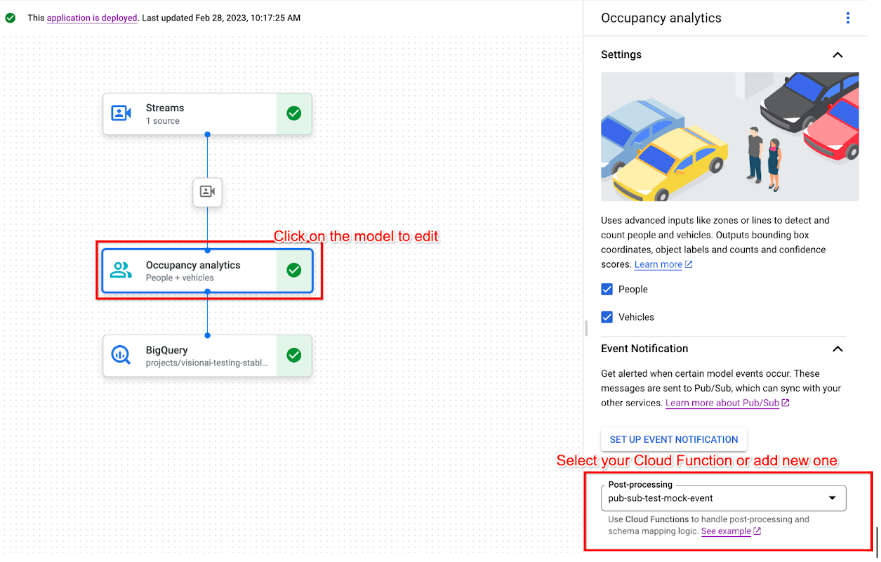
通过 Pub/Sub 启用模型事件通知
设置好 Cloud Run 函数以处理模型输出并生成事件后,您可以使用 Pub/Sub 设置事件通知。如需读取主题中的消息,您还需要选择并创建 Pub/Sub 订阅。
控制台

后续步骤
- 如需了解如何部署应用以测试模型事件通知,请参阅部署和取消部署应用。
- 完成 Gemini Enterprise Agent Platform Vision 占用情况分析应用(含事件管理)Codelab。
- 如需详细了解 Pub/Sub 和 Cloud Run functions,请参阅什么是 Pub/Sub?和 Cloud Run functions 概览。