 Google 会使用 AI 技术将内容翻译成您偏好的语言。AI 翻译可能包含错误。
将数据连接并存储到数据仓库
使用集合让一切井井有条
根据您的偏好保存内容并对其进行分类。
您可以添加到应用中的数据目标位置组件之一是 Vision 仓库,用于存储流式数据和已处理的数据。
控制台
打开 Gemini Enterprise Agent Platform Vision 信息中心内的应用 标签页。
前往“应用”标签页
从列表中选择应用名称旁边的查看应用 。
从组件的侧边列表中,从连接器 列表中选择 Vision AI 仓库 。仓库节点会添加到应用图表中,并打开 Vision AI 仓库侧边菜单。
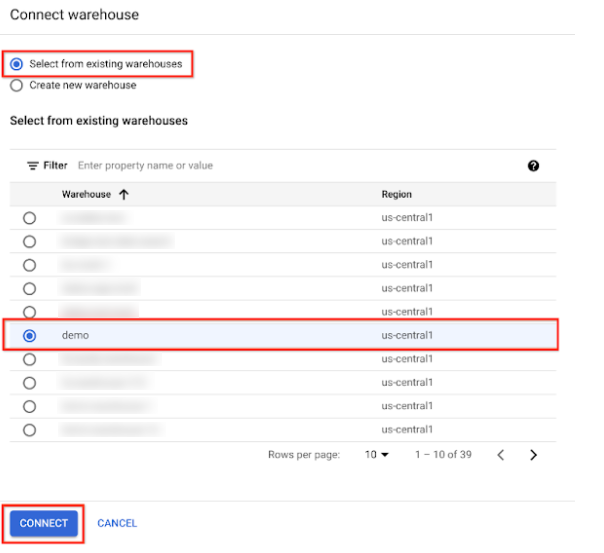
选择连接仓库 。
如果您选择
radio_button_checked创建新
仓库,请输入仓库名称并选择
[存留时间 (TTL)][ttl-link]{: .external}。然后,点击创建 。

如果您选择
radio_button_checked从
现有仓库中选择,请选择仓库旁边的按钮,然后
点击 连接。
如未另行说明,那么本页面中的内容已根据知识共享署名 4.0 许可获得了许可,并且代码示例已根据 Apache 2.0 许可获得了许可。有关详情,请参阅 Google 开发者网站政策。Java 是 Oracle 和/或其关联公司的注册商标。
最后更新时间 (UTC):2026-10-14。
[[["易于理解","easyToUnderstand","thumb-up"],["解决了我的问题","solvedMyProblem","thumb-up"],["其他","otherUp","thumb-up"]],[["很难理解","hardToUnderstand","thumb-down"],["信息或示例代码不正确","incorrectInformationOrSampleCode","thumb-down"],["没有我需要的信息/示例","missingTheInformationSamplesINeed","thumb-down"],["翻译问题","translationIssue","thumb-down"],["其他","otherDown","thumb-down"]],["最后更新时间 (UTC):2026-10-14。"],[],[]]

