


将 BigQuery 连接器添加到 Gemini Enterprise Agent Platform Vision 应用后,所有连接的应用模型输出都将提取到目标表。
您可以创建自己的 BigQuery 表,并在向应用添加 BigQuery 连接器时指定该表,也可以让 Gemini Enterprise Agent Platform Vision 应用平台自动创建该表。
自动创建表
如果您让 Gemini Enterprise Agent Platform Vision 应用平台自动创建表,则可以在添加 BigQuery 连接器节点时指定此选项。
如果您想使用自动创建表,则需要满足以下数据集和表条件:
- 数据集:自动创建的数据集名称为
visionai_dataset。 - 表:自动创建的表名称为
visionai_dataset.APPLICATION_ID。 错误处理:
- 如果同一数据集下存在同名的表,则不会自动创建表。
控制台
打开 Gemini Enterprise Agent Platform Vision 信息中心内的应用 标签页。
从列表中选择应用名称旁边的查看应用 。
在应用构建器页面上,从连接器 部分选择 BigQuery 。
将 BigQuery 路径 字段留空。
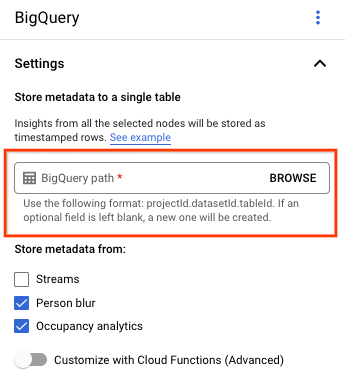
更改任何其他设置。
REST 和命令行
如需让应用平台推断表架构,请在
createDefaultTableIfNotExists时使用 BigQueryConfig
的字段,以创建或更新应用。
手动创建和指定表
如果您想手动管理输出表,则该表必须具有所需的架构作为表架构的子集。
如果现有表的架构不兼容,则部署会被拒绝。
使用默认架构
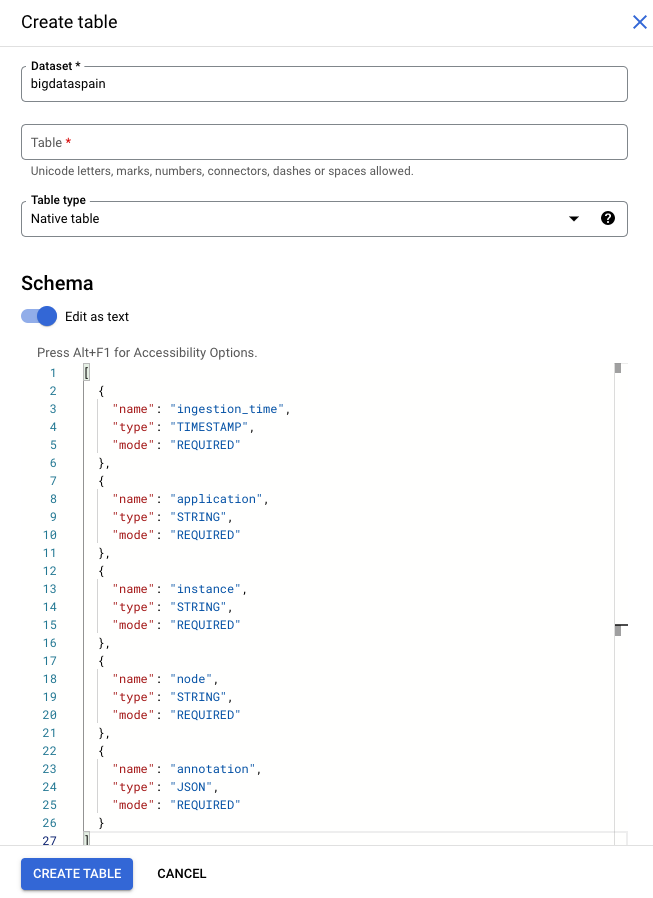
如果您为模型输出表使用默认架构,请确保您的表仅包含表中的以下必需列。您可以在创建 BigQuery 表时直接复制以下架构文本。如需详细了解如何创建 BigQuery 表,请参阅 创建和使用表。如需详细了解如何在创建表时指定架构,请参阅指定架构。
创建表时,请使用以下文本来描述架构。如需了解如何使用 JSON 列类型
("type": "JSON"),请参阅 处理标准 SQL 中的 JSON 数据。
建议将 JSON 列类型用于注解查询。您还可以使用
"type" : "STRING"。
[
  {
    "name": "ingestion_time",
    "type": "TIMESTAMP",
    "mode": "REQUIRED"
  },
 {
   "name": "application",
   "type": "STRING",
   "mode": "REQUIRED"
 },
 {
   "name": "instance",
   "type": "STRING",
   "mode": "REQUIRED"
 },
 {
   "name": "node",
   "type": "STRING",
   "mode": "REQUIRED"
 },
 {
   "name": "annotation",
   "type": "JSON",
   "mode": "REQUIRED"
 }
]
Google Cloud 控制台
在 Google Cloud 控制台中,前往 BigQuery 页面。
选择您的项目。
选择“更多选项”图标 。
点击创建表 。
在“架构”部分中,启用 以文本形式修改。
gcloud
以下示例首先创建请求 JSON 文件,然后使用
gcloud alpha bq tables create 命令。
首先创建请求 JSON 文件:
echo "{
\"schema\": [
    {
      \"name\": \"ingestion_time\",
      \"type\": \"TIMESTAMP\",
      \"mode\": \"REQUIRED\"
    },
    {
      \"name\": \"application\",
      \"type\": \"STRING\",
      \"mode\": \"REQUIRED\"
    },
    {
      \"name\": \"instance\",
      \"type\": \"STRING\",
      \"mode\": \"REQUIRED\"
    },
    {
      \"name\": \"node\",
      \"type\": \"STRING\",
      \"mode\": \"REQUIRED\"
    },
    {
      \"name\": \"annotation\",
      \"type\": \"JSON\",
      \"mode\": \"REQUIRED\"
    }
]
}
" >> bigquery_schema.json
发送
gcloud命令。进行以下替换:TABLE_NAME:表的 ID 或表的完全限定标识符。
DATASET:BigQuery 数据集的 ID。
gcloud alpha bq tables create TABLE_NAME \
--dataset=DATASET \
--schema-file=./bigquery_schema.json
Gemini Enterprise Agent Platform Vision 应用生成的 BigQuery 示例行:
| ingestion_time | 应用 | 实例 | 节点 | 注解 |
|---|---|---|---|---|
| 2022-05-11 23:3211.911378 UTC | my_application | 5 | just-one-node | {"bytesFields": ["Ig1qdXN0LW9uZS1ub2RIGgE1Eg5teV9hcHBsaWNhdGlvbgjS+YnOzdj3Ag=="],"displayNames":["hello","world"],"ids":["12345","34567"]} |
| 2022-05-11 23:3211.911338 UTC | my_application | 1 | just-one-node | {"bytesFields": ["Ig1qdXN0LW9uZS1ub2RIGgExEg5teV9hcHBsaWNhdGlvbgiq+YnOzdj3Ag=="],"displayNames":["hello","world"],"ids":["12345","34567"]} |
| 2022-05-11 23:3211.911313 UTC | my_application | 4 | just-one-node | {"bytesFields": ["Ig1qdXN0LW9uZS1ub2RIGgE0Eg5teV9hcHBsaWNhdGlvbgiR+YnOzdj3Ag=="],"displayNames":["hello","world"],"ids":["12345","34567"]} |
| 2022-05-11 23:3212.235327 UTC | my_application | 4 | just-one-node | {"bytesFields": ["Ig1qdXN0LW9uZS1ub2RIGgE0Eg5teV9hcHBsaWNhdGlvbgi/3J3Ozdj3Ag=="],"displayNames":["hello","world"],"ids":["12345","34567"]} |
使用自定义架构
如果默认架构不适合您的使用情形,您可以使用 Cloud Run functions 生成具有用户定义架构的 BigQuery 行。 如果您使用自定义架构,则对 BigQuery 表架构没有前提条件。
选择了 BigQuery 节点的应用图
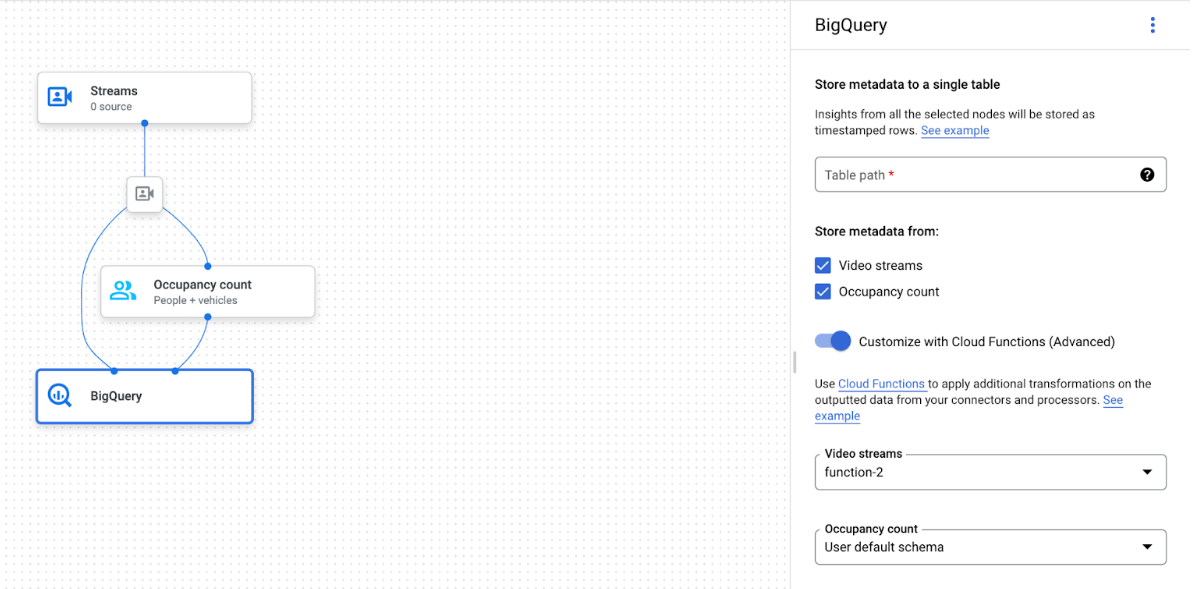
BigQuery 连接器可以连接到任何输出视频或基于 proto 的注解的模型:
- 对于视频输入,BigQuery 连接器 仅 提取存储在流标头中的元数据,并将此数据提取到 BigQuery 中,作为其他模型注解输出。视频本身 不会 存储。
- 如果您的流 不 包含元数据,则不会将任何内容存储到 BigQuery。
查询表数据
使用默认的 BigQuery 表架构,您可以在表填充数据后执行强大的分析。
查询示例
您可以在 BigQuery 中使用以下查询示例,从 Gemini Enterprise Agent Platform Vision 模型中获取洞见。
例如,您可以使用 BigQuery 通过以下 查询,使用 人员 / 车辆检测器模型中的数据绘制每分钟检测到的人员数量上限的时序曲线:
WITH
 nested3 AS(
 WITH
   nested2 AS (
   WITH
     nested AS (
     SELECT
       t.ingestion_time AS ingestion_time,
       JSON_QUERY_ARRAY(t.annotation.stats["fullFrameCount"]) AS counts
     FROM
       `PROJECT_ID.DATASET_NAME.TABLE_NAME` AS t)
   SELECT
     ingestion_time,
     e
   FROM
     nested,
     UNNEST(nested.counts) AS e)
 SELECT
   STRING(TIMESTAMP_TRUNC(nested2.ingestion_time, MINUTE, "America/Los_Angeles"),"America/Los_Angeles") AS time,
   IFNULL(INT64(nested2.e["count"]), 0) AS person_count
 FROM
   nested2
 WHERE
   JSON_VALUE(nested2.e["entity"]["labelString"])="Person")
SELECT
 time,
 MAX(person_count)
FROM
 nested3
GROUP BY
 time
同样,您可以使用 BigQuery 和过线计数功能 (占用情况分析模型的一部分)来创建查询,以统计每分钟通过过线的车辆总数:
WITH
 nested4 AS (
 WITH
   nested3 AS (
   WITH
     nested2 AS (
     WITH
       nested AS (
       SELECT
         t.ingestion_time AS ingestion_time,
         JSON_QUERY_ARRAY(t.annotation.stats["crossingLineCounts"]) AS lines
       FROM
         `PROJECT_ID.DATASET_NAME.TABLE_NAME` AS t)
     SELECT
       nested.ingestion_time,
       JSON_QUERY_ARRAY(line["positiveDirectionCounts"]) AS entities
     FROM
       nested,
       UNNEST(nested.lines) AS line
     WHERE
       JSON_VALUE(line.annotation.id) = "LINE_ANNOTATION_ID")
   SELECT
     ingestion_time,
     entity
   FROM
     nested2,
     UNNEST(nested2.entities) AS entity )
 SELECT
   STRING(TIMESTAMP_TRUNC(nested3.ingestion_time, MINUTE, "America/Los_Angeles"),"America/Los_Angeles") AS time,
   IFNULL(INT64(nested3.entity["count"]), 0) AS vehicle_count
 FROM
   nested3
 WHERE
   JSON_VALUE(nested3.entity["entity"]["labelString"])="Vehicle" )
SELECT
 time,
 SUM(vehicle_count)
FROM
 nested4
GROUP BY
 time
运行查询
格式化 Google 标准 SQL 查询后,您可以使用控制台运行查询:
控制台
在 Google Cloud 控制台中,打开 BigQuery 页面。
选择数据集名称旁边的 展开 ,然后选择表名称。
在表详细信息视图中,点击 编写新查询。

在查询编辑器 文本区域中输入 Google 标准 SQL 查询。 如需查看查询示例,请参阅查询示例。
可选:如需更改数据处理位置,请依次点击修改 > 查询设置。在处理位置下,点击自动选择并 选择数据的位置。最后,点击保存 以更新查询设置。
点击运行。
这会创建一个将输出写入临时表中的查询作业。
Cloud Run functions 集成
您可以使用 Cloud Run functions 通过自定义 BigQuery 提取触发其他数据处理。 如需将 Cloud Run functions 用于自定义 BigQuery 提取,请执行以下操作:
使用 Google Cloud 控制台时,从 每个连接的模型的下拉菜单中选择相应的 Cloud Functions。
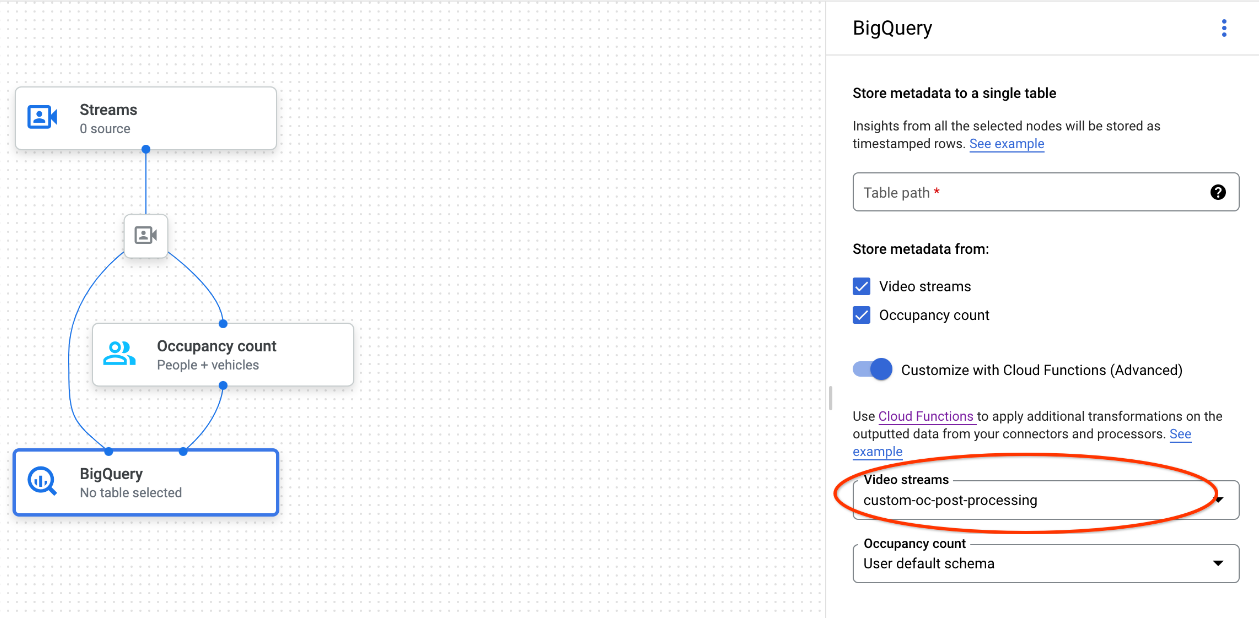
使用 Gemini Enterprise Agent Platform Vision API 时,向 BigQuery 节点中
BigQueryConfig的cloud_function_mapping字段添加一个键值对。键是 BigQuery 节点名称,值是目标函数的 HTTP 触发器。
如需将 Cloud Run functions 用于自定义 BigQuery 提取,该函数必须满足以下要求:
- 您必须先创建 Cloud Run functions 实例,然后才能创建 BigQuery 节点。
- Gemini Enterprise Agent Platform Vision API 期望收到从
Cloud Run functions 返回的
AppendRowsRequest注解。 - 您必须为
所有
CloudFunction响应设置proto_rows.writer_schema字段;write_stream可以忽略。
Cloud Run functions 集成示例
以下示例展示了如何解析占用情况计数节点输出 (OccupancyCountPredictionResult),并从中提取 ingestion_time、person_count 和 vehicle_count 表架构。
以下示例的结果是一个具有以下架构的 BigQuery 表:
[
  {
    "name": "ingestion_time",
    "type": "TIMESTAMP",
    "mode": "REQUIRED"
  },
  {
    "name": "person_count",
    "type": "INTEGER",
    "mode": "NULLABLE"
  },
      {
    "name": "vehicle_count",
    "type": "INTEGER",
    "mode": "NULLABLE"
  },
]
使用以下代码创建此表:
为您要写入的表字段定义 proto(例如
test_table_schema.proto):syntax = "proto3"; package visionai.testing; message TestTableSchema { int64 ingestion_time = 1; int32 person_count = 2; int32 vehicle_count = 3; }编译 proto 文件以生成协议缓冲区 Python 文件:
protoc -I=./ --python_out=./ ./test_table_schema.proto导入生成的 Python 文件并编写 Cloud Functions。
Python
import base64
import sys

from flask import jsonify
import functions_framework
from google.protobuf import descriptor_pb2
from google.protobuf.json_format import MessageToDict
import test_table_schema_pb2

def table_schema():
  schema = descriptor_pb2.DescriptorProto()
  test_table_schema_pb2.DESCRIPTOR.message_types_by_name[
      'TestTableSchema'].CopyToProto(schema)
  return schema

def bigquery_append_row_request(row):
  append_row_request = {}
  append_row_request['protoRows'] = {
      'writerSchema': {
          'protoDescriptor': MessageToDict(table_schema())
      },
      'rows': {
          'serializedRows':
              base64.b64encode(row.SerializeToString()).decode('utf-8')
      }
  }
  return append_row_request

@functions_framework.http
def hello_http(request):
  request_json = request.get_json(silent=False)
  annotations = []
  payloads = []
  if request_json and 'annotations' in request_json:
    for annotation_with_timestamp in request_json['annotations']:
      row = test_table_schema_pb2.TestTableSchema()
      row.person_count = 0
      row.vehicle_count = 0
      if 'ingestionTimeMicros' in annotation_with_timestamp:
        row.ingestion_time = int(
            annotation_with_timestamp['ingestionTimeMicros'])
      if 'annotation' in annotation_with_timestamp:
        annotation = annotation_with_timestamp['annotation']
        if 'stats' in annotation:
          stats = annotation['stats']
          for count in stats['fullFrameCount']:
            if count['entity']['labelString'] == 'Person':
              if 'count' in count:
                row.person_count = count['count']
            elif count['entity']['labelString'] == 'Vehicle':
              if 'count' in count:
                row.vehicle_count = count['count']
      payloads.append(bigquery_append_row_request(row))
  for payload in payloads:
    annotations.append({'annotation': payload})
  return jsonify(annotations=annotations)
如需在 Cloud Run functions 中添加依赖项,您还必须上传生成的
test_table_schema_pb2.py文件,并指定类似于以下内容的requirements.txt:functions-framework==3.* click==7.1.2 cloudevents==1.2.0 deprecation==2.1.0 Flask==1.1.2 gunicorn==20.0.4 itsdangerous==1.1.0 Jinja2==2.11.2 MarkupSafe==1.1.1 pathtools==0.1.2 watchdog==1.0.2 Werkzeug==1.0.1 protobuf==3.12.2部署 Cloud Functions,并在
BigQueryConfig中设置相应的 HTTP 触发器。