

RAG Engine on Gemini Enterprise Agent Platform provides different Deployment Modes for operating your RAG instances. Your choice of deployment mode determines where your data is stored, how that storage scales as your data grows, and what level of infrastructure management is required from you. By understanding how these modes operate, you can choose the right balance of simplicity, scalability, and costs for your project.
RAG Engine offers two deployment modes: Serverless and Spanner. You can switch between both modes seamlessly. Data within each mode remains isolated from the other.
Available deployment modes
In this section, we discuss the two deployment modes available for RAG Engine:
Serverless mode
Serverless mode is the most affordable and recommended way to get started with RAG Engine. It provides a fully managed, planet-scale, enterprise-ready database that abstracts away all database provisioning and scaling.
- Best for: Most users, quick onboarding, and seamless scaling without the need to manage infrastructure configurations.
- Key features: Requires no tier management. It automatically uses RAG-managed Vector Search as the default vector database to provide a streamlined and out-of-the-box RAG experience.
In the serverless mode, the RAG managed database is for managing RAG business operations and storing RAG resources. These resources include (but are not limited to) RagCorpus, RagFiles, RagMetadata, DataSchema etc. But it can no longer be used for embedding indexing and vector search.
Users will always need to choose a different vector database separately. In Serverless mode, by default, RAG Engine provisions a Vector Search 2.0 collection in your project for embedding indexing and vector search. Compared with Spanner mode, provisioning Vector Search 2.0 in your project gives you full visibility and control over the vector DB usage and costs. See the Spanner Mode versus Serverless Mode section for a detailed comparison.
Spanner mode
Spanner mode allocates dedicated Spanner infrastructure specifically to serve as the foundation of your RAG Engine deployment. It is designed for workloads that require specific compliance features (like CMEK) or dedicated, isolated database instances. Spanner mode is assigned as the default if a mode choice isn't explicitly selected.
When using Spanner mode, you must manage your infrastructure by selecting a performance tier:
- Basic tier (default): A fixed, cost-effective, low-compute tier suitable for experimentation, small data sizes, or latency-insensitive workloads.
- Scaled tier: Offers production-scale performance with autoscaling functionality. It is suitable for customers with large amounts of data or performance-sensitive workloads.
Data isolation and switching modes
RAG Engine lets you switch your project's deployment mode as long as there are no ongoing operations in your active deployment mode. You can have data under both modes. However, only one mode can be active at a time, and the data is strictly isolated between deployment modes.
As a helpful tool, you can imagine that your project behaves as if it has two completely separate backends. The resources you create (corpora, imported and uploaded files, and parsed embeddings) are permanently tied to the deployment mode that was active during their creation. Any retrieval requests either directly or through Gemini will also be limited to the corpora and files that are present under your current deployment mode. Switching between the two modes does not move your data over or delete data from the other mode.
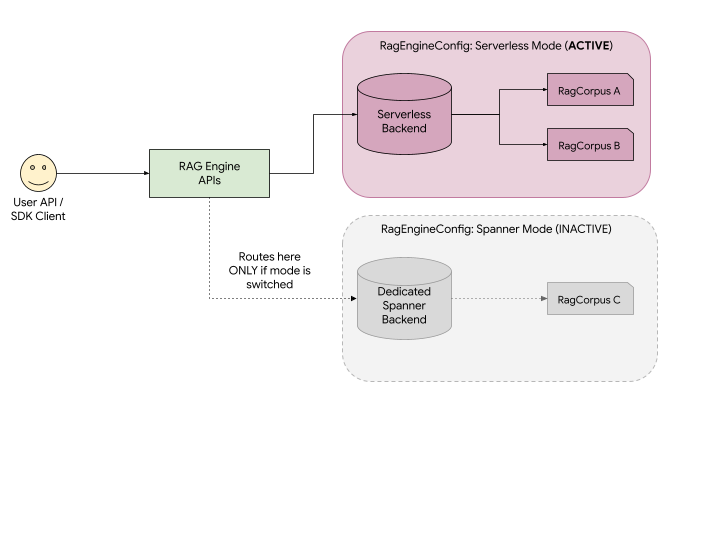
As illustrated in the diagram:
- Unified API: You use the exact same Agent Platform RAG APIs to create and manage resources. The API automatically routes your requests to the backend associated with your active deployment mode.
- Visibility: If Serverless mode is active, your application can only see and interact with RagCorpus A and B. RagCorpus C, which was created under Spanner mode, remains safely stored but is completely hidden and inaccessible to your application until you switch your project's mode back to Spanner.
- No data loss: Switching modes does not delete your data. It just changes which "backend" the API is looking at.
Manage your deployment mode
The deployment mode is a project-level setting. You can view or change your current mode using the GetRagEngineConfig and UpdateRagEngineConfig APIs. See the Switching between modes page for details on how to switch between your deployment modes and choosing an appropriate tier for your Spanner mode.
Delete data and halt billing
Because data is isolated between modes, the processes for cleaning up resources and halting billing differ slightly depending on where your data lives.
- To delete Serverless data: Ensure your active mode is set to Serverless. Call the
ListRagCorporaAPI to view your resources, and then manually delete each corpus using theDeleteRagCorpusAPI. - To delete Spanner data (Deprovisioning): Ensure your active mode is set to Spanner. Update your
RagEngineConfigand set the Spanner tier toUnprovisioned. This will immediately delete your dedicated Spanner instance and all RAG data held within it, halting any associated billing for the Spanner mode. Note: Data deleted using the Unprovisioned tier cannot be recovered.
Spanner mode versus Serverless mode
| Feature | Serverless Mode | Spanner Mode |
|---|---|---|
| Cost |
|
|
| Scaling | Fully managed autoscaling | Choice of tier needs to be configured, but does offer an autoscaling tier. |
| Isolation | Storage is not isolated | Provides storage and performance isolation. |
| CMEK | No CMEK at the moment | Offers CMEK support |
| VPC Security Controls | Supported | Supported |
| Supported Vector DBs |
|
|
What's next
- To start using RAG Engine, see RAG quick start.
- To change your deployment mode or update the tier of your Spanner mode, see Switching between modes.
- To delete your Spanner instance, see Update to Unprovisioned Tier.
- To learn more about Spanner mode, see Managing Spanner mode.
- To learn more about Serverless mode, see Serverless mode.
- To learn about pricing, see RAG Engine on Gemini Enterprise Agent Platform billing.