

Labels and attributes in Cloud Trace let you attach key-value
metadata—such as HTTP status codes, region names, or custom application
properties—to your spans so that you can filter, group, and troubleshoot
requests. If you use the Cloud Trace API v1, then you add key-value pairs by using
the labels field in the
TraceSpan object. If you use the
Trace API v2, then you add metadata by using an Attributes object.
About labels and attributes
The labels field is a map of key-value pairs stored as strings, with a limit
of 1024 labels per span. For string length
restrictions, see the API reference for labels.
When you explore a span on the Trace Explorer page, labels for that span are displayed in the Attributes tab, as shown in the following screenshot:
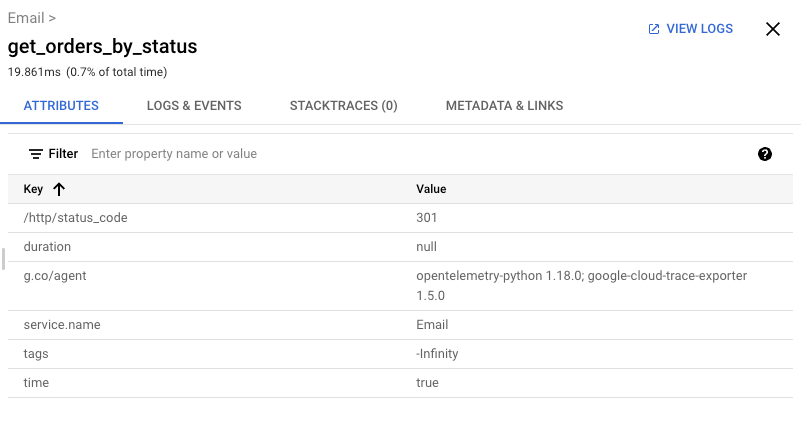
For information about how to access this information, see Find and explore traces.
Predefined keys
Canonical labels
The following table lists the supported predefined keys, includes a description, and in some cases, includes an example:
| Label key | Description Example |
|---|---|
/agent |
Trace agent identifier."node@google-cloud/trace-agent v3.0.0" |
/component |
Component identifier."grpc" |
/error/message |
An error message."Rendezvous of RPC that terminated with:
|
/error/name |
Display name for the error. |
/http/client_city |
The city of the client."NYC" |
/http/client_country |
The country of the client."US" |
/http/client_protocol |
HTTP protocol identifier."1.0" |
/http/client_region |
The region of the client."us-east4" |
/http/host |
The value of the
Host Header."default.example.com"
|
/http/method† |
Set to the HTTP request method. Don't include this key for non-HTTP requests. "GET"
|
/http/path† |
Request-URL path."/cart/checkout" |
/http/redirected_url |
The URL prior to redirection. In this case, use the key HTTP URL label to store the final URL. |
/http/request/size |
Number of bytes in the request. |
/http/response/size |
Number of bytes in the response. |
/http/route† |
The matched route."/cart/checkout/:item_id" |
/http/status_code† |
HTTP response status code."200" |
/http/url |
Complete HTTP request URL."http://example.com"
|
/http/user_agent |
Information about the
HTTP User-Agent
that originated the request."python-requests/2.19.1"
|
/stacktrace |
JSON-formatted stack trace.
Stack traces aren't indexed for search. This label is displayed in the Call Stack table. The /stacktrace label is only used by the V1 API. For the V2 API, the span contains a stackTrace
field.
|
    "stackTrace": {
      "stackFrames": {
        "frame": [
          {
            "functionName": {
              "value": "serverMethodTrace [as func]"
            },
            "fileName": {
              "value":
              "/usr/src/app/node_modules/@google-cloud/trace-agent/build/src/plugins/plugin-grpc.js"
            },
            "lineNumber": "249",
            "columnNumber": "28"
          },
          {
            "functionName": {
              "value": "anonymous function"
            },
            "fileName": {
              "value": "/usr/src/app/node_modules/grpc/src/server.js"
            },
            "lineNumber": "592",
            "columnNumber": "13"
          }
        ]
      }
}, |
|
†This label and its value are displayed in the
Details table that is included in the
Trace details view.
Canonical labels for GKE
The following table lists all of the canonical labels for a GKE container:
| Display Name in the GKE Container table Label key |
Description |
|---|---|
Project IDg.co/r/k8s_container/project_id |
The Google Cloud project hosting the GKE cluster. Click the project name to go to the GKE dashboard in the Google Cloud console. |
Locationg.co/r/k8s_container/location |
The physical location of the GKE cluster. |
Cluster Nameg.co/r/k8s_container/cluster_name
|
Identifies the GKE cluster. To go to the Clusters configuration page, click this value. |
Namespaceg.co/r/k8s_container/namespace
|
Identifies the namespace. To go to the GKE Workloads page, click this value. |
Pod Nameg.co/r/k8s_container/pod_name
|
Identifies the GKE pod. To go to the Pods details dashboard, click this value. |
Container Nameg.co/r/k8s_container/container_name
|
Identifies the GKE container. To go to the details page for the container, click this value. |
Example
The following is a partial JSON representation of a
Trace object that includes multiple labels:
{
  "projectId": "a-sample-project",
  "traceId": "00000000000000004db6dd68e7d37f57",
  "spans": [
    {
      "spanId": "12913864118554233534",
      "kind": "RPC_SERVER",
      "name": "http://192.0.2.0/",
      "startTime": "2024-04-02T19:37:34.149058Z",
      "endTime": "2025-04-02T19:37:34.151136Z",
      "parentSpanId": "5599906629317525335",
      "labels": {
        "/component": "default",
        "/http/host": "192.0.2.0",
        "/http/status_code": "200",
        "/http/url": "http://192.0.2.0/",
        "zipkin.io/http.route": "/**",
        "/http/method": "GET",
        "zipkin.io/endpoint.ipv4": "10.16.1.6",
        "zipkin.io/http.path": "/",
        "zipkin.io/mvc.controller.class": "ResourceHttpRequestHandler"
      }
    }
  ]
}
The previous trace was taken from a system using a Zipkin collector.
In this case, the labels with zipkin.io keys were added by that collector.
Prefix g.co
In some cases, the displayed labels
contain a g.co prefix. The g.co prefix indicates
that this label was generated by a Google service. If you are running your
service on App Engine or other Google Cloud infrastructure, you might
see labels such as the following:
| Label key | Sample label value |
|---|---|
g.co/agent |
opentelemetry-js 1.18.1; google-cloud-trace-exporter 2.1.0 |
g.co/r/generic_node/location |
global |
Custom labels
You can create custom labels. If you create a custom label, we recommend that you use the following formats:
/category/product/keyfor agents of well-known products. For example,/db/mongodb/read_size.short_host/path/keyfor domain-specific keys. For example,g.co/agent.
If you create a lot of custom labels, then that might incur performance impacts due to the increased label cardinality.
As illustrated in the Example section, if you use a Zipkin collector or a library such as OpenTelemetry, it might add labels to your trace spans.
Using OpenTelemetry
If you are using OpenTelemetry libraries, then ensure you use the OpenTelemetry Semantic Conventions when creating spans.