


Chirp 3 הוא הדור האחרון של מודלים גנרטיביים ספציפיים לזיהוי דיבור אוטומטי (ASR) רב-לשוני של Google, שנועדו לענות על צורכי המשתמשים על סמך משוב וניסיון. Chirp 3 מספק דיוק ומהירות משופרים בהשוואה למודלים קודמים של Chirp, וכולל תכונות של דיאריזציה וזיהוי שפה אוטומטי.
פרטי המודל
Chirp 3: תמלול, זמין באופן בלעדי ב-Speech-to-Text API V2.
מזהי הדגמים
אתם יכולים להשתמש ב-Chirp 3: Transcription בדיוק כמו בכל מודל אחר, על ידי ציון מזהה המודל המתאים בבקשת הזיהוי כשמשתמשים ב-API או בשם המודל כשנמצאים במסוף Google Cloud . מציינים את המזהה המתאים בהכרה.
| דגם | מזהה הדגם |
|---|---|
| Chirp 3 | chirp_3 |
שיטות API
לא כל שיטות הזיהוי תומכות באותן קבוצות של שפות זמינות, כי Chirp 3 זמין ב-Speech-to-Text API V2, והוא תומך בשיטות הזיהוי הבאות:
| גרסת ה-API | שיטת ה-API | תמיכה |
|---|---|---|
| V2 | Speech.StreamingRecognize (מתאים לסטרימינג ולאודיו בזמן אמת) | נתמך |
| V2 | Speech.Recognize (מתאים לאודיו באורך של פחות מדקה) | נתמך |
| V2 | Speech.BatchRecognize (מתאים לאודיו ארוך, בדרך כלל מדקה אחת עד שעה, אבל עד 20 דקות אם מופעלת חותמת זמן ברמת המילה) | נתמך |
זמינות אזורית
Chirp 3 זמין באזורים הבאים Google Cloud , ובקרוב יהיו זמינים אזורים נוספים:
| Google Cloud אזור | מוכנות להשקה |
|---|---|
us (multi-region) |
GA |
eu (multi-region) |
GA |
באמצעות Locations API, כפי שמוסבר כאן, תוכלו למצוא את הרשימה העדכנית של אזורים, שפות ולוקאלים נתמכים, ושל תכונות לכל מודל תמלול. Google Cloud
השפות שבהן אפשר לתמלל
Chirp 3 תומך בתמלול ב-StreamingRecognize, Recognize ו-BatchRecognize בשפות הבאות:
| שפה | BCP-47 Code |
מוכנות להשקה |
| קטלאנית (ספרד) | ca-ES | GA |
| סינית (פשוטה, סין) | cmn-Hans-CN | GA |
| קרואטית (קרואטיה) | hr-HR | GA |
| דנית (דנמרק) | da-DK | GA |
| הולנדית (הולנד) | nl-NL | GA |
| אנגלית (אוסטרליה) | en-AU | GA |
| אנגלית (הודו) | en-IN | GA |
| אנגלית (בריטניה) | en-GB | GA |
| אנגלית (ארצות הברית) | en-US | GA |
| פינית (פינלנד) | fi-FI | GA |
| צרפתית (קנדה) | fr-CA | GA |
| צרפתית (צרפת) | fr-FR | GA |
| גרמנית (גרמניה) | de-DE | GA |
| יוונית (יוון) | el-GR | GA |
| הינדית (הודו) | hi-IN | GA |
| איטלקית (איטליה) | it-IT | GA |
| יפנית (יפן) | ja-JP | GA |
| קוריאנית (קוריאה) | ko-KR | GA |
| פולנית (פולין) | pl-PL | GA |
| פורטוגזית (ברזיל) | pt-BR | GA |
| פורטוגזית (פורטוגל) | pt-PT | GA |
| רומנית (רומניה) | ro-RO | GA |
| רוסית (רוסיה) | ru-RU | GA |
| ספרדית (ספרד) | es-ES | GA |
| ספרדית (ארצות הברית) | es-US | GA |
| שוודית (שוודיה) | sv-SE | GA |
| טורקית (טורקיה) | tr-TR | GA |
| אוקראינית (אוקראינה) | uk-UA | GA |
| וייטנאמית (וייטנאם) | vi-VN | GA |
| אפריקאנס (דרום אפריקה) | af-ZA | תצוגה מקדימה |
| אלבנית (אלבניה) | sq-AL | תצוגה מקדימה |
| אמהרית (אתיופיה) | am-ET | תצוגה מקדימה |
| ערבית (אלג'יריה) | ar-DZ | תצוגה מקדימה |
| ערבית (בחריין) | ar-BH | תצוגה מקדימה |
| ערבית (מצרים) | ar-EG | תצוגה מקדימה |
| ערבית (ישראל) | ar-IL | תצוגה מקדימה |
| ערבית (ירדן) | ar-JO | תצוגה מקדימה |
| ערבית (כוויית) | ar-KW | תצוגה מקדימה |
| ערבית (לבנון) | ar-LB | תצוגה מקדימה |
| ערבית (מאוריטניה) | ar-MR | תצוגה מקדימה |
| ערבית (מרוקו) | ar-MA | תצוגה מקדימה |
| ערבית (עומאן) | ar-OM | תצוגה מקדימה |
| ערבית (קטאר) | ar-QA | תצוגה מקדימה |
| ערבית (ערב הסעודית) | ar-SA | תצוגה מקדימה |
| ערבית (פלסטין) | ar-PS | תצוגה מקדימה |
| ערבית (סוריה) | ar-SY | תצוגה מקדימה |
| ערבית (טוניסיה) | ar-TN | תצוגה מקדימה |
| ערבית (איחוד האמירויות) | ar-AE | תצוגה מקדימה |
| ערבית (תימן) | ar-YE | תצוגה מקדימה |
| ערבית | ar-XA | תצוגה מקדימה |
| ארמנית (ארמניה) | hy-AM | תצוגה מקדימה |
| אסאמית (הודו) | as-IN | תצוגה מקדימה |
| אסטורית (ספרד) | ast-ES | תצוגה מקדימה |
| אזרית (אזרבייג'ן) | az-AZ | תצוגה מקדימה |
| בסקית (ספרד) | eu-ES | תצוגה מקדימה |
| בנגלית (בנגלדש) | bn-BD | תצוגה מקדימה |
| בנגלית (הודו) | bn-IN | תצוגה מקדימה |
| בולגרית (בולגריה) | bg-BG | תצוגה מקדימה |
| בורמזית (מיאנמר) | my-MM | תצוגה מקדימה |
| כורדית מרכזית (עיראק) | ar-IQ | תצוגה מקדימה |
| סינית (קנטונזית מסורתית; הונג קונג) | yue-Hant-HK | תצוגה מקדימה |
| סינית, מנדרינית (מסורתית, טייוואן) | cmn-Hant-TW | תצוגה מקדימה |
| צ'כית (צ'כיה) | cs-CZ | תצוגה מקדימה |
| אנגלית (הפיליפינים) | en-PH | תצוגה מקדימה |
| אסטונית (אסטוניה) | et-EE | תצוגה מקדימה |
| פיליפינית (פיליפינים) | fil-PH | תצוגה מקדימה |
| גליציאנית (ספרד) | gl-ES | תצוגה מקדימה |
| גאורגית (גאורגיה) | ka-GE | תצוגה מקדימה |
| גוג'ראטית (הודו) | gu-IN | תצוגה מקדימה |
| האוסה (ניגריה) | ha-NG | תצוגה מקדימה |
| עברית (ישראל) | iw-IL | תצוגה מקדימה |
| הונגרית (הונגריה) | hu-HU | תצוגה מקדימה |
| איסלנדית (איסלנד) | is-IS | תצוגה מקדימה |
| אינדונזית (אינדונזיה) | id-ID | תצוגה מקדימה |
| ג'אווה (אינדונזיה) | jv-ID | תצוגה מקדימה |
| קאנדה (הודו) | kn-IN | תצוגה מקדימה |
| קזחית (קזחסטן) | kk-KZ | תצוגה מקדימה |
| חמרית (קמבודיה) | km-KH | תצוגה מקדימה |
| קירגיזית (קירגיסטן) | ky-KG | תצוגה מקדימה |
| לאו (לאוס) | lo-LA | תצוגה מקדימה |
| לטבית (לטביה) | lv-LV | תצוגה מקדימה |
| ליטאית (ליטא) | lt-LT | תצוגה מקדימה |
| לוקסמבורגית (לוקסמבורג) | lb-LU | תצוגה מקדימה |
| מקדונית (מקדוניה הצפונית) | mk-MK | תצוגה מקדימה |
| מלאית (מלזיה) | ms-MY | תצוגה מקדימה |
| מליאלאם (הודו) | ml-IN | תצוגה מקדימה |
| מלטזית (מלטה) | mt-MT | תצוגה מקדימה |
| מאורית (ניו זילנד) | mi-NZ | תצוגה מקדימה |
| מראטהית (הודו) | mr-IN | תצוגה מקדימה |
| מונגולית (מונגוליה) | mn-MN | תצוגה מקדימה |
| נפאלית (נפאל) | ne-NP | תצוגה מקדימה |
| סוטו צפונית (דרום אפריקה) | nso-ZA | תצוגה מקדימה |
| נורווגית (נורווגיה) | no-NO | תצוגה מקדימה |
| אוריה (הודו) | or-IN | תצוגה מקדימה |
| פרסית (איראן) | fa-IR | תצוגה מקדימה |
| פונג'אבית (גורמוקי, הודו) | pa-Guru-IN | תצוגה מקדימה |
| סרבית (סרביה) | sr-RS | תצוגה מקדימה |
| סלובקית (סלובקיה) | sk-SK | תצוגה מקדימה |
| סלובנית (סלובניה) | sl-SI | תצוגה מקדימה |
| ספרדית (מקסיקו) | es-MX | תצוגה מקדימה |
| סוואהילית (קניה) | sw-KE | תצוגה מקדימה |
| סווהילי | sw | תצוגה מקדימה |
| טמילית (הודו) | ta-IN | תצוגה מקדימה |
| טלוגו (הודו) | te-IN | תצוגה מקדימה |
| תאית (תאילנד) | th-TH | תצוגה מקדימה |
| אוזבקית (אוזבקיסטן) | uz-UZ | תצוגה מקדימה |
| וולשית (בריטניה) | cy-GB | תצוגה מקדימה |
| וולופית (סנגל) | wo-SN | תצוגה מקדימה |
| קוסה (דרום אפריקה) | xh-ZA | תצוגה מקדימה |
| יורובה (ניגריה) | yo-NG | תצוגה מקדימה |
| זולו (דרום אפריקה) | zu-ZA | תצוגה מקדימה |
השפות שבהן אפשר להשתמש בתכונה 'חלוקת קובץ האודיו לפי דוברים'
Chirp 3 תומך בתמלול ובזיהוי דוברים רק ב-BatchRecognize וב-Recognize בשפות הבאות:
| שפה | קוד BCP-47 |
| סינית (פשוטה, סין) | cmn-Hans-CN |
| גרמנית (גרמניה) | de-DE |
| אנגלית (בריטניה) | en-GB |
| אנגלית (הודו) | en-IN |
| אנגלית (ארצות הברית) | en-US |
| ספרדית (ספרד) | es-ES |
| ספרדית (ארצות הברית) | es-US |
| צרפתית (קנדה) | fr-CA |
| צרפתית (צרפת) | fr-FR |
| הינדית (הודו) | hi-IN |
| איטלקית (איטליה) | it-IT |
| יפנית (יפן) | ja-JP |
| קוריאנית (קוריאה) | ko-KR |
| פורטוגזית (ברזיל) | pt-BR |
תמיכה בתכונות ומגבלות
Chirp 3 תומך בתכונות הבאות:
| תכונה | תיאור | שלב ההשקה |
|---|---|---|
| פיסוק אוטומטי | הן נוצרות אוטומטית על ידי המודל, ויש אפשרות להשבית אותן. | GA |
| שימוש אוטומטי באותיות רישיות | הן נוצרות אוטומטית על ידי המודל, ויש אפשרות להשבית אותן. | GA |
| חותמות זמן ברמת האמירה | נוצר באופן אוטומטי על ידי המודל. זמין רק ב-Speech.StreamingRecognize |
GA |
| חלוקת קובץ האודיו לפי דוברים | זיהוי אוטומטי של הדוברים השונים בדגימת אודיו של ערוץ יחיד. זמין רק ב-Speech.BatchRecognize |
GA |
| התאמת הדיבור (הטיה) | מספק רמזים למודל בצורה של ביטויים או מילים כדי לשפר את דיוק הזיהוי של מונחים ספציפיים או שמות עצם. | GA |
| תמלול אודיו ללא תלות בשפה | המערכת מסיקה באופן אוטומטי את השפה הנפוצה ביותר ומתמללת אותה. | GA |
| הנחיה בהתאמה אישית | לתת למודל הוראות מותאמות אישית לפורמט התמליל. | תצוגה מקדימה |
Chirp 3 לא תומך בתכונות הבאות:
| תכונה | תיאור |
|---|---|
| חותמות זמן ברמת המילה | נוצר באופן אוטומטי על ידי המודל, ואפשר להפעיל אותו (אבל צפוי שיהיו בו שגיאות). זמין רק ב-Speech.Recognize וב-Speech.BatchRecognize |
| ציוני מהימנות ברמת המילה | ה-API מחזיר ערך, אבל הוא לא באמת ציון מהימנות. |
תמלול באמצעות Chirp 3
איך משתמשים ב-Chirp 3 למשימות תמלול
ביצוע זיהוי דיבור בסטרימינג
Python
import os

from google.cloud.speech_v2 import SpeechClient
from google.cloud.speech_v2.types import cloud_speech
from google.api_core.client_options import ClientOptions

PROJECT_ID = os.getenv("GOOGLE_CLOUD_PROJECT")
REGION = "us"

def transcribe_streaming_chirp3(
   audio_file: str
) -> cloud_speech.StreamingRecognizeResponse:
   """Transcribes audio from audio file stream using the Chirp 3 model of Google Cloud Speech-to-Text v2 API.

   Args:
       audio_file (str): Path to the local audio file to be transcribed.
           Example: "resources/audio.wav"

   Returns:
       cloud_speech.RecognizeResponse: The response from the Speech-to-Text API V2 containing
       the transcription results.
   """

   # Instantiates a client
   client = SpeechClient(
       client_options=ClientOptions(
           api_endpoint=f"{REGION}-speech.googleapis.com",
       )
   )

   # Reads a file as bytes
   with open(audio_file, "rb") as f:
       content = f.read()

   # In practice, stream should be a generator yielding chunks of audio data
   chunk_length = len(content) // 5
   stream = [
       content[start : start + chunk_length]
       for start in range(0, len(content), chunk_length)
   ]
   audio_requests = (
       cloud_speech.StreamingRecognizeRequest(audio=audio) for audio in stream
   )

   recognition_config = cloud_speech.RecognitionConfig(
       auto_decoding_config=cloud_speech.AutoDetectDecodingConfig(),
       language_codes=["en-US"],
       model="chirp_3",
   )
   streaming_config = cloud_speech.StreamingRecognitionConfig(
       config=recognition_config
   )
   config_request = cloud_speech.StreamingRecognizeRequest(
       recognizer=f"projects/{PROJECT_ID}/locations/{REGION}/recognizers/_",
       streaming_config=streaming_config,
   )

   def requests(config: cloud_speech.RecognitionConfig, audio: list) -> list:
       yield config
       yield from audio

   # Transcribes the audio into text
   responses_iterator = client.streaming_recognize(
       requests=requests(config_request, audio_requests)
   )
   responses = []
   for response in responses_iterator:
       responses.append(response)
       for result in response.results:
           print(f"Transcript: {result.alternatives[0].transcript}")

   return responses
ביצוע זיהוי דיבור סינכרוני
Python
import os

from google.cloud.speech_v2 import SpeechClient
from google.cloud.speech_v2.types import cloud_speech
from google.api_core.client_options import ClientOptions

PROJECT_ID = os.getenv("GOOGLE_CLOUD_PROJECT")
REGION = "us"

def transcribe_sync_chirp3(
   audio_file: str
) -> cloud_speech.RecognizeResponse:
   """Transcribes an audio file using the Chirp 3 model of Google Cloud Speech-to-Text V2 API.
   Args:
       audio_file (str): Path to the local audio file to be transcribed.
           Example: "resources/audio.wav"
   Returns:
       cloud_speech.RecognizeResponse: The response from the Speech-to-Text API containing
       the transcription results.
   """

   # Instantiates a client
   client = SpeechClient(
       client_options=ClientOptions(
           api_endpoint=f"{REGION}-speech.googleapis.com",
       )
   )

   # Reads a file as bytes
   with open(audio_file, "rb") as f:
       audio_content = f.read()

   config = cloud_speech.RecognitionConfig(
       auto_decoding_config=cloud_speech.AutoDetectDecodingConfig(),
       language_codes=["en-US"],
       model="chirp_3",
   )

   request = cloud_speech.RecognizeRequest(
       recognizer=f"projects/{PROJECT_ID}/locations/{REGION}/recognizers/_",
       config=config,
       content=audio_content,
   )

   # Transcribes the audio into text
   response = client.recognize(request=request)

   for result in response.results:
       print(f"Transcript: {result.alternatives[0].transcript}")

   return response
ביצוע זיהוי דיבור בקבוצה
Python
import os

from google.cloud.speech_v2 import SpeechClient
from google.cloud.speech_v2.types import cloud_speech
from google.api_core.client_options import ClientOptions

PROJECT_ID = os.getenv("GOOGLE_CLOUD_PROJECT")
REGION = "us"

def transcribe_batch_3(
   audio_uri: str,
) -> cloud_speech.BatchRecognizeResults:
   """Transcribes an audio file from a Google Cloud Storage URI using the Chirp 3 model of Google Cloud Speech-to-Text v2 API.
   Args:
       audio_uri (str): The Google Cloud Storage URI of the input audio file.
           E.g., gs://[BUCKET]/[FILE]
   Returns:
       cloud_speech.RecognizeResponse: The response from the Speech-to-Text API containing
       the transcription results.
   """

   # Instantiates a client
   client = SpeechClient(
       client_options=ClientOptions(
           api_endpoint=f"{REGION}-speech.googleapis.com",
       )
   )

   config = cloud_speech.RecognitionConfig(
       auto_decoding_config=cloud_speech.AutoDetectDecodingConfig(),
       language_codes=["en-US"],
       model="chirp_3",
   )

   file_metadata = cloud_speech.BatchRecognizeFileMetadata(uri=audio_uri)

   request = cloud_speech.BatchRecognizeRequest(
       recognizer=f"projects/{PROJECT_ID}/locations/{REGION}/recognizers/_",
       config=config,
       files=[file_metadata],
       recognition_output_config=cloud_speech.RecognitionOutputConfig(
           inline_response_config=cloud_speech.InlineOutputConfig(),
       ),
   )

   # Transcribes the audio into text
   operation = client.batch_recognize(request=request)

   print("Waiting for operation to complete...")
   response = operation.result(timeout=120)

   for result in response.results[audio_uri].transcript.results:
       print(f"Transcript: {result.alternatives[0].transcript}")

   return response.results[audio_uri].transcript
שימוש בתכונות של Chirp 3
כדאי לעיין בדוגמאות קוד כדי ללמוד איך להשתמש בתכונות החדשות:
ביצוע תמלול ללא תלות בשפה
Chirp 3 יכול לזהות ולתמלל באופן אוטומטי את השפה הדומיננטית שמדוברת באודיו, וזה חיוני לאפליקציות רב-לשוניות. כדי להשיג את זה, מגדירים את language_codes=["auto"] כמו בדוגמת הקוד:
Python
import os

from google.cloud.speech_v2 import SpeechClient
from google.cloud.speech_v2.types import cloud_speech
from google.api_core.client_options import ClientOptions

PROJECT_ID = os.getenv("GOOGLE_CLOUD_PROJECT")
REGION = "us"

def transcribe_sync_chirp3_auto_detect_language(
   audio_file: str
) -> cloud_speech.RecognizeResponse:
   """Transcribes an audio file and auto-detect spoken language using Chirp 3.
   Please see https://cloud.google.com/speech-to-text/docs/encoding for more
   information on which audio encodings are supported.
   Args:
       audio_file (str): Path to the local audio file to be transcribed.
           Example: "resources/audio.wav"
   Returns:
       cloud_speech.RecognizeResponse: The response from the Speech-to-Text API containing
       the transcription results.
   """
   # Instantiates a client
   client = SpeechClient(
       client_options=ClientOptions(
           api_endpoint=f"{REGION}-speech.googleapis.com",
       )
   )

   # Reads a file as bytes
   with open(audio_file, "rb") as f:
       audio_content = f.read()

   config = cloud_speech.RecognitionConfig(
       auto_decoding_config=cloud_speech.AutoDetectDecodingConfig(),
       language_codes=["auto"],  # Set language code to auto to detect language.
       model="chirp_3",
   )

   request = cloud_speech.RecognizeRequest(
       recognizer=f"projects/{PROJECT_ID}/locations/{REGION}/recognizers/_",
       config=config,
       content=audio_content,
   )

   # Transcribes the audio into text
   response = client.recognize(request=request)

   for result in response.results:
       print(f"Transcript: {result.alternatives[0].transcript}")
       print(f"Detected Language: {result.language_code}")

   return response
איך מבצעים תמלול בשפה מסוימת
Chirp 3 יכול לזהות ולתמלל באופן אוטומטי את השפה הדומיננטית בקובץ אודיו. אפשר גם להגביל את התנאי ללוקאלים ספציפיים שאתם מצפים להם, למשל: ["en-US", "fr-FR"]. כך משאבי המודל יתמקדו בשפות הסבירות ביותר כדי לספק תוצאות מהימנות יותר, כפי שמוצג בדוגמת הקוד:
Python
import os

from google.cloud.speech_v2 import SpeechClient
from google.cloud.speech_v2.types import cloud_speech
from google.api_core.client_options import ClientOptions

PROJECT_ID = os.getenv("GOOGLE_CLOUD_PROJECT")
REGION = "us"

def transcribe_sync_3_auto_detect_language(
   audio_file: str
) -> cloud_speech.RecognizeResponse:
   """Transcribes an audio file and auto-detect spoken language using Chirp 3.
   Please see https://cloud.google.com/speech-to-text/docs/encoding for more
   information on which audio encodings are supported.
   Args:
       audio_file (str): Path to the local audio file to be transcribed.
           Example: "resources/audio.wav"
   Returns:
       cloud_speech.RecognizeResponse: The response from the Speech-to-Text API containing
       the transcription results.
   """
   # Instantiates a client
   client = SpeechClient(
       client_options=ClientOptions(
           api_endpoint=f"{REGION}-speech.googleapis.com",
       )
   )

   # Reads a file as bytes
   with open(audio_file, "rb") as f:
       audio_content = f.read()

   config = cloud_speech.RecognitionConfig(
       auto_decoding_config=cloud_speech.AutoDetectDecodingConfig(),
       language_codes=["en-US", "fr-FR"],  # Set language codes of the expected spoken locales
       model="chirp_3",
   )

   request = cloud_speech.RecognizeRequest(
       recognizer=f"projects/{PROJECT_ID}/locations/{REGION}/recognizers/_",
       config=config,
       content=audio_content,
   )

   # Transcribes the audio into text
   response = client.recognize(request=request)

   for result in response.results:
       print(f"Transcript: {result.alternatives[0].transcript}")
       print(f"Detected Language: {result.language_code}")

   return response
ביצוע תמלול וחלוקת קובץ האודיו לפי דוברים
להשתמש ב-Chirp 3 למשימות תמלול וזיהוי דוברים.
Python
import os

from google.cloud.speech_v2 import SpeechClient
from google.cloud.speech_v2.types import cloud_speech
from google.api_core.client_options import ClientOptions

PROJECT_ID = os.getenv("GOOGLE_CLOUD_PROJECT")
REGION = "us"

def transcribe_batch_chirp3(
   audio_uri: str,
) -> cloud_speech.BatchRecognizeResults:
   """Transcribes an audio file from a Google Cloud Storage URI using the Chirp 3 model of Google Cloud Speech-to-Text V2 API.
   Args:
       audio_uri (str): The Google Cloud Storage URI of the input
         audio file. E.g., gs://[BUCKET]/[FILE]
   Returns:
       cloud_speech.RecognizeResponse: The response from the
         Speech-to-Text API containing the transcription results.
   """

   # Instantiates a client.
   client = SpeechClient(
       client_options=ClientOptions(
           api_endpoint=f"{REGION}-speech.googleapis.com",
       )
   )

   config = cloud_speech.RecognitionConfig(
       auto_decoding_config=cloud_speech.AutoDetectDecodingConfig(),
       language_codes=["en-US"],  # Use "auto" to detect language.
       model="chirp_3",
       features=cloud_speech.RecognitionFeatures(
           # Enable diarization by setting empty diarization configuration.
           diarization_config=cloud_speech.SpeakerDiarizationConfig(),
       ),
   )

   file_metadata = cloud_speech.BatchRecognizeFileMetadata(uri=audio_uri)

   request = cloud_speech.BatchRecognizeRequest(
       recognizer=f"projects/{PROJECT_ID}/locations/{REGION}/recognizers/_",
       config=config,
       files=[file_metadata],
       recognition_output_config=cloud_speech.RecognitionOutputConfig(
           inline_response_config=cloud_speech.InlineOutputConfig(),
       ),
   )

   # Creates audio transcription job.
   operation = client.batch_recognize(request=request)

   print("Waiting for transcription job to complete...")
   response = operation.result(timeout=120)

   for result in response.results[audio_uri].transcript.results:
       print(f"Transcript: {result.alternatives[0].transcript}")
       print(f"Detected Language: {result.language_code}")
       print(f"Speakers per word: {result.alternatives[0].words}")

   return response.results[audio_uri].transcript
שיפור הדיוק באמצעות התאמת המודל
Chirp 3 יכול לשפר את הדיוק של התמלול באודיו הספציפי שלכם באמצעות התאמת המודל. כך תוכלו לספק רשימה של מילים וביטויים ספציפיים, ולהגדיל את הסיכוי שהמודל יזהה אותם. האפשרות הזו שימושית במיוחד למונחים ספציפיים לדומיין, לשמות פרטיים או למילים ייחודיות.
Python
import os

from google.cloud.speech_v2 import SpeechClient
from google.cloud.speech_v2.types import cloud_speech
from google.api_core.client_options import ClientOptions

PROJECT_ID = os.getenv("GOOGLE_CLOUD_PROJECT")
REGION = "us"

def transcribe_sync_chirp3_model_adaptation(
   audio_file: str
) -> cloud_speech.RecognizeResponse:
   """Transcribes an audio file using the Chirp 3 model with adaptation, improving accuracy for specific audio characteristics or vocabulary.
   Args:
       audio_file (str): Path to the local audio file to be transcribed.
           Example: "resources/audio.wav"
   Returns:
       cloud_speech.RecognizeResponse: The response from the Speech-to-Text API containing
       the transcription results.
   """

   # Instantiates a client
   client = SpeechClient(
       client_options=ClientOptions(
           api_endpoint=f"{REGION}-speech.googleapis.com",
       )
   )

   # Reads a file as bytes
   with open(audio_file, "rb") as f:
       audio_content = f.read()

   config = cloud_speech.RecognitionConfig(
       auto_decoding_config=cloud_speech.AutoDetectDecodingConfig(),
       language_codes=["en-US"],
       model="chirp_3",
       # Use model adaptation
       adaptation=cloud_speech.SpeechAdaptation(
         phrase_sets=[
             cloud_speech.SpeechAdaptation.AdaptationPhraseSet(
                 inline_phrase_set=cloud_speech.PhraseSet(phrases=[
                   {
                       "value": "alphabet",
                   },
                   {
                         "value": "cell phone service",
                   }
                 ])
             )
         ]
       )
   )

   request = cloud_speech.RecognizeRequest(
       recognizer=f"projects/{PROJECT_ID}/locations/{REGION}/recognizers/_",
       config=config,
       content=audio_content,
   )

   # Transcribes the audio into text
   response = client.recognize(request=request)

   for result in response.results:
       print(f"Transcript: {result.alternatives[0].transcript}")

   return response
שימוש בהנחיה מותאמת אישית לעיצוב התמליל
Chirp 3 מקבל הנחיה מותאמת אישית כהוראות עיצוב למודל.
Python
import os

from google.cloud.speech_v2 import SpeechClient
from google.cloud.speech_v2.types import cloud_speech
from google.api_core.client_options import ClientOptions

PROJECT_ID = os.getenv("GOOGLE_CLOUD_PROJECT")
REGION = "us"

def transcribe_sync_chirp3_custom_prompt(
 audio_file: str,
 custom_prompt: str,
 ) -> cloud_speech.RecognizeResponse:
     """Transcribes an audio file and auto-detect spoken language using Chirp 3.
     Args:
         audio_file (str): Path to the local audio file to be transcribed.
             Example: "resources/audio.wav"
         custom_prompt: the customized formatting instructions.
             Example: "Capitalize the following special words: GOOGLE, CHIRP."
             Example: "For dates don't use the 'December 23rd, 1939' format!
             But strictly use the '12/23/1939' format."
     Returns:
         cloud_speech.RecognizeResponse: The response from the Speech-to-Text API containing
         the transcription results.
     """
     # Instantiates a client
     client = SpeechClient(
         client_options=ClientOptions(
             api_endpoint=f"{REGION}-speech.googleapis.com",
         )
     )

     # Reads a file as bytes
     with open(audio_file, "rb") as f:
         audio_content = f.read()

     config = cloud_speech.RecognitionConfig(
         auto_decoding_config=cloud_speech.AutoDetectDecodingConfig(),
         language_codes=["en-US"],
         model="chirp_3",
         features=cloud_speech.RecognitionFeatures(
             custom_prompt_config=cloud_speech.CustomPromptConfig(
                 custom_prompt= custom_prompt,
             )
         ),
     )

     request = cloud_speech.RecognizeRequest(
         recognizer=f"projects/{PROJECT_ID}/locations/{REGION}/recognizers/_",
         config=config,
         content=audio_content,
     )

     # Transcribes the audio into text
     response = client.recognize(request=request)
     print(f"Prompt used: {response.metadata.prompt}")

     for result in response.results:
         print(f"Transcript: {result.alternatives[0].transcript}")
         print(f"Detected Language: {result.language_code}")

     return response
הפעלת סינון רעשים
Chirp 3 יכול לשפר את איכות האודיו על ידי הפחתת רעשי הרקע. כדי לשפר את התוצאות בסביבות רועשות, אפשר להפעיל את מסנן הרעשים המובנה.
ההגדרה denoiser_audio=true יכולה לעזור לכם להפחית את עוצמת הקול של מוזיקת הרקע או של רעשים כמו גשם ותנועה ברחוב.
Python
 import os

 from google.cloud.speech_v2 import SpeechClient
 from google.cloud.speech_v2.types import cloud_speech
 from google.api_core.client_options import ClientOptions

 PROJECT_ID = os.getenv("GOOGLE_CLOUD_PROJECT")
 REGION = "us"

def transcribe_sync_chirp3_with_timestamps(
   audio_file: str
) -> cloud_speech.RecognizeResponse:
   """Transcribes an audio file using the Chirp 3 model of Google Cloud Speech-to-Text v2 API, which provides word-level timestamps for each transcribed word.
   Args:
       audio_file (str): Path to the local audio file to be transcribed.
           Example: "resources/audio.wav"
   Returns:
       cloud_speech.RecognizeResponse: The response from the Speech-to-Text API containing
       the transcription results.
   """

   # Instantiates a client
   client = SpeechClient(
       client_options=ClientOptions(
           api_endpoint=f"{REGION}-speech.googleapis.com",
       )
   )

   # Reads a file as bytes
   with open(audio_file, "rb") as f:
       audio_content = f.read()

   config = cloud_speech.RecognitionConfig(
       auto_decoding_config=cloud_speech.AutoDetectDecodingConfig(),
       language_codes=["en-US"],
       model="chirp_3",
       denoiser_config={
           denoise_audio: True,
           snr_threshold: 0.0, # snr_threshold is deprecated in Chirp3; set to 0.0 to maintain compatibility.
       }
   )

   request = cloud_speech.RecognizeRequest(
       recognizer=f"projects/{PROJECT_ID}/locations/{REGION}/recognizers/_",
       config=config,
       content=audio_content,
   )

   # Transcribes the audio into text
   response = client.recognize(request=request)

   for result in response.results:
       print(f"Transcript: {result.alternatives[0].transcript}")

   return response
שינוי הרגישות של סיום השיחה
Cloud Speech-to-Text API מאפשר לכם לשלוט באיזון בין זמן האחזור לבין הדיוק של אפליקציות סטרימינג ואפליקציות בזמן אמת עבור Chirp 3. כברירת מחדל, מודל הזיהוי ממתין לפרק זמן קצר של שקט אחרי זיהוי דיבור, כדי לוודא שהמשתמש סיים משפט או ביטוי שלמים. כך אפשר להבטיח את רמת הדיוק הגבוהה ביותר, אבל יש עיכוב קל בתגובה הסופית.
אפשר לשנות את ההגדרה של endpointing_sensitivity כדי לקבל תוצאות מהר יותר באפליקציות שרגישות לזמן, כמו פקודות קוליות או בוטים קוליים.
רמות רגישות
אפשר להגדיר את רמת הרגישות של סיום השיחה באחת מהרמות הבאות, בהתאם לתרחיש השימוש:
ENDPOINTING_SENSITIVITY_STANDARD(ברירת מחדל): ההגדרה הרגילה שמאזנת בין זמן האחזור לבין הדיוק. היא מותאמת לרוב תרחישי השימוש, כולל הכתבה של טקסט ארוך ושיחה טבעית. המודל ממתין כדי לוודא שההצהרה הושלמה לפני שהוא מסיים את התוצאה.
ENDPOINTING_SENSITIVITY_SHORT: מותאם לאמירות קצרות, כמו משפטים או פקודות בודדות, למשל "תזכיר לי להתקשר לרופא השיניים מחר". ההגדרה הזו מקצרת את זמן ההמתנה אחרי זיהוי הדיבור, וכך מספקת תגובה מהירה יותר מההגדרה הרגילה, תוך שמירה על רמת דיוק סבירה ברמת המשפט.ENDPOINTING_SENSITIVITY_SUPERSHORT: מותאם לפקודות קצרות מאוד או למילים בודדות, כמו 'כן', 'לא' או 'הפסקה'. ההגדרה הזו מציעה את זמן האחזור הנמוך ביותר, והתוצאה מוצגת מיד אחרי שמזוהה סוף הדיבור. מומלץ להשתמש בה רק באפליקציות שבהן המהירות היא קריטית, ושבהן הביטויים צפויים להיות קצרים.
Python
import time
from google.api_core.client_options import ClientOptions
from google.cloud import speech_v2

RATE = 16000

def transcribe_streaming(
    project_id: str,
    audio_file: str,
    # 'us' is a multi-region that currently supports the 'chirp_3' model.
    # Other valid regions include 'eu' or specific regions like 'asia-southeast1'.
    region: str = "us"
):
    recognizer_path = f"projects/{project_id}/locations/{region}/recognizers/_"

    # Setup client with the correct regional endpoint
    client = speech_v2.SpeechClient(
        client_options=ClientOptions(
            api_endpoint=f"{region}-speech.googleapis.com",
            quota_project_id=project_id
        )
    )

    recognition_config_obj = speech_v2.RecognitionConfig(
        explicit_decoding_config=speech_v2.ExplicitDecodingConfig(
            encoding=speech_v2.ExplicitDecodingConfig.AudioEncoding.LINEAR16,
            sample_rate_hertz=RATE,
            audio_channel_count=1,
        ),
        language_codes=["en-US"],
        model="chirp_3",
        features=speech_v2.RecognitionFeatures(
            enable_automatic_punctuation=True,
        ),
    )

    config_request = speech_v2.StreamingRecognizeRequest(
        recognizer=recognizer_path,
        streaming_config=speech_v2.StreamingRecognitionConfig(
            config=recognition_config_obj,
            streaming_features=speech_v2.StreamingRecognitionFeatures(
                interim_results=False,
                enable_voice_activity_events=True,
                # Set sensitivity to SUPERSHORT (Low Latency)
                endpointing_sensitivity=speech_v2.StreamingRecognitionFeatures.EndpointingSensitivity.ENDPOINTING_SENSITIVITY_SUPERSHORT,
            ),
        )
    )

    def request_generator():
        yield config_request
        with open(audio_file, "rb") as f:
            while chunk := f.read(4096):
                yield speech_v2.StreamingRecognizeRequest(audio=chunk)

    start_time = time.time()

    print(f"Streaming audio to {region}-speech.googleapis.com...")

    for response in client.streaming_recognize(requests=request_generator()):
        if response.results:
            for result in response.results:
                if result.is_final:
                    print(f"Transcript: {result.alternatives[0].transcript}")
                    print(f"Time taken: {time.time() - start_time:.3f}s")

def main() -> None:
    # TODO: Replace with your Project ID and File Path
    PROJECT_ID = "your-project-id"
    AUDIO_FILE_PATH = "path/to/your/audio.wav"

    transcribe_streaming(
        project_id=PROJECT_ID,
        audio_file=AUDIO_FILE_PATH
    )

if __name__ == "__main__":
    main()
שימוש ב-Chirp 3 במסוף Google Cloud
- נרשמים לחשבון Google Cloud ויוצרים פרויקט.
- נכנסים אל Speech במסוף Google Cloud .
- אם ה-API לא מופעל, מפעילים אותו.
מוודאים שיש לכם קונסולת STT Workspace. אם אין לכם סביבת עבודה, אתם צריכים ליצור סביבת עבודה.
עוברים אל דף התמלילים ולוחצים על תמליל חדש.
פותחים את התפריט הנפתח סביבת עבודה ולוחצים על סביבת עבודה חדשה כדי ליצור סביבת עבודה לתמלול.
בסרגל הצד לניווט יצירת סביבת עבודה חדשה, לוחצים על עיון.
לוחצים כדי ליצור מאגר חדש.
מזינים שם ל-bucket ולוחצים על המשך.
לוחצים על יצירה כדי ליצור את הקטגוריה של Cloud Storage.
אחרי שיוצרים את הקטגוריה, לוחצים על בחירה כדי לבחור את הקטגוריה לשימוש.
לוחצים על יצירה כדי לסיים את היצירה של סביבת העבודה עבור Speech-to-Text API V2 console.
מבצעים תמלול של האודיו בפועל.
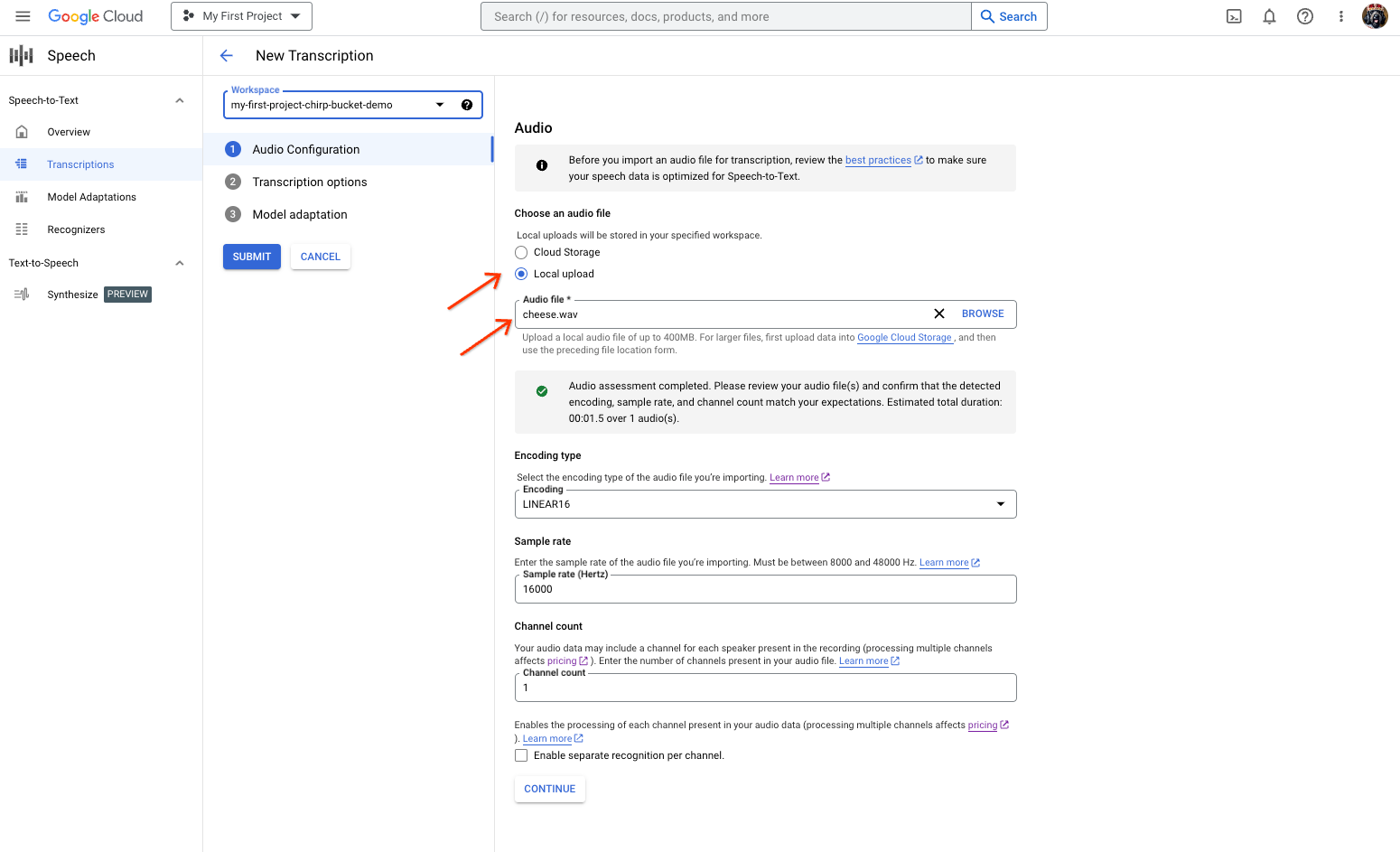
דף יצירת התמליל של המרת דיבור לטקסט, שבו מוצגת אפשרות לבחור או להעלות קובץ. בדף New Transcription (תמלול חדש), בוחרים את קובץ האודיו באמצעות העלאה (Local upload (העלאה מקומית)) או ציון קובץ קיים ב-Cloud Storage (Cloud storage (אחסון בענן)).
לוחצים על המשך כדי לעבור אל אפשרויות התמלול.
בוחרים את השפה המדוברת שבה מתכננים להשתמש לזיהוי באמצעות Chirp מתוך רכיב הזיהוי שיצרתם קודם.
בתפריט הנפתח לבחירת המודל, בוחרים באפשרות chirp_3.
בתפריט הנפתח Recognizer, בוחרים את הכלי החדש לזיהוי דיבור שיצרתם.
לוחצים על Submit כדי להריץ את בקשת הזיהוי הראשונה באמצעות
chirp_3.
צפייה בתוצאת התמלול של Chirp 3.
בדף תמלילים, לוחצים על שם התמליל כדי לראות את התוצאה שלו.
בדף פרטי התמליל, אפשר לראות את תוצאת התמליל, ואם רוצים, להפעיל את האודיו בדפדפן.