


許多應用程式需要處理工作階段以進行驗證和使用者偏好設定。Sinatra 隨附以記憶體為基礎的實作,以執行此函式。但是,此實作並不適合可從多個執行個體提供的應用程式,因為記錄在一個執行個體中的工作階段可能與其他執行個體不同。本教學課程說明如何在 App Engine 上處理工作階段。
目標
- 編寫應用程式。
- 在本機執行應用程式。
- 在 App Engine 上部署應用程式。
費用
在本文件中,您會使用下列 Google Cloud的計費元件:
如要根據預測用量估算費用,請使用 Pricing Calculator。
完成本文所述工作後,您可以刪除建立的資源,避免繼續計費,詳情請參閱「清除所用資源」。
事前準備
- 登入 Google Cloud 帳戶。如果您是 Google Cloud新手,歡迎 建立帳戶,親自評估產品在實際工作環境中的成效。新客戶還能獲得價值 $300 美元的免費抵免額,可用於執行、測試及部署工作負載。
-
In the Google Cloud console, on the project selector page, select or create a Google Cloud project.
Roles required to select or create a project
- Select a project: Selecting a project doesn't require a specific IAM role—you can select any project that you've been granted a role on.
-
Create a project: To create a project, you need the Project Creator role
(
roles/resourcemanager.projectCreator), which contains theresourcemanager.projects.createpermission. Learn how to grant roles.
-
Verify that billing is enabled for your Google Cloud project.
Enable the Firestore API, if it is not already enabled.
Roles required to enable APIs
To enable APIs, you need the
serviceusage.services.enablepermission. If you created the project, then you likely already have this permission through the Owner role (roles/owner). Otherwise, you can get this permission through the Service Usage Admin role (roles/serviceusage.serviceUsageAdmin). Learn how to grant roles.-
In the Google Cloud console, on the project selector page, select or create a Google Cloud project.
Roles required to select or create a project
- Select a project: Selecting a project doesn't require a specific IAM role—you can select any project that you've been granted a role on.
-
Create a project: To create a project, you need the Project Creator role
(
roles/resourcemanager.projectCreator), which contains theresourcemanager.projects.createpermission. Learn how to grant roles.
-
Verify that billing is enabled for your Google Cloud project.
Enable the Firestore API, if it is not already enabled.
Roles required to enable APIs
To enable APIs, you need the
serviceusage.services.enablepermission. If you created the project, then you likely already have this permission through the Owner role (roles/owner). Otherwise, you can get this permission through the Service Usage Admin role (roles/serviceusage.serviceUsageAdmin). Learn how to grant roles.- 準備開發環境。
設定專案
在終端機視窗中,從您選擇的目錄開始,建立一個新目錄,名稱為
sessions。本教學課程的所有程式碼都在sessions目錄中。變更至
sessions目錄:cd sessions初始化
Gemfile:bundle init在產生的 Gemfile 中附加下列內容:
Gemfile 會列出應用程式需要 App Engine 為其載入的所有非標準 Ruby 程式庫:
google-cloud-firestore是 Firestore API 的 Ruby 用戶端。Sinatra 是應用程式使用的 Ruby 網路架構。
安裝依附元件:
bundle install
編寫網頁應用程式
這個應用程式為每個使用者顯示不同語言的問候語。系統一律會用與上次相同的語言問候回訪者。
使用文字編輯器,在
sessions目錄中建立名為app.rb的檔案,並加入以下內容:
建立工作階段儲存區
您必須先將目前使用者的相關資訊儲存在工作階段中,應用程式才能儲存使用者的偏好設定。下圖說明 Firestore 如何處理 App Engine 應用程式的工作階段。
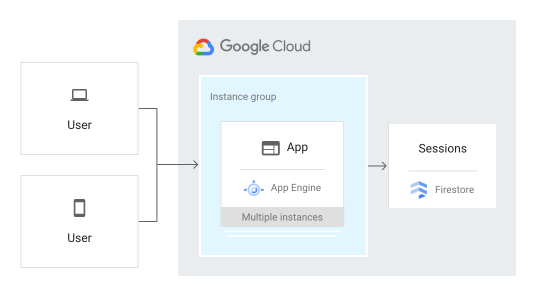
Sinatra 內建支援將工作階段資料儲存至 Cookie。如要改為儲存至 Firestore,您必須自行定義 Rack::Session 物件。
在
sessions目錄中,建立名為firestore_session.rb的檔案,並加入以下內容:
刪除工作階段
如您所撰寫,這個應用程式不會刪除舊的或過期的工作階段。您可以透過 Google Cloud 控制台刪除工作階段資料,也可以實作自動刪除策略。
在本機環境中執行
啟動 HTTP 伺服器:
bundle exec ruby app.rb在網路瀏覽器中檢視應用程式。
您會看到以下五個問候語其中之一:「Hello World」、「Hallo Welt」、「Hola mundo」、「Salut le Monde」或「Ciao Mondo」。如果您在其他瀏覽器或無痕模式下開啟頁面,語言就會變更。您可以在Google Cloud 控制台中查看和編輯工作階段資料。
如要停止 HTTP 伺服器,請在您的終端機視窗中,按下
Control+C。
在 App Engine 上部署及執行
您可以使用 App Engine 標準環境以建構及部署應用程式,即使是處在高負載和大量資料的情況下,應用程式仍會穩定可靠地執行。
本教學課程使用 App Engine 標準環境來部署伺服器。
在終端機視窗中,建立
app.yaml檔案,並將下列內容貼到檔案中:在 App Engine 上部署應用程式:
gcloud app deploy透過以下網址查看執行中的應用程式,其中
PROJECT_ID是您的 Google Cloud 專案 ID:https://PROJECT_ID.appspot.com
問候語目前是由 App Engine 執行個體上執行的網路伺服器提供。
應用程式偵錯
如果您無法連接到 App Engine 應用程式,請檢查以下內容:
- 檢查
gcloud部署指令是否順利完成,且未輸出任何錯誤。如果發生錯誤 (例如message=Build failed),請修正錯誤,並再次嘗試部署 App Engine 應用程式。 前往 Google Cloud 控制台的「Logs Explorer」頁面。
在「Recently selected resources」(最近選取的資源) 下拉式清單中,點選「App Engine Application」(App Engine 應用程式),然後按一下「All module_id」(所有 module_id)。系統隨即會顯示您造訪應用程式時的要求清單。如果您沒看見要求清單,請確認您已從下拉式清單中選取「All module_id」(所有 module_id)。如果在 Google Cloud 控制台中看到錯誤訊息,請檢查應用程式的程式碼是否與「編寫網頁應用程式」一節中的程式碼相符。
確認已啟用 Firestore API。
清除所用資源
刪除專案
- 前往 Google Cloud 控制台的「Manage resources」(管理資源) 頁面。
- 在專案清單中選取要刪除的專案,然後點選「Delete」(刪除)。
- 在對話方塊中輸入專案 ID,然後按一下 [Shut down] (關閉) 以刪除專案。
刪除 App Engine 執行個體
- 前往 Google Cloud 控制台的 App Engine「Versions」(版本) 頁面。
- 勾選您要刪除的非預設應用程式版本的核取方塊。
- 如要刪除應用程式版本,請按一下 「刪除」。
後續步驟
- 試試其他 Cloud Run functions 教學課程。
- 進一步瞭解 App Engine。
- 嘗試 Cloud Run ,可讓您在全代管的環境中或在您自己的 Google Kubernetes Engine 叢集中,執行無狀態容器。