

將建議匯出至 BigQuery
總覽
透過 BigQuery 匯出功能,您可以查看機構每日的建議快照。這項作業是透過 BigQuery 資料移轉服務完成。如要瞭解目前 BigQuery 匯出功能支援哪些推薦項目,請參閱「推薦項目」。
BigQuery Export 支援下列項目:
匯出機構中所有專案、資料夾和帳單帳戶的建議和洞察資料 (包括機構層級的建議和洞察資料)
匯出議定價格,而非標準價格,以取得節省費用的建議。
事前準備
建立建議資料移轉作業前,請完成下列步驟:
- 允許 BigQuery 資料移轉服務管理資料移轉作業。如果您使用 BigQuery 網頁版 UI 建立移轉作業,請在瀏覽器中允許來自
console.cloud.google.com的彈出式視窗,以便查看權限。詳情請參閱 啟用 BigQuery 資料移轉服務。 - 建立
BigQuery 資料集來儲存資料。
- 資料移轉作業會使用建立資料集的相同區域。 資料集和移轉作業建立後,位置就無法變更。
- 資料集會包含全球所有區域的洞察資料和建議。因此,這項作業會在過程中將所有資料匯總到全球區域。如有任何資料落地問題,請參閱 Google Cloud Customer Care。
- 如果資料集位置是新推出的,初始匯出資料可能會有延遲。
定價
所有推薦功能客戶都可以將建議匯出至 BigQuery,但須視推薦功能定價層級而定。
所需權限
設定資料移轉作業時,您需要在建立資料移轉作業的專案層級具備下列權限:
bigquery.transfers.update- 允許您建立移轉作業bigquery.datasets.update- 允許您更新目標資料集的動作resourcemanager.projects.update- 讓你選取要儲存匯出資料的專案pubsub.topics.list:可選取 Pub/Sub 主題,以便接收匯出作業的通知
您必須具備下列組織層級權限。這個機構就是您要設定匯出的機構。
recommender.resources.export- 允許您將建議匯出至 BigQuery
如要匯出成本節省建議的協商價格,必須具備下列權限:
billing.resourceCosts.get at project level- 允許匯出專案層級建議的議定價格billing.accounts.getSpendingInformation at billing account level- 允許匯出帳單帳戶層級建議的議定價格
如果沒有這些權限,系統會以標準價格而非議定價格匯出節省費用建議。
授予權限
您必須在建立資料移轉作業的專案中,取得下列角色:
- BigQuery 管理員角色 -
roles/bigquery.admin - 專案擁有者角色 -
roles/owner - 專案擁有者角色 -
roles/owner - 專案檢視者角色 -
roles/viewer - 專案編輯者角色 -
roles/editor - 「帳單帳戶管理員」角色 -
roles/billing.admin - 「帳單帳戶費用管理員」角色 -
roles/billing.costsManager - 「帳單帳戶檢視者」角色 -
roles/billing.viewer
如要允許您在目標資料集上建立移轉作業及更新動作,您必須授予下列角色:
有多個角色包含權限,可選取專案來儲存匯出資料,以及選取 Pub/Sub 主題來接收通知。如要同時擁有這兩項權限,請授予下列角色:
有多個角色包含 billing.resourceCosts.get 權限,可匯出成本節省專案層級建議的議定價格,您可以授予其中任一角色:
有多個角色包含 billing.accounts.getSpendingInformation 權限,可匯出費用節省帳單帳戶層級建議的議定價格,您可以授予其中任一角色:
您必須在機構層級授予下列角色:
- 建議匯出者 (
roles/recommender.exporter) 角色。 Google Cloud
建立建議的資料移轉作業
前往 Active Assist 的 BigQuery 匯出表單。
選取「目的地專案」,儲存建議資料。
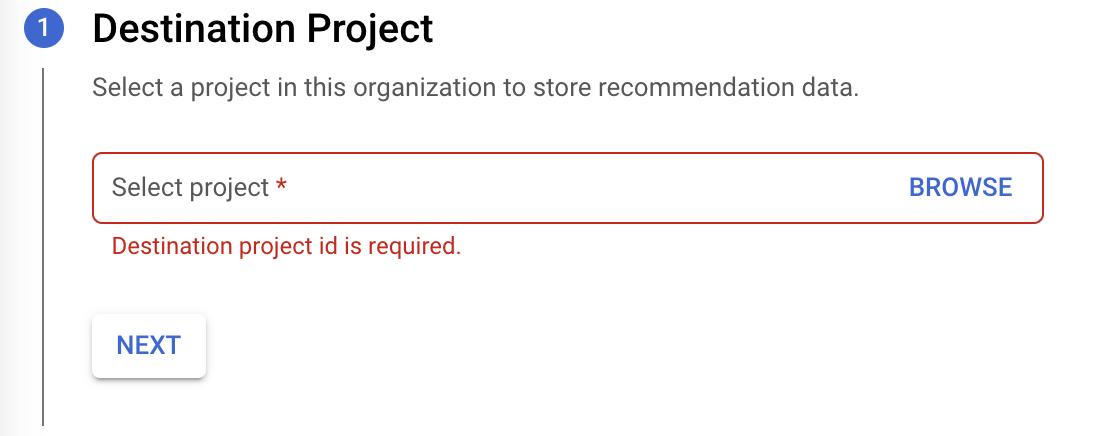
點選「下一步」。
按一下「啟用 API」,啟用匯出作業所需的 BigQuery API。 這項作業需要幾秒鐘才能完成。完成後,按一下「繼續」。
在「設定轉移」表單中,提供下列詳細資料:
在「Transfer config name」(轉移設定名稱) 部分,針對「Display name」(顯示名稱) 輸入移轉作業的名稱。移轉作業名稱可以是任何容易辨識的值,方便您日後在必要時進行修改。

在「Schedule options」(排程選項) 區段中,針對「Schedule」(排程) 保留預設值 ([Start now] (立即開始)),或按一下「Start at a set time」(於設定的時間開始)。
針對「Repeats」(重複時間間隔),選擇您要多久執行移轉作業一次的選項。
- Daily (每天) (預設)
- Weekly (每週)
- Monthly (每月)
- Custom (自訂)
- 隨選
在「Start date and run time」(開始日期和執行時間) 部分,輸入開始移轉的日期與時間。如果您選擇 [Start now] (立即開始),系統就會停用這個選項。
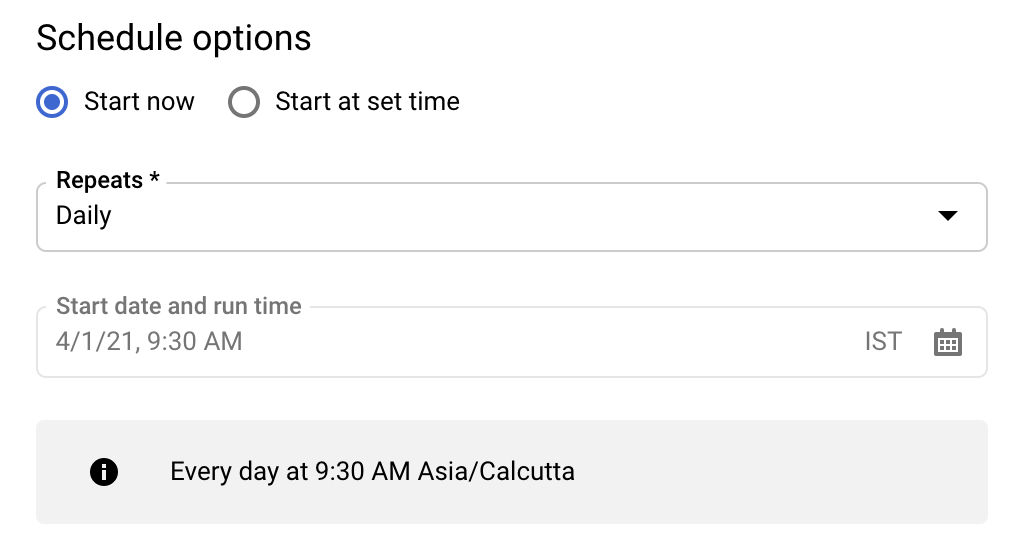
在「Destination settings」(目的地設定) 部分,「Destination dataset」(目的地資料集) 請選取您為了儲存資料而建立的資料集 ID。

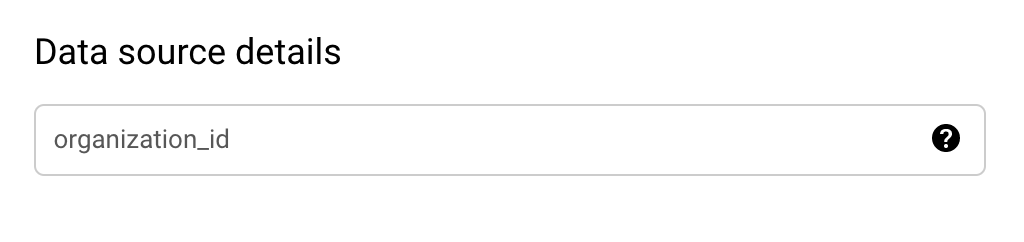
在「Data source details」(資料來源詳細資料) 區段:
organization_id 的預設值是您目前查看建議的機構。如要將建議匯出至其他機構,請在機構檢視器中變更控制台頂端的設定。
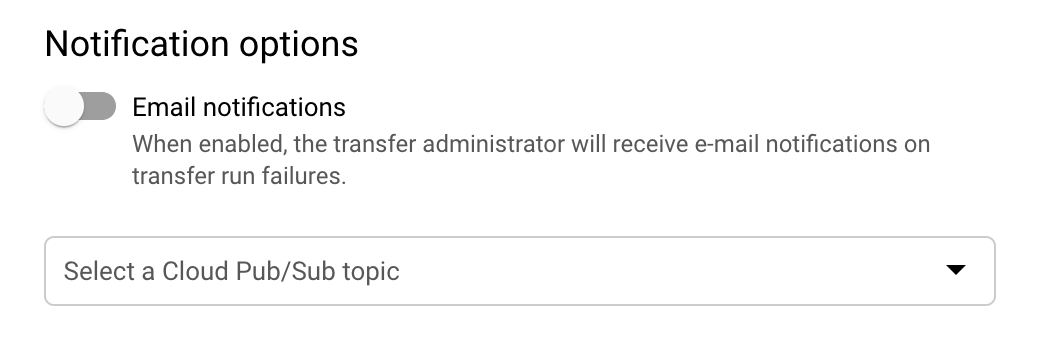
(選用) 在「Notification options」(通知選項) 區段中:
- 按一下啟用電子郵件通知的切換開關。啟用這個選項之後,若移轉失敗,移轉作業管理員就會收到電子郵件通知。
- 在「Select a Pub/Sub topic」(選取 Pub/Sub 主題) 選取主題名稱,或是點選「Create a topic」(建立主題)。這個選項會針對移轉作業設定 Pub/Sub 執行通知。
按一下「建立」,建立轉移作業。
在同意聲明彈出式視窗中,按一下「允許」。

建立轉移作業後,系統會將您重新導向回 Active Assist。 按一下連結即可存取移轉設定詳細資料。或者,您也可以按照下列步驟存取轉移作業:
前往 Google Cloud 控制台的「BigQuery」頁面。
按一下「資料移轉」。您可以查看所有可用的資料移轉。
查看移轉作業的執行記錄
如要查看移轉作業的執行記錄,請按照下列步驟操作:
前往 Google Cloud 控制台的「BigQuery」頁面。
按一下「資料移轉」。您可以查看所有可用的資料移轉。
在清單中按一下適當的移轉項目。
在「執行記錄」分頁下方顯示的執行移轉作業清單中,選取要查看詳細資料的移轉作業。
系統會顯示所選個別執行作業的「執行作業詳細資料」面板。 系統可能會顯示下列執行詳細資料:
- 由於來源資料無法使用,因此延後移轉。
- 工作:指出匯出至表格的列數
- 缺少資料來源的權限,您必須授予權限,然後排定回填時間。
資料何時會匯出?
建立資料移轉作業後,系統會在兩天內首次匯出資料。 第一次匯出後,匯出工作會按照您在設定時要求的頻率執行。申請條件如下:
特定日期 (D) 的匯出作業會將當天結束 (D) 的資料匯出至 BigQuery 資料集,通常會在隔天結束 (D+1) 前完成。匯出作業會在太平洋標準時間時區執行,因此其他時區可能會出現額外延遲。
系統會等到所有要匯出的資料都備妥後,才會執行每日匯出工作。這可能會導致資料集更新的日期和時間有所差異,有時甚至會延遲。因此,最好使用最新的可用資料快照,而不是對特定日期資料表有嚴格的時間敏感型依附元件。
匯出作業會轉移各區域的最新可用資料,因此不同區域的建議可能會有不同的最新日期。
匯出作業的常見狀態訊息
瞭解將建議匯出至 BigQuery 時,常見的狀態訊息。
使用者沒有必要權限
如果使用者沒有必要權限,就會看到以下訊息:recommender.resources.export。你會看到以下訊息:
User does not have required permission "recommender.resources.export". Please, obtain the required permissions for the datasource and try again by triggering a backfill for this date
如要解決這個問題,請為設定匯出的機構,在機構層級將 IAM 角色 roles/recommender.exporter 授予 user/service account。可透過下列 gcloud 指令授予:
使用者:
gcloud organizations add-iam-policy-binding *<organization_id>* --member='user:*<user_name>*' --role='roles/recommender.exporter'如果是服務帳戶:
gcloud organizations add-iam-policy-binding *<organization_id>* --member='serviceAccount:*<service_acct_name>*' --role='roles/recommender.exporter'
由於來源資料無法使用,因此延後轉移
如果來源資料尚未提供,系統會重新安排移轉作業,並顯示以下訊息。這並非錯誤。這表示當天的匯出管道尚未完成。轉移作業會在新的排定時間重新執行,並在匯出管道完成後成功執行。你會看到以下訊息:
Transfer deferred due to source data not being available
找不到來源資料
如果 F1toPlacer 管道已完成,但系統未找到為匯出設定的機構提供建議或洞察資料,就會顯示以下訊息。你會看到以下訊息:
Source data not found for 'recommendations_export$<date>'insights_export$<date>
發生這則訊息的原因如下:
- 使用者在 2 天前設定匯出作業。客戶指南會告知顧客,匯出作業完成後,需要一天時間才能使用匯出資料。
- 當天沒有可用的建議或深入分析資料。這可能是實際情況,也可能是因為管道在當天所有建議或洞察資料都可用之前就已執行。
查看移轉的資料表
將建議匯出至 BigQuery 時,資料集會包含兩個按日期分區的資料表:
- recommendations_export
- insight_export
如要進一步瞭解資料表和結構定義,請參閱「建立及使用資料表」和「指定結構定義」。
如要查看資料移轉的資料表,請按照下列步驟操作:
前往 Google Cloud 控制台的「BigQuery」頁面。 前往 BigQuery 頁面
按一下「資料移轉」。您可以查看所有可用的資料移轉。
在清單中按一下適當的移轉項目。
按一下「設定」分頁標籤,然後點選資料集。
在「Explorer」面板中展開專案並選取資料集。 說明和詳細資料會顯示在詳細資料面板中。在「Explorer」面板中,資料集名稱下方會列出其資料表。
排程補充作業
如要匯出過去某個日期的建議 (這個日期晚於機構啟用匯出功能的日期),請排定回填作業。如要排定補充作業時間,請按照下列步驟操作:
前往 Google Cloud 控制台的「BigQuery」頁面。
按一下「資料移轉」。
在「Transfers」(傳輸作業) 頁面中,於清單中按一下適當的移轉項目。
按一下「排定遞補時間」。
在「Schedule backfill」(安排補充作業) 對話方塊中,選擇「Start date」(開始日期) 和「End date」(結束日期)。
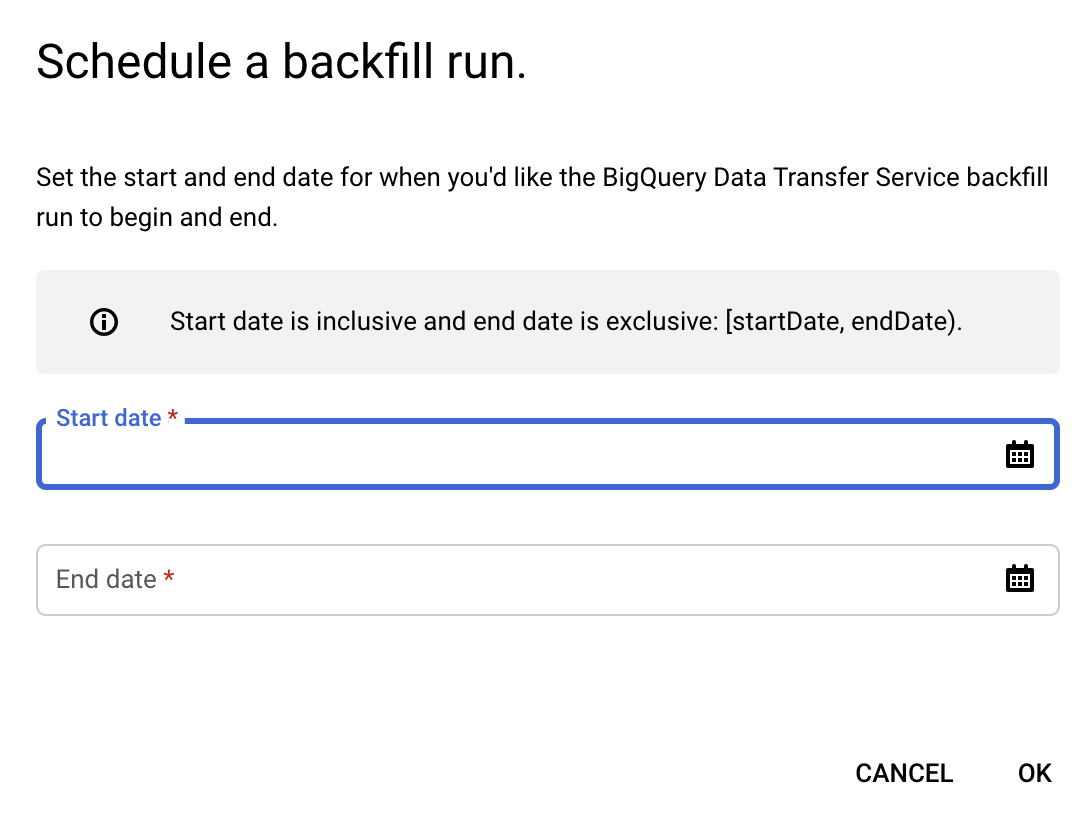
如要進一步瞭解如何使用移轉作業,請參閱「使用移轉作業」一文。
匯出架構
最佳化建議匯出表格:
schema:
   fields:
     - name: cloud_entity_type
       type: STRING
       description: |
         Represents what cloud entity type the recommendation was generated for - eg: project number, billing account
     - name: cloud_entity_id
       type: STRING
       description: |
         Value of the project number or billing account id
     - name: name
       type: STRING
       description: |
         Name of recommendation. A project recommendation is represented as
         projects/[PROJECT_NUMBER]/locations/[LOCATION]/recommenders/[RECOMMENDER_ID]/recommendations/[RECOMMENDATION_ID]
     - name: location
       type: STRING
       description: |
         Location for which this recommendation is generated
     - name: recommender
       type: STRING
       description: |
         Recommender ID of the recommender that has produced this recommendation
     - name: recommender_subtype
       type: STRING
       description: |
           Contains an identifier for a subtype of recommendations produced for the
           same recommender. Subtype is a function of content and impact, meaning a
           new subtype will be added when either content or primary impact category
           changes.
           Examples:
           For recommender = "google.iam.policy.Recommender",
           recommender_subtype can be one of "REMOVE_ROLE"/"REPLACE_ROLE"
     - name: target_resources
       type: STRING
       mode: REPEATED
       description: |
         Contains the fully qualified resource names for resources changed by the
         operations in this recommendation. This field is always populated. ex:
         [//cloudresourcemanager.googleapis.com/projects/foo].
     - name: description
       type: STRING
       description: |
         Required. Free-form human readable summary in English.
         The maximum length is 500 characters.
     - name: last_refresh_time
       type: TIMESTAMP
       description: |
         Output only. Last time this recommendation was refreshed by the system that created it in the first place.
     - name: primary_impact
       type: RECORD
       description: |
         Required. The primary impact that this recommendation can have while trying to optimize
         for one category.
       schema:
         fields:
         - name: category
           type: STRING
           description: |
             Category that is being targeted.
             Values can be the following:
               CATEGORY_UNSPECIFIED:
                 Default unspecified category. Do not use directly.
               COST:
                 Indicates a potential increase or decrease in cost.
               SECURITY:
                 Indicates a potential increase or decrease in security.
               PERFORMANCE:
                 Indicates a potential increase or decrease in performance.
               RELIABILITY:
                 Indicates a potential increase or decrease in reliability.
         - name: cost_projection
           type: RECORD
           description: Optional. Use with CategoryType.COST
           schema:
             fields:
             - name: cost
               type: RECORD
               description: |
                 An approximate projection on amount saved or amount incurred.
                 Negative cost units indicate cost savings and positive cost units indicate
                 increase. See google.type.Money documentation for positive/negative units.
               schema:
                 fields:
                 - name: currency_code
                   type: STRING
                   description: The 3-letter currency code defined in ISO 4217.
                 - name: units
                   type: INTEGER
                   description: |
                     The whole units of the amount. For example if `currencyCode` is `"USD"`,
                     then 1 unit is one US dollar.
                 - name: nanos
                   type: INTEGER
                   description: |
                     Number of nano (10^-9) units of the amount.
                     The value must be between -999,999,999 and +999,999,999 inclusive.
                     If `units` is positive, `nanos` must be positive or zero.
                     If `units` is zero, `nanos` can be positive, zero, or negative.
                     If `units` is negative, `nanos` must be negative or zero.
                     For example $-1.75 is represented as `units`=-1 and `nanos`=-750,000,000.
             - name: cost_in_local_currency
               type: RECORD
               description: |
                 An approximate projection on amount saved or amount incurred in the local currency.
                 Negative cost units indicate cost savings and positive cost units indicate
                 increase. See google.type.Money documentation for positive/negative units.
               schema:
                 fields:
                 - name: currency_code
                   type: STRING
                   description: The 3-letter currency code defined in ISO 4217.
                 - name: units
                   type: INTEGER
                   description: |
                     The whole units of the amount. For example if `currencyCode` is `"USD"`,
                     then 1 unit is one US dollar.
                 - name: nanos
                   type: INTEGER
                   description: |
                     Number of nano (10^-9) units of the amount.
                     The value must be between -999,999,999 and +999,999,999 inclusive.
                     If `units` is positive, `nanos` must be positive or zero.
                     If `units` is zero, `nanos` can be positive, zero, or negative.
                     If `units` is negative, `nanos` must be negative or zero.
                     For example $-1.75 is represented as `units`=-1 and `nanos`=-750,000,000.
             - name: duration
               type: RECORD
               description: Duration for which this cost applies.
               schema:
                 fields:
                 - name: seconds
                   type: INTEGER
                   description: |
                     Signed seconds of the span of time. Must be from -315,576,000,000
                     to +315,576,000,000 inclusive. Note: these bounds are computed from:
                     60 sec/min * 60 min/hr * 24 hr/day * 365.25 days/year * 10000 years
                 - name: nanos
                   type: INTEGER
                   description: |
                     Signed fractions of a second at nanosecond resolution of the span
                     of time. Durations less than one second are represented with a 0
                     `seconds` field and a positive or negative `nanos` field. For durations
                     of one second or more, a non-zero value for the `nanos` field must be
                     of the same sign as the `seconds` field. Must be from -999,999,999
                     to +999,999,999 inclusive.
             - name: pricing_type_name
               type: STRING
               description: |
                     A pricing type can either be based on the price listed on GCP (LIST) or a custom
                     price based on past usage (CUSTOM).
         - name: reliability_projection
           type: RECORD
           description: Optional. Use with CategoryType.RELIABILITY
           schema:
             fields:
             - name: risk_types
               type: STRING
               mode: REPEATED
               description: |
                 The risk associated with the reliability issue.
                   RISK_TYPE_UNSPECIFIED:
                     Default unspecified risk. Do not use directly.
                   SERVICE_DISRUPTION:
                     Potential service downtime.
                   DATA_LOSS:
                     Potential data loss.
                   ACCESS_DENY:
                     Potential access denial. The service is still up but some or all clients
                     can not access it.
             - name: details_json
               type: STRING
               description: |
                 Additional reliability impact details that is provided by the recommender in JSON
                 format.
     - name: state
       type: STRING
       description: |
             Output only. The state of the recommendation:
               STATE_UNSPECIFIED:
                 Default state. Do not use directly.
               ACTIVE:
                 Recommendation is active and can be applied. Recommendations content can
                 be updated by Google.
                 ACTIVE recommendations can be marked as CLAIMED, SUCCEEDED, or FAILED.
               CLAIMED:
                 Recommendation is in claimed state. Recommendations content is
                 immutable and cannot be updated by Google.
                 CLAIMED recommendations can be marked as CLAIMED, SUCCEEDED, or FAILED.
               SUCCEEDED:
                 Recommendation is in succeeded state. Recommendations content is
                 immutable and cannot be updated by Google.
                 SUCCEEDED recommendations can be marked as SUCCEEDED, or FAILED.
               FAILED:
                 Recommendation is in failed state. Recommendations content is immutable
                 and cannot be updated by Google.
                 FAILED recommendations can be marked as SUCCEEDED, or FAILED.
               DISMISSED:
                 Recommendation is in dismissed state.
                 DISMISSED recommendations can be marked as ACTIVE.
     - name: ancestors
       type: RECORD
       description: |
         Ancestry for the recommendation entity
       schema:
         fields:
         - name: organization_id
           type: STRING
           description: |
             Organization to which the recommendation project
         - name: folder_ids
           type: STRING
           mode: REPEATED
           description: |
             Up to 5 levels of parent folders for the recommendation project
     - name: associated_insights
       type: STRING
       mode: REPEATED
       description: |
         Insights associated with this recommendation. A project insight is represented as
         projects/[PROJECT_NUMBER]/locations/[LOCATION]/insightTypes/[INSIGHT_TYPE_ID]/insights/[insight_id]
     - name: recommendation_details
       type: STRING
       description: |
         Additional details about the recommendation in JSON format.
       schema:
            - name: overview
              type: RECORD
              description: Overview of the recommendation in JSON format
            - name: operation_groups
              type: OperationGroup
              mode: REPEATED
              description: Operations to one or more Google Cloud resources grouped in such a way
              that, all operations within one group are expected to be performed
              atomically and in an order. More here: https://cloud.google.com/recommender/docs/key-concepts#operation_groups
                  - name: operations
                    type: Operation
                    description: An Operation is the individual action that must be performed as one of the atomic steps in a suggested recommendation. More here: https://cloud.google.com/recommender/docs/key-concepts?#operation
            - name: state_metadata
              type: map with key: STRING, value: STRING
              description: A map of STRING key, STRING value of metadata for the state, provided by user or automations systems.
            - name: additional_impact
              type: Impact
              mode: REPEATED
              description: Optional set of additional impact that this recommendation may have when
              trying to optimize for the primary category. These may be positive
              or negative. More here: https://cloud.google.com/recommender/docs/key-concepts?#recommender_impact
     - name: priority
       type: STRING
       description: |
         Priority of the recommendation:
           PRIORITY_UNSPECIFIED:
             Default unspecified priority. Do not use directly.
           P4:
             Lowest priority.
           P3:
             Second lowest priority.
           P2:
             Second highest priority.
           P1:
             Highest priority.
洞察資料匯出表格:
schema:
  - fields:
      - name: cloud_entity_type
        type: STRING
        description: |
          Represents what cloud entity type the recommendation was generated for - eg: project number, billing account
      - name: cloud_entity_id
        type: STRING
        description: |
          Value of the project number or billing account id
      - name: name
        type: STRING
        description: |
          Name of recommendation. A project recommendation is represented as
          projects/[PROJECT_NUMBER]/locations/[LOCATION]/recommenders/[RECOMMENDER_ID]/recommendations/[RECOMMENDATION_ID]
      - name: location
        type: STRING
        description: |
          Location for which this recommendation is generated
      - name: insight_type
        type: STRING
        description: |
          Recommender ID of the recommender that has produced this recommendation
      - name: insight_subtype
        type: STRING
        description: |
            Contains an identifier for a subtype of recommendations produced for the
            same recommender. Subtype is a function of content and impact, meaning a
            new subtype will be added when either content or primary impact category
            changes.
            Examples:
            For recommender = "google.iam.policy.Recommender",
            recommender_subtype can be one of "REMOVE_ROLE"/"REPLACE_ROLE"
      - name: target_resources
        type: STRING
        mode: REPEATED
        description: |
          Contains the fully qualified resource names for resources changed by the
          operations in this recommendation. This field is always populated. ex:
          [//cloudresourcemanager.googleapis.com/projects/foo].
      - name: description
        type: STRING
        description: |
          Required. Free-form human readable summary in English.
          The maximum length is 500 characters.
      - name: last_refresh_time
        type: TIMESTAMP
        description: |
          Output only. Last time this recommendation was refreshed by the system that created it in the first place.
      - name: category
        type: STRING
        description: |
          Category being targeted by the insight. Can be one of:
          Unspecified category.
          CATEGORY_UNSPECIFIED = Unspecified category.
          COST = The insight is related to cost.
          SECURITY = The insight is related to security.
          PERFORMANCE = The insight is related to performance.
          MANAGEABILITY = The insight is related to manageability.
          RELIABILITY = The insight is related to reliability.;
      - name: state
        type: STRING
        description: |
              Output only. The state of the recommendation:
                STATE_UNSPECIFIED:
                  Default state. Do not use directly.
                ACTIVE:
                  Recommendation is active and can be applied. Recommendations content can
                  be updated by Google.
                  ACTIVE recommendations can be marked as CLAIMED, SUCCEEDED, or FAILED.
                CLAIMED:
                  Recommendation is in claimed state. Recommendations content is
                  immutable and cannot be updated by Google.
                  CLAIMED recommendations can be marked as CLAIMED, SUCCEEDED, or FAILED.
                SUCCEEDED:
                  Recommendation is in succeeded state. Recommendations content is
                  immutable and cannot be updated by Google.
                  SUCCEEDED recommendations can be marked as SUCCEEDED, or FAILED.
                FAILED:
                  Recommendation is in failed state. Recommendations content is immutable
                  and cannot be updated by Google.
                  FAILED recommendations can be marked as SUCCEEDED, or FAILED.
                DISMISSED:
                  Recommendation is in dismissed state.
                  DISMISSED recommendations can be marked as ACTIVE.
      - name: ancestors
        type: RECORD
        description: |
          Ancestry for the recommendation entity
        schema:
          fields:
          - name: organization_id
            type: STRING
            description: |
              Organization to which the recommendation project
          - name: folder_ids
            type: STRING
            mode: REPEATED
            description: |
              Up to 5 levels of parent folders for the recommendation project
      - name: associated_recommendations
        type: STRING
        mode: REPEATED
        description: |
          Insights associated with this recommendation. A project insight is represented as
          projects/[PROJECT_NUMBER]/locations/[LOCATION]/insightTypes/[INSIGHT_TYPE_ID]/insights/[insight_id]
      - name: insight_details
        type: STRING
        description: |
          Additional details about the insight in JSON format
          schema:
            fields:
            - name: content
              type: STRING
              description: |
                A struct of custom fields to explain the insight.
                Example: "grantedPermissionsCount": "1000"
            - name: observation_period
              type: TIMESTAMP
              description: |
                Observation period that led to the insight. The source data used to
                generate the insight ends at last_refresh_time and begins at
                (last_refresh_time - observation_period).
          - name: state_metadata
            type: STRING
            description: |
              A map of metadata for the state, provided by user or automations systems.
      - name: severity
        type: STRING
        description: |
          Severity of the insight:
            SEVERITY_UNSPECIFIED:
              Default unspecified severity. Do not use directly.
            LOW:
              Lowest severity.
            MEDIUM:
              Second lowest severity.
            HIGH:
              Second highest severity.
            CRITICAL:
              Highest severity.
查詢範例
您可以使用下列查詢範例分析匯出的資料。
查看建議的費用節省金額 (建議時間以天為單位)
SELECT name, recommender, target_resources,
  case primary_impact.cost_projection.cost.units is null
       when true then round(primary_impact.cost_projection.cost.nanos * power(10,-9),2)
       else
       round( primary_impact.cost_projection.cost.units +
       (primary_impact.cost_projection.cost.nanos * power(10,-9)), 2)
   end
   as dollar_amt,
   primary_impact.cost_projection.duration.seconds/(60*60*24) as duration_in_days
FROM `<project>.<dataset>.recommendations_export`
WHERE DATE(_PARTITIONTIME) = "<date>"
and primary_impact.category = "COST"
查看未使用的 IAM 角色清單
SELECT *
FROM `<project>.<dataset>.recommendations_export`
WHERE DATE(_PARTITIONTIME) = "<date>"
and recommender = "google.iam.policy.Recommender"
and recommender_subtype = "REMOVE_ROLE"
查看必須替換為較小角色的已授予角色清單
SELECT *
FROM `<project>.<dataset>.recommendations_export`
WHERE DATE(_PARTITIONTIME) = "<date>"
and recommender = "google.iam.policy.Recommender"
and recommender_subtype = "REPLACE_ROLE"
查看最佳化建議的洞察資料
SELECT recommendations.name as recommendation_name,
insights.name as insight_name,
recommendations.cloud_entity_id,
recommendations.cloud_entity_type,
recommendations.recommender,
recommendations.recommender_subtype,
recommendations.description,
recommendations.target_resources,
recommendations.recommendation_details,
recommendations.state,
recommendations.last_refresh_time as recommendation_last_refresh_time,
insights.insight_type,
insights.insight_subtype,
insights.category,
insights.description,
insights.insight_details,
insights.state,
insights.last_refresh_time as insight_last_refresh_time
FROM `<project>.<dataset>.recommendations_export` as recommendations,
   `<project>.<dataset>.insights_export` as insights
WHERE DATE(recommendations._PARTITIONTIME) = "<date>"
and DATE(insights._PARTITIONTIME) = "<date>"
and insights.name in unnest(recommendations.associated_insights)
查看特定資料夾所屬專案的建議
這項查詢會傳回專案最多五層的上層資料夾。
SELECT *
FROM `<project>.<dataset>.recommendations_export`
WHERE DATE(_PARTITIONTIME) = "<date>"
and "<folder_id>" in unnest(ancestors.folder_ids)
查看目前匯出最新可用日期的建議
DECLARE max_date TIMESTAMP;

SET max_date = (
  SELECT MAX(_PARTITIONTIME) FROM
  `<project>.<dataset>.recommendations_export`
  );

SELECT *
FROM `<project>.<dataset>.recommendations_export`
WHERE _PARTITIONTIME = max_date
使用試算表探索 BigQuery 資料
除了在 BigQuery 上執行查詢,您也可以使用「連結試算表」功能 (也就是新的 BigQuery 資料連接器),藉此存取、分析、共用並以圖表呈現試算表中數十億列的 BigQuery 資料。詳情請參閱「開始在 Google 試算表中使用 BigQuery 資料」。
使用 BigQuery 指令列和 REST API 設定匯出作業
-
您可以透過Google Cloud 控制台或指令列取得所需的 Identity and Access Management 權限。
舉例來說,如要使用指令列取得服務帳戶的機構層級 recommender.resources.export 權限,請執行下列指令:
gcloud organizations add-iam-policy-binding *<organization_id>* --member=serviceAccount:*<service_acct_name>*' --role='roles/recommender.exporter' -
Datasource to use: 6063d10f-0000-2c12-a706-f403045e6250 建立匯出作業:
使用 BigQuery 指令列:
bq mk \
--transfer_config \
--project_id=project_id \
--target_dataset=dataset_id \
--display_name=name \
--params='parameters' \
--data_source=data_source \
--service_account_name=service_account_name
其中:
- project_id 是您的專案 ID。
- dataset 是移轉設定的目標資料集 ID。
- name 是移轉設定的顯示名稱。移轉作業名稱可以是任何容易辨識的值,方便您日後在必要時進行修改。
- parameters 含有已建立移轉設定的 JSON 格式參數,如要匯出建議和洞察資料至 BigQuery,您必須提供要匯出建議和洞察資料的 organization_id。參數格式:「{"organization_id":"<org id>"}'」
- data_source 要使用的資料來源:'6063d10f-0000-2c12-a706-f403045e6250'
- service_account_name 是用於驗證匯出的服務帳戶名稱。服務帳戶應由用於建立轉移作業的相同
project_id擁有,且應具備上述所有必要權限。
透過使用者介面或 BigQuery 指令列管理現有匯出作業:
注意:匯出作業會以設定帳戶的使用者身分執行,與日後更新匯出設定的使用者無關。舉例來說,如果匯出作業是透過服務帳戶設定,之後使用者透過 BigQuery 資料移轉服務 UI 更新匯出設定,匯出作業仍會以服務帳戶身分執行。在這種情況下,每次執行匯出作業時,系統都會檢查服務帳戶的「recommender.resources.export」權限。