

This document provides an overview of the process of deploying Oracle AI Database using Google Cloud NetApp Volumes.
You can use NetApp Volumes iSCSI block storage to deploy high availability Oracle AI Database 26ai with Oracle Data Guard on Compute Engine.
Platform roles
NetApp Volumes provides high-performance block storage and accelerates standby database initialization using storage-layer replication, snapshots, and clones.
NetApp Volumes replication significantly reduces standby initialization time compared to the conventional Oracle Recovery Manager (RMAN) active duplication by moving data at the storage layer instead of moving it through the Oracle database channels.
Oracle Data Guard provides continuous synchronization, redo transport, role management, and failover orchestration (Broker, Fast-Start Failover, and Observer).
You can use NetApp Volumes replicate, snapshot, or clone to populate the standby database, and then use Oracle Data Guard for high availability.
Architecture
The architecture described in this guide deploys Oracle AI Database 26ai high availability on Compute Engine using NetApp Volumes iSCSI storage and Oracle Data Guard. It consists of the following three independent data paths:
- Path 1: moves data files at the NetApp Volumes layer for standby initialization.
- Path 2: keeps databases synchronized after cutover.
- Path 3: orchestrates role transitions and automatic failover through Oracle Data Guard Broker and the Observer.
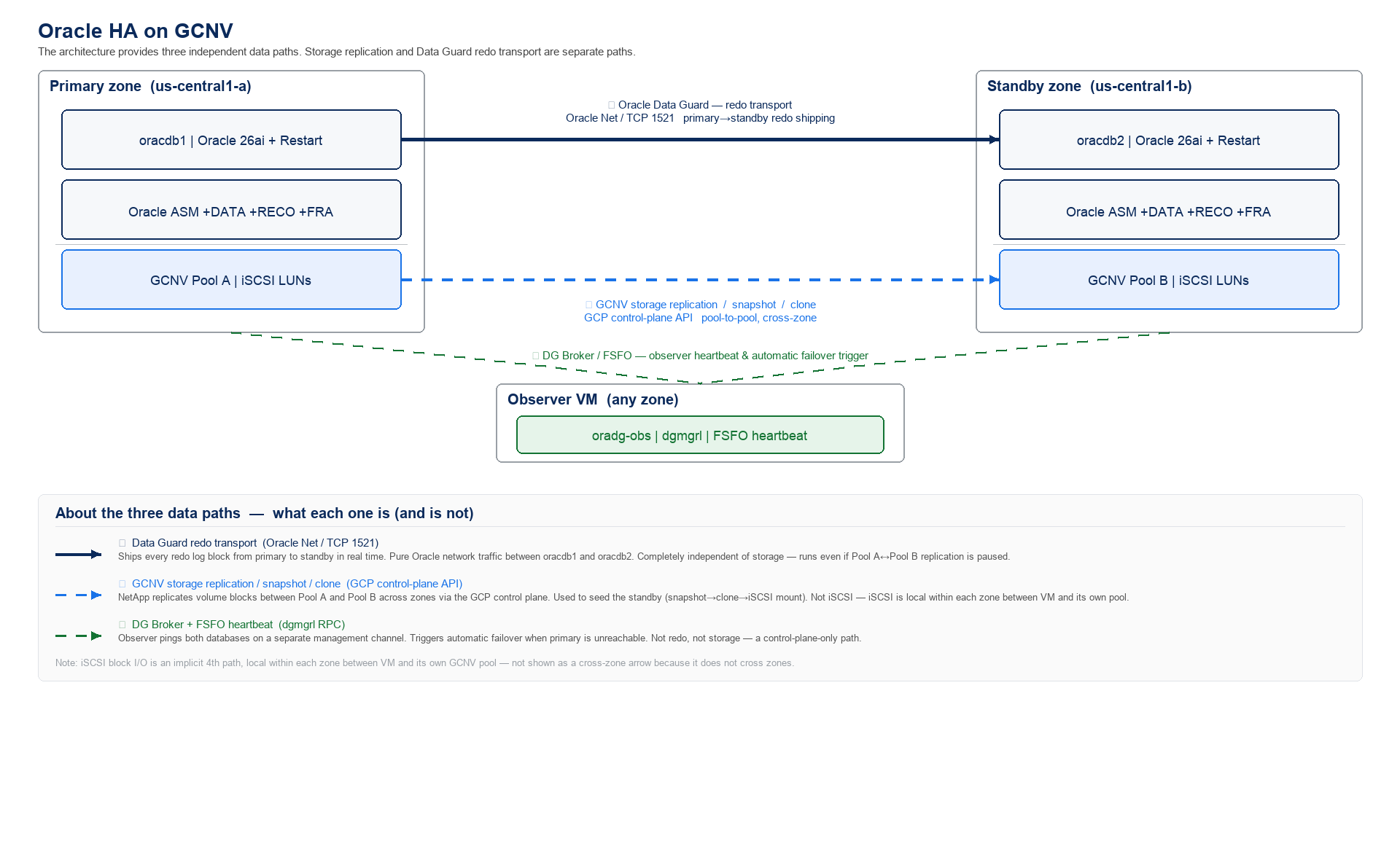
Components
The architecture has the following components:
| Component | Details |
|---|---|
| DB hosts | oracdb1 and oracdb2 in different zones, five
NetApp Volumes iSCSI volumes each. |
| Storage | /u01 +ASM, +DATA, +RECO, +FRA on NetApp Volumes
(EXTERNAL) |
| Standby initialization | NetApp Volumes replicate, snapshot, and clone. Then, finalize the standby for Oracle Data Guard. |
| High availability | Restart, physical standby (MOUNTED), Broker, Fast-Start Failover (FSFO), Observer
(oradg-obs) |
| Apps | Service orclapp |
Zoning
One NetApp Volumes Flex Unified pool per database zone, dedicated volumes per host. Boot disks are OS-only.
Topology
The topology of this architecture places the primary, standby, and observer roles across separate zones and maps each database host to dedicated NetApp Volumes pools and iSCSI volumes.
| Role | VM | Zone | NetApp Volumes pool | Volumes (per host) |
|---|---|---|---|---|
| Primary | oracdb1 |
us-west1-a |
oracle-pool-a |
ora_<host>_u01, ora_<host>_data_01/02,
ora_<host>_arch_01, ora_<host>_fra_01 |
| Standby | oracdb2 |
us-west1-b |
oracle-pool-b |
Same as Primary |
| Observer | oradg-obs |
us-west1-c |
Not applicable | Boot disk only |
Storage
| Storage | Backing | Use |
|---|---|---|
| OS | Compute Engine boot disk | OS only |
/u01 |
NetApp Volumes iSCSI storage | Grid/DB homes, and staging (XFS) |
+DATA, +RECO, +FRA |
NetApp Volumes iSCSI storage | ASM EXTERNAL — datafiles, archives, and FRA |
Machine types
The deployment described in this guide uses sample n4-highmem-8 machine type.
However, OLTP workloads typically use c4-standard-* machine types.
What's next
- Learn how to deploy an Oracle Database using NetApp Volumes.