

To analyze your workloads' network traffic at scale, you can use Packet Mirroring, an out-of-band Network Security Integration service. Packet Mirroring lets you monitor network traffic using third-party virtual appliances.
Packet Mirroring clones the network traffic based on the filtering criteria specified in the mirroring rules of the firewall policy. This mirrored traffic is then sent to your third-party virtual appliance deployments for deep packet inspection.
Packet Mirroring captures all of the packet data, including IP payloads and headers. You can analyze the mirrored network traffic to monitor your network and application performance and detect threats in your network.
Packet Mirroring is a zonal service that supports regional deployments. However, you are charged for cross-zonal traffic if the consumer and producer of your mirroring deployment are in different zones. To enhance the reliability of your mirroring deployment, we recommend creating a separate producer deployment in the same zone as your mirroring source. By doing so, you can minimize cross-zonal traffic charges and improve the overall reliability of your mirroring setup.
Benefits of using out-of-band integration
Out-of-band integration provides the following benefits:
Granular traffic matching capabilities: with granular traffic matching capabilities, you can specify mirroring rules as part of your firewall policy. This lets you use the global network firewall policy when defining mirroring rules. These rules let you mirror specific traffic based on various criteria, including source or destination IP addresses, protocols, and destination port ranges. For more information on mirroring rules, see Mirroring rules.
Negative filters: you can use the
DO_NOT_MIRRORaction in your mirroring rules to define negative filters. This lets you ignore specific traffic within mirroring rules.Geneve encapsulation: mirrored traffic is encapsulated using Geneve. This helps you to preserve the original packets when they are delivered to the third-party appliances for inspection. For more information, see Understand GENEVE format.
Apart from the original packet, geneve-encapsulation also includes information about the mirroring source. It adds a unique Virtual Private Cloud (VPC) network identifier to each packet redirected to the mirroring endpoint group for deep packet inspection. If you have multiple VPC networks with overlapping IP address ranges, this network identifier helps to ensure that each redirected packet is correctly associated with its VPC network.
Mirroring collectors as-a-service: you can centralize the operational management of your third-party appliances while offering them as a service to different application teams in your organization. This centralized appliance deployment can be in a different project or a different organization depending on how your teams are organized.
Out-of-band integration deployment model
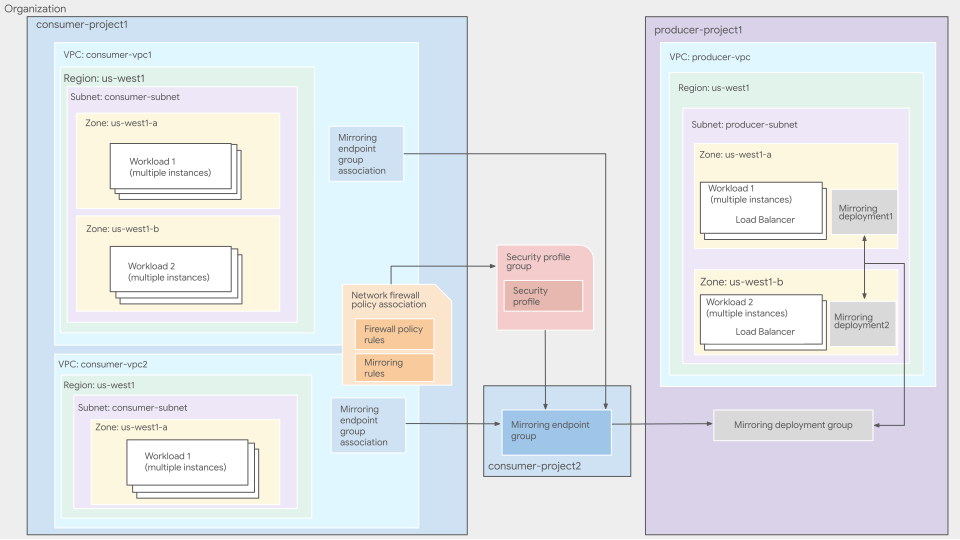
Out-of-band integration is based on the producer-consumer model, where the consumer consumes the services offered by the producer.
Figure 1 shows the high-level deployment architecture of out-of-band integration service.
Producer components
A producer VPC network contains a set of load-balanced collector instances that are capable of receiving Geneve-encapsulated packets from a consumer network. Instances in the instance group are referred to as collector instances.
When you specify the collector instances, you enter the name of a forwarding rule that is associated with the internal passthrough Network Load Balancer. Google Cloud then forwards the mirrored traffic to the collector instances. An internal load balancer for Packet Mirroring is similar to other internal load balancers except that the forwarding rule must be configured for Packet Mirroring. Any non-mirrored traffic that is sent to the load balancer is dropped.
Mirroring deployment groups and mirroring deployments
Mirroring deployment is a zonal resource that points to the forwarding rule of an internal passthrough Network Load Balancer that acts as the frontend for the collector instances. These mirroring deployments are further grouped in mirroring deployment groups across different locations within a project for easier consumption and management.
A mirroring endpoint group in the consumer network sends mirrored traffic to its corresponding mirroring deployment group. The mirroring deployment group then sends the traffic to the mirroring deployment in the same zone as the mirroring source for inspection.
For more information about deployment groups and deployments, see Mirroring deployment groups overview and Mirroring deployments overview.
Consumer components
Mirrored sources are Compute Engine virtual machine (VM) instances that you can select by using target, source, and destination parameters in mirroring rules. You can specify one or more source types; if an instance matches at least one of them, it's mirrored.
Packet Mirroring collects traffic from an instance's network interface in the network where the packet mirroring policy applies. In cases where an instance has multiple network interfaces, the other interfaces aren't mirrored unless another policy has been configured to do so.
The following sections cover the components of a consumer network.
Mirroring endpoint groups
A mirroring endpoint group is a project-level resource on the consumer side that directly corresponds to a producer's mirroring deployment group. You can associate the individual VPC networks to a mirroring endpoint group, to enable traffic mirroring.
We recommend that you create mirroring endpoint group in a project owned by
your security administrator. To create the mirroring endpoint group
associations, the security administrator must provide the
Mirroring Endpoint Admin role
(roles/networksecurity.mirroringAdmin) and
Mirroring Endpoint Network Admin role
(roles/networksecurity.mirroringEndpointNetworkAdmin)
to this project or the network administrator.
For more information about mirroring endpoint groups, see Mirroring endpoint group overview.
Mirroring endpoint group association
Mirroring endpoint group association specifies the consumer VPC network whose traffic needs to be mirrored and transferred to the producer deployment group for inspection.
Mirroring endpoint groups send the mirrored traffic to the corresponding deployment group in the producer network. However, to specify the consumer VPC network whose mirrored traffic needs to be inspected, you create an association between the VPC network and the mirroring endpoint group.
After you create a mirroring endpoint group association, the firewall policy mirroring rules determine which packets to mirror from the associated VPC network. If the mirroring endpoint group association is not created, then the mirroring rules are ignored and the packets aren't sent to the deployment group for inspection.
For more information about endpoint group association, see Create and manage mirroring endpoint group associations.
Firewall policies and rules
In a consumer VPC network, you use network firewall policies to select the traffic that you want to mirror and inspect. The firewall policies contain the following rules:
Firewall policy rules: allows or denies the ingress or egress of data packets to and from the consumer VMs. A firewall policy rule can have one of the following actions:
ALLOW: permits traffic and stops evaluation of other lower priority firewall policy rules.DENY: disallows traffic and stops evaluation of other lower priority firewall policy rules.GOTO_NEXT: continues the rule evaluation process.
For more information about firewall policy rules, see Firewall policy rules overview.
Mirroring rules: determines whether ingress or egress data packets are mirrored. A mirroring rule can have one of the following actions:
MIRROR: permits mirroring of the traffic flow and stops evaluation of other lower priority mirroring rules.DO_NOT_MIRROR: disallows mirroring of the traffic flow and stops evaluation of other lower priority mirroring rules. You use theDO_NOT_MIRRORaction to granularly filter traffic flows that don't need mirroring.GOTO_NEXT: action that you can use to delegate connection evaluation to lower levels. The mirroring rule allows for the processing of subsequent rules if one of the following conditions is met:- If that action is
goto_next, the evaluation proceeds to the next rule. Consequently, multiplegoto_nextrules don't affect each other's behavior. - If incoming traffic doesn't match any existing rules, the system
defaults to a
goto_nextaction. This means the current policy level didn't find a relevant action, so evaluation proceeds to the next lower level.
- If that action is
Policy and rule evaluation order for mirroring rules
You can add mirroring rules to global network firewall policy. Similar to firewall policy rules, mirroring rules are evaluated in descending order of priority, with zero (0) having the highest priority. Each mirroring rule within a firewall policy must have a unique priority. If a traffic flow matches a mirroring rule, out-of-band integration mirrors the packet and skips evaluation of any lower priority mirroring rules.
When mirroring rules are configured in a firewall policy, the order in which the rules are evaluated is based on the direction of the traffic ingressing to or egressing from a VM.
In the ingress case, the traffic is first evaluated based on the firewall policy rule evaluation order.
- If the firewall rules allow the ingress traffic, then the traffic is evaluated against the mirroring rules. Based on the action of the mirroring rules, the traffic is then either mirrored or not mirrored.
- If the firewall rules disallow the ingress traffic, then the traffic is not evaluated against the mirroring rules and traffic packets blocked by firewall rules are dropped and are not mirrored.
In the egress case, the traffic is first evaluated against mirroring rules. Based on the action specified for mirroring rules, traffic is either mirrored or not mirrored, and then the traffic is evaluated against the egress firewall policy rule evaluation order.
Security profiles and security profile groups
Mirroring rules reference the security profiles within security profile groups
to implement deep packet inspection of the mirrored traffic. Traffic that
matches a mirroring rule is mirrored to the mirroring endpoint group that
is referenced by the security profile of the mirroring rule.
You must create a security profile group containing a custom security
profile that points to your mirroring endpoint group for third-party
inspection. When you create your mirroring rule, you associate
the security profile group with the rule by using the --security-profile-group
flag. Both security profiles and security profile groups are
organizational-level resources.
For more information about security profiles and security profile groups, see Security profiles overview and Security profile groups overview.
How out-of-band integration works
Out-of-band integration uses Packet Mirroring technology to copy the traffic data from the consumer VPC network and send it to the producer VPC network through a mirroring endpoint group. Packet Mirroring processes the traffic in the following sequence:
- A network firewall policy is applied to the traffic to and from the VM in the network.
- Traffic that matches the mirroring rule within the policy is mirrored, and the mirrored packets are encapsulated using Geneve, preserving the original packets.
- Based on the security profile in the security profile group that is specified in the network firewall policy, the mirrored traffic is sent to a mirroring endpoint group.
- The mirroring endpoint group securely transports the packets to the corresponding mirroring deployment within the target mirroring deployment group for deep packet inspection.
- The internal passthrough load balancer of the producer's mirroring deployment group distributes the packet flows across the third-party virtual appliances that are configured as the backends to the load balancer.
- The backend third-party virtual appliances process the packets to perform deep packet inspection.
Specifications
The following sections cover the specifications of out-of-band integration.
General specifications
- All Layer 4 protocols are supported by Packet Mirroring.
- You can create an IAM permission on the producer side to control which consumer can connect to its producer's deployment group.
- We recommend that you have producer and consumer projects in the same organization. However, you can also have them in different organizations.
- Don't configure your producer and consumer in the same VPC network because doing so causes a mirroring loop.
- You must configure firewall policy rules on the producer's VPC network to allow Geneve-encapsulated packets (UDP:6081) from the mirroring deployment group. In addition, you must configure the firewall policy rules to also allow healthcheck probes from the internal passthrough Network Load Balancer. For more information, see Use global network firewall policies and rules.
- Out-of-band integration supports cross-zone mirroring. You can configure cross-zone or same-zone mirroring by choosing the zone of the internal load balancer backend on the producer side.
- Mirroring rules, similar to firewall rules, are session based—a mirroring rule specifies the session that needs to be mirrored according to the session initiator. For a mirrored session, all packets in both the incoming and outgoing traffic are mirrored.
- An internal load balancer for Packet Mirroring is similar to other internal
load balancers except that the forwarding rule must be configured for
Packet Mirroring by specifying the
--is_mirroring_collectorflag. Any non-mirrored traffic that is sent to the load balancer is dropped. For more information about how to configure internal passthrough Network Load Balancers for Packet Mirroring, see Create a load balancer for Packet Mirroring.
Traffic mirroring
- Packet Mirroring collects traffic data only from a VM's network interface that is attached to a VPC network where the network firewall policy containing the mirroring rules apply. In cases where an instance has multiple network interfaces, you need to configure separate network firewall policies for each network interface.
- Mirroring traffic consumes bandwidth on the mirrored instance. For example, if a mirrored instance experiences 1 Gbps of ingress traffic and 1 Gbps of egress traffic, the total traffic on the instances is 1 Gbps of ingress and 3 Gbps of egress (1 Gbps of normal egress traffic and 2 Gbps of mirrored egress traffic). To limit what traffic is collected, you can use filters.
- To mirror traffic passing between Pods on the same Google Kubernetes Engine node, you must enable Intranode visibility for the cluster.
Filtering
- You can use mirroring rules to filter traffic of mirrored instances for both IPv4 and IPv6 traffic.
- Mirroring rules can narrow the volume of the mirrored traffic, which can help you limit bandwidth consumption by mirroring only the required traffic.
- You can configure mirroring rules to collect traffic based on protocol, Classless Inter-Domain Routing (CIDR) ranges (IPv4, IPv6, or both), direction of traffic (ingress only, egress only, or both), or a combination.
Firewall Rules Logging
Firewall Rules Logging doesn't log mirrored packets. If a producer VM is on a subnet that has Firewall Rules Logging enabled, traffic that is sent directly to the producer VM is logged, including traffic from mirrored VMs. So, if the original destination IPv4 or IPv6 address matches the IPv4 or IPv6 address of the producer VM, the flow is logged. For more information about Firewall Rules Logging, see Use Firewall Rules Logging.
Use cases
The following sections describe real-world scenarios that demonstrate why you might use Packet Mirroring.
Enterprise security
Security and network engineering teams must ensure that they are catching all anomalies and threats that might indicate security breaches and intrusions. They mirror all traffic so that they can complete a comprehensive inspection of suspicious flows. Because attacks can span multiple packets, security teams must be able to get all packets for each flow.
For example, the following security tools require you to capture multiple packets:
Intrusion detection system (IDS) tools require multiple packets of a single flow to match a signature so that the tools can detect persistent threats.
Deep Packet Inspection engines inspect packet payloads to detect protocol anomalies.
Network forensics for PCI compliance and other regulatory use cases require that most packets be examined. Packet Mirroring provides a solution for capturing different attack vectors, such as infrequent communication or attempted but unsuccessful communication.
Application performance monitoring
Network engineers can use mirrored traffic to troubleshoot performance issues reported by application and database teams. To check for networking issues, network engineers can view what's going over the wire rather than relying on application logs.
For example, network engineers can use data from Packet Mirroring to complete the following tasks:
Analyze protocols and behaviors so that they can find and fix issues, such as packet loss or TCP resets.
Analyze (in real time) traffic patterns from remote desktop, VoIP, and other interactive applications. Network engineers can search for issues that affect the application's user experience, such as multiple packet resends or more than expected reconnections.
Security audits
You can collect and preserve network-related evidence for any audits if required.
Comparison of VPC Packet Mirroring and Network Security Integration Packet Mirroring
The following table summarizes the differences between VPC Packet Mirroring and Network Security Integration Packet Mirroring.
| Attribute | VPC Packet Mirroring | Network Security Integration Packet Mirroring |
|---|---|---|
| Encapsulation | Packets are mirrored without encapsulation. | Packets are encapsulated with Geneve. |
| Mirroring rules semantics | Mirroring rules are evaluated on a per-packet basis. A VPC packet mirroring policy can specify to mirror only one side of a session | Mirroring is session based. Also, in the mirroring rules, you can
specify one of the two options: mirror or
do-not-mirror. These options let you choose the
traffic that you want to mirror or don't want to mirror. |
| Mirroring rules filters | Mirroring rules support filtering by source (src) and
destination (dst) IP addresses and protocols. |
Same as VPC Packet Mirroring, with the addition of destination port ranges. |
| Third-party appliances support | ||
| Supported by hierarchical firewall policies | ||
| Supported by regional network firewall policies | ||
| Supported by global network firewall policies |
VPC and Network Security Integration Packet Mirroring interoperability
On the workload level, the Network Security Integration Packet Mirroring takes precedence over VPC Packet Mirroring. If a workload has an Network Security Integration Packet Mirroring configuration, the data plane disregards any existing VPC Packet Mirroring configuration. This applies even when the Network Security Integration Packet Mirroring configuration is applied implicitly to the workload.
For example, the pre-existing VPC Packet Mirroring policy is configured to mirror both HTTP and ICMP traffic. When the customer creates a Network Security Integration Packet Mirroring configuration with a mirroring rule to mirror HTTP, this rule is enabled on a global network firewall policy and associated with the project. As a result, the Network Security Integration Packet Mirroring configuration takes precedence over the VPC Packet Mirroring policy, and the following changes occur during packet processing:
- HTTP traffic is mirrored according to the Network Security Integration Packet Mirroring configuration. This means that all HTTP traffic is sent to the specified destination for deep packet inspection.
- The data plane disregards all VPC Packet Mirroring configurations for all workloads. This means that the ICMP traffic mirroring configured in the VPC Packet Mirroring policy is terminated, and ICMP traffic is no longer mirrored.
This change in behavior can have significant implications on your network. For example, if you rely on ICMP traffic mirroring to troubleshoot network issues, you can no longer do so after the Network Security Integration Packet Mirroring configuration is applied.
Limitations
The only supported internal load balancer type for the producer deployment is an internal passthrough Network Load Balancer with an instance group backend. This means that the network endpoint group (NEG) backend configuration isn't supported for the producer deployment.
When network packets match any mirroring rule, Compute Engine processes both the original and mirrored packets at a slower rate. The rate of packet processing depends on the machine type, packet size, and CPU utilization, and is approximately similar to the egress rates outside of a VPC network. If you need full network and processing speed for mirrored traffic, contact Support to discuss alternative solutions.
Enabling mirroring is not recommended for 3rd generation machine families and later because the rate of the slower route cancels out their high-bandwidth networking benefits.
Regional network firewall policies don't support Packet Mirroring.
Each internal load balancer forwarding rule can only be associated with a single mirroring deployment. The mirroring deployment must be in the same project as an internal load balancer and the zone of the mirroring deployment must be located within the region of an internal load balancer.
Mirroring rules don't support source secure tags.
A VPC can be associated with, at most, one mirroring endpoint group association.
What's next
- Set up producer services
- Set up consumer services
- Monitor out-of-band integration
- Network Security Integration overview