패키지 수명 주기
이 페이지에서는 Manufacturing Data Engine (MDE)의 패키지 수명 주기를 설명합니다.
새 구성 패키지 업로드
단일 *.zip 파일을 제공하여 REST 엔드포인트를 사용하거나 MDE 웹 인터페이스에서 새 MDE의 구성 패키지를 업로드할 수 있습니다.
REST
다음 정보로 REST API 요청을 실행합니다.
- 메서드: POST.
- 엔드포인트:
/configuration/v1/configuration-packages. - 요청 본문:
multiform data with key=”packageArchive”, value=configuration-package-zip file. - 응답 코드: 200 OK.
응답 본문 (JSON):
{
    "id": "4adaecc2-54b9-482b-90d6-380f5d4b2be6",
    "name": "basic-configuration",
    "provider": "google",
    "latestStatus": "ACTIVATED",
    "status": [
        {
            "code": "NOT_LOADED",
            "updatedTime": "1742566718210",
            "messages": []
        },
        {
            "code": "VALIDATED",
            "updatedTime": "1742566718210",
            "messages": [
                {
                    "severity": "INFO",
                    "message": "Successfully validated all message classes in the package"
                },
                {
                    "severity": "INFO",
                    "message": "Successfully validated all parsers in the package"
                },
                {
                    "severity": "INFO",
                    "message": "Successfully validated all types in the package"
                }
            ]
        },
        {
            "code": "LOADED",
            "updatedTime": "1742566718696",
            "messages": [
                {
                    "severity": "INFO",
                    "message": "Successfully applied all message classes in the package"
                },
                {
                    "severity": "INFO",
                    "message": "Successfully applied all types in the package"
                },
                {
                    "severity": "INFO",
                    "message": "Successfully applied all parsers in the package"
                }
            ]
        },
        {
            "code": "ACTIVATED",
            "updatedTime": "1742566718792",
            "messages": [
                {
                    "severity": "INFO",
                    "message": "Successfully activated all ingestion-specification, if there is any, in the package"
                },
                {
                    "severity": "INFO",
                    "message": "Successfully activated all message classes, if there is any, in the package"
                },
                {
                    "severity": "INFO",
                    "message": "Successfully activated all buckets, if there is any, in the package"
                },
                {
                    "severity": "INFO",
                    "message": "Successfully activated all metadata instance, if there is any, in the package"
                },
                {
                    "severity": "INFO",
                    "message": "Successfully activated all types, if there is any, in the package"
                },
                {
                    "severity": "INFO",
                    "message": "Successfully activated all parsers, if there is any, in the package"
                }
            ]
        }
    ]
}
콘솔
- Cloud 구성 을 클릭합니다.
- 새 구성 패키지 추가 를 클릭합니다.
- 콘솔에 업로드할 파일을 선택합니다.
- 업로드 를 클릭합니다.
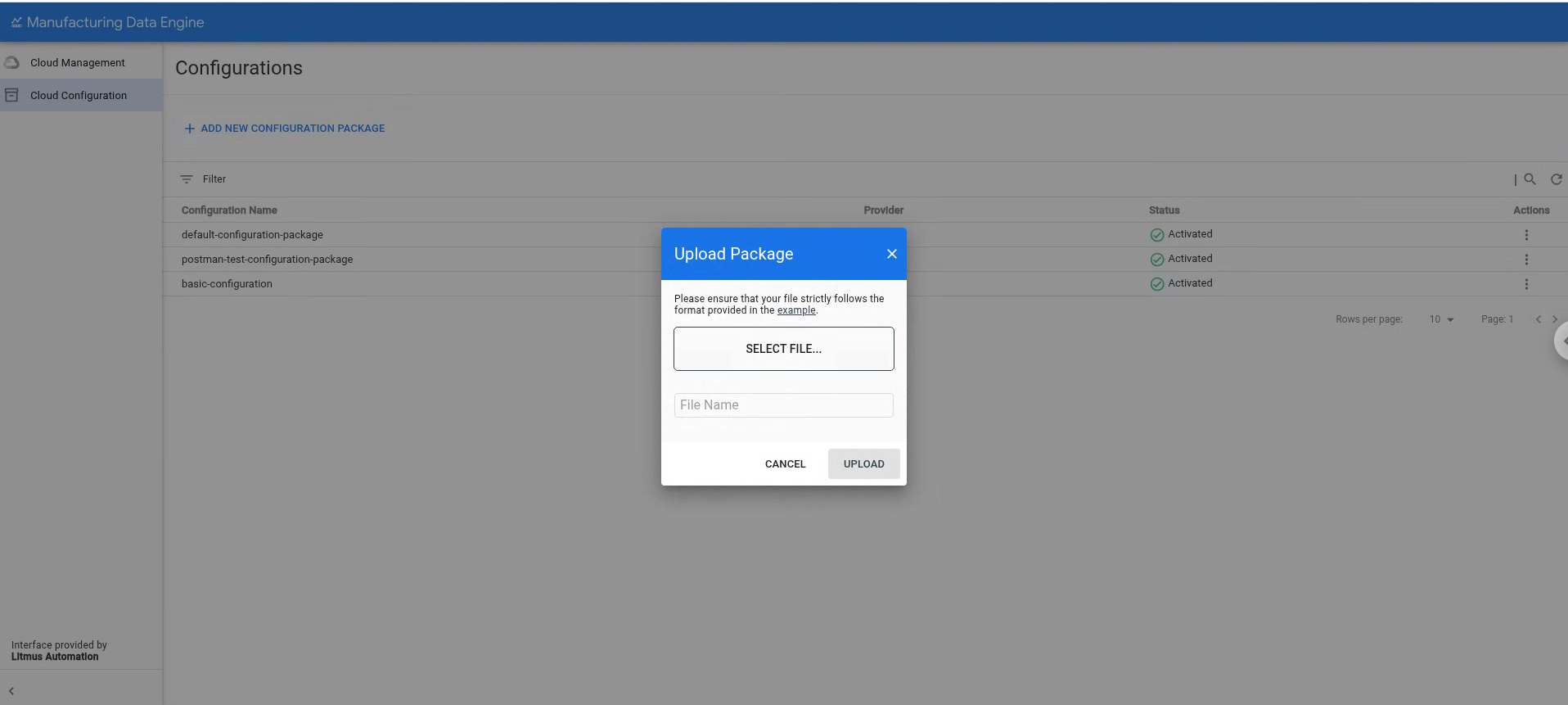
패키지가 업로드되면 MDE는 다음 단계를 실행하여 패키지를 처리합니다.
유효성 검사: 이 단계에서 MDE는 패키지의 콘텐츠 유효성을 검사하여 모든 파일이 구문상 올바르고 올바른 위치에 있는지 확인합니다. 이 단계가 완료되면 MDE는 다음 단계로 진행합니다.
로드: 이 단계에서 MDE는 패키지에 지정된 구성을 현재 환경 구성으로 로드하고 병합하려고 시도합니다. 종속 항목을 확인하고 기존 구성과 이름이 충돌하지 않는지 확인합니다. 이 단계는 원자적입니다. 즉, 패키지가 로드되거나 완전히 롤백됩니다. 로드가 성공하면 MDE는 다음 단계로 진행합니다.
활성화: 이 단계에서 MDE는 구성을 활성화하고 나머지 환경 사용자에게 표시합니다. 또한 패키지 구성의 일부로 필요한 인프라 요소 (예: 유형 활성화)의 생성을 트리거합니다.
MDE v1.5.0은 이미 배포되거나 활성화된 패키지의 업데이트를 지원하지 않습니다. 유효성 검사 또는 로드 단계에서 오류를 수정하는 데 필요한 경우 활성 상태가 아닌 한 동일한 패키지를 다시 업로드할 수 있습니다. 패키지가 활성 상태로 설정되면 동일한 패키지를 다시 업로드하거나 이름이 충돌하는 구성 항목이 포함된 패키지를 업로드할 수 없습니다.
기존 구성 패키지 나열
REST 엔드포인트를 사용하거나 MDE 웹 인터페이스에서 기존 MDE의 구성 패키지를 나열할 수 있습니다.
REST
다음 정보로 REST API 요청을 실행합니다.
- 메서드: GET.
- 엔드포인트:
/configuration/v1/configuration-packages. - 응답 코드: 200 OK.
응답 본문 (JSON):
{
    "configurationPackages": [
        {
            "id": "0505ed17-ad20-458d-9128-d44783704acb",
            "name": "default-configuration-package",
            "provider": "google",
            "latestStatus": "ACTIVATED",
            "status": [
                {
                    "code": "NOT_LOADED",
                    "updatedTime": "1742501535249",
                    "messages": []
                },
                {
                    "code": "VALIDATED",
                    "updatedTime": "1742501535249",
                    "messages": [
                        {
                            "severity": "INFO",
                            "message": "Successfully validated all buckets in the package"
                        },
                        {
                            "severity": "INFO",
                            "message": "Successfully validated all message classes in the package"
                        },
                        {
                            "severity": "INFO",
                            "message": "Successfully validated all metadata-instances in the package"
                        },
                        {
                            "severity": "INFO",
                            "message": "Successfully validated all parsers in the package"
                        },
                        {
                            "severity": "INFO",
                            "message": "Successfully validated all types in the package"
                        }
                    ]
                },
                {
                    "code": "LOADED",
                    "updatedTime": "1742501536740",
                    "messages": [
                        {
                            "severity": "INFO",
                            "message": "Successfully applied all message classes in the package"
                        },
                        {
                            "severity": "INFO",
                            "message": "Successfully applied all buckets in the package"
                        },
                        {
                            "severity": "INFO",
                            "message": "Successfully validated all metadata-instances in the package"
                        },
                        {
                            "severity": "INFO",
                            "message": "Successfully applied all types in the package"
                        },
                        {
                            "severity": "INFO",
                            "message": "Successfully applied all parsers in the package"
                        }
                    ]
                },
                {
                    "code": "ACTIVATED",
                    "updatedTime": "1742501537289",
                    "messages": [
                        {
                            "severity": "INFO",
                            "message": "Successfully activated all ingestion-specification, if there is any, in the package"
                        },
                        {
                            "severity": "INFO",
                            "message": "Successfully activated all message classes, if there is any, in the package"
                        },
                        {
                            "severity": "INFO",
                            "message": "Successfully activated all buckets, if there is any, in the package"
                        },
                        {
                            "severity": "INFO",
                            "message": "Successfully activated all metadata instance, if there is any, in the package"
                        },
                        {
                            "severity": "INFO",
                            "message": "Successfully activated all types, if there is any, in the package"
                        },
                        {
                            "severity": "INFO",
                            "message": "Successfully activated all parsers, if there is any, in the package"
                        }
                    ]
                }
            ]
        },
        {
            "id": "4adaecc2-54b9-482b-90d6-380f5d4b2be6",
            "name": "basic-configuration",
            "provider": "google",
            "latestStatus": "ACTIVATED",
            "status": [
                {
                    "code": "NOT_LOADED",
                    "updatedTime": "1742566718210",
                    "messages": []
                },
                {
                    "code": "VALIDATED",
                    "updatedTime": "1742566718210",
                    "messages": [
                        {
                            "severity": "INFO",
                            "message": "Successfully validated all message classes in the package"
                        },
                        {
                            "severity": "INFO",
                            "message": "Successfully validated all parsers in the package"
                        },
                        {
                            "severity": "INFO",
                            "message": "Successfully validated all types in the package"
                        }
                    ]
                },
                {
                    "code": "LOADED",
                    "updatedTime": "1742566718696",
                    "messages": [
                        {
                            "severity": "INFO",
                            "message": "Successfully applied all message classes in the package"
                        },
                        {
                            "severity": "INFO",
                            "message": "Successfully applied all types in the package"
                        },
                        {
                            "severity": "INFO",
                            "message": "Successfully applied all parsers in the package"
                        }
                    ]
                },
                {
                    "code": "ACTIVATED",
                    "updatedTime": "1742566718792",
                    "messages": [
                        {
                            "severity": "INFO",
                            "message": "Successfully activated all ingestion-specification, if there is any, in the package"
                        },
                        {
                            "severity": "INFO",
                            "message": "Successfully activated all message classes, if there is any, in the package"
                        },
                        {
                            "severity": "INFO",
                            "message": "Successfully activated all buckets, if there is any, in the package"
                        },
                        {
                            "severity": "INFO",
                            "message": "Successfully activated all metadata instance, if there is any, in the package"
                        },
                        {
                            "severity": "INFO",
                            "message": "Successfully activated all types, if there is any, in the package"
                        },
                        {
                            "severity": "INFO",
                            "message": "Successfully activated all parsers, if there is any, in the package"
                        }
                    ]
                }
            ]
        }
    ],
    "nextPageToken": ""
}
콘솔
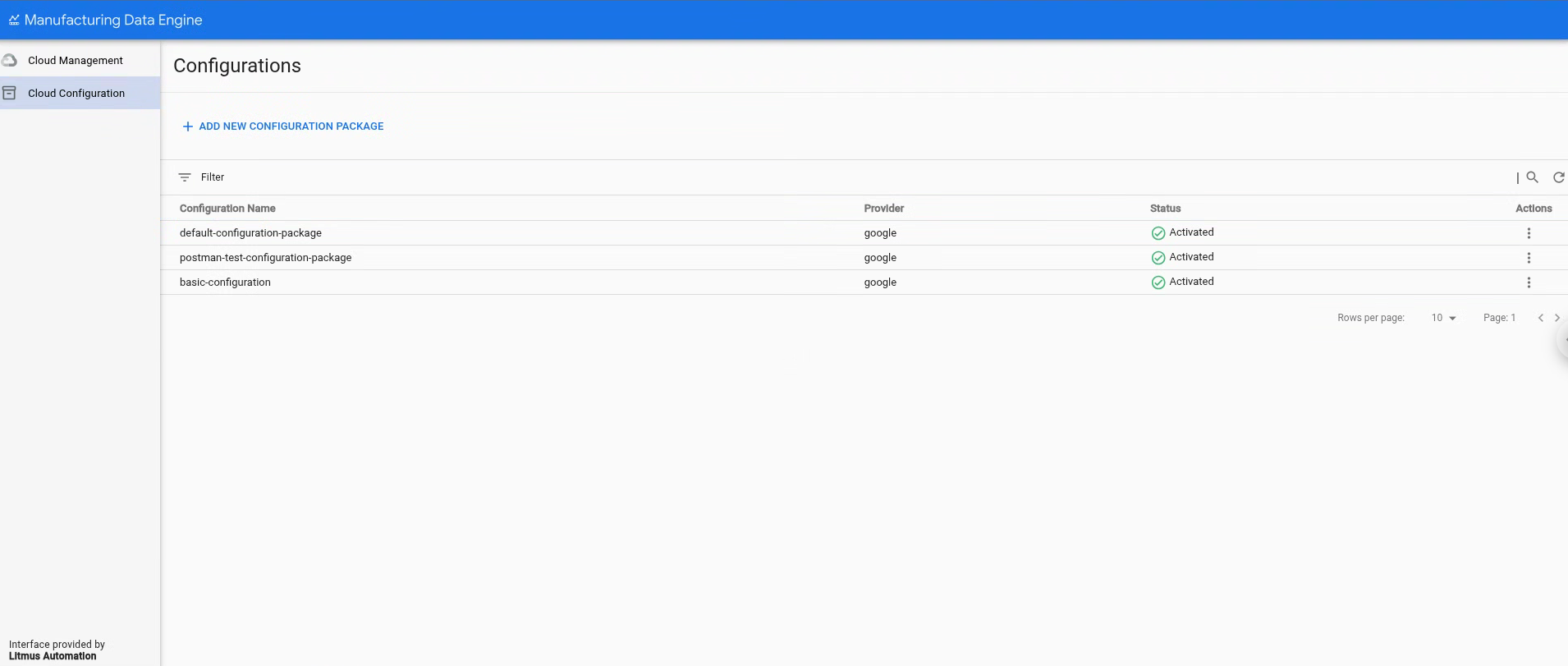
구성 페이지의 Cloud 구성 섹션에서 기존 구성 패키지 목록을 확인할 수 있습니다.
기존 구성 패키지 삭제
v1.5.0부터 MDE는 환경을 개발 모드로 변경할 수 있는 환경 플래그를 지원하므로 구성 항목을 삭제하고 구성 패키지를 삭제할 수 있습니다. 이 모드가 설정되면 REST 엔드포인트 또는 MDE 웹 인터페이스 삭제 버튼을 사용하여 이미 활성화된 패키지를 삭제할 수 있습니다.
REST
다음 정보로 REST API 요청을 실행합니다.
- 메서드: DELETE
- 엔드포인트:
/configuration/v1/configuration-packages/$PACKAGE-ID - 응답 코드: 200 OK
- 응답 본문 (JSON):
{
    "id": "87e160db-8ff9-403a-a873-e6674f6ac3cb",
    "name": "postman-test-configuration-package",
    "provider": "google",
    "latestStatus": "DELETED",
    "status": [
        {
            "code": "NOT_LOADED",
            "updatedTime": "1742550114832",
            "messages": []
        },
        {
            "code": "VALIDATED",
            "updatedTime": "1742550114832",
            "messages": [
                {
                    "severity": "INFO",
                    "message": "Successfully validated all buckets in the package"
                },
                {
                    "severity": "INFO",
                    "message": "Successfully validated all ingestion-specifications in the package"
                },
                {
                    "severity": "INFO",
                    "message": "Successfully validated all message classes in the package"
                },
                {
                    "severity": "INFO",
                    "message": "Successfully validated all metadata-instances in the package"
                },
                {
                    "severity": "INFO",
                    "message": "Successfully validated all parsers in the package"
                },
                {
                    "severity": "INFO",
                    "message": "Successfully validated all types in the package"
                }
            ]
        },
        {
            "code": "LOADED",
            "updatedTime": "1742550115241",
            "messages": [
                {
                    "severity": "INFO",
                    "message": "Successfully applied all ingestion-specification in the package"
                },
                {
                    "severity": "INFO",
                    "message": "Successfully applied all message classes in the package"
                },
                {
                    "severity": "INFO",
                    "message": "Successfully applied all buckets in the package"
                },
                {
                    "severity": "INFO",
                    "message": "Successfully validated all metadata-instances in the package"
                },
                {
                    "severity": "INFO",
                    "message": "Successfully applied all types in the package"
                },
                {
                    "severity": "INFO",
                    "message": "Successfully applied all parsers in the package"
                }
            ]
        },
        {
            "code": "ACTIVATED",
            "updatedTime": "1742550115327",
            "messages": [
                {
                    "severity": "INFO",
                    "message": "Successfully activated all ingestion-specification, if there is any, in the package"
                },
                {
                    "severity": "INFO",
                    "message": "Successfully activated all message classes, if there is any, in the package"
                },
                {
                    "severity": "INFO",
                    "message": "Successfully activated all buckets, if there is any, in the package"
                },
                {
                    "severity": "INFO",
                    "message": "Successfully activated all metadata instance, if there is any, in the package"
                },
                {
                    "severity": "INFO",
                    "message": "Successfully activated all types, if there is any, in the package"
                },
                {
                    "severity": "INFO",
                    "message": "Successfully activated all parsers, if there is any, in the package"
                }
            ]
        },
        {
            "code": "DELETED",
            "updatedTime": "1742567553260",
            "messages": [
                {
                    "severity": "INFO",
                    "message": "Successfully deleted all parsers, if there is any, in the package"
                },
                {
                    "severity": "INFO",
                    "message": "Successfully deleted all message classes, if there is any, in the package"
                },
                {
                    "severity": "INFO",
                    "message": "Successfully deleted all types, if there is any, in the package"
                },
                {
                    "severity": "INFO",
                    "message": "Successfully activated all metadata instance, if there is any, in the package"
                },
                {
                    "severity": "INFO",
                    "message": "Successfully deleted all buckets, if there is any, in the package"
                },
                {
                    "severity": "INFO",
                    "message": "Successfully deleted all ingestion-specification, if there is any, in the package"
                }
            ]
        }
    ]
}
콘솔
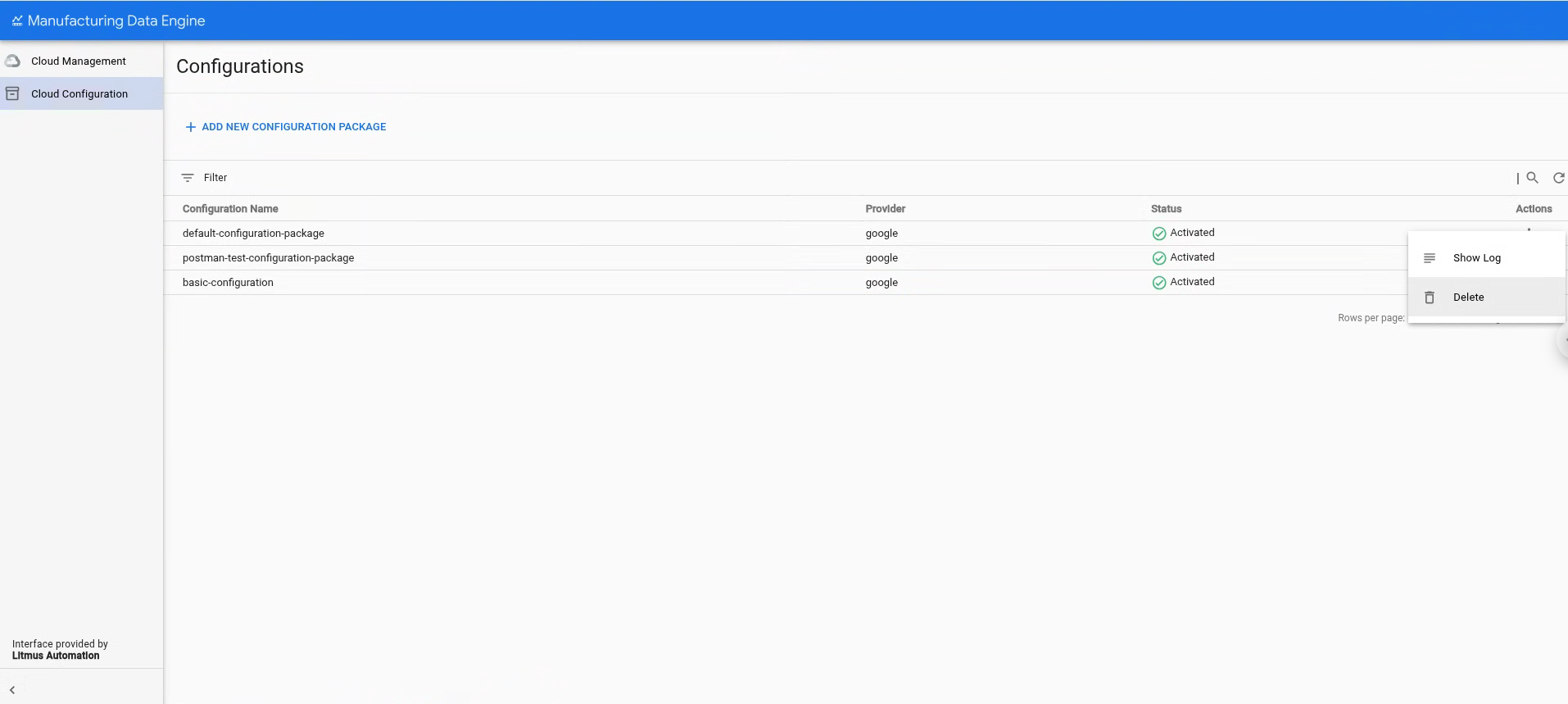
- Cloud 구성 을 클릭합니다.
- 삭제할 구성 패키지를 선택합니다.
- 작업 을 클릭합니다.
삭제 를 클릭합니다.
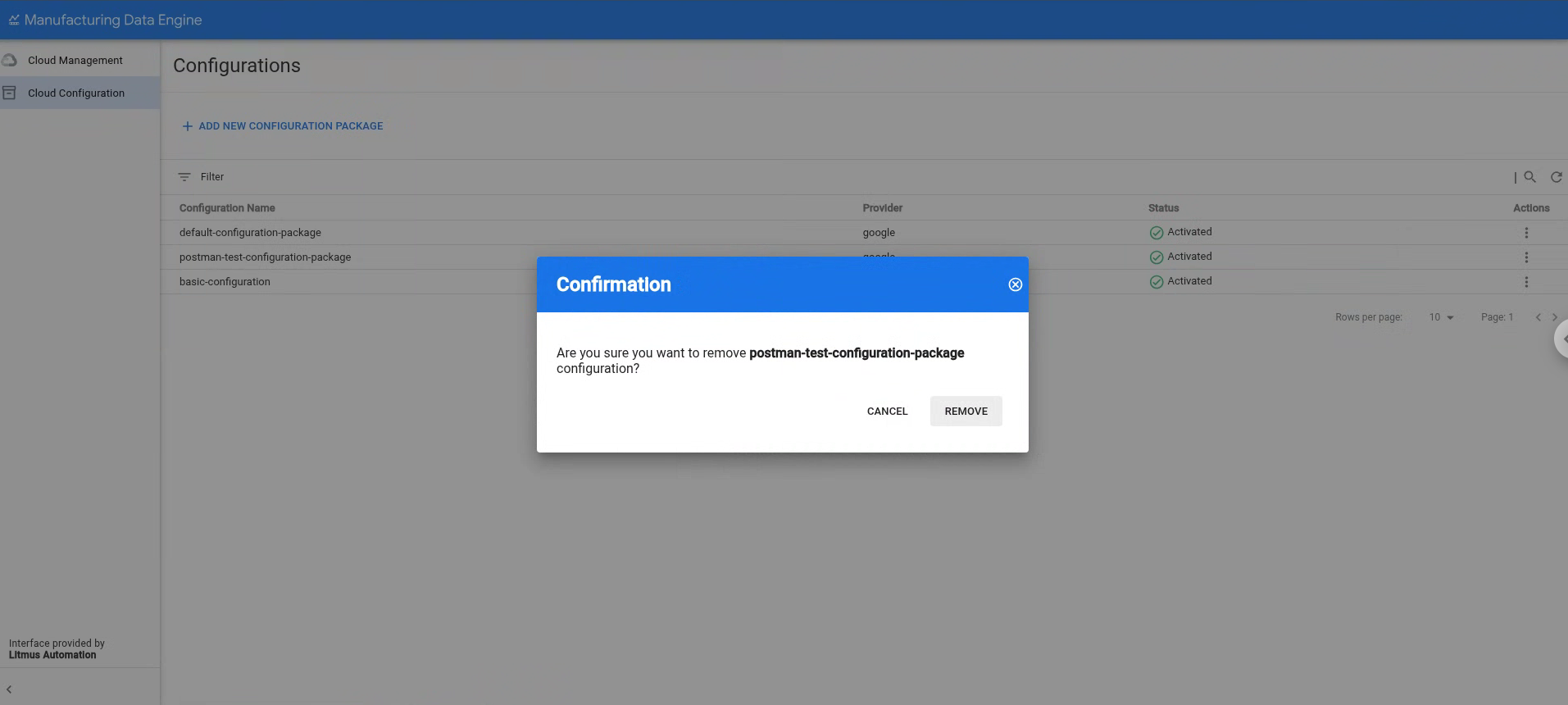
삭제 를 클릭하여 선택한 구성 패키지를 삭제할 것인지 확인합니다.