Siklus proses paket
Halaman ini menjelaskan siklus proses paket Manufacturing Data Engine (MDE).
Mengupload paket konfigurasi baru
Anda dapat mengupload paket konfigurasi MDE baru menggunakan
endpoint REST atau dari
antarmuka web MDE dengan memberikan satu file *.zip.
REST
Jalankan permintaan REST API dengan informasi berikut:
- Metode: POST.
- Endpoint:
/configuration/v1/configuration-packages. - Isi permintaan:
multiform data with key=”packageArchive”, value=configuration-package-zip file. - Kode respons: 200 OK.
Isi respons (JSON):
{
    "id": "4adaecc2-54b9-482b-90d6-380f5d4b2be6",
    "name": "basic-configuration",
    "provider": "google",
    "latestStatus": "ACTIVATED",
    "status": [
        {
            "code": "NOT_LOADED",
            "updatedTime": "1742566718210",
            "messages": []
        },
        {
            "code": "VALIDATED",
            "updatedTime": "1742566718210",
            "messages": [
                {
                    "severity": "INFO",
                    "message": "Successfully validated all message classes in the package"
                },
                {
                    "severity": "INFO",
                    "message": "Successfully validated all parsers in the package"
                },
                {
                    "severity": "INFO",
                    "message": "Successfully validated all types in the package"
                }
            ]
        },
        {
            "code": "LOADED",
            "updatedTime": "1742566718696",
            "messages": [
                {
                    "severity": "INFO",
                    "message": "Successfully applied all message classes in the package"
                },
                {
                    "severity": "INFO",
                    "message": "Successfully applied all types in the package"
                },
                {
                    "severity": "INFO",
                    "message": "Successfully applied all parsers in the package"
                }
            ]
        },
        {
            "code": "ACTIVATED",
            "updatedTime": "1742566718792",
            "messages": [
                {
                    "severity": "INFO",
                    "message": "Successfully activated all ingestion-specification, if there is any, in the package"
                },
                {
                    "severity": "INFO",
                    "message": "Successfully activated all message classes, if there is any, in the package"
                },
                {
                    "severity": "INFO",
                    "message": "Successfully activated all buckets, if there is any, in the package"
                },
                {
                    "severity": "INFO",
                    "message": "Successfully activated all metadata instance, if there is any, in the package"
                },
                {
                    "severity": "INFO",
                    "message": "Successfully activated all types, if there is any, in the package"
                },
                {
                    "severity": "INFO",
                    "message": "Successfully activated all parsers, if there is any, in the package"
                }
            ]
        }
    ]
}
Konsol
- Klik Cloud Configuration.
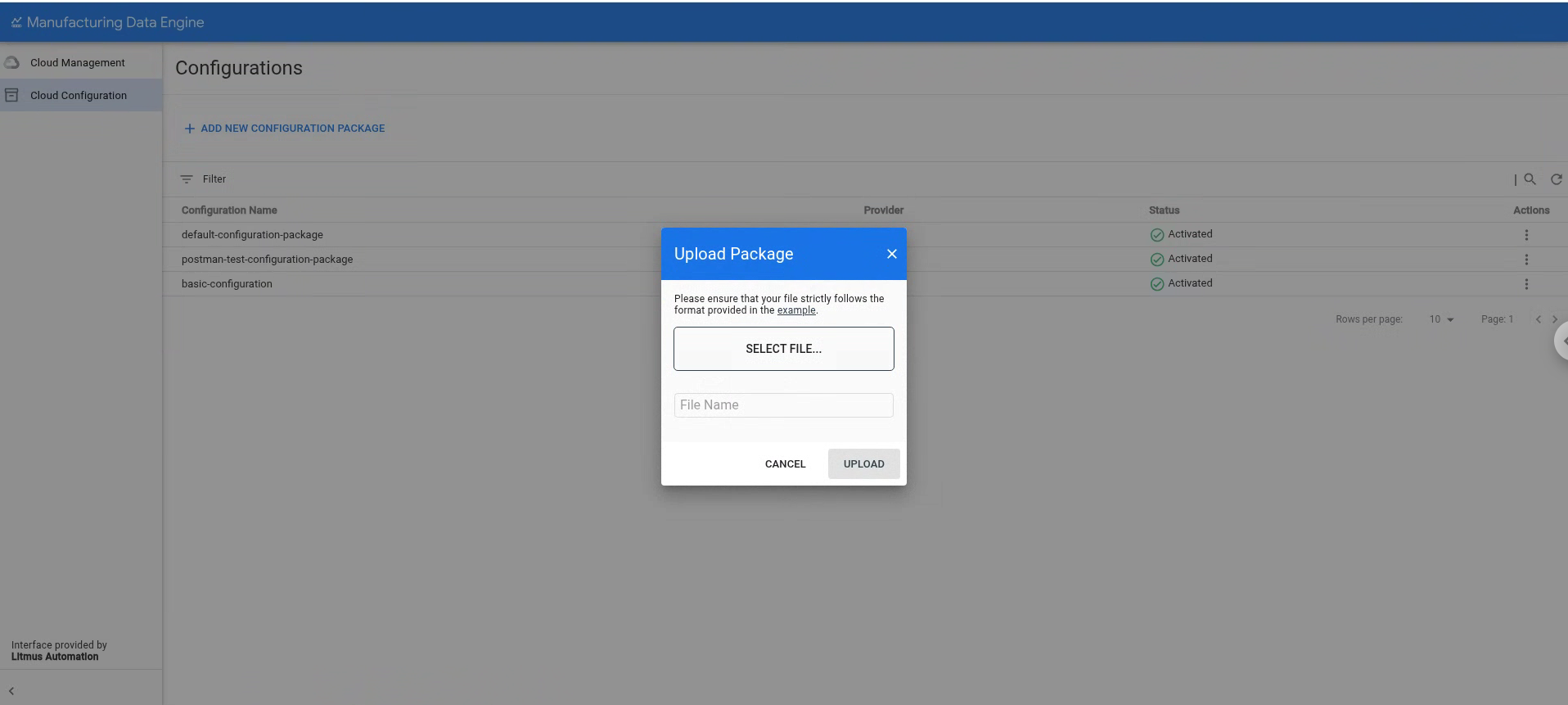
- Klik ADD NEW CONFIGURATION PACKAGE.
- Pilih file yang akan diupload ke konsol.
- Klik UPLOAD.
Setelah paket diupload, MDE akan memprosesnya dengan menjalankan tahap berikut:
Validasi: Pada tahap ini, MDE memvalidasi konten paket, memastikan bahwa semua file secara sintaksis benar dan berada di tempat yang tepat. Jika fase ini berhasil diselesaikan, maka MDE akan melanjutkan ke tahap berikutnya.
Memuat: Pada tahap ini, MDE mencoba memuat dan menggabungkan konfigurasi yang ditentukan dalam paket dengan konfigurasi lingkungan saat ini. Alat ini memeriksa dependensi dan memastikan tidak ada konflik penamaan dengan konfigurasi yang ada. Tahap ini bersifat atomik, yang berarti paket akan berhasil dimuat, atau akan di-roll back sepenuhnya. Jika pemuatan berhasil, MDE akan melanjutkan ke tahap berikutnya.
Aktivasi: Pada tahap ini, MDE mengaktifkan konfigurasi dan menampilkannya kepada pengguna lingkungan lainnya. Hal ini juga memicu pembuatan elemen infrastruktur yang diperlukan sebagai bagian dari konfigurasi paket (misalnya, mengaktifkan jenis).
MDE v1.5.0 tidak mendukung update untuk paket yang sudah di-deploy atau diaktifkan. Anda dapat mengupload paket yang sama lagi selama paket tersebut tidak aktif jika hal ini diperlukan untuk memperbaiki error apa pun di tahap validasi atau pemuatan. Setelah paket ditetapkan ke aktif, Anda tidak dapat mengupload paket yang sama lagi atau mengupload paket yang berisi entitas konfigurasi dengan nama yang bertentangan.
Mencantumkan paket konfigurasi yang ada
Anda dapat mencantumkan paket konfigurasi MDE yang ada menggunakan endpoint REST atau dari antarmuka web MDE.
REST
Jalankan permintaan REST API dengan informasi berikut:
- Metode: GET.
- Endpoint:
/configuration/v1/configuration-packages. - Kode respons: 200 OK.
Isi respons (JSON):
{
    "configurationPackages": [
        {
            "id": "0505ed17-ad20-458d-9128-d44783704acb",
            "name": "default-configuration-package",
            "provider": "google",
            "latestStatus": "ACTIVATED",
            "status": [
                {
                    "code": "NOT_LOADED",
                    "updatedTime": "1742501535249",
                    "messages": []
                },
                {
                    "code": "VALIDATED",
                    "updatedTime": "1742501535249",
                    "messages": [
                        {
                            "severity": "INFO",
                            "message": "Successfully validated all buckets in the package"
                        },
                        {
                            "severity": "INFO",
                            "message": "Successfully validated all message classes in the package"
                        },
                        {
                            "severity": "INFO",
                            "message": "Successfully validated all metadata-instances in the package"
                        },
                        {
                            "severity": "INFO",
                            "message": "Successfully validated all parsers in the package"
                        },
                        {
                            "severity": "INFO",
                            "message": "Successfully validated all types in the package"
                        }
                    ]
                },
                {
                    "code": "LOADED",
                    "updatedTime": "1742501536740",
                    "messages": [
                        {
                            "severity": "INFO",
                            "message": "Successfully applied all message classes in the package"
                        },
                        {
                            "severity": "INFO",
                            "message": "Successfully applied all buckets in the package"
                        },
                        {
                            "severity": "INFO",
                            "message": "Successfully validated all metadata-instances in the package"
                        },
                        {
                            "severity": "INFO",
                            "message": "Successfully applied all types in the package"
                        },
                        {
                            "severity": "INFO",
                            "message": "Successfully applied all parsers in the package"
                        }
                    ]
                },
                {
                    "code": "ACTIVATED",
                    "updatedTime": "1742501537289",
                    "messages": [
                        {
                            "severity": "INFO",
                            "message": "Successfully activated all ingestion-specification, if there is any, in the package"
                        },
                        {
                            "severity": "INFO",
                            "message": "Successfully activated all message classes, if there is any, in the package"
                        },
                        {
                            "severity": "INFO",
                            "message": "Successfully activated all buckets, if there is any, in the package"
                        },
                        {
                            "severity": "INFO",
                            "message": "Successfully activated all metadata instance, if there is any, in the package"
                        },
                        {
                            "severity": "INFO",
                            "message": "Successfully activated all types, if there is any, in the package"
                        },
                        {
                            "severity": "INFO",
                            "message": "Successfully activated all parsers, if there is any, in the package"
                        }
                    ]
                }
            ]
        },
        {
            "id": "4adaecc2-54b9-482b-90d6-380f5d4b2be6",
            "name": "basic-configuration",
            "provider": "google",
            "latestStatus": "ACTIVATED",
            "status": [
                {
                    "code": "NOT_LOADED",
                    "updatedTime": "1742566718210",
                    "messages": []
                },
                {
                    "code": "VALIDATED",
                    "updatedTime": "1742566718210",
                    "messages": [
                        {
                            "severity": "INFO",
                            "message": "Successfully validated all message classes in the package"
                        },
                        {
                            "severity": "INFO",
                            "message": "Successfully validated all parsers in the package"
                        },
                        {
                            "severity": "INFO",
                            "message": "Successfully validated all types in the package"
                        }
                    ]
                },
                {
                    "code": "LOADED",
                    "updatedTime": "1742566718696",
                    "messages": [
                        {
                            "severity": "INFO",
                            "message": "Successfully applied all message classes in the package"
                        },
                        {
                            "severity": "INFO",
                            "message": "Successfully applied all types in the package"
                        },
                        {
                            "severity": "INFO",
                            "message": "Successfully applied all parsers in the package"
                        }
                    ]
                },
                {
                    "code": "ACTIVATED",
                    "updatedTime": "1742566718792",
                    "messages": [
                        {
                            "severity": "INFO",
                            "message": "Successfully activated all ingestion-specification, if there is any, in the package"
                        },
                        {
                            "severity": "INFO",
                            "message": "Successfully activated all message classes, if there is any, in the package"
                        },
                        {
                            "severity": "INFO",
                            "message": "Successfully activated all buckets, if there is any, in the package"
                        },
                        {
                            "severity": "INFO",
                            "message": "Successfully activated all metadata instance, if there is any, in the package"
                        },
                        {
                            "severity": "INFO",
                            "message": "Successfully activated all types, if there is any, in the package"
                        },
                        {
                            "severity": "INFO",
                            "message": "Successfully activated all parsers, if there is any, in the package"
                        }
                    ]
                }
            ]
        }
    ],
    "nextPageToken": ""
}
Konsol
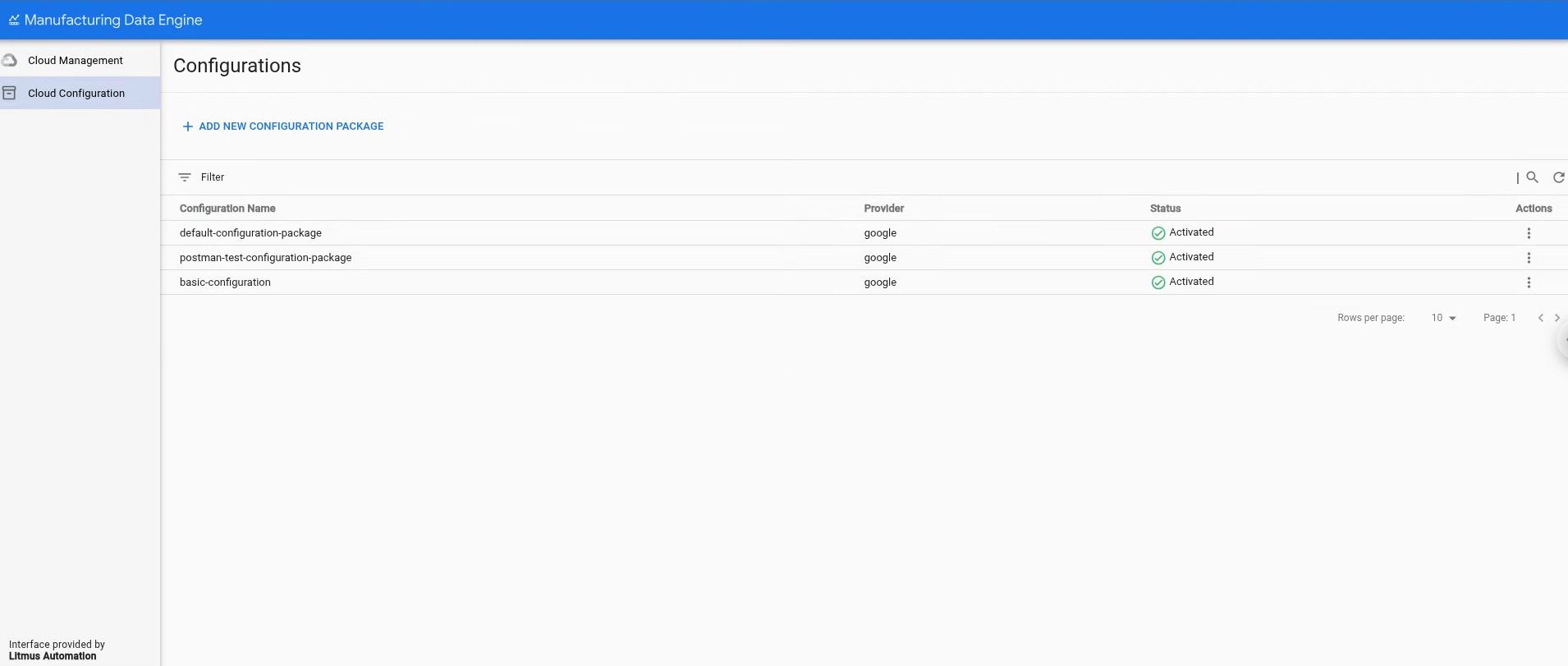
Anda dapat melihat daftar paket konfigurasi yang ada di bagian Cloud Configuration, di halaman Configurations.
Menghapus paket konfigurasi yang ada
Mulai v1.5.0, MDE mendukung tanda lingkungan yang dapat mengubah lingkungan ke mode pengembangan, yang memungkinkan Anda menghapus entity konfigurasi dan menghapus paket konfigurasi. Setelah mode ini disetel, Anda dapat menghapus paket yang sudah diaktifkan menggunakan endpoint REST atau tombol hapus antarmuka web MDE.
REST
Jalankan permintaan REST API dengan informasi berikut:
- Metode: DELETE
- Endpoint:
/configuration/v1/configuration-packages/$PACKAGE-ID - Kode respons: 200 OK
- Isi respons (JSON):
{
    "id": "87e160db-8ff9-403a-a873-e6674f6ac3cb",
    "name": "postman-test-configuration-package",
    "provider": "google",
    "latestStatus": "DELETED",
    "status": [
        {
            "code": "NOT_LOADED",
            "updatedTime": "1742550114832",
            "messages": []
        },
        {
            "code": "VALIDATED",
            "updatedTime": "1742550114832",
            "messages": [
                {
                    "severity": "INFO",
                    "message": "Successfully validated all buckets in the package"
                },
                {
                    "severity": "INFO",
                    "message": "Successfully validated all ingestion-specifications in the package"
                },
                {
                    "severity": "INFO",
                    "message": "Successfully validated all message classes in the package"
                },
                {
                    "severity": "INFO",
                    "message": "Successfully validated all metadata-instances in the package"
                },
                {
                    "severity": "INFO",
                    "message": "Successfully validated all parsers in the package"
                },
                {
                    "severity": "INFO",
                    "message": "Successfully validated all types in the package"
                }
            ]
        },
        {
            "code": "LOADED",
            "updatedTime": "1742550115241",
            "messages": [
                {
                    "severity": "INFO",
                    "message": "Successfully applied all ingestion-specification in the package"
                },
                {
                    "severity": "INFO",
                    "message": "Successfully applied all message classes in the package"
                },
                {
                    "severity": "INFO",
                    "message": "Successfully applied all buckets in the package"
                },
                {
                    "severity": "INFO",
                    "message": "Successfully validated all metadata-instances in the package"
                },
                {
                    "severity": "INFO",
                    "message": "Successfully applied all types in the package"
                },
                {
                    "severity": "INFO",
                    "message": "Successfully applied all parsers in the package"
                }
            ]
        },
        {
            "code": "ACTIVATED",
            "updatedTime": "1742550115327",
            "messages": [
                {
                    "severity": "INFO",
                    "message": "Successfully activated all ingestion-specification, if there is any, in the package"
                },
                {
                    "severity": "INFO",
                    "message": "Successfully activated all message classes, if there is any, in the package"
                },
                {
                    "severity": "INFO",
                    "message": "Successfully activated all buckets, if there is any, in the package"
                },
                {
                    "severity": "INFO",
                    "message": "Successfully activated all metadata instance, if there is any, in the package"
                },
                {
                    "severity": "INFO",
                    "message": "Successfully activated all types, if there is any, in the package"
                },
                {
                    "severity": "INFO",
                    "message": "Successfully activated all parsers, if there is any, in the package"
                }
            ]
        },
        {
            "code": "DELETED",
            "updatedTime": "1742567553260",
            "messages": [
                {
                    "severity": "INFO",
                    "message": "Successfully deleted all parsers, if there is any, in the package"
                },
                {
                    "severity": "INFO",
                    "message": "Successfully deleted all message classes, if there is any, in the package"
                },
                {
                    "severity": "INFO",
                    "message": "Successfully deleted all types, if there is any, in the package"
                },
                {
                    "severity": "INFO",
                    "message": "Successfully activated all metadata instance, if there is any, in the package"
                },
                {
                    "severity": "INFO",
                    "message": "Successfully deleted all buckets, if there is any, in the package"
                },
                {
                    "severity": "INFO",
                    "message": "Successfully deleted all ingestion-specification, if there is any, in the package"
                }
            ]
        }
    ]
}
Konsol
- Klik Cloud Configuration.
- Pilih paket konfigurasi yang akan dihapus.
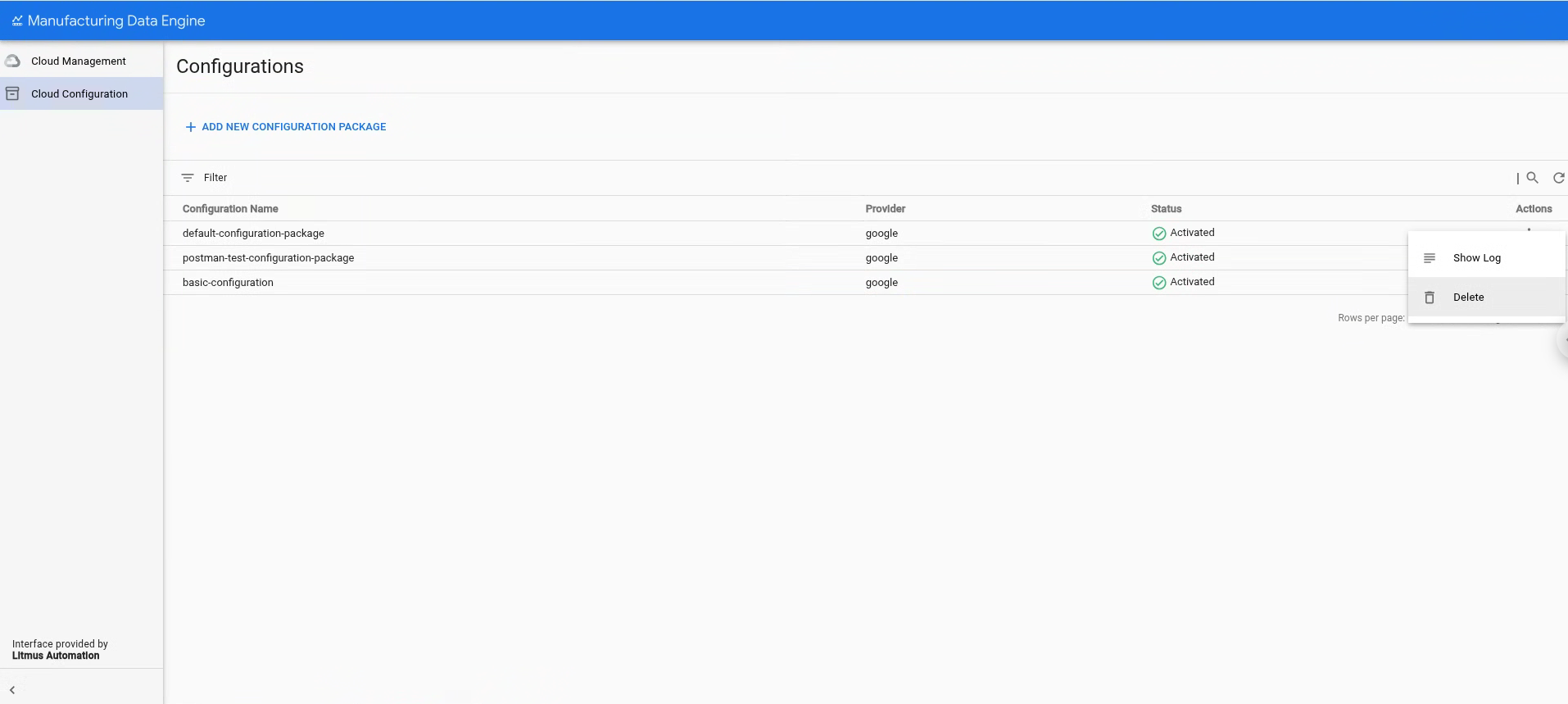
- Klik Tindakan.
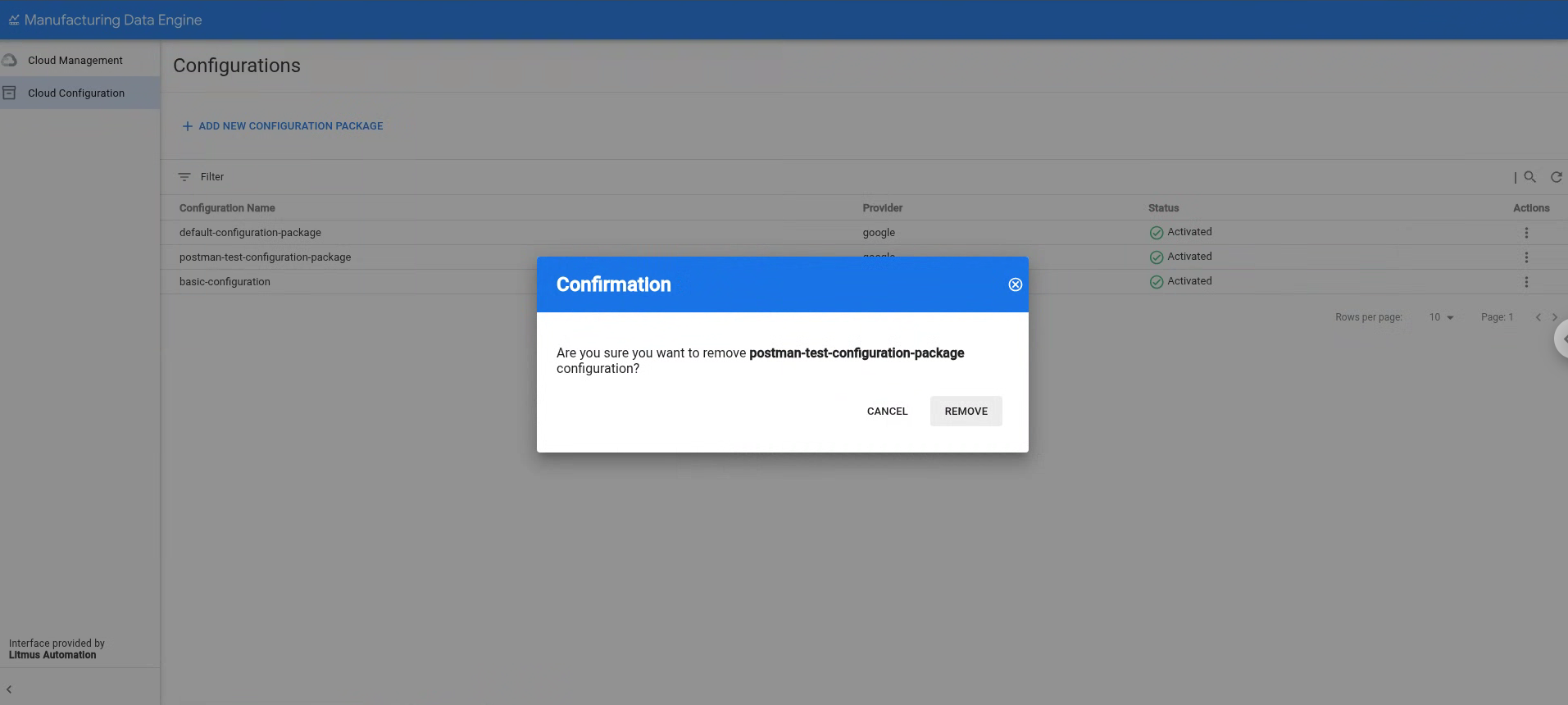
Klik Hapus.
Konfirmasi bahwa Anda yakin ingin menghapus paket konfigurasi yang dipilih dengan mengklik Hapus.