


查看資料歷程,瞭解專案資源與建立這些資源的程序之間的關係。這些關係會顯示資料資產 (例如資料表和資料集) 如何透過查詢和管道等程序進行轉換。本指南說明如何在 Google Cloud 控制台中查看資料歷程詳細資料,或使用 Data Lineage API 擷取這些資料。
角色和權限
啟用 Data Lineage API 後,資料歷程會自動追蹤歷程資訊。您不需要任何管理員或編輯者角色,即可擷取資料資產歷程。
如要查看資料歷程,您必須具備特定的 Identity and Access Management (IAM) 權限。歷程資訊會跨專案擷取,因此您需要多項專案的權限。
在 Knowledge Catalog、BigQuery 或 Vertex AI 查看歷程時,您必須具備相關權限,才能在查看歷程的專案中檢視歷程資訊。
查看其他專案中記錄的歷程時:您必須具備權限,才能查看記錄歷程資訊的專案。
如要取得查看資料歷程所需的權限,請要求管理員授予您下列 IAM 角色:
-
全部:記錄歷程的專案和查看歷程的專案,都必須具備資料歷程檢視者 (
roles/datalineage.viewer) 角色 -
查看 BigQuery 資料表詳細資料:資料表儲存專案的 BigQuery 中繼資料檢視者 (
roles/bigquery.metadataViewer) -
查看 BigQuery 工作詳細資料:工作運算專案的 BigQuery 資源檢視者 (
roles/bigquery.resourceViewer) -
查看其他目錄資產的詳細資料:在儲存目錄項目的專案中,具備 Dataplex Catalog 檢視者 (
roles/dataplex.catalogViewer) 角色
如要進一步瞭解如何授予角色,請參閱「管理專案、資料夾和組織的存取權」。
這些預先定義的角色具備查看資料歷程所需的權限。如要查看確切的必要權限,請展開「Required permissions」(必要權限) 部分:
所需權限
必須具備下列權限,才能查看資料歷程:
-
查看 BigQuery 資料表詳細資料:
bigquery.tables.get- 資料表的儲存專案 -
查看 BigQuery 工作詳細資料:
bigquery.jobs.get- 工作的運算專案
資料歷程檢視畫面類型
您可以在 Google Cloud 控制台中,以互動式圖表或結構化清單的形式查看歷程資訊。
如要詳細瞭解圖表元素 (例如節點、邊緣、程序圖示和標籤) 以及清單檢視中可用的資料欄,請參閱「關於 Knowledge Catalog 中的資料歷程視覺化」。
啟用資料歷程
啟用資料歷程,即可開始自動追蹤支援系統的歷程資訊。根據預設,啟用 API 後,系統會為大多數支援的服務啟用歷程追蹤功能。詳情請參閱「自動追蹤資料歷程」和「關於資料歷程擷取控制項」。
Data Lineage API 的費用會依 Knowledge Catalog 進階處理 SKU 計費。詳情請參閱「Knowledge Catalog 定價」。
您必須在查看歷程的專案和記錄歷程的專案中,啟用 Data Lineage API。詳情請參閱「專案類型」。
- 如要擷取歷程資訊,請完成下列步驟:
在您查看歷程的專案中,啟用 Data Lineage API 和 Dataplex API。
控管服務的歷程擷取
您可以在專案、資料夾或組織層級,選擇啟用或停用特定服務的自動歷程追蹤功能。
如要進一步瞭解如何透過資源樹狀結構,以階層方式套用這些設定,請參閱「關於資料歷程擷取控制項」。
查看歷程
如要追蹤資料在系統間轉換及移動的方式,您可以使用 Google Cloud 控制台或 API 查看資料歷程。
控制台
您可以從多個起點,在 Google Cloud 控制台中存取資料歷程資訊:
- Knowledge Catalog:前往 Knowledge Catalog 的「Search」(搜尋) 頁面,選取「Knowledge Catalog」做為搜尋模式,搜尋要查看的項目,然後按一下該項目。詳情請參閱「在 Knowledge Catalog 中搜尋資料資產」。
- BigQuery:前往「BigQuery」頁面,然後開啟要查看資料歷程的資料表。
- Vertex AI:前往「Datasets」(資料集) 或「Model Registry」(模型登錄) 頁面,然後點選要查看資料歷程的資料集或模型。
如要查看歷程圖,請按照下列步驟操作:
點選「歷程」分頁標籤。
系統會開啟預設的「Graph」(圖表) 檢視畫面,顯示各系統和區域的資料表層級歷程。詳情請參閱「歷程圖檢視畫面」。
如要手動探索歷程圖,請按一下節點旁的「Expand」(展開),一次載入五個節點。
詳情請參閱「探索歷程圖」。
在「Graph」檢視畫面中,按一下節點。
「Details」(詳細資料) 面板隨即開啟,其中包含資產的相關資訊,例如完整名稱和類型。詳情請參閱「查看歷程節點詳細資料」。
在「Graph」檢視畫面中,按一下含有處理程序圖示的邊緣。
「Query」(查詢) 面板隨即開啟。詳情請參閱「檢查轉換邏輯」和「稽核與執行記錄」。
- 如要檢查轉換邏輯,請按一下「Details」(詳細資料) 分頁標籤。
- 如要查看執行作業的稽核和記錄,請按一下「執行作業」分頁標籤。
在「Lineage explorer」(歷程探索工具) 面板中,選取篩選條件 (例如「Direction」(方向)、「Dependency type」(依附元件類型) 或「Time range」(日期範圍)),然後按一下「Apply」(套用)。
系統會開啟特定區域的聚焦檢視畫面 (預先發布版)。這個檢視畫面會自動展開圖表,最多顯示三層節點。詳情請參閱「篩選及醒目顯示資料歷程檢視畫面」。
在聚焦的「Graph」(圖表) 檢視畫面中選取節點,然後在節點的詳細資料面板中,按一下「Visualize Path」(視覺化路徑),即可查看從所選節點回到根項目的歷程路徑 (僅限聚焦檢視畫面)。
詳情請參閱「以圖表呈現資料歷程路徑」。
如要查看資料欄層級歷程 (僅適用於 BigQuery 和 Managed Service for Apache Spark 工作),請執行下列任一操作:
- 在聚焦的「Graph」(圖表) 檢視畫面中,按一下表格上的欄圖示。
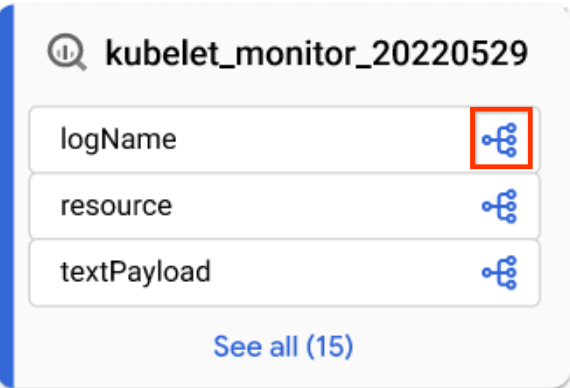
「欄」圖示 - 在「Lineage explorer」(歷程探索工具) 面板中,依資料欄名稱篩選,然後按一下「Apply」(套用)。
詳情請參閱「何時使用資料欄層級歷程」。
- 在聚焦的「Graph」(圖表) 檢視畫面中,按一下表格上的欄圖示。
按一下「重設」圖示 。
這項操作會移除所有已套用的篩選器,並將您帶往圖表檢視畫面的開頭。
按一下「List」(清單),切換至清單檢視。
「List」(清單) 檢視畫面提供資料表層級和資料欄層級歷程的簡化和詳細表格表示法,並與「Graph」(圖表) 檢視畫面同步。根據預設,系統會顯示簡易清單檢視,您可以切換至詳細清單檢視,分析個別來源與目標之間的關係。您可以設定要顯示哪些資料欄,以及匯出歷程資料。詳情請參閱「歷程清單檢視畫面」。
Java
import com.google.api.gax.rpc.ApiException;
import com.google.cloud.datacatalog.lineage.v1.BatchSearchLinkProcessesRequest;
import com.google.cloud.datacatalog.lineage.v1.EntityReference;
import com.google.cloud.datacatalog.lineage.v1.EventLink;
import com.google.cloud.datacatalog.lineage.v1.LineageClient;
import com.google.cloud.datacatalog.lineage.v1.LineageEvent;
import com.google.cloud.datacatalog.lineage.v1.Link;
import com.google.cloud.datacatalog.lineage.v1.ListLineageEventsRequest;
import com.google.cloud.datacatalog.lineage.v1.ListRunsRequest;
import com.google.cloud.datacatalog.lineage.v1.LocationName;
import com.google.cloud.datacatalog.lineage.v1.ProcessLinks;
import com.google.cloud.datacatalog.lineage.v1.Run;
import com.google.cloud.datacatalog.lineage.v1.SearchLinksRequest;
import java.io.IOException;
import java.util.ArrayList;
import java.util.HashSet;
import java.util.LinkedList;
import java.util.List;
import java.util.Queue;
import java.util.Set;

public class ViewLineageExample {

  public static void main(String[] args) throws IOException {
    // TODO(developer): Replace these variables before running the sample.
    String projectId = "my-project-id";
    String location = "us";
    String targetFullyQualifiedName = "bigquery:my-project-id.my_dataset.my_table";
    int maxDepth = 3;

    viewLineage(projectId, location, targetFullyQualifiedName, maxDepth);
  }

  static class Node {
    String fqn;
    int depth;
    Node(String fqn, int depth) {
      this.fqn = fqn;
      this.depth = depth;
    }
  }

  public static void viewLineage(
      String projectId, String location, String targetFullyQualifiedName, int maxDepth)
      throws IOException {
    // Initialize client that will be used to send requests. This client only needs
    // to be created once, and can be reused for multiple requests.
    try (LineageClient client = LineageClient.create()) {
      String parent = LocationName.of(projectId, location).toString();

      Set<String> visitedNodes = new HashSet<>();
      Queue<Node> queue = new LinkedList<>();

      visitedNodes.add(targetFullyQualifiedName);
      queue.offer(new Node(targetFullyQualifiedName, 0));

      while (!queue.isEmpty()) {
        Node current = queue.poll();
        System.out.printf("\nExploring node (Depth %d): %s\n", current.depth, current.fqn);

        if (current.depth >= maxDepth) {
          continue;
        }

        EntityReference targetEntity =
            EntityReference.newBuilder().setFullyQualifiedName(current.fqn).build();
        SearchLinksRequest searchLinksRequest =
            SearchLinksRequest.newBuilder().setParent(parent).setTarget(targetEntity).build();

        List<String> linkNames = new ArrayList<>();
        try {
          // 1. Search for links related to the target entity
          for (Link link : client.searchLinks(searchLinksRequest).iterateAll()) {
            linkNames.add(link.getName());
          }
        } catch (ApiException e) {
          System.out.printf("  Failed to retrieve links for %s: %s\n", current.fqn, e.getMessage());
          continue;
        }

        if (linkNames.isEmpty()) {
          continue;
        }

        // 2. Batch search for processes in chunks of 100
        for (int i = 0; i < linkNames.size(); i += 100) {
          List<String> batch = linkNames.subList(i, Math.min(linkNames.size(), i + 100));
          BatchSearchLinkProcessesRequest batchSearchRequest =
              BatchSearchLinkProcessesRequest.newBuilder()
                  .setParent(parent)
                  .addAllLinks(batch)
                  .build();

          try {
            for (ProcessLinks processLinks :
                client.batchSearchLinkProcesses(batchSearchRequest).iterateAll()) {
              String processName = processLinks.getProcess();
              System.out.printf("  Process: %s\n", processName);

              // 3. List runs for the process
              ListRunsRequest runsRequest =
                  ListRunsRequest.newBuilder().setParent(processName).build();
              for (Run run : client.listRuns(runsRequest).iterateAll()) {
                System.out.printf("    Run: %s\n", run.getName());

                // 4. List events for the run
                ListLineageEventsRequest eventsRequest =
                    ListLineageEventsRequest.newBuilder().setParent(run.getName()).build();
                for (LineageEvent event : client.listLineageEvents(eventsRequest).iterateAll()) {
                  for (EventLink eventLink : event.getLinksList()) {
                    String sourceFqn = eventLink.getSource().getFullyQualifiedName();
                    // If exploring upstream, queue the source
                    if (!sourceFqn.isEmpty() && !visitedNodes.contains(sourceFqn)) {
                      visitedNodes.add(sourceFqn);
                      queue.offer(new Node(sourceFqn, current.depth + 1));
                    }
                  }
                }
              }
            }
          } catch (ApiException e) {
            System.out.printf("  Failed to retrieve processes/runs: %s\n", e.getMessage());
          }
        }
      }
    }
  }
}
Python
from google.cloud import datacatalog_lineage_v1
from google.api_core.exceptions import GoogleAPICallError

def view_lineage(project_id: str, location: str, target_fully_qualified_name: str, max_depth: int = 3):
    """Retrieves lineage for a given entity using a depth-limited search."""
    client = datacatalog_lineage_v1.LineageClient()
    parent = f"projects/{project_id}/locations/{location}"

    # Store visited nodes to avoid infinite loops in cyclic graphs
    visited_nodes = set([target_fully_qualified_name])
    queue = [(target_fully_qualified_name, 0)]

    while queue:
        current_node, current_depth = queue.pop(0)
        print(f"\nExploring node (Depth {current_depth}): {current_node}")

        if current_depth >= max_depth:
            continue

        target_entity = datacatalog_lineage_v1.EntityReference(
            fully_qualified_name=current_node
        )
        search_links_request = datacatalog_lineage_v1.SearchLinksRequest(
            parent=parent,
            target=target_entity,
        )

        try:
            links = list(client.search_links(request=search_links_request))
        except GoogleAPICallError as e:
            print(f"  Failed to retrieve links for {current_node}: {e.message}")
            continue

        if not links:
            continue

        # Extract link names to query processes in batches
        link_names = [link.name for link in links]

        # Batch max size is 100
        for i in range(0, len(link_names), 100):
            batch = link_names[i:i + 100]
            batch_request = datacatalog_lineage_v1.BatchSearchLinkProcessesRequest(
                parent=parent,
                links=batch
            )

            try:
                for process_links in client.batch_search_link_processes(request=batch_request):
                    process_name = process_links.process
                    print(f"  Process: {process_name}")

                    runs_request = datacatalog_lineage_v1.ListRunsRequest(parent=process_name)
                    for run in client.list_runs(request=runs_request):
                        print(f"    Run: {run.name}")

                        events_request = datacatalog_lineage_v1.ListLineageEventsRequest(parent=run.name)
                        for event in client.list_lineage_events(request=events_request):
                            for event_link in event.links:
                                source_fqn = event_link.source.fully_qualified_name

                                # If exploring upstream, queue the source
                                if source_fqn and source_fqn not in visited_nodes:
                                    visited_nodes.add(source_fqn)
                                    queue.append((source_fqn, current_depth + 1))

            except GoogleAPICallError as e:
                 print(f"  Failed to retrieve processes/runs: {e.message}")
調整歷程圖表
如要調整歷程視覺化圖表,您可以使用歷程探索工具中的醒目顯示和篩選選項:
如要搜尋特定專案、資料集或實體名稱,請使用「Filters」(篩選器) 面板。
套用篩選器後,符合篩選條件的歷程節點會視為相符節點。您可以調整相符和不相符節點的顯示方式。
在歷程圖中,按一下「Clear filters」(清除篩選器) 按鈕旁的「More actions」(更多動作) 圖示 ,即可查看顯示選項。
選取下列其中一個或兩個選項:
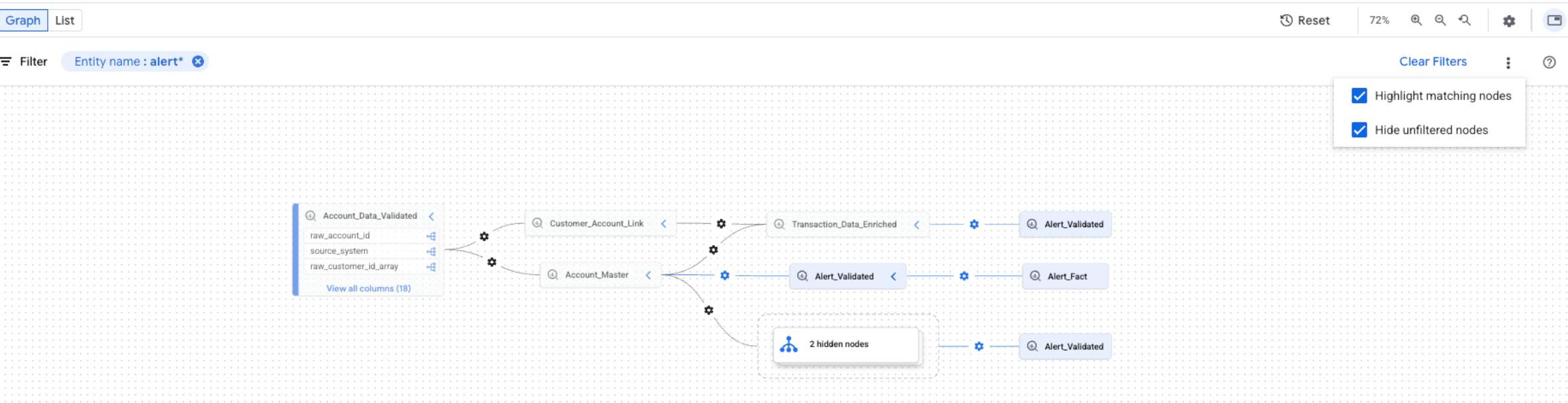
您可以同時選取這兩個選項。如果同時選取這兩個選項,系統會隱藏未篩選的節點,並在篩選後的圖表檢視畫面中醒目顯示相符的節點。
關閉資料歷程
如要停止追蹤歷程並避免產生資料歷程費用,請在已啟用 Data Lineage API (datalineage.googleapis.com) 的各項專案中停用該 API。
停用 Dataplex API 不會關閉資料歷程,也不會停止計費。您必須停用 Data Lineage API。
如要關閉資料歷程,請選取下列其中一個分頁標籤,並針對已啟用歷程追蹤功能的各項專案完成步驟:
控制台
在 Google Cloud 控制台中,前往「Enabled APIs & services」(已啟用的 API 和服務) 頁面。
在 API 清單中,按一下「Data Lineage API」。
點選「停用 API」。
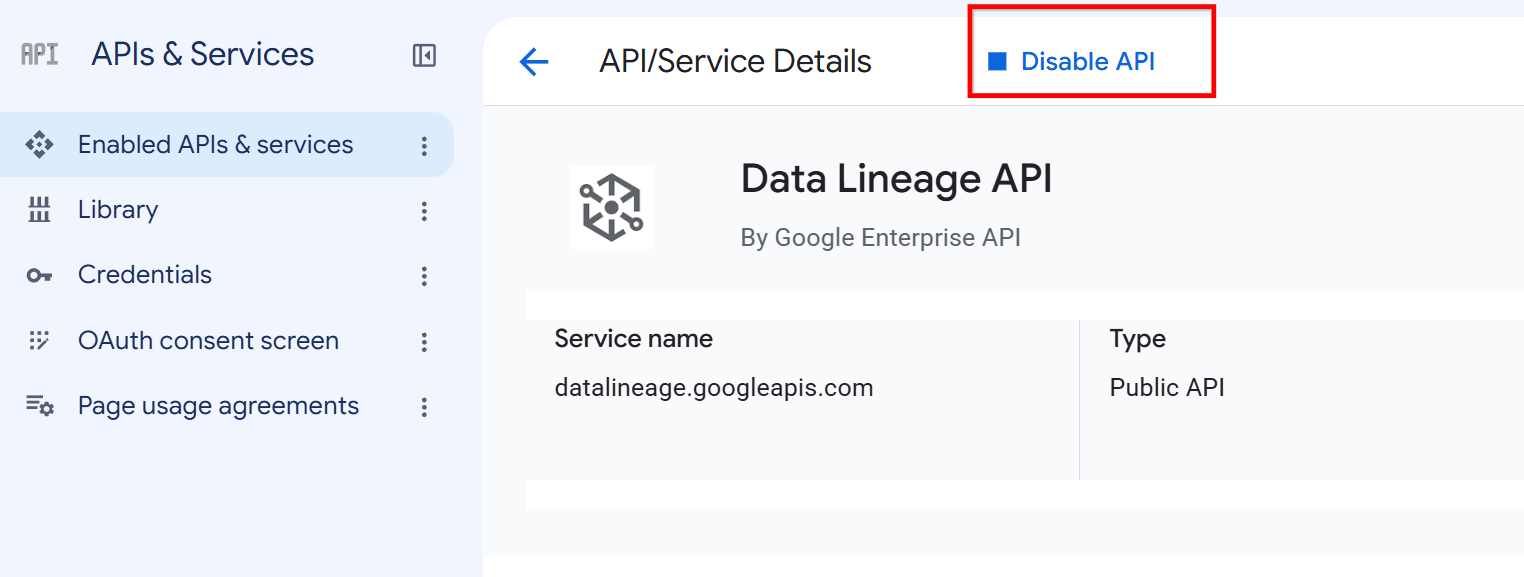
Data Lineage API 詳細資料頁面上的「停用 API」按鈕。 出現提示訊息時,請點選「停用」。
gcloud
如要停用 Data Lineage API,請使用 gcloud services
disable 指令:
gcloud services disable datalineage.googleapis.com --project=PROJECT_ID
更改下列內容:
PROJECT_ID: Google Cloud專案的 ID
如要停止特定服務的歷程追蹤,但不想完全停用 API,請參閱「設定服務的資料歷程擷取功能」。
後續步驟
- 追蹤 BigQuery 資料表的資料歷程。
- 瞭解資料歷程資訊模型。
- 瞭解資料歷程注意事項和限制。
- 瞭解 Data Lineage API 稽核記錄。
- 排解資料歷程問題。
- 與 OpenLineage 整合。
- 搭配使用資料歷程與 Managed Service for Apache Spark。