

Knowledge Studio (Preview) transforms metadata into an active context engine that helps you improve the reliability of generative AI applications. You can use Knowledge Studio to prevent hallucinations in AI agents, such as conversational analytics in BigQuery and Gemini, by grounding them in your business context.
Knowledge Studio automates metadata curation by unifying fragmented knowledge from schemas, wikis, and past SQL queries. You can explore data using natural language, navigate a visual context graph that connects data assets to business semantics, and run automated workflows that draft catalog updates for human review. You can then dynamically serve these curated context blocks to agents using the Model Context Protocol (MCP) or Knowledge Catalog APIs.
This document is for data architects, governance leads, and AI engineers who want to understand how Knowledge Studio works.
From passive catalog to active context engine
Typical metadata catalogs store static schemas, descriptions, and data dictionaries. Although sufficient for human data analysts searching for tables, static metadata is insufficient for generative AI agents that require the following:
Deep semantic relationships: Understanding how tables join across schemas, which columns represent key business metrics, and how business glossaries map to underlying storage.
Operational grounding: Incorporating real-world SQL usage patterns, query frequency, and actual agent prompts and responses into context.
Continuous self-learning: Automatically refining table descriptions, aspects, and column definitions based on user feedback and agent execution success rates.
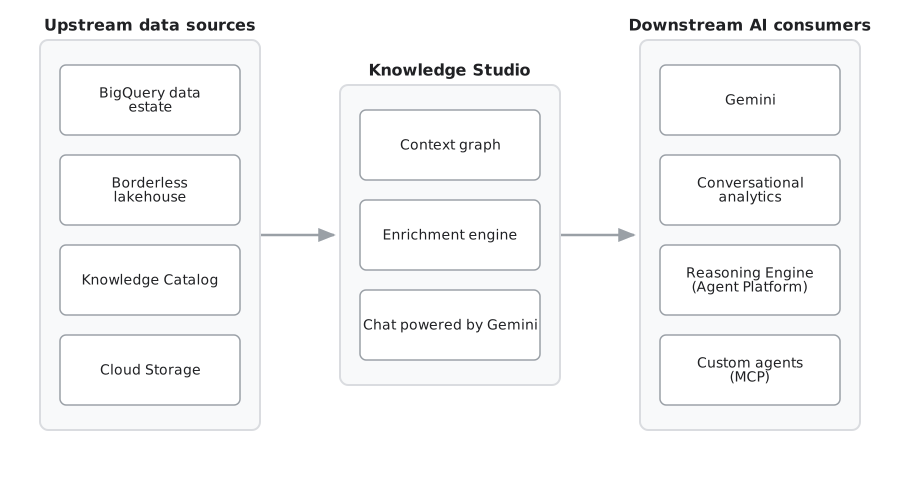
Knowledge Studio delivers these capabilities through an always-on context engine that continuously mines operational signals, generates high-fidelity metadata proposals, and serves pre-formatted context blocks to agents through the Model Context Protocol (MCP) or Knowledge Catalog Catalog APIs.
Knowledge Studio interfaces
Knowledge Studio organizes your workflow into three primary areas:
New chat: A conversational chat interface and interactive context graph for data discovery, investigation, and semantic query validation using natural language. For more information, see Explore data assets.
Context sets: An interface to create and manage the logical containers (entry groups) that package your enriched metadata to safely ground downstream AI agents. For more information, see Manage context sets.
Enrichments: A control center to automate metadata generation, configure evaluation benchmarks, and review AI-proposed catalog updates (change requests) with human-in-the-loop curation workflows. For more information, see About enrichment tasks.
Real-world multi-product scenarios
Knowledge Studio connects your data warehouse, enterprise knowledge repositories, and generative AI applications. The following scenarios illustrate how Knowledge Studio operates across multiple products in an enterprise architecture.
Ground natural language queries in BigQuery
The challenge: Business analysts use natural language in conversational analytics to ask questions such as "What was our net retention rate by region last quarter?" Without curated business semantics, the model might hallucinate join keys or mistake gross bookings for net revenue.
The Knowledge Studio solution: The analyst uses the New chat interface to verify relationships between sales staging tables and the certified
SZBank Business Glossary. Knowledge Studio grounds conversational analytics using the active context graph, ensuring generated SQL includes verified join conditions and standard KPI formulas.
Enrich metadata from enterprise SOPs
The challenge: Data engineering teams maintain dozens of datasets in BigQuery, while critical business rules and pipeline lineage live in external Confluence wikis or Jira tickets. As schemas evolve, catalog documentation becomes outdated.
The Knowledge Studio solution: A governance lead configures a recurring Enrichment task targeting the analytics dataset. Knowledge Studio ingests unstructured SOPs from Confluence and historical query logs from Cloud Logging, automatically proposing updated column definitions and table relationships. Curators inspect the proposed diffs in the Run Details page and approve verified updates to the catalog.
Provide curated context to agents
- The challenge: AI developers building customer-facing support or advisory agents using LangChain or the ADK need fresh schema semantics without hardcoding database credentials or prompt-stuffing large table definitions.
- The Knowledge Studio solution: Knowledge Studio captures curated
metadata and validated join graphs into a context set (such as
entryGroups/customer-360). To access context, agents can connect to Knowledge Studio through the Model Context Protocol (MCP) or use the Knowledge Catalog Catalog APIs. At inference time, the agent queries the MCP endpoint or Catalog APIs to dynamically retrieve certified business context and sample queries relevant to the user's intent.
Architecture overview
The following diagram illustrates how Knowledge Studio components interact with your data estate, foundation models, and consuming AI applications:
Core concepts
To work effectively with Knowledge Studio, understand how enterprise metadata is modeled, packaged, and curated.
Context graph
The context graph is the central, interactive visual topology in Knowledge Studio. It unifies your data assets (such as BigQuery tables, views, and lake houses) with business semantics (such as business glossary terms, metric formulas, and data products). In typical catalogs, a data table and its associated business glossary definition exist in separate silos. In the context graph, they exist as nodes on
the same canvas. Data analysts and engineers can visually see relationships between their data, either by inferred usage, join conditions on tables and more, while Gemini uses the graph to ground natural language exploration. For more information, see Explore data assets in Knowledge Studio.
Supported resource and connection types for the context graph
The context graph supports rendering the following Knowledge Catalog resources as nodes or containers:
- Tables and views: Technical BigQuery and Lakehouse tables, views, datasets, and catalogs.
- Databases and storage: Operational databases (such as Spanner and AlloyDB) and Cloud Storage resources.
- Analytics and modeling: Looker projects and dbt models, tests, and exposures.
- Glossary terms: Individual business definitions from a business glossary.
- Data products: Curated bundles of data assets for cross-team consumption.
- Context: Custom context sets and attached documentation.
- Custom assets: Custom entry groups and unsupported entry types.
The graph defines how these resources are connected by visualizing the following semantic relationship edges:
Schema join: Structural and operational join relationships between tables. The system automatically scans BigQuery jobs for queries that indicate columns across different tables share the same meaning and can be joined together.
Definition: Links mapping a technical data asset or column to its corresponding business glossary definition.
Context: Links attributing specialized context sets or custom domain documentation to a target data asset.
Packages: Aggregation links showing which data assets are bundled into a specific data product.
Entry links
An entry link represents a directed or non-directional semantic edge in the context graph. These links visually join your data assets and other unified resources on the canvas. You can selectively filter these links to isolate specific relationships across your data estate.
Entry links connect distinct entities across your enterprise:
Definition links: Connect underlying table columns directly to certified business glossary terms and KPI formulas.
Relationship links: Map verified primary key, foreign key, and multi-table join paths.
Agent trace links: Associate real-world AI user prompts with the specific tables used to answer them.
Packages links: Join sets of data assets to a curated data product.
Entry links serve as the individual connections traversed to assemble context sets. During automated enrichment runs, the agent proposes new entry links for curator approval whenever it identifies candidate joins or unlinked terms.
Context sets
A context set is a bounded container of semantic information and data asset
references. Each context set is implemented as a specialized Entry Group
(type="context-set").
Context sets establish hermetic execution boundaries that prevent agents from performing open-ended searches across the entire enterprise catalog. This method reduces hallucinations and token consumption.
To understand how context sets differ from related constructs, such as data products and the semantic context graph, or for detailed architectural capabilities, categories, namespaces, and agent consultation patterns, see Context sets overview.
Enrichment tasks and runs
Automated metadata enhancement in Knowledge Studio is organized into enrichment tasks, enrichment jobs, and enrichment runs.
Enrichment task: A durable configuration that defines how the enrichment agent analyzes a targeted set of data assets. An enrichment task specifies the target context set, contextual input sources, and evaluation benchmarks.
Enrichment job: The backend orchestration process within Knowledge Studio that executes an enrichment task.
Enrichment run: A single, point-in-time execution instance of a task. Each run inspects target assets, extracts semantic signals, and generates change requests (proposals) that data stewards can review.
For more information about enrichment workflows, see About enrichment tasks.
Context graph compared to data lineage
Understanding the difference between the Knowledge Studio context graph and Knowledge Catalog data lineage is essential for choosing the right tool.
Data lineage tracks the operational movement and underlying transformation of data over time. Lineage answers questions like: Where did this data come from? What ETL pipeline populated this table? If this upstream schema changes, what downstream dashboards break? Nodes represent underlying assets and transformation jobs (such as Dataflow pipelines or BigQuery jobs), and directed edges represent underlying data flow.
Context graph models business semantics, relationships, and domain knowledge. The context graph answers questions like: What does this column mean in business terms? How do these two tables relate conceptually? How should an AI agent join these assets to answer a question? Nodes represent underlying assets alongside conceptual entities (such as glossary terms, KPI formulas, and data products), and edges represent semantic connections (such as column-to-glossary definition links and verified join conditions).
For more information about pipeline traceability, see Knowledge Catalog data lineage.
Enterprise security and governance
Knowledge Studio is built on an enterprise-grade security architecture designed for strictly governed environments.
User-managed execution identity: Enrichment tasks run using a user-managed service account, which is an identity you create and manage in your project to allow services to act on your behalf. The Dataplex Service Agent (P4SA) impersonates this service account by using the Service Account Token Creator role (
roles/iam.serviceAccountTokenCreator) to generate short-lived OAuth 2.0 credentials. Generating these short-lived credentials limits the lifespan of access tokens, minimizing the risk of credential exposure compared to using long-lived service account keys.Third-party authentication: Connecting remote SaaS knowledge sources (such as Microsoft SharePoint, Atlassian Confluence, Jira, and GitHub) uses Google Cloud's Agent Identity Auth Manager, ensuring human operators never handle raw client secrets.
For information about how to configure these security features, see Configure enrichment prerequisites.
Limitations
Assured Workloads compliance regimes (including FedRAMP, CJIS, IL4/IL5, and HIPAA).
Data Residency (DRZ) commitments. Data processed by this feature might be stored or processed outside of your strictly configured geographic boundaries.
Customer-managed encryption keys (CMEK). Data stored or processed by this feature is encrypted using Google-owned and Google-owned and Google-managed encryption keys instead of your Cloud Key Management Service or Cloud EKM keys.
VPC Service Controls. VPC Service Controls is not supported.
Access Transparency (AXT) notifications and Access Approval controls. Actions taken by Google personnel to support or maintain this preview won't be logged in your Access Transparency Cloud Access Ledger (CAL).
During Preview, Knowledge Studio operates within the following additional boundaries:
Context set regional scope: Global context sets linked to regional data assets are not supported. Context sets must align with the regional boundaries of the assets they package.
Console-first management: Enrichment tasks and exploration sessions are managed through the Google Cloud console. Direct REST APIs and
gcloudCLI commands for task management aren't available in Preview. However, downstream agents can programmatically discover and query curated context sets using the Knowledge Catalog Catalog APIs (ListEntries,LookupEntry) and the Model Context Protocol (MCP).Centralized curation: All metadata review and approval occurs within the Enrichment run details page.
No standalone billing SKU: Knowledge Studio doesn't introduce separate product SKUs. Usage charges reflect standard consumption of underlying resources ( Gemini Reasoning Engine, BigQuery, and Cloud Storage).
What's next
Explore data assets and the context graph
Use the visual canvas in Knowledge Studio to chat with your data and trace semantic relationships.
About data context
Understand how active context transforms passive metadata to ground AI agents and prevent hallucinations.
Context sets overview
Learn about Knowledge Studio's packaged context containers used to safely ground your downstream AI agents.
About enrichment tasks
Learn how to configure AI-driven metadata extraction workflows to build data context automatically.
Establish foundational data context
Build a business glossary, define custom aspect types, and enrich assets in BigQuery.
Ground agents with MCP
Connect AI agents and developer tools to Knowledge Catalog using Model Context Protocol.