

Enrichment tasks are autonomous agents in Knowledge Catalog that help data stewards and platform engineers scale their metadata operations. An enrichment task continuously analyzes your dataset schemas, reads your company documentation, and generates proposed descriptions for your data assets. To get the most from enrichment tasks, you must be familiar with core Knowledge Catalog concepts and your organization's data architecture.
By automating metadata generation, enrichment tasks reduce the burden of manual curation while ensuring that your catalog reflects accurate, business-specific context.
Why use enrichment tasks
Enrichment tasks address the challenge of keeping large-scale data catalogs accurate and up-to-date.
| Aspect | Conventional approach | Knowledge Studio approach |
|---|---|---|
| Process | Hand-written descriptions. Stewards manually review thousands of tables and interview domain experts. | Agent-driven. An autonomous agent analyzes data and reads standard operating procedures. |
| Speed and scale | Slow and difficult to maintain as schemas change over time. | Highly scalable. High-quality metadata proposals are generated continuously. |
| Human effort | High. Extensive manual data entry and ongoing maintenance. | Low. Data stewards only need to review and approve generated suggestions. |
Enrichment task use cases
Enrichment tasks help organizations solve the following common metadata challenges:
Acquisition integration: A company acquires a new business unit with thousands of undocumented data assets. Data engineers point an enrichment task at the new dataset, using the acquired company's data dictionaries as a knowledge signal. The agent proposes business-aligned descriptions for the entire dataset in hours rather than months.
Continuous documentation: A platform engineering team builds a dynamic lakehouse where schemas change daily. They configure an enrichment task to run on a daily schedule with auto-publishing enabled, ensuring that the catalog always reflects the latest schema changes.
Semantic governance: A central data office wants to standardize terminology across all departments. They deploy an enrichment task that references a curated Knowledge Catalog glossary. The agent automatically flags and proposes overrides for any table descriptions that violate the approved enterprise glossary terms.
Core concepts
When you configure an enrichment task, you define the following core components:
- Enrichment task
-
The configuration that defines what the agent must do. A task contains your selected context set, target resources, schedule, and any knowledge signals you provide.
For example, a task configured to instruct the agent to read your GitHub repositories and enrich your
financedataset every Sunday at midnight. - Enrichment job
- The backend orchestration process within Knowledge Studio that executes an enrichment task.
- Enrichment run
-
A single, point-in-time execution instance of a task. The Knowledge Studio console includes a Jobs tab that lists historical runs for a task, and you can open a specific run to review the metadata proposals it generated.
For example, the specific execution instance that occurred on October 24th and resulted in 15 proposed column changes.
- Context set
-
A bounded container of target data assets and metadata. Every enrichment task must be configured to target exactly one context set. The context set can contain target resources, such as a BigQuery dataset or Lakehouse, but you can also create an empty context set if one doesn't exist.
For example, a marketing context set that logically bounds your campaign tables, ROAS metrics, and terminology glossaries into a single AI context boundary.
- Knowledge signals
- External materials that ground the agent in your company's reality. By providing Cloud Storage buckets containing data dictionaries, Knowledge Catalog glossaries, or internal documentation URLs, you ensure the agent uses your specific business logic rather than making generic guesses.
- Evaluation sets
-
Test questions and corresponding SQL (provided in
.jsonlformat) used to grade the agent's accuracy. When the agent proposes new metadata, it runs these test questions against the proposals to ensure accuracy doesn't drop before publishing.For example, providing a test question like "What is our MRR?" paired with the exact SQL query needed to calculate Monthly Recurring Revenue. If the agent proposes confusing metadata that causes this test query to fail, the proposal is flagged.
- Self-learning sources
-
Live conversational logs from your Gemini Enterprise apps or BigQuery agent analytics. The agent reads these chat logs to identify what users are asking, discovers missing knowledge gaps, and automatically proposes new metadata to fill those gaps.
For example, if chat logs reveal that users frequently ask "What does status code 42 mean?" and the agent fails to answer, self-learning triggers a metadata proposal to document that missing status code.
Supported data sources and integrations for enrichment tasks
Enrichment tasks integrate with both Google Cloud and third-party systems.
Target data assets
The enrichment agent can directly enrich and add the following Google Cloud target data assets to your context sets:
BigQuery datasets, tables, and views
Lakehouse lakes, zones, and assets
Through Lakehouse integration, Knowledge Studio indirectly supports enriching metadata from third-party sources attached through Iceberg REST Catalog integrations (such as Databricks Unity, Snowflake Horizon, AWS Glue Data Catalog, and SAP Business Data Cloud).
Knowledge signals
During an enrichment run, the agent extracts semantic rules, business context, and domain knowledge from the following read-only sources:
Google Cloud:
- Cloud Storage buckets containing supported file formats (such as PDFs, CSVs, Markdown, configuration, datasets, and unstructured text files)
- Knowledge Catalog business glossaries located in the same regional scope
- Google Workspace applications, including Google Drive files (such as Documents, Sheets, Slides, PDFs, files, and generic text documents)
Third-party systems (Non-Google-Cloud):
- Microsoft SharePoint files under 5 MB (such as PDFs, Office files, and generic text documents, excluding legacy formats or images)
- GitHub repositories (any file containing readable text)
- Atlassian Confluence page bodies
Self-learning sources
To identify knowledge gaps from real interaction logs, the enrichment agent mines trajectories from the following:
- Gemini Enterprise applications
- BigQuery agent analytics tables
- Cloud Logging using scoped log views
How the enrichment agent works
When you trigger an enrichment task—either on-demand or on a recurring schedule—an enrichment run is initiated. The enrichment agent executes asynchronously in the background, analyzing your data assets, query traces, and documentation to produce verified metadata proposals.
The following diagram illustrates the high-level workflow architecture of an enrichment agent:
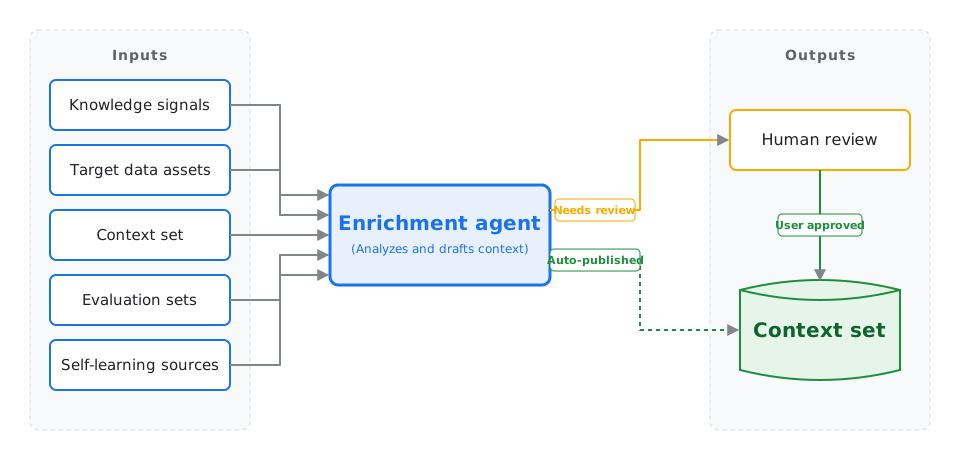
The agent curates your context set through four key phases:
- Analyzing signals and documentation: The agent mines interaction logs to find where downstream AI agents struggled or required disambiguation. It scans enterprise documents in Cloud Storage or linked third-party apps, and it examines query history to discover high-frequency table joins and upstream dependencies.
- Drafting context proposals: Guided by your curation goal, the agent drafts structured context for your target assets. This includes business-oriented table overviews, formal metric formulas, verified join conditions, and golden parameter-based SQL query templates.
- Benchmarking and optimization: Using the test questions from your evaluation set, the agent iteratively tests its own drafted metadata, refining the descriptions until downstream query accuracy is maximized. It then runs held-out test queries to calculate a regression error rate. Every proposed description or metric rule is assigned a confidence score.
- Applying review policies: Proposals that meet the confidence threshold trigger your policy rules. If you enabled auto-publishing and the regression error rate is within the allowable limit, changes are merged automatically. If the regression error exceeds the allowable threshold, auto-publishing is immediately stopped, and all proposals are packaged into a single change request for human review.
Data security and governance
Because Knowledge Studio enrichment tasks use artificial intelligence to analyze your data schemas and internal documentation, the platform implements strict boundaries to protect your proprietary information.
Foundation model training: Your data remains your own. Customer execution traces, database schemas, and supplied knowledge signals (such as documents or internal glossaries) are never used to train Google's foundation models.
Data sanitization: Before any proposed metadata is written into a context set, the agent automatically redacts personally identifiable information (PII) from system logs and generation traces.
Execution boundaries: The enrichment agent operates within a secure, Google-managed tenant. It securely reaches your private data sources using a Private Service Connect interface and a customer-controlled egress proxy.
Compliance status: During the current Preview phase, enrichment tasks don't support VPC Service Controls (VPC-SC), Customer-Managed Encryption Keys (CMEK), or Assured Workloads.
Recommended configurations
Knowledge Catalog provides several optional settings for enrichment tasks. We recommend starting with a basic configuration and progressively enabling advanced features as you scale your metadata operations.
| Configuration | Included components | Auto-publish | Recommended for |
|---|---|---|---|
| Basic | Context set | Disabled | Testing the tool. Lets you see how the agent infers metadata strictly from your dataset's schema. You must manually review all proposals. |
| Grounded |
|
Disabled | Production environments. Grounds the agent in your specific business logic, using your standard operating procedures and glossaries to improve accuracy. |
| Automated |
|
Enabled | Scaling metadata operations. The Evaluation set acts as a safety guardrail. If an auto-generated proposal causes a regression in downstream accuracy, publishing halts for manual review. |
| Self-learning |
|
Enabled | Advanced and autonomous catalogs. The agent continuously adapts by analyzing live user interactions and agent chat logs to identify and patch knowledge gaps. |
Limitations and preview boundaries
During Preview, enrichment tasks operate within the following boundaries:
Console-first management: You configure and manage tasks exclusively through the Google Cloud console. Direct public REST APIs and
gcloudCLI commands aren't available in Preview.Quotas and limits: Enrichment tasks and task runs are subject to per-project regional resource and rate quotas. For more information, see the Knowledge Studio enrichment tasks section in Quotas and limits.
Deployment lifecycle
The process of building and deploying an enrichment task follows a linear lifecycle:
- Configure prerequisites: Grant the required roles, configure the service accounts, and enable data profiling and AI data insights on frequently used tables. For more information, see Configure prerequisites for enrichment tasks.
- Link external knowledge: Authorize the task to read files from your Google Drive or external Git repositories for grounding.
- Create the task: Define the context set, target resources, knowledge signals, and evaluation strategy.
- Review the AI proposals: Check the run diagnostics, review the proposed descriptions, and approve the metadata changes.
What's next
Knowledge Studio overview
Learn about the core concepts and architecture of Knowledge Studio.
Context sets overview
Learn how metadata generated by enrichment tasks is stored in context sets to ground AI agents.
Configure enrichment prerequisites
Learn how to configure roles and service accounts to run enrichment tasks.
Manage enrichment runs
Learn how to monitor jobs and manually review or approve metadata proposals.