

本頁說明如何為使用 Looker 資料來源的資料代理程式編寫系統指令,這些資料來源是以 Looker 探索為基礎。
撰寫的背景資訊是資料代理擁有者提供的指引,可塑造資料代理的行為,並改善 API 的回應。有效撰寫的內容可為對話式數據分析 API 資料代理程式提供實用背景資訊,協助回答資料來源相關問題。
如果是 Looker 資料來源,您可以透過結構化內容和系統指令的組合,提供撰寫的內容。請盡可能透過結構化內容欄位提供內容。接著,您可以使用 system_instruction 參數,提供結構化欄位未涵蓋的補充指引。系統指示是撰寫的脈絡,資料代理擁有者可提供給代理,告知代理的角色、語氣和整體行為。系統指令通常比結構化脈絡更自由。
結構化脈絡欄位和系統指令皆為選用,但提供豐富的脈絡有助於服務專員給出更準確且相關的回覆。建立資料代理程式時,您提供的任何結構化內容資訊都會自動加入系統指令。
定義結構化情境
您可以為資料代理程式提供結構化情境中的黃金問題和答案。定義結構化內容後,您可以使用直接 HTTP 要求或 Python SDK,將內容提供給資料代理程式。
如果是 Looker 資料來源,系統會將黃金查詢擷取到 looker_golden_queries 鍵中,該鍵會定義自然語言問題及其對應 Looker 查詢的配對。只要提供一組自然語言問題和對應的探索中繼資料給代理程式,就能引導代理程式提供品質更高且更一致的結果。本頁面提供 Looker 黃金查詢的範例。
如要定義每個 Looker 黃金查詢,請為下列兩個欄位提供值:
natural_language_questions:使用者可能會提出的自然語言問題looker_query:與自然語言問題相應的 Looker 精確查詢
以下是名為「Airports」的探索中,natural_language_questions - looker_query 配對的範例:
  natural_language_questions: ["What are the major airport codes and cities in CA?"]
  looker_query": {
        "model": "airports",
        "explore": "airports",
        "fields": ["airports.city", "airports.code"],
        "filters": [
          {
            "field": "airports.major",
            "value": "Y"
          },
          {
            "field": "airports.state",
            "value": "CA"
          }
        ]
  }
定義 Looker 黃金查詢
為指定探索定義 Looker 黃金查詢,方法是提供 natural_language_questions 和 looker_query 欄位的值。在 natural_language_questions 欄位中,請考慮使用者可能會對該探索內容提出的問題,並以自然語言撰寫這些問題。您可以在這個欄位的值中加入多個問題。您可以從「探索」的查詢中繼資料取得 looker_query 欄位的值。
Looker 查詢物件支援下列欄位:
model(字串):用於產生查詢的 LookML 模型。這是必填欄位。explore(字串):用於產生查詢的探索。這是必填欄位。fields[](字串):要從「探索」擷取的欄位,包括維度和指標。此為選填欄位。filters[](物件 (Filter)): 要套用至「探索」的篩選器。此為選填欄位。sorts[](字串):要套用至「探索」的排序方式。此為選填欄位。limit(字串):要套用至「探索」的資料列限制。這是選填欄位。
您可以透過下列方式擷取探索的查詢中繼資料:
從「探索」使用者介面擷取查詢中繼資料
- 在「探索」中,選取「探索動作」選單,然後選取「取得 LookML」。
- 選取「資訊主頁」分頁標籤。
- 從 LookML 複製查詢詳細資料。舉例來說,下圖顯示「訂購商品」探索的 LookML:
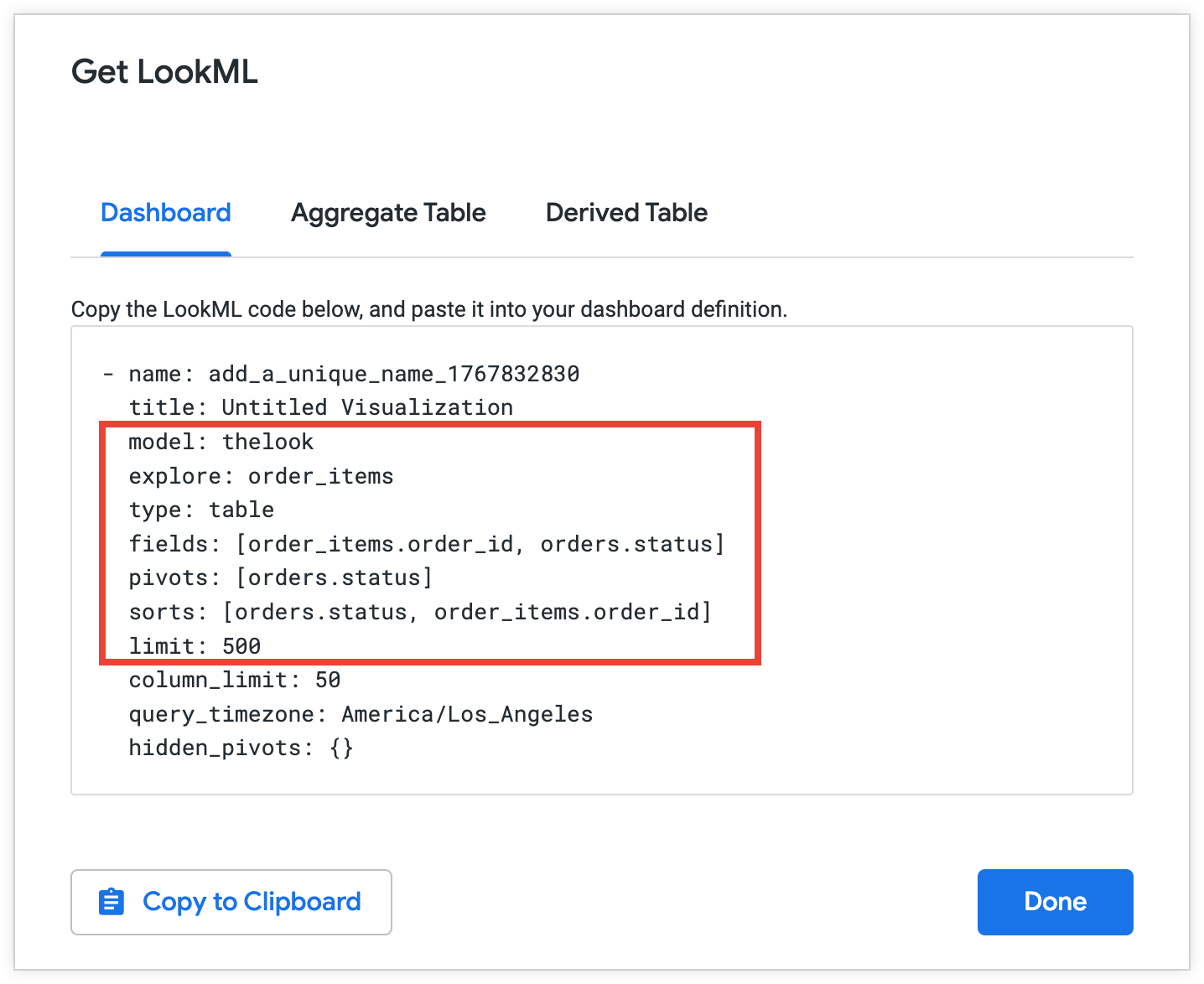
複製所選中繼資料,以用於 Looker 黃金查詢:
  model: thelook
  explore: order_items
  fields: [order_items.order_id, orders.status]
  sorts: [orders.status, order_items.order_id]
  limit: 500
使用 Looker API 擷取 Looker 查詢物件
如要使用 Looker API 擷取有關探索的資訊,請按照下列步驟操作:
- 在「探索」中,選取「探索動作」選單,然後選取「共用」。Looker 會顯示可複製的網址,方便您分享探索。共用網址通常如下所示:
https://looker.yourcompany/x/vwGSbfc。分享網址中的尾端vwGSbfc是分享 Slug。 - 複製分享 Slug。
- 向 Looker API 提出要求:在
Explore_slug中以字串形式傳遞探索網址代碼GET /queries/slug/Explore_slug。在要求中,加入您要傳回的「探索」查詢中繼資料欄位。詳情請參閱「Get Query for Slug」API 參考頁面。 - 從 API 回應複製查詢中繼資料。
Looker 黃金查詢範例
下列範例說明如何透過直接 HTTP 要求和 Python SDK,為 airports「探索」提供黃金查詢。
HTTP
在直接 HTTP 要求中,為 looker_golden_queries 鍵提供 Looker 黃金查詢物件清單。每個物件都必須包含 natural_Language_questions 鍵和對應的 looker_query 鍵。
looker_golden_queries = [
  {
    "natural_language_questions": ["What is the highest observed positive longitude?"],
    "looker_query": {
      "model": "airports",
      "explore": "airports",
      "fields": ["airports.longitude"],
      "filters": [
        {
          "field": "airports.longitude",
          "value": ">0"
        }
      ],
      "sorts": ["airports.longitude desc"],
      "limit": "1"
    }
  },
 {
    "natural_language_questions": ["What are the major airport codes and cities in CA?", "Can you list the cities and airport codes of airports in CA?"],
    "looker_query": {
      "model": "airports",
      "explore": "airports",
      "fields": ["airports.city", "airports.code"],
      "filters": [
        {
          "field": "airports.major",
          "value": "Y"
        },
        {
          "field": "airports.state",
          "value": "CA"
        }
      ]
    }
  },
]
Python SDK
使用 Python SDK 時,您可以提供 LookerGoldenQuery 物件清單。為每個物件提供 natural_language_questions 和 looker_query 參數的值。
looker_golden_queries = [geminidataanalytics.LookerGoldenQuery(
      natural_language_questions=[
          "What is the highest observed positive longitude?"
      ],
      looker_query=geminidataanalytics.LookerQuery(
          model="airports",
          explore="airports",
          fields=["airports.longitude"],
          filters=[
              geminidataanalytics.LookerQuery.Filter(
                  field="airports.longitude", value=">0"
              )
          ],
          sorts=["airports.longitude desc"],
          limit="1",
      ),
  ),
  geminidataanalytics.LookerGoldenQuery(
      natural_language_questions=[
          "What are the major airport codes and cities in CA?",
          "Can you list the cities and airport codes of airports in CA?",
      ],
      looker_query=geminidataanalytics.LookerQuery(
          model="airports",
          explore="airports",
          fields=["airports.city", "airports.code"],
          filters=[
              geminidataanalytics.LookerQuery.Filter(
                  field="airports.major", value="Y"
              ),
              geminidataanalytics.LookerQuery.Filter(
                  field="airports.state", value="CA"
              ),
          ],
      ),
  ),
]
在系統指令中定義其他脈絡資訊
系統指令包含一系列重要元件和物件,可向資料代理程式提供資料來源的詳細資料,以及代理程式在回答問題時的角色指引。您可以在 system_instruction 參數中,以 YAML 格式的字串向資料代理程式提供系統指令。
以下 YAML 範本顯示如何為 Looker 資料來源建構系統指令:
-   system_instruction: str # Describe the expected behavior of the agent
-   glossaries: # Define business terms, jargon, and abbreviations that are relevant to your use case
    -   glossary:
            -   term: str
            -   description: str
            -   synonyms: list[str]
-   additional_descriptions: # List any additional general instructions
    -   text: str
系統指令主要元件的說明
以下章節提供 Looker 系統指令主要元件的範例。這些鍵包括:
system_instruction
使用 system_instruction 鍵定義代理程式的角色和員工角色。這項初始指令會設定 API 回覆的語氣和風格,並協助代理程式瞭解核心用途。
舉例來說,您可以將代理程式定義為虛構電子商務商店的銷售分析師,如下所示:
-   system_instruction: You are an expert sales analyst for a fictitious
    ecommerce store. You will answer questions about sales, orders, and customer
    data. Your responses should be concise and data-driven.
glossaries
glossaries 鍵清單會列出與資料和用途相關,但尚未出現在資料中的業務用語、術語和縮寫定義。舉例來說,您可以根據特定業務情境定義常見的業務狀態和「忠實顧客」等字詞,如下所示:
-   glossaries:
    -   glossary:
            -   term: Loyal Customer
            -   description: A customer who has made more than one purchase.
                Maps to the dimension 'user_order_facts.repeat_customer' being
                'Yes'. High value loyal customers are those with high
                'user_order_facts.lifetime_revenue'.
            -   synonyms:
                -   repeat customer
                -   returning customer
additional_descriptions
additional_descriptions 鍵會列出系統指令中未涵蓋的任何其他一般指令或背景資訊。舉例來說,您可以使用 additional_descriptions 鍵提供有關代理程式的資訊,如下所示:
-   additional_descriptions:
    -   text: The user is typically a Sales Manager, Product Manager, or
        Marketing Analyst. They need to understand performance trends, build
        customer lists for campaigns, and analyze product sales.
範例:Looker 中的系統指令
以下範例顯示虛構的銷售分析師代理程式的系統指令:
-   system_instruction: "You are an expert sales, product, and operations
    analyst for our e-commerce store. Your primary function is to answer
    questions by querying the 'Order Items' Explore. Always be concise and
    data-driven. When asked about 'revenue' or 'sales', use
    'order_items.total_sale_price'. For 'profit' or 'margin', use
    'order_items.total_gross_margin'. For 'customers' or 'users', use
    'users.count'. The default date for analysis is 'order_items.created_date'
    unless specified otherwise. For advanced statistical questions, such as
    correlation or regression analysis, use the Python tool to fetch the
    necessary data, perform the calculation, and generate a plot (like a scatter
    plot or heatmap)."
-   glossaries:
    -   term: Revenue
    -   description: The total monetary value from items sold. Maps to the
        measure 'order_items.total_sale_price'.
    -   synonyms:
        -   sales
        -   total sales
        -   income
        -   turnover
    -   term: Profit
    -   description: Revenue minus the cost of goods sold. Maps to the measure
        'order_items.total_gross_margin'.
    -   synonyms:
        -   margin
        -   gross margin
        -   contribution
    -   term: Buying Propensity
    -   description: Measures the likelihood of a customer to purchase again
        soon. Primarily maps to the 'order_items.30_day_repeat_purchase_rate'
        measure.
    -   synonyms:
        -   repeat purchase rate
        -   repurchase likelihood
        -   customer velocity
    -   term: Customer Lifetime Value
    -   description: The total revenue a customer has generated over their
        entire history with us. Maps to 'user_order_facts.lifetime_revenue'.
    -   synonyms:
        -   CLV
        -   LTV
        -   lifetime spend
        -   lifetime value
    -   term: Loyal Customer
    -   description: "A customer who has made more than one purchase. Maps to
        the dimension 'user_order_facts.repeat_customer' being 'Yes'. High value
        loyal customers are those with high
        'user_order_facts.lifetime_revenue'."
    -   synonyms:
        -   repeat customer
        -   returning customer
    -   term: Active Customer
    -   description: "A customer who is currently considered active based on
        their recent purchase history. Mapped to
        'user_order_facts.currently_active_customer' being 'Yes'."
    -   synonyms:
        -   current customer
        -   engaged shopper
    -   term: Audience
    -   description: A list of customers, typically identified by their email
        address, for marketing or analysis purposes.
    -   synonyms:
        -   audience list
        -   customer list
        -   segment
    -   term: Return Rate
    -   description: The percentage of items that are returned by customers
        after purchase. Mapped to 'order_items.return_rate'.
    -   synonyms:
        -   returns percentage
        -   RMA rate
    -   term: Processing Time
    -   description: The time it takes to prepare an order for shipment from the
        moment it is created. Maps to 'order_items.average_days_to_process'.
    -   synonyms:
        -   fulfillment time
        -   handling time
    -   term: Inventory Turn
    -   description: "A concept related to how quickly stock is sold. This can
        be analyzed using 'inventory_items.days_in_inventory' (lower days means
        higher turn)."
    -   synonyms:
        -   stock turn
        -   inventory turnover
        -   sell-through
    -   term: New vs Returning Customer
    -   description: "A classification of whether a purchase was a customer's
        first ('order_facts.is_first_purchase' is Yes) or if they are a repeat
        buyer ('user_order_facts.repeat_customer' is Yes)."
    -   synonyms:
        -   customer type
        -   first-time buyer
-   additional_descriptions:
    -   text: The user is typically a Sales Manager, Product Manager, or
        Marketing Analyst. They need to understand performance trends, build
        customer lists for campaigns, and analyze product sales.
    -   text: This agent can answer complex questions by joining data about
        sales line items, products, users, inventory, and distribution centers.
後續步驟
定義構成撰寫脈絡的結構化欄位和系統指令後,您可以在下列其中一個呼叫中,將該脈絡提供給 Conversational Analytics API:
- 建立持續性資料代理:在要求主體的
published_context物件中加入撰寫的內容,設定代理行為,讓代理在多個對話中保持一致。詳情請參閱「建立資料代理程式」(HTTP) 或「為有狀態或無狀態的對話設定環境」(Python SDK)。 - 傳送無狀態要求:在聊天要求中,於
inline_context物件內提供撰寫的脈絡,為該特定 API 呼叫定義代理程式的行為。詳情請參閱「建立無狀態多輪對話」(HTTP) 或「傳送內含內嵌情境的無狀態即時通訊要求」(Python SDK)。 - 傳送查詢資料要求:如果是資料庫資料來源,請在查詢資料要求的
agent_context_reference物件中,提供所撰寫內容的內容集 ID。詳情請參閱「為資料庫資料來源定義資料代理程式環境」。