

To achieve high QueryData query accuracy and low online latency in your data agent applications, you can use the context engineering agent to build, evaluate, and optimize context sets. By automating context creation, upload, and optimization, the agent helps your applications return fast, deterministic, and explainable answers to natural language questions.
To learn about context sets and QueryData, see Context sets overview and QueryData overview.
By providing QueryData with context tailored to your business application, you supply the precise business rules that the system needs to resolve nuanced user intent and deliver near-100% query quality. As you work in your CLI or IDE, the context engineering agent automatically uploads your context sets to Google Cloud while saving local files in your workspace for version control.
Context engineering agent
The context engineering agent acts as your design-time assistant directly in your CLI or IDE. Manual context authoring requires writing detailed query patterns by hand, anticipating every phrasing variation, and manually diagnosing query failures across iterations. The context engineering agent eliminates this overhead by bootstrapping baseline context, curating ground-truth evaluation datasets, iteratively hill-climbing to fix accuracy gaps, and proving that your context generalizes across new questions.
You converse with the agent by using natural language to drive the optimization workflow. Start with a prompt like "Optimize the context set against my application requirements."
Before you begin
Before you use the context engineering agent, complete the prerequisites in the
following sections. You can create and store context sets in the us-central1,
us-east1, europe-west4, and asia-southeast1 regions, even if your database
instance is in a different region.
Enable required services
Enable the following services for your project:
Prepare your database
Prepare your Spanner instance and database:
- Create a Spanner instance or use an existing instance.
- Create a database on the Spanner instance or use an existing database.
Required roles and permissions
To get the permissions that you need to use the context engineering agent and manage context sets, configure the following Identity and Access Management (IAM) roles and database privileges:
- Grant the
roles/spanner.databaseReader,roles/serviceusage.serviceUsageConsumer,roles/geminidataanalytics.queryDataUser, androles/mcp.toolUserroles to the IAM user or service account at the project level (or grantroles/spanner.databaseReaderat the database level for the required databases). For more information, see Apply IAM roles and Add IAM policy binding for a project. - To create, upload, and manage context sets, grant the Dataplex Catalog
Editor (
roles/dataplex.catalogEditor) or Dataplex Catalog Admin (roles/dataplex.catalogAdmin) role to the IAM user at the project level. For more information, see Context sets permissions.
Prepare your environment
You can build and optimize context sets from your local development environment or IDE.
Install uv
The context engineering agent requires uv to manage underlying Python
packages:
Install
uvby following the instructions in Installuv.Verify that
uvis installed and accessible from your command line:uv --version
Install the context engineering agent
Install the context engineering agent plugin in your preferred development environment:
Antigravity CLI
- Install the Antigravity CLI. See Get started with Antigravity CLI.
- Install the context engineering agent plugin:
agy plugin install https://github.com/GoogleCloudPlatform/db-context-enrichment/tree/main/plugin
- Start the Antigravity CLI:
agy
To update the plugin later, run agy plugin uninstall db-context-engineering followed by agy plugin install https://github.com/GoogleCloudPlatform/db-context-enrichment/tree/main/plugin.
Claude Code
- Add the plugin marketplace:
/plugin marketplace add https://github.com/GoogleCloudPlatform/db-context-enrichment.git
- Install the plugin:
/plugin install db-context-engineering@db-context-enrichment-marketplace
- Reload plugins to activate the changes:
/reload-plugins
To update the plugin later, run /plugin update db-context-engineering@db-context-enrichment-marketplace.
Gemini CLI (Deprecated)
- Install the Gemini CLI. See Get Started with Gemini CLI.
- Install the extension:
gemini extensions install https://github.com/GoogleCloudPlatform/db-context-enrichment
To update the extension later, run gemini extensions update google-cloud-db-context-engineering.
Authenticate with Google Cloud
Configure Application Default Credentials (ADC) to authenticate your development environment:
gcloud auth application-default loginSet the quota project for your credentials so that the Model Context Protocol (MCP) tools can use your Google Cloud project:
gcloud auth application-default set-quota-project PROJECT_IDReplace
PROJECT_IDwith your Google Cloud project ID.
Connect to your database
Start your agent environment and ask the agent to establish the database connection (for example, "Help me set up the database connection"). The agent guides you through creating the
.context-engineering/tools.yamlconfiguration file so that it can read schemas and validate SQL. (Before.context-engineering/tools.yamlis created, an initialtoolboxMCP server connection warning on startup is expected.)Reload the MCP server connection to apply the
.context-engineering/tools.yamlconfiguration:- Antigravity CLI: Run
/mcpand selecttoolbox(ordb-context-engineering_toolbox) to restart. - Claude Code: Run
/mcp, selecttoolbox, and selectReconnect. - Gemini CLI: Run
/mcp refresh(or/mcp reload).
- Antigravity CLI: Run
Build and optimize context
The context engineering agent guides your context set through an end-to-end lifecycle, from initial bootstrapping to verified generalizability.
Bootstrap a baseline context set
To avoid creating context from a blank page, the agent inspects your database schema along with any available application artifacts, such as business requirements, documentation, or sample SQL queries. The agent derives an initial baseline context set containing foundational query templates and query facets grounded in your database model.
After generating and validating the baseline context, the agent uploads it directly to Google Cloud and returns the context set resource name.
Create evaluation and held-out datasets from application artifacts
To systematically improve accuracy, you need ground-truth questions paired with verified SQL queries. If you don't already have an evaluation benchmark, the agent can generate one by extracting business scenarios from your application code, historical queries, and database schema.
During dataset generation, the agent creates two distinct sets:
- Training benchmark: A collection of representative question-SQL pairs used during iterative optimization.
- Held-out dataset: A separate set of questions similar in domain to your training benchmark, reserved for testing for generalizability.
Optimize accuracy with hill-climbing
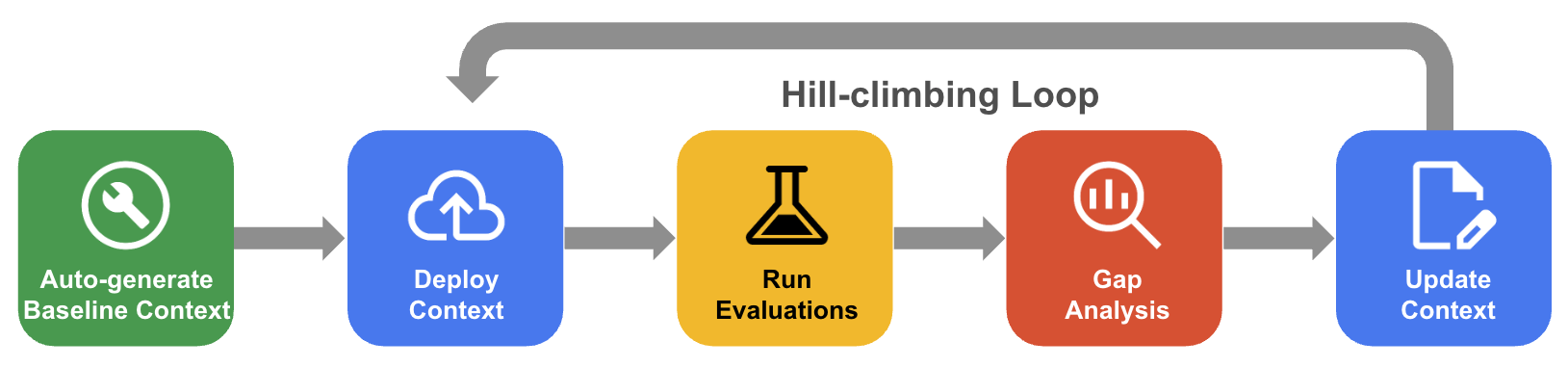
In hill-climbing optimization, the agent iteratively refines your context set to drive QueryData accuracy toward near-100%:
- Evaluate: The agent tests your current context set against the training benchmark by using the QueryData API and scores accuracy.
- Diagnose gaps: The agent analyzes query failures, identifies their root causes (such as missing table joins, unlinked private entities, or complex filter conditions), and formulates targeted fixes.
- Refine and upload: The agent adds or improves query templates, query facets, and value searches to resolve the gaps, and automatically uploads the updated context set to Google Cloud from your CLI.
- Iterate: The agent repeats this cycle across rounds until accuracy converges on the optimal score.
The following diagram shows the systematic hill-climbing workflow:
Prove generalizability with the held-out dataset
Achieving high accuracy on a training benchmark is necessary, but production traffic includes phrasing variations and complex compound questions that were never seen during development.
After hill-climbing optimization converges, the agent tests the resulting context set against the held-out dataset. This step verifies that the context set generalizes cleanly to new user inputs without overfitting to the initial benchmark. The agent produces a generalizability report showing accuracy across unseen question variations and composite filters (such as "Find me homes near good schools in Del Mar for a starter family with an ocean view").
On-demand authoring and reasoning
In addition to full optimization runs, you can converse with the agent for targeted updates as business requirements evolve:
Targeted authoring: Describe a specific business requirement in natural language, and the agent formats the context item and uploads it directly from your CLI without manual editing:
- "Create a template for: 'Find me homes near good schools in Del Mar' with SQL:
SELECT p.property_id, p.address FROM properties AS p JOIN schools AS s ON p.school_id = s.school_id WHERE p.city = 'Del Mar' AND s.rating >= 7." - "Create a facet for the filter
properties.bedrooms BETWEEN 3 AND 4 AND properties.square_feet BETWEEN 1500 AND 2500labeled 'for a starter family'." - "Create a value search for
properties.city."
- "Create a template for: 'Find me homes near good schools in Del Mar' with SQL:
Bulk updates across a context set: If database columns are renamed or table structures change, the agent can update all affected context items simultaneously without modifying unrelated entries:
- "In my context set, replace
properties.property_type = 'SFR'withproperties.property_type = 'Single Family Residential'for any item referencing single-family homes. Leave unrelated items alone."
- "In my context set, replace
What's next
- Learn more about context sets.
- Learn how to test QueryData in Spanner Studio.
- Learn how to integrate QueryData with an application.
- Learn how to create or delete a context set in Spanner Studio.