


Conversational Analytics API יכול ליצור ויזואליזציות אינטראקטיביות שמבוססות על שאלות של משתמשים. ה-API מחזיר תרשימים כהגדרות Vega-Lite JSON או כתמונות SVG (למקורות נתונים של Looker ורק בגרסאות API v1alpha ו-v1beta). אפשר גם לתת לסוכן הנחיה ליצור תרשימים עם דרישות ספציפיות. התרשימים להמחשה נוצרים באמצעות תוצאות הנתונים שהתקבלו בתגובה לשאלה של המשתמש.
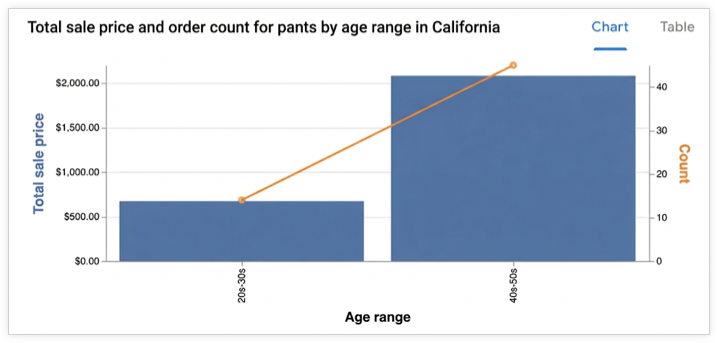
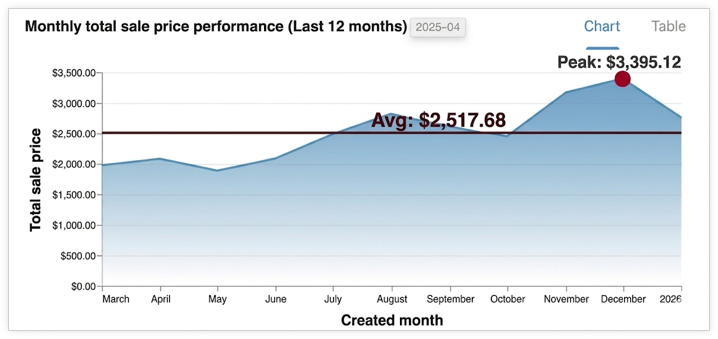
הצגות חזותיות נתמכות
ה-API משתמש ב-Vega-Lite כדי ליצור ויזואליזציות, והוא תומך בכל התכונות הסטנדרטיות של Vega-Lite. יש תמיכה בסוגי התרשימים הבאים:
- אזור
- עמודה
- Geoshape
- מפת חום
- קו (פעולות על ציר הזמן)
- עוגה
- פיזור
איך התרשימים נוצרים
הסוכן מזהה את תוצאת הנתונים הרלוונטית ומעביר אותה לסוכן משנה. סוכן המשנה הזה מריץ קוד Python כדי ליצור הגדרת JSON של Vega-Lite לתרשים. ה-API משתמש בהקשר של השיחה כדי להבין טוב יותר את כוונת המשתמש כשיוצרים תרשימים. בעזרת Python, API יכול ליצור תרשימים מורכבים יותר.
יכול להיות שהסוכן יבצע שינויים קלים בנתונים, כמו צבירה או החלת מסננים, כדי שהתרשים יהיה רלוונטי וקריא יותר.
פורמטים של פלט
התרשים מוחזר בהודעת תוצאה chart ויכול להיות בפורמטים הבאים:
- קובץ JSON של Vega-Lite
- תמונת SVG
אפשר לבקש תמונות באמצעות השדה ChartOptions בהקשר. כשמתבצעת בקשה לתמונה, ה-API מספק גם את התמונה וגם את פלט ה-JSON של Vega-Lite.
הצגת תשובה של סוכן כוויזואליזציה
בקטע הזה נסביר איך להשתמש ב-Python SDK כדי לעבד ויזואליזציה ממפרטי התרשים שמופיעים בתשובה של Conversational Analytics API. קוד לדוגמה מחלץ את מפרט התרשים (בפורמט Vega-Lite) מהשדה chart בתשובה, ומשתמש בספרייה Altair (שמבוססת על Vega-Lite) כדי לרנדר את התרשים, לשמור אותו כתמונה ולהציג אותו.
פרטים נוספים על עיבוד תרשימים באמצעות Vega-Lite והמערכת האקולוגית של Vega-Lite זמינים במאמר כלים ליצירת ויזואליזציות של Vega-Lite.
דוגמה: הצגת תרשים מפלט של Vega-Lite
בדוגמה הזו מוסבר איך לעבד תרשים עמודות מתשובה של סוכן Conversational Analytics API. בדוגמה הבאה נשלחת בקשה עם ההנחיה הבאה:
"Create a bar graph that shows the top five states by the total number of airports."
קוד הדוגמה מגדיר את פונקציות העזר הבאות:
-
render_chart_response: מחלץ את ההגדרה של Vega-Lite מההודעהchart, ממיר אותה לפורמט שספריית Altair יכולה להשתמש בו, מעבד את התרשים, שומר אותו ב-chart.pngומציג אותו. -
chat: שולח בקשה אל Conversational Analytics API באמצעות המשתנהinline_contextוהרשימה הנוכחיתmessages, מעבד את התגובה של הסטרימינג, ואם מוחזר תרשים, קורא ל-render_chart_responseכדי להציג אותו.
כדי להשתמש בקוד לדוגמה הבא, מחליפים את הערכים הבאים:
- sqlgen-testing: המזהה של פרויקט החיוב שבו מופעלים ממשקי ה-API הנדרשים.
- Create a bar graph that shows the top five states by the total number of airports: ההנחיה שרוצים לשלוח ל-Conversational Analytics API.
from google.cloud import geminidataanalytics
from google.protobuf.json_format import MessageToDict
import altair as alt
import proto

# Helper function for rendering chart response
def render_chart_response(resp):
  def _convert(v):
    if isinstance(v, proto.marshal.collections.maps.MapComposite):
      return {k: _convert(val) for k, val in v.items()}
    elif isinstance(v, proto.marshal.collections.RepeatedComposite):
      return [_convert(el) for el in v]
    elif isinstance(v, (int, float, str, bool, type(None))):
      return v
    else:
      return MessageToDict(v)

  try:
    vega_config = _convert(resp.result.vega_config)
    chart = alt.Chart.from_dict(vega_config)
    chart.save('chart.png')
    chart.display()
    print("Chart rendered and saved as chart.png")
  except Exception as e:
    print(f"Error rendering chart: {e}")

# Helper function for calling the API
def chat(q: str, inline_context, messages):
  billing_project = "sqlgen-testing"

  input_message = geminidataanalytics.Message(
      user_message=geminidataanalytics.UserMessage(text=q)
  )
  messages.append(input_message)

  client = geminidataanalytics.DataChatServiceClient()
  request = geminidataanalytics.ChatRequest(
      inline_context=inline_context,
      parent=f"projects/{billing_project}/locations/global",
      messages=messages,
  )

  # Make the request
  try:
    stream = client.chat(request=request)

    for reply in stream:
      if reply.system_message and hasattr(reply.system_message, 'chart'):
        # ChartMessage includes `query` for generating a chart and `result` with the generated chart.
        if hasattr(reply.system_message.chart, 'result'):
          print("Chart result found in response.")
          render_chart_response(reply.system_message.chart)
        else:
          print("Chart message found, but no result yet.")
      # Append system messages to maintain context for follow-up turns
      if reply.system_message:
          messages.append(geminidataanalytics.Message(system_message=reply.system_message))

  except Exception as e:
    print(f"Error calling API: {e}")

# Example Usage:
# Assuming 'inline_context' and 'messages' are initialized as per "Build a data agent using the Python SDK"
# Example initialization (replace with your actual context and message history):
# inline_context = geminidataanalytics.InlineContext(...)
# messages = []

# Send the prompt to make a bar graph
chat("Create a bar graph that shows the top five states by the total number of airports")