

Managed Agents API on Agent Platform lets you build managed, autonomous agents with a single API call. Powered by the Antigravity harness, each agent runs with a sandbox environment where it reasons, plans, uses agent skills, executes code, searches the web, and reads and writes files.
System architecture
Managed Agents API on Agent Platform leverages two key interfaces:
| API | Description |
|---|---|
| Agents API | The control plane for managing agents. Use it to create agents from configurations and configure their execution environments, including mounting external data sources and defining network allowlists. The system applies these configurations to the agent's sandbox execution environment. Connecting external data sources and tools requires authentication, with limitations described in Security and best practices. |
| Interactions API | This is the data plane, serving as the primary interface to communicate and interact with your deployed agents at runtime. It connects to the agent created using agents API. |
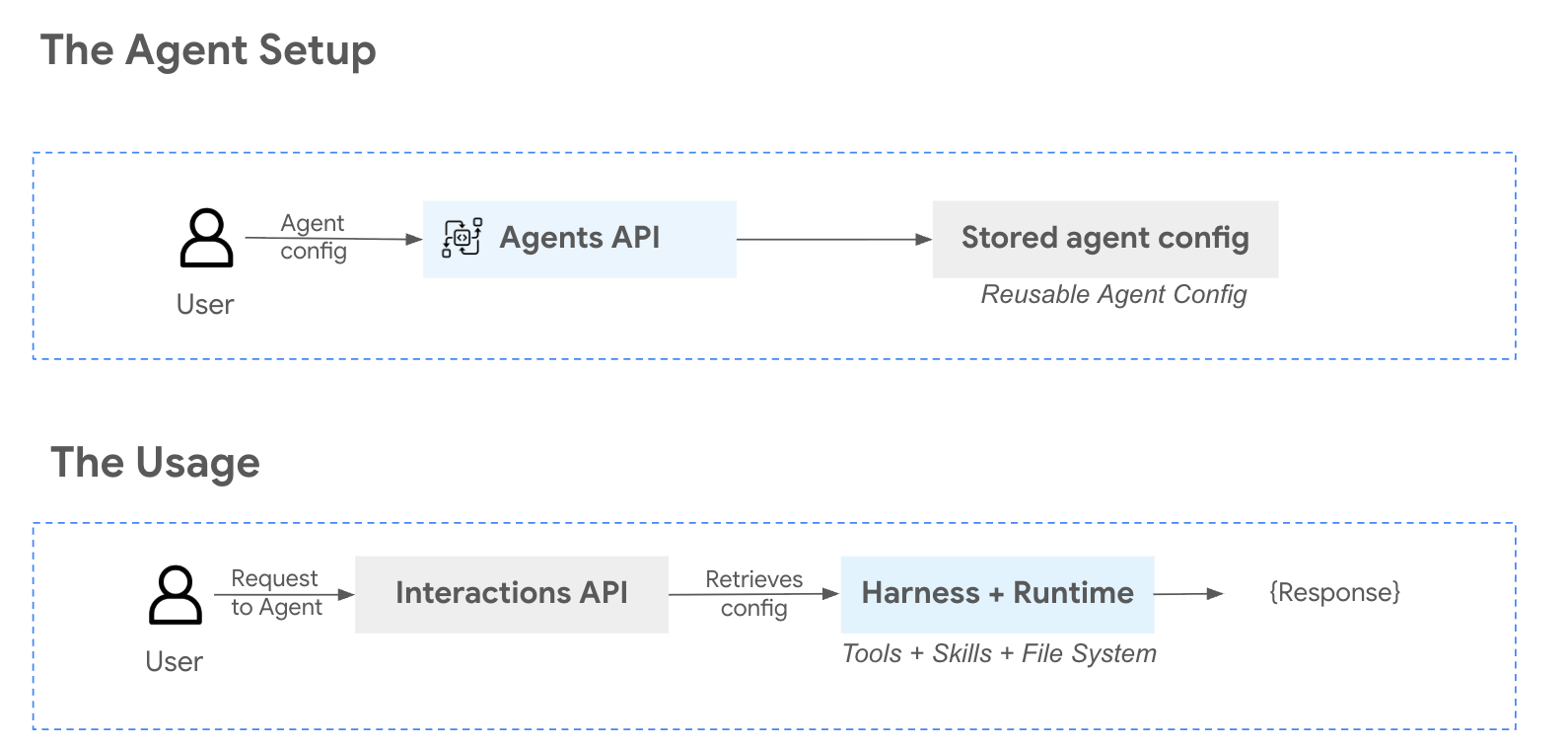
For enhanced security, each agent operates with an isolated sandbox environment. When you customize the environment with external sources, such as Cloud Storage, the system loads these files directly into the container's file system on demand, and the agent can write results back to Cloud Storage. For more information, see the Managed Agents API on Agent Platform sandbox environment reference.
Security and best practices
By default, every agent performs actions in a sandbox environment with no access to external systems, networks, or credentials. The agent can only interact with the files, packages, and data inside its own sandbox.
This means that out of the box, the agent cannot make network calls, access databases, or reach any of your production infrastructure.
Any connectivity beyond the sandbox must be explicitly configured by you, the developer. For more information, see Configure network access.
Network access
Only enable this when your use case requires it, and scope access as narrowly as possible.
When you enable network access for an environment, the agent can reach external APIs, clone public repositories, and download packages. Before enabling network access, consider the following:
- Avoid exposing sensitive endpoints. Do not point the agent at internal services, admin panels, or databases unless you have reviewed the risks and are prepared to monitor the agent's activity.
- Review agent actions. When network access is enabled, monitor the agent's interactions—especially during initial development—to verify it is only accessing the resources you intended.
Credential best practices
If your workflow requires the agent to authenticate with external services, such as MCP servers, you are responsible for provisioning and scoping those credentials. Follow these guidelines to reduce risk:
- Use least-privilege credentials. Create service accounts or API keys with only the permissions your agent needs. Avoid passing credentials with broad or administrative access.
- Prefer short-lived tokens. Where possible, use time-limited credentials or tokens that expire rather than long-lived API keys.
- Never pass credentials you aren't comfortable with the agent using. The agent may use any credential it has access to in order to complete the task you've given it. Only provide credentials whose full scope of access you are willing to grant.
- Rotate credentials regularly. Treat credentials shared with the agent the same way you would treat any programmatic credential—rotate them on a regular schedule.
Connecting external tools and APIs
The Agents API supports connecting external tools and APIs (such as MCP servers) to extend the agent's capabilities. When doing so:
- Evaluate tool sources carefully. Only connect tools from sources you trust. A malicious or poorly written tool could expose data or perform unintended actions.
- Scope tool permissions. Configure tools with the minimum permissions required for your use case. If a tool supports read-only mode, use that unless write access is necessary.
- Test in isolation first. Before connecting a tool to a production data source, test it against sample or synthetic data to verify the agent uses it as expected.
Human oversight
Agents can reason, plan, and execute multi-step workflows with a high degree of autonomy. While this is powerful, it also means you should apply appropriate oversight—particularly for tasks that modify data or interact with external systems.
Always verify critical outputs—such as generated code, data transformations, or configuration changes—before deploying them.
Support and feedback
Email the public discussion group at
managed-agents-in-agent-platform@google.com for support and feedback on
Managed Agents API on Agent Platform.
What's next
Create and manage agents
Learn how to create, update, list, get, and delete agents using the REST API.
Managed Agents API on Agent Platform sandbox environment
Learn about the isolated sandbox container, permissions, and pre-installed packages/tools.
Evaluate agents
Learn how to evaluate agents built with the Managed Agents API using the GenAI Evaluation Service.