מדריך ל-Slack – פקודות דרך שורת הפקודות (דור ראשון)

במדריך הזה נדגים איך להשתמש בפונקציות של Cloud Run כדי להטמיע פקודת לוכסן ב-Slack שמחפשת ב-Google Knowledge Graph API.

מטרות

  • יוצרים פקודה דרך שורת הפקודות ב-Slack.
  • כתיבה ופריסה של פונקציית HTTP Cloud Run.
  • מחפשים ב-Google Knowledge Graph API באמצעות פקודת הלוכס.

עלויות

במסמך הזה משתמשים ברכיבים הבאים של Google Cloud, והשימוש בהם כרוך בתשלום:

  • Cloud Run functions

כדי להעריך את ההוצאות בהתאם לתחזית השימוש שלכם, אתם יכולים להיעזר במחשבון העלויות.

משתמשים חדשים של Google Cloud ? יכול להיות שאתם זכאים לתקופת ניסיון בחינם.

לפני שמתחילים

  1. נכנסים לחשבון Google Cloud . אם אתם משתמשים חדשים ב- Google Cloud, צרו חשבון כדי שתוכלו להעריך את הביצועים של המוצרים שלנו בתרחישים מהעולם האמיתי. לקוחות חדשים מקבלים בחינם גם קרדיט בשווי 300$ להרצה, לבדיקה ולפריסה של עומסי העבודה.
  2. In the Google Cloud console, on the project selector page, select or create a Google Cloud project.

    Roles required to select or create a project

    • Select a project: Selecting a project doesn't require a specific IAM role—you can select any project that you've been granted a role on.
    • Create a project: To create a project, you need the Project Creator role (roles/resourcemanager.projectCreator), which contains the resourcemanager.projects.create permission. Learn how to grant roles.

    Go to project selector

  3. Verify that billing is enabled for your Google Cloud project.

  4. Enable the Cloud Functions, Cloud Build, and Google Knowledge Graph Search APIs.

    Roles required to enable APIs

    To enable APIs, you need the serviceusage.services.enable permission. If you created the project, then you likely already have this permission through the Owner role (roles/owner). Otherwise, you can get this permission through the Service Usage Admin role (roles/serviceusage.serviceUsageAdmin). Learn how to grant roles.

    Enable the APIs

  5. התקינו את ה-CLI של Google Cloud.

  6. אם אתם משתמשים בספק זהויות חיצוני (IdP), קודם אתם צריכים להיכנס ל-CLI של gcloud באמצעות המאגר המאוחד לניהול זהויות.

  7. כדי לאתחל את ה-CLI של gcloud, הריצו את הפקודה הבאה:

    gcloud init
  8. In the Google Cloud console, on the project selector page, select or create a Google Cloud project.

    Roles required to select or create a project

    • Select a project: Selecting a project doesn't require a specific IAM role—you can select any project that you've been granted a role on.
    • Create a project: To create a project, you need the Project Creator role (roles/resourcemanager.projectCreator), which contains the resourcemanager.projects.create permission. Learn how to grant roles.

    Go to project selector

  9. Verify that billing is enabled for your Google Cloud project.

  10. Enable the Cloud Functions, Cloud Build, and Google Knowledge Graph Search APIs.

    Roles required to enable APIs

    To enable APIs, you need the serviceusage.services.enable permission. If you created the project, then you likely already have this permission through the Owner role (roles/owner). Otherwise, you can get this permission through the Service Usage Admin role (roles/serviceusage.serviceUsageAdmin). Learn how to grant roles.

    Enable the APIs

  11. התקינו את ה-CLI של Google Cloud.

  12. אם אתם משתמשים בספק זהויות חיצוני (IdP), קודם אתם צריכים להיכנס ל-CLI של gcloud באמצעות המאגר המאוחד לניהול זהויות.

  13. כדי לאתחל את ה-CLI של gcloud, הריצו את הפקודה הבאה:

    gcloud init
  14. אם כבר התקנתם את ה-CLI של gcloud, מריצים את הפקודה הבאה כדי לעדכן אותו:

    gcloud components update
  15. מכינים את סביבת הפיתוח.

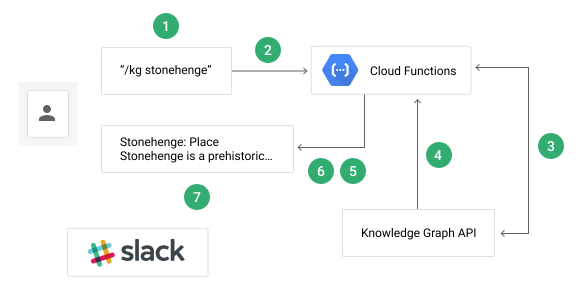
המחשת זרימת הנתונים

תהליך העברת הנתונים באפליקציית ההדרכה של פקודות דרך שורת הפקודות ב-Slack כולל כמה שלבים:

  1. המשתמש מריץ את הפקודה /kg <search_query> דרך שורת הפקודות בערוץ Slack.
  2. ‫Slack שולחת את מטען הנתונים של הפקודה לנקודת הקצה של הטריגר של הפונקציה.
  3. הפונקציה שולחת בקשה עם שאילתת החיפוש של המשתמש אל Knowledge Graph API.
  4. התשובה של Knowledge Graph API כוללת את כל התוצאות התואמות.
  5. הפונקציה מעצבת את התשובה כהודעה ב-Slack.
  6. הפונקציה שולחת את ההודעה בחזרה ל-Slack.
  7. המשתמש רואה את התשובה המעוצבת בערוץ Slack.

כדאי להסתכל על השלבים הבאים:

יצירת מפתח Knowledge Graph API

בדף Google Cloud Credentials במסוף, לוחצים על הלחצן Create credentials ובוחרים באפשרות API key. חשוב לזכור את המפתח הזה, כי תשתמשו בו כדי לגשת ל-Knowledge Graph API בקטע הבא.

הכנת הפונקציה

  1. משכפלים את מאגר האפליקציה לדוגמה ומעבירים אותו למכונה המקומית:

    Node.js

    git clone https://github.com/GoogleCloudPlatform/nodejs-docs-samples.git

    אפשרות נוספת היא להוריד את הדוגמה כקובץ ZIP ולחלץ אותה.

    Python

    git clone https://github.com/GoogleCloudPlatform/python-docs-samples.git

    אפשרות נוספת היא להוריד את הדוגמה כקובץ ZIP ולחלץ אותה.

    המשך

    git clone https://github.com/GoogleCloudPlatform/golang-samples.git

    אפשרות נוספת היא להוריד את הדוגמה כקובץ ZIP ולחלץ אותה.

    Java

    git clone https://github.com/GoogleCloudPlatform/java-docs-samples.git

    אפשרות נוספת היא להוריד את הדוגמה כקובץ ZIP ולחלץ אותה.

    Ruby

    git clone https://github.com/GoogleCloudPlatform/ruby-docs-samples.git

    אפשרות נוספת היא להוריד את הדוגמה כקובץ ZIP ולחלץ אותה.

  2. עוברים לספרייה שמכילה את הקוד לדוגמה של פונקציות Cloud Run:

    Node.js

    cd nodejs-docs-samples/functions/slack/

    Python

    cd python-docs-samples/functions/slack/

    Go

    cd golang-samples/functions/slack/

    Java

    cd java-docs-samples/functions/slack/

    Ruby

    cd ruby-docs-samples/functions/slack/

פריסת הפונקציה

כדי לפרוס את הפונקציה שמופעלת כשאתם (או Slack) שולחים בקשת HTTP POST לנקודת הקצה של הפונקציה, מריצים את הפקודה הבאה בספרייה שמכילה את קוד הדוגמה (או את קובץ pom.xml עבור Java):

מחליפים את YOUR_SLACK_SIGNING_SECRET בסוד החתימה שסופק על ידי Slack בדף Basic information של הגדרות האפליקציה, ואת YOUR_KG_API_KEY במפתח Knowledge Graph API שיצרתם קודם לכן.

Node.js

gcloud functions deploy kgSearch \
--runtime nodejs22 \
--trigger-http \
--set-env-vars "SLACK_SECRET=YOUR_SLACK_SIGNING_SECRET,KG_API_KEY=YOUR_KG_API_KEY" \
--allow-unauthenticated

משתמשים בדגל --runtime כדי לציין את מזהה סביבת זמן הריצה של גרסת Node.js נתמכת להרצת הפונקציה.

Python

gcloud functions deploy kg_search \
--runtime python312 \
--trigger-http \
--set-env-vars "SLACK_SECRET=YOUR_SLACK_SIGNING_SECRET,KG_API_KEY=YOUR_KG_API_KEY" \
--allow-unauthenticated

משתמשים בדגל --runtime כדי לציין את מזהה זמן הריצה של גרסת Python נתמכת להרצת הפונקציה.

המשך

gcloud functions deploy KGSearch \
--runtime go121 \
--trigger-http \
--set-env-vars "SLACK_SECRET=YOUR_SLACK_SIGNING_SECRET,KG_API_KEY=YOUR_KG_API_KEY" \
--allow-unauthenticated

כדי לציין את מזהה זמן הריצה של גרסת Go נתמכת להרצת הפונקציה, משתמשים בדגל --runtime.

Java

gcloud functions deploy java-slack-function \
--entry-point functions.SlackSlashCommand \
--runtime java17 \
--memory 512MB \
--trigger-http \
--set-env-vars "SLACK_SECRET=YOUR_SLACK_SIGNING_SECRET,KG_API_KEY=YOUR_KG_API_KEY" \
--allow-unauthenticated

משתמשים בדגל --runtime כדי לציין את מזהה זמן הריצה של גרסת Java נתמכת להרצת הפונקציה.

Ruby

gcloud functions deploy kg_search --runtime ruby33 \
-
-trigger-http \
-
-set-env-vars "SLACK_SECRET=YOUR_SLACK_SIGNING_SECRET,KG_API_KEY=YOUR_KG_API_KEY" \
-
-allow-unauthenticated

משתמשים בדגל --runtime כדי לציין את מזהה זמן הריצה של גרסת Ruby נתמכת להרצת הפונקציה.

הגדרת האפליקציה

אחרי שפורסים את הפונקציה, צריך ליצור פקודת לוכסן ב-Slack שתשלח את השאילתה לפונקציה בכל פעם שהפקודה מופעלת:

  1. יוצרים אפליקציית Slack כדי לארח את פקודת הסלאש של Slack. משייכים אותו לצוות ב-Slack שיש לכם הרשאות להתקין בו שילובים.

  2. עוברים אל פקודות סלאש ולוחצים על הכפתור יצירת פקודה חדשה.

  3. מזינים /kg כשם הפקודה.

  4. מזינים את כתובת ה-URL של הפקודה:

    Node.js

    https://YOUR_REGION-YOUR_PROJECT_ID.cloudfunctions.net/kgSearch

    Python

    https://YOUR_REGION-YOUR_PROJECT_ID.cloudfunctions.net/kg_search

    Go

    https://YOUR_REGION-YOUR_PROJECT_ID.cloudfunctions.net/KGSearch

    Java

    https://YOUR_REGION-YOUR_PROJECT_ID.cloudfunctions.net/java-slack-function

    Ruby

    https://YOUR_REGION-YOUR_PROJECT_ID.cloudfunctions.net/kg_search

    כאשר YOUR_REGION הוא האזור שבו הפונקציה נפרסת ו-YOUR_REGION הוא מזהה פרויקט Cloud.YOUR_PROJECT_ID

    שני הערכים מוצגים בטרמינל כשהפריסה של הפונקציה מסתיימת.

  5. לוחצים על Save.

  6. עוברים אל מידע בסיסי.

  7. לוחצים על התקנת האפליקציה בסביבת העבודה ופועלים לפי ההוראות במסך כדי להפעיל את האפליקציה בסביבת העבודה.

    הפקודה דרך שורת הפקודות ב-Slack אמורה להתעדכן בקרוב.

הסבר על הקוד

ייבוא יחסי תלות

האפליקציה צריכה לייבא כמה תלויות כדי לתקשר עם שירותי Google Cloud Platform:

Node.js

const functions = require('@google-cloud/functions-framework');
const google = require('@googleapis/kgsearch');
const crypto = require('crypto');

// Get a reference to the Knowledge Graph Search component
const kgsearch = google.kgsearch('v1');

Python

import os

from flask import jsonify
import functions_framework
import googleapiclient.discovery
from slack.signature import SignatureVerifier


kgsearch = googleapiclient.discovery.build(
    "kgsearch", "v1", developerKey=os.environ["KG_API_KEY"], cache_discovery=False
)

המשך


package slack

import (
	"context"
	"log"
	"os"

	"google.golang.org/api/kgsearch/v1"
	"google.golang.org/api/option"
)

var (
	entitiesService *kgsearch.EntitiesService
	kgKey           string
	slackSecret     string
)

func setup(ctx context.Context) {
	kgKey = os.Getenv("KG_API_KEY")
	slackSecret = os.Getenv("SLACK_SECRET")

	if entitiesService == nil {
		kgService, err := kgsearch.NewService(ctx, option.WithAPIKey(kgKey))
		if err != nil {
			log.Fatalf("kgsearch.NewService: %v", err)
		}
		entitiesService = kgsearch.NewEntitiesService(kgService)
	}
}

Java

private static final Logger logger = Logger.getLogger(SlackSlashCommand.class.getName());
private static final String API_KEY = getenv("KG_API_KEY");
private static final String SLACK_SECRET = getenv("SLACK_SECRET");
private static final Gson gson = new Gson();

private final String apiKey;
private final Kgsearch kgClient;
private final SlackSignature.Verifier verifier;

public SlackSlashCommand() throws IOException, GeneralSecurityException {
  this(new SlackSignature.Verifier(new SlackSignature.Generator(SLACK_SECRET)));
}

SlackSlashCommand(SlackSignature.Verifier verifier) throws IOException, GeneralSecurityException {
  this(verifier, API_KEY);
}

SlackSlashCommand(SlackSignature.Verifier verifier, String apiKey)
    throws IOException, GeneralSecurityException {
  this.verifier = verifier;
  this.apiKey = apiKey;
  this.kgClient = new Kgsearch.Builder(
      GoogleNetHttpTransport.newTrustedTransport(), new GsonFactory(), null).build();
}

// Avoid ungraceful deployment failures due to unset environment variables.
// If you get this warning you should redeploy with the variable set.
private static String getenv(String name) {
  String value = System.getenv(name);
  if (value == null) {
    logger.warning("Environment variable " + name + " was not set");
    value = "MISSING";
  }
  return value;
}

Ruby

require "functions_framework"
require "slack-ruby-client"
require "google/apis/kgsearch_v1"

# This block is executed during cold start, before the function begins
# handling requests. This is the recommended way to create shared resources
# and objects.
FunctionsFramework.on_startup do
  # Create a global handler object, configured with the environment-provided
  # API key and signing secret.
  kg_search = KGSearch.new kg_api_key:     ENV["KG_API_KEY"],
                           signing_secret: ENV["SLACK_SECRET"]
  set_global :kg_search, kg_search
end

# The KGSearch class implements the logic of validating and responding
# to requests. More methods of this class are shown below.
class KGSearch
  def initialize kg_api_key:, signing_secret:
    # Create the global client for the Knowledge Graph Search Service,
    # configuring it with your API key.
    @client = Google::Apis::KgsearchV1::KgsearchService.new
    @client.key = kg_api_key

    # Save signing secret for use by the signature validation method.
    @signing_secret = signing_secret
  end

קבלת ה-webhook

הפונקציה הבאה מופעלת כשאתם (או Slack) שולחים בקשת HTTP POST לנקודת הקצה של הפונקציה:

Node.js

/**
 * Receive a Slash Command request from Slack.
 *
 * Trigger this function by creating a Slack slash command with the HTTP Trigger URL.
 * You can find the HTTP URL in the Cloud Console or using `gcloud functions describe`
 *
 * @param {object} req Cloud Function request object.
 * @param {object} req.body The request payload.
 * @param {string} req.rawBody Raw request payload used to validate Slack's message signature.
 * @param {string} req.body.text The user's search query.
 * @param {object} res Cloud Function response object.
 */
functions.http('kgSearch', async (req, res) => {
  try {
    if (req.method !== 'POST') {
      const error = new Error('Only POST requests are accepted');
      error.code = 405;
      throw error;
    }

    if (!req.body.text) {
      const error = new Error('No text found in body.');
      error.code = 400;
      throw error;
    }

    // Verify that this request came from Slack
    verifyWebhook(req);

    // Make the request to the Knowledge Graph Search API
    const response = await makeSearchRequest(req.body.text);

    // Send the formatted message back to Slack
    res.json(response);
  } catch (err) {
    console.error(err);
    res.status(err.code || 500).send(err.message || 'Internal Server Error');
  }
});

Python

@functions_framework.http
def kg_search(request):
    if request.method != "POST":
        return "Only POST requests are accepted", 405

    verify_signature(request)
    kg_search_response = make_search_request(request.form["text"])
    return jsonify(kg_search_response)

המשך


// Package slack is a Cloud Function which recieves a query from
// a Slack command and responds with the KG API result.
package slack

import (
	"bytes"
	"crypto/hmac"
	"crypto/sha256"
	"encoding/hex"
	"encoding/json"
	"fmt"
	"io"
	"log"
	"net/http"
	"strconv"
	"strings"
	"time"
)

type oldTimeStampError struct {
	s string
}

func (e *oldTimeStampError) Error() string {
	return e.s
}

const (
	version                     = "v0"
	slackRequestTimestampHeader = "X-Slack-Request-Timestamp"
	slackSignatureHeader        = "X-Slack-Signature"
)

type attachment struct {
	Color     string `json:"color"`
	Title     string `json:"title"`
	TitleLink string `json:"title_link"`
	Text      string `json:"text"`
	ImageURL  string `json:"image_url"`
}

// Message is the a Slack message event.
// see https://api.slack.com/docs/message-formatting
type Message struct {
	ResponseType string       `json:"response_type"`
	Text         string       `json:"text"`
	Attachments  []attachment `json:"attachments"`
}

// KGSearch uses the Knowledge Graph API to search for a query provided
// by a Slack command.
func KGSearch(w http.ResponseWriter, r *http.Request) {
	setup(r.Context())

	bodyBytes, err := io.ReadAll(r.Body)
	if err != nil {
		log.Fatalf("Couldn't read request body: %v", err)
	}
	r.Body = io.NopCloser(bytes.NewBuffer(bodyBytes))

	if r.Method != "POST" {
		http.Error(w, "Only POST requests are accepted", http.StatusMethodNotAllowed)
	}
	if err := r.ParseForm(); err != nil {
		http.Error(w, "Couldn't parse form", 400)
		log.Fatalf("ParseForm: %v", err)
	}

	// Reset r.Body as ParseForm depletes it by reading the io.ReadCloser.
	r.Body = io.NopCloser(bytes.NewBuffer(bodyBytes))
	result, err := verifyWebHook(r, slackSecret)
	if err != nil {
		log.Fatalf("verifyWebhook: %v", err)
	}
	if !result {
		log.Fatalf("signatures did not match.")
	}

	if len(r.Form["text"]) == 0 {
		log.Fatalf("empty text in form")
	}
	kgSearchResponse, err := makeSearchRequest(r.Form["text"][0])
	if err != nil {
		log.Fatalf("makeSearchRequest: %v", err)
	}
	w.Header().Set("Content-Type", "application/json")
	if err = json.NewEncoder(w).Encode(kgSearchResponse); err != nil {
		log.Fatalf("json.Marshal: %v", err)
	}
}

Java

/**
 * Receive a Slash Command request from Slack.
 *
 * @param request Cloud Function request object.
 * @param response Cloud Function response object.
 * @throws IOException if Knowledge Graph request fails
 */
@Override
public void service(HttpRequest request, HttpResponse response) throws IOException {

  // Validate request
  if (!"POST".equals(request.getMethod())) {
    response.setStatusCode(HttpURLConnection.HTTP_BAD_METHOD);
    return;
  }

  // reader can only be read once per request, so we preserve its contents
  String bodyString = request.getReader().lines().collect(Collectors.joining());

  // Slack sends requests as URL-encoded strings
  //   Java 11 doesn't have a standard library
  //   function for this, so do it manually
  Map<String, String> body = new HashMap<>();
  for (String keyValuePair : bodyString.split("&")) {
    String[] keyAndValue = keyValuePair.split("=");
    if (keyAndValue.length == 2) {
      String key = keyAndValue[0];
      String value = keyAndValue[1];

      body.put(key, value);
    }
  }

  if (body == null || !body.containsKey("text")) {
    response.setStatusCode(HttpURLConnection.HTTP_BAD_REQUEST);
    return;
  }

  if (!isValidSlackWebhook(request, bodyString)) {
    response.setStatusCode(HttpURLConnection.HTTP_UNAUTHORIZED);
    return;
  }

  String query = body.get("text");

  // Call knowledge graph API
  JsonObject kgResponse = searchKnowledgeGraph(query);

  // Format response to Slack
  // See https://api.slack.com/docs/message-formatting
  BufferedWriter writer = response.getWriter();

  writer.write(formatSlackMessage(kgResponse, query));

  response.setContentType("application/json");
}

Ruby

# Handler for the function endpoint.
FunctionsFramework.http "kg_search" do |request|
  # Return early if the request is not a POST.
  unless request.post?
    return [405, {}, ["Only POST requests are accepted."]]
  end

  # Access the global Knowledge Graph Search client
  kg_search = global :kg_search

  # Verify the request signature and return early if it failed.
  unless kg_search.signature_valid? request
    return [401, {}, ["Signature validation failed."]]
  end

  # Query the Knowledge Graph and format a Slack message with the response.
  # This method returns a nested hash, which the Functions Framework will
  # convert to JSON automatically.
  kg_search.make_search_request request.params["text"]
end

הפונקציה הבאה מאמתת את הבקשה הנכנסת על ידי אימות הכותרת X-Slack-Signature שסופקה על ידי Slack:

Node.js

/**
 * Verify that the webhook request came from Slack.
 *
 * @param {object} req Cloud Function request object.
 * @param {string} req.headers Headers Slack SDK uses to authenticate request.
 * @param {string} req.rawBody Raw body of webhook request to check signature against.
 */
const verifyWebhook = req => {
  const signingSecret = process.env.SLACK_SECRET;
  const requestSignature = req.headers['x-slack-signature'];
  const requestTimestamp = req.headers['x-slack-request-timestamp'];
  const requestBody = req.rawBody;

  if (!requestSignature || !requestTimestamp) {
    const err = new Error('Missing Slack validation headers.');
    err.code = 400;
    throw err;
  }

  if (!signingSecret) {
    const err = new Error(
      'Server configuration error: SLACK_SECRET is missing.'
    );
    err.code = 500;
    throw err;
  }

  // Prevent replay attacks by verifying the timestamp is recent
  const now = Math.floor(Date.now() / 1000);
  if (Math.abs(now - Number(requestTimestamp)) > 60 * 5) {
    const err = new Error('Slack request timestamp is too old.');
    err.code = 401;
    throw err;
  }

  const hmac = crypto.createHmac('sha256', signingSecret);
  hmac.update('v0:' + requestTimestamp + ':', 'utf8');
  hmac.update(requestBody || '');
  const expectedSignature = 'v0=' + hmac.digest('hex');

  const sigBuffer = Buffer.from(requestSignature, 'utf8');
  const expBuffer = Buffer.from(expectedSignature, 'utf8');

  if (
    sigBuffer.length !== expBuffer.length ||
    !crypto.timingSafeEqual(sigBuffer, expBuffer)
  ) {
    const err = new Error('Invalid Slack signature.');
    err.code = 401;
    throw err;
  }
};

Python

def verify_signature(request):
    request.get_data()  # Decodes received requests into request.data

    verifier = SignatureVerifier(os.environ["SLACK_SECRET"])

    if not verifier.is_valid_request(request.data, request.headers):
        raise ValueError("Invalid request/credentials.")

המשך


// verifyWebHook verifies the request signature.
// See https://api.slack.com/docs/verifying-requests-from-slack.
func verifyWebHook(r *http.Request, slackSigningSecret string) (bool, error) {
	timeStamp := r.Header.Get(slackRequestTimestampHeader)
	slackSignature := r.Header.Get(slackSignatureHeader)

	t, err := strconv.ParseInt(timeStamp, 10, 64)
	if err != nil {
		return false, fmt.Errorf("strconv.ParseInt(%s): %w", timeStamp, err)
	}

	if ageOk, age := checkTimestamp(t); !ageOk {
		return false, &oldTimeStampError{fmt.Sprintf("checkTimestamp(%v): %v %v", t, ageOk, age)}
		// return false, fmt.Errorf("checkTimestamp(%v): %v %v", t, ageOk, age)
	}

	if timeStamp == "" || slackSignature == "" {
		return false, fmt.Errorf("either timeStamp or signature headers were blank")
	}

	body, err := io.ReadAll(r.Body)
	if err != nil {
		return false, fmt.Errorf("io.ReadAll(%v): %w", r.Body, err)
	}

	// Reset the body so other calls won't fail.
	r.Body = io.NopCloser(bytes.NewBuffer(body))

	baseString := fmt.Sprintf("%s:%s:%s", version, timeStamp, body)

	signature := getSignature([]byte(baseString), []byte(slackSigningSecret))

	trimmed := strings.TrimPrefix(slackSignature, fmt.Sprintf("%s=", version))
	signatureInHeader, err := hex.DecodeString(trimmed)

	if err != nil {
		return false, fmt.Errorf("hex.DecodeString(%v): %w", trimmed, err)
	}

	return hmac.Equal(signature, signatureInHeader), nil
}

func getSignature(base []byte, secret []byte) []byte {
	h := hmac.New(sha256.New, secret)
	h.Write(base)

	return h.Sum(nil)
}

// Arbitrarily trusting requests time stamped less than 5 minutes ago.
func checkTimestamp(timeStamp int64) (bool, time.Duration) {
	t := time.Since(time.Unix(timeStamp, 0))

	return t.Minutes() <= 5, t
}

Java

/**
 * Verify that the webhook request came from Slack.
 *
 * @param request Cloud Function request object in {@link HttpRequest} format.
 * @param requestBody Raw body of webhook request to check signature against.
 * @return true if the provided request came from Slack, false otherwise
 */
boolean isValidSlackWebhook(HttpRequest request, String requestBody) {
  // Check for headers
  Optional<String> maybeTimestamp = request.getFirstHeader("X-Slack-Request-Timestamp");
  Optional<String> maybeSignature = request.getFirstHeader("X-Slack-Signature");
  if (!maybeTimestamp.isPresent() || !maybeSignature.isPresent()) {
    return false;
  }

  Long nowInMs = ZonedDateTime.now().toInstant().toEpochMilli();

  return verifier.isValid(maybeTimestamp.get(), requestBody, maybeSignature.get(), nowInMs);
}

Ruby

# slack-ruby-client expects a Rails-style request object with a "headers"
# method, but the Functions Framework provides only a Rack request.
# To avoid bringing in Rails as a dependency, we'll create a simple class
# that implements the "headers" method and delegates everything else back to
# the Rack request object.
require "delegate"
class RequestWithHeaders < SimpleDelegator
  def headers
    env.each_with_object({}) do |(key, val), result|
      if /^HTTP_(\w+)$/ =~ key
        header = Regexp.last_match(1).split("_").map(&:capitalize).join("-")
        result[header] = val
      end
    end
  end
end

# This is a method of the KGSearch class.
# It determines whether the given request's signature is valid.
def signature_valid? request
  # Wrap the request with our class that provides the "headers" method.
  request = RequestWithHeaders.new request

  # Validate the request signature.
  slack_request = Slack::Events::Request.new request,
                                             signing_secret: @signing_secret
  slack_request.valid?
end

שליחת שאילתות אל Knowledge Graph API

הפונקציה הבאה שולחת בקשה עם שאילתת החיפוש של המשתמש אל Knowledge Graph API:

Node.js

/**
 * Send the user's search query to the Knowledge Graph API.
 *
 * @param {string} query The user's search query.
 */
const makeSearchRequest = async query => {
  const response = await kgsearch.entities.search({
    auth: process.env.KG_API_KEY,
    query,
    limit: 1,
  });
  return formatSlackMessage(query, response);
};

Python

def make_search_request(query):
    req = kgsearch.entities().search(query=query, limit=1)
    res = req.execute()
    return format_slack_message(query, res)

המשך

func makeSearchRequest(query string) (*Message, error) {
	res, err := entitiesService.Search().Query(query).Limit(1).Do()
	if err != nil {
		return nil, fmt.Errorf("do: %w", err)
	}
	return formatSlackMessage(query, res)
}

Java

/**
 * Send the user's search query to the Knowledge Graph API.
 *
 * @param query The user's search query.
 * @return The Knowledge graph API results as a {@link JsonObject}.
 * @throws IOException if Knowledge Graph request fails
 */
JsonObject searchKnowledgeGraph(String query) throws IOException {
  Kgsearch.Entities.Search kgRequest = kgClient.entities().search();
  kgRequest.setQuery(query);
  kgRequest.setKey(apiKey);

  return gson.fromJson(kgRequest.execute().toString(), JsonObject.class);
}

Ruby

# This is a method of the KGSearch class.
# It makes an API call to the Knowledge Graph Search Service, and formats
# a Slack message as a nested Hash object.
def make_search_request query
  response = @client.search_entities query: query, limit: 1
  format_slack_message query, response
end

עיצוב ההודעה ב-Slack

לבסוף, הפונקציה הבאה מעצבת את התוצאה מ-Knowledge Graph להודעה ב-Slack עם עיצוב עשיר שתוצג למשתמש:

Node.js

/**
 * Format the Knowledge Graph API response into a richly formatted Slack message.
 *
 * @param {string} query The user's search query.
 * @param {object} response The response from the Knowledge Graph API.
 * @returns {object} The formatted message.
 */
const formatSlackMessage = (query, response) => {
  let entity;

  // Extract the first entity from the result list, if any
  if (
    response &&
    response.data &&
    response.data.itemListElement &&
    response.data.itemListElement.length > 0
  ) {
    entity = response.data.itemListElement[0].result;
  }

  // Prepare a rich Slack message
  // See https://api.slack.com/docs/message-formatting
  const slackMessage = {
    response_type: 'in_channel',
    text: `Query: ${query}`,
    attachments: [],
  };

  if (entity) {
    const attachment = {
      color: '#3367d6',
    };
    if (entity.name) {
      attachment.title = entity.name;
      if (entity.description) {
        attachment.title = `${attachment.title}: ${entity.description}`;
      }
    }
    if (entity.detailedDescription) {
      if (entity.detailedDescription.url) {
        attachment.title_link = entity.detailedDescription.url;
      }
      if (entity.detailedDescription.articleBody) {
        attachment.text = entity.detailedDescription.articleBody;
      }
    }
    if (entity.image && entity.image.contentUrl) {
      attachment.image_url = entity.image.contentUrl;
    }
    slackMessage.attachments.push(attachment);
  } else {
    slackMessage.attachments.push({
      text: 'No results match your query...',
    });
  }

  return slackMessage;
};

Python

def format_slack_message(query, response):
    entity = None
    if (
        response
        and response.get("itemListElement") is not None
        and len(response["itemListElement"]) > 0
    ):
        entity = response["itemListElement"][0]["result"]

    message = {
        "response_type": "in_channel",
        "text": f"Query: {query}",
        "attachments": [],
    }

    attachment = {}
    if entity:
        name = entity.get("name", "")
        description = entity.get("description", "")
        detailed_desc = entity.get("detailedDescription", {})
        url = detailed_desc.get("url")
        article = detailed_desc.get("articleBody")
        image_url = entity.get("image", {}).get("contentUrl")

        attachment["color"] = "#3367d6"
        if name and description:
            attachment["title"] = "{}: {}".format(entity["name"], entity["description"])
        elif name:
            attachment["title"] = name
        if url:
            attachment["title_link"] = url
        if article:
            attachment["text"] = article
        if image_url:
            attachment["image_url"] = image_url
    else:
        attachment["text"] = "No results match your query."
    message["attachments"].append(attachment)

    return message

המשך


package slack

import (
	"fmt"

	"google.golang.org/api/kgsearch/v1"
)

func formatSlackMessage(query string, response *kgsearch.SearchResponse) (*Message, error) {
	if response == nil {
		return nil, fmt.Errorf("empty response")
	}

	if response.ItemListElement == nil || len(response.ItemListElement) == 0 {
		message := &Message{
			ResponseType: "in_channel",
			Text:         fmt.Sprintf("Query: %s", query),
			Attachments: []attachment{
				{
					Color: "#d6334b",
					Text:  "No results match your query.",
				},
			},
		}
		return message, nil
	}

	entity, ok := response.ItemListElement[0].(map[string]interface{})
	if !ok {
		return nil, fmt.Errorf("could not parse response entity")
	}
	result, ok := entity["result"].(map[string]interface{})
	if !ok {
		return nil, fmt.Errorf("error formatting response result")
	}

	attach := attachment{Color: "#3367d6"}
	if name, ok := result["name"].(string); ok {
		if description, ok := result["description"].(string); ok {
			attach.Title = fmt.Sprintf("%s: %s", name, description)
		} else {
			attach.Title = name
		}
	}
	if detailedDesc, ok := result["detailedDescription"].(map[string]interface{}); ok {
		if url, ok := detailedDesc["url"].(string); ok {
			attach.TitleLink = url
		}
		if article, ok := detailedDesc["articleBody"].(string); ok {
			attach.Text = article
		}
	}
	if image, ok := result["image"].(map[string]interface{}); ok {
		if imageURL, ok := image["contentUrl"].(string); ok {
			attach.ImageURL = imageURL
		}
	}

	message := &Message{
		ResponseType: "in_channel",
		Text:         fmt.Sprintf("Query: %s", query),
		Attachments:  []attachment{attach},
	}
	return message, nil
}

Java

/**
 * Helper method to copy properties between {@link JsonObject}s
 */
void addPropertyIfPresent(
    JsonObject target, String targetName, JsonObject source, String sourceName) {
  if (source.has(sourceName)) {
    target.addProperty(targetName, source.get(sourceName).getAsString());
  }
}

/**
 * Format the Knowledge Graph API response into a richly formatted Slack message.
 *
 * @param kgResponse The response from the Knowledge Graph API as a {@link JsonObject}.
 * @param query The user's search query.
 * @return The formatted Slack message as a JSON string.
 */
String formatSlackMessage(JsonObject kgResponse, String query) {
  JsonObject attachmentJson = new JsonObject();

  JsonObject responseJson = new JsonObject();
  responseJson.addProperty("response_type", "in_channel");
  responseJson.addProperty("text", String.format("Query: %s", query));

  JsonArray entityList = kgResponse.getAsJsonArray("itemListElement");

  // Extract the first entity from the result list, if any
  if (entityList.size() == 0) {
    attachmentJson.addProperty("text", "No results match your query...");
    responseJson.add("attachments", attachmentJson);

    return gson.toJson(responseJson);
  }

  JsonObject entity = entityList.get(0).getAsJsonObject().getAsJsonObject("result");

  // Construct Knowledge Graph response attachment
  String title = entity.get("name").getAsString();
  if (entity.has("description")) {
    title = String.format("%s: %s", title, entity.get("description").getAsString());
  }
  attachmentJson.addProperty("title", title);

  if (entity.has("detailedDescription")) {
    JsonObject detailedDescJson = entity.getAsJsonObject("detailedDescription");
    addPropertyIfPresent(attachmentJson, "title_link", detailedDescJson, "url");
    addPropertyIfPresent(attachmentJson, "text", detailedDescJson, "articleBody");
  }

  if (entity.has("image")) {
    JsonObject imageJson = entity.getAsJsonObject("image");
    addPropertyIfPresent(attachmentJson, "image_url", imageJson, "contentUrl");
  }

  JsonArray attachmentList = new JsonArray();
  attachmentList.add(attachmentJson);

  responseJson.add("attachments", attachmentList);

  return gson.toJson(responseJson);
}

Ruby

# This is a method of the KGSearch class.
# It takes a raw SearchResponse from the Knowledge Graph Search Service,
# and formats a Slack message.
def format_slack_message query, response
  result = response.item_list_element&.first&.fetch "result", nil
  attachment =
    if result
      name = result.fetch "name", nil
      description = result.fetch "description", nil
      details = result.fetch "detailedDescription", {}
      { "title"      => name && description ? "#{name}: #{description}" : name,
        "title_link" => details.fetch("url", nil),
        "text"       => details.fetch("articleBody", nil),
        "image_url"  => result.dig("image", "contentUrl") }
    else
      { "text" => "No results match your query." }
    end
  { "response_type" => "in_channel",
    "text"          => "Query: #{query}",
    "attachments"   => [attachment.compact] }
end

פסק זמן ב-Slack API

‫Slack API מצפה שהפונקציה תגיב תוך 3 שניות מרגע קבלת בקשת webhook.

בדרך כלל הפקודות במדריך הזה מגיבות תוך פחות מ-3 שניות. לפקודות שפועלות למשך זמן ארוך יותר, מומלץ להגדיר פונקציה לדחיפת בקשות (כולל response_url) לנושא Pub/Sub שמשמש כתור משימות.

אחר כך תוכלו ליצור פונקציה שנייה שמופעלת על ידי Pub/Sub, שתעבד את המשימות האלה ותשלח את התוצאות בחזרה אל response_url של Slack.

שימוש בפקודה דרך שורת הפקודות

  1. מקלידים את הפקודה בערוץ Slack:

    /kg giraffe
  2. כדי לוודא שההפעלות הסתיימו, בודקים את היומנים:

    gcloud functions logs read --limit 100

הסרת המשאבים

כדי להימנע מחיובים בחשבון Google Cloud בגלל השימוש במשאבים שנעשה במסגרת המדריך הזה, אפשר למחוק את הפרויקט שמכיל את המשאבים, או להשאיר את הפרויקט ולמחוק את המשאבים בנפרד.

מחיקת הפרויקט

הדרך הקלה ביותר לבטל את החיוב היא למחוק את הפרויקט שיצרתם בשביל המדריך.

כדי למחוק את הפרויקט:

  1. במסוף Google Cloud , נכנסים לדף Manage resources.

    כניסה לדף Manage resources

  2. ברשימת הפרויקטים, בוחרים את הפרויקט שרוצים למחוק ולוחצים על Delete.
  3. כדי למחוק את הפרויקט, כותבים את מזהה הפרויקט בתיבת הדו-שיח ולוחצים על Shut down.

מחיקת הפונקציה

כדי למחוק את הפונקציה שפרסתם במדריך הזה, מריצים את הפקודה הבאה:

Node.js

gcloud functions delete kgSearch 

Python

gcloud functions delete kg_search 

Go

gcloud functions delete KGSearch 

Java

gcloud functions delete java-slack-function 

Ruby

gcloud functions delete kg_search 

אפשר גם למחוק פונקציות Cloud Run ממסוףGoogle Cloud .