

在 Google Cloud 控制台中构建文档摘要器
您可以使用 Document AI 创建摘要器处理器,以对文档的内容进行汇总。您可以根据长度和格式自定义输出。
以下是来自生成的实体的一些 JSON 输出示例:
{
  "type": "summary",
  "mentionText": " Superconductivity is a phenomenon in which a material conducts
  electricity with no resistance. It was discovered in 1911 by Dutch physicist Heike
  Kamerlingh Onnes. In 1986, a new class of materials was discovered that can superconduct
  at much higher temperatures. These materials are called high-temperature superconductors.
  They have the potential to revolutionize the way we use electricity. However,
  high-temperature superconductors are still very expensive to produce. Scientists
  are working on ways to make them more affordable.",
  "normalizedValue": {
    "text": " Superconductivity is a phenomenon in which a material conducts
    electricity with no resistance. It was discovered in 1911 by Dutch physicist
    Heike Kamerlingh Onnes. In 1986, a new class of materials was discovered that
    can superconduct at much higher temperatures. These materials are called
    high-temperature superconductors. They have the potential to revolutionize
    the way we use electricity. However, high-temperature superconductors are
    still very expensive to produce. Scientists are working on ways to make
    them more affordable."
  }
}
过程
在本快速入门中,您将创建文档摘要器处理器、上传示例文档以进行处理,然后创建自定义处理器版本以调整摘要结构。
如需在 Google Cloud 控制台中直接遵循有关此任务的分步指导,请点击操作演示:
准备工作
- 登录您的 Google Cloud 账号。如果您是 Google Cloud新手,请 创建一个账号来评估我们的产品在实际场景中的表现。新客户还可获享 $300 赠金,用于运行、测试和部署工作负载。
-
In the Google Cloud console, on the project selector page, select or create a Google Cloud project.
Roles required to select or create a project
- Select a project: Selecting a project doesn't require a specific IAM role—you can select any project that you've been granted a role on.
-
Create a project: To create a project, you need the Project Creator role
(
roles/resourcemanager.projectCreator), which contains theresourcemanager.projects.createpermission. Learn how to grant roles.
-
If you're using an existing project for this guide, verify that you have the permissions required to complete this guide. If you created a new project, then you already have the required permissions.
-
Verify that billing is enabled for your Google Cloud project.
Enable the Document AI, Cloud Storage APIs.
Roles required to enable APIs
To enable APIs, you need the Service Usage Admin IAM role (
roles/serviceusage.serviceUsageAdmin), which contains theserviceusage.services.enablepermission. Learn how to grant roles.-
In the Google Cloud console, on the project selector page, select or create a Google Cloud project.
Roles required to select or create a project
- Select a project: Selecting a project doesn't require a specific IAM role—you can select any project that you've been granted a role on.
-
Create a project: To create a project, you need the Project Creator role
(
roles/resourcemanager.projectCreator), which contains theresourcemanager.projects.createpermission. Learn how to grant roles.
-
If you're using an existing project for this guide, verify that you have the permissions required to complete this guide. If you created a new project, then you already have the required permissions.
-
Verify that billing is enabled for your Google Cloud project.
Enable the Document AI, Cloud Storage APIs.
Roles required to enable APIs
To enable APIs, you need the Service Usage Admin IAM role (
roles/serviceusage.serviceUsageAdmin), which contains theserviceusage.services.enablepermission. Learn how to grant roles.
所需的角色
如需获得构建文档摘要器所需的权限,请让您的管理员为您授予项目的 Document AI Administrator (roles/documentai.admin) IAM 角色。如需详细了解如何授予角色,请参阅管理对项目、文件夹和组织的访问权限。
创建摘要器处理器
使用 Google Cloud 控制台创建摘要器处理器。如需了解详情,请参阅创建和管理处理器。
在 Google Cloud 控制台的 Document AI 部分,进入 Workbench 页面。
对于摘要器,选择
创建处理器 。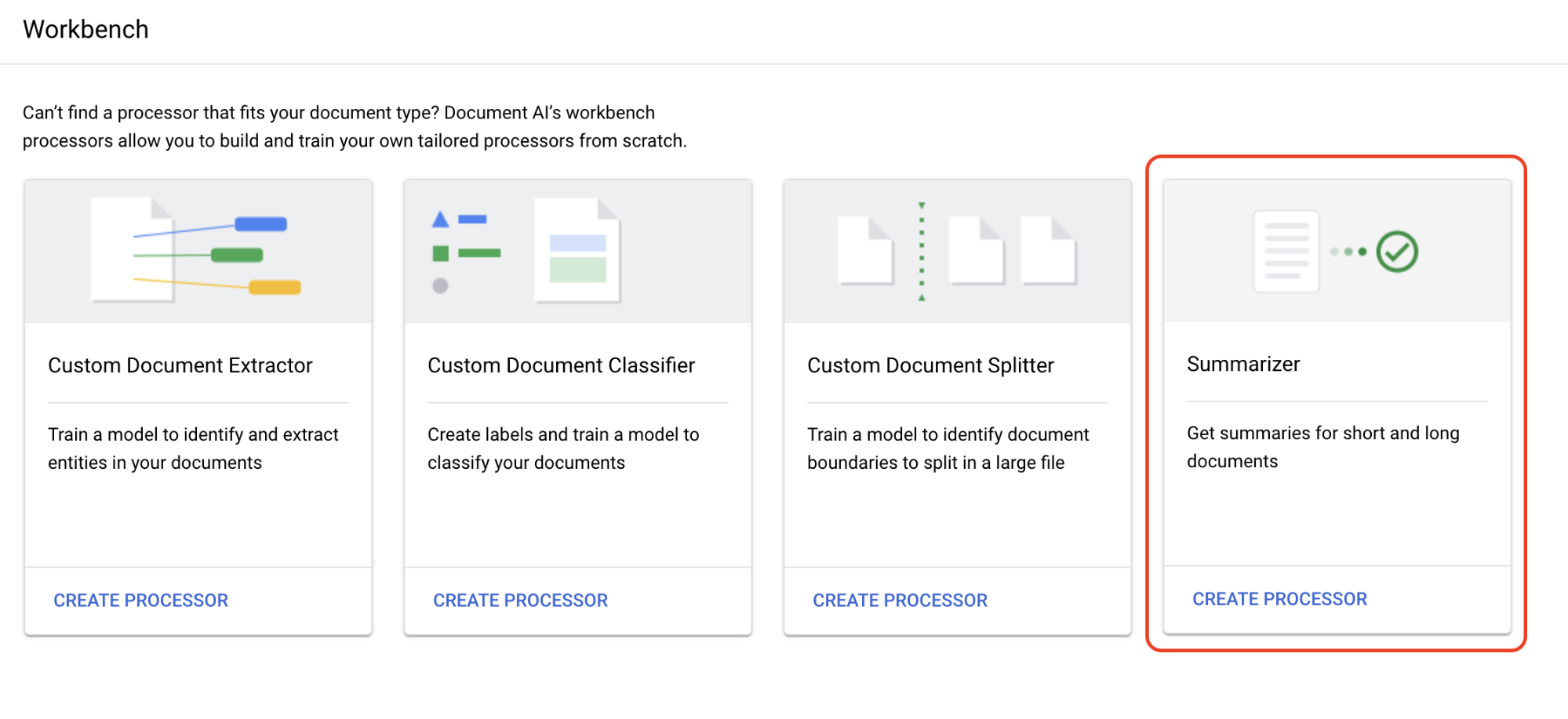
在创建处理器菜单中,输入处理器的名称,例如
quickstart-summarizer。选择离您最近的区域。
选择创建。
您的处理器已创建完成。
测试处理器
您位于刚刚创建的处理器的处理器概览页面。
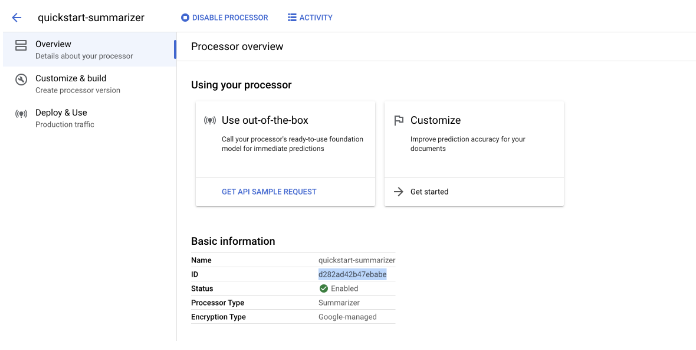
选择
自定义和构建 标签页,对处理器进行实验。
-
它是一个 PDF 文件,其中包含关于超导率的维基百科页面。
选择
上传测试文档 ,然后选择您刚刚下载的文档。您现在位于摘要页面。您可以查看 OCR 检测到的文本和文档摘要。
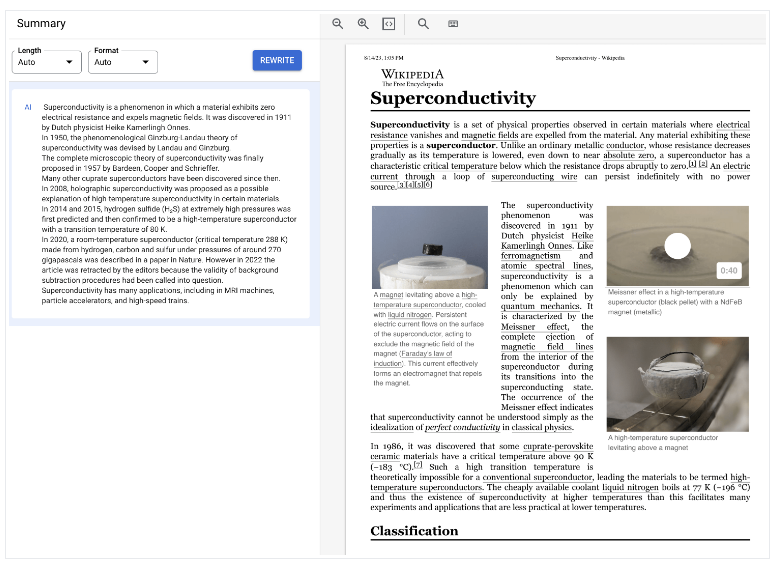
将
长度和格式 设置分别调整为适中和项目符号,然后选择重写并观察结果。返回自定义和构建页面。
部署处理器版本
如果您想在使用 API 处理文档时使用特定的摘要设置,请为这些设置创建处理器版本。
汇总设置 设为您在上一页中使用的最后几个值。选择
创建新版本 ,以创建具有指定摘要设置的处理器版本。输入处理器版本的名称(例如
quickstart-moderate-bulleted),然后选择创建版本。前往
部署和使用 标签页以查看部署状态。部署需要几分钟时间。部署版本后,您可以将其设置为
默认版本 ,也可以在使用 API 处理文档时提供版本 ID。如需使用 Document AI API,请执行以下操作:
您已成功使用 Document AI 从文档中提取文本并对其进行总结。
清理
为避免因本页中使用的资源导致您的 Google Cloud 账号产生费用,请按照以下步骤操作。
为避免产生不必要的 Google Cloud 费用,请使用Google Cloud console 删除不再需要的处理器和项目。