

Process documents with Gemini layout parser
The Document AI layout parser is an advanced text parsing and document understanding service that converts unstructured content from complex files into highly structured, precise and machine-readable information. It combines Google's specialized Object Character Recognition (OCR) models with the generative AI capabilities of Gemini. It understands the complete document structure, identifying elements like tables, figures, lists, and headers while preserving the contextual relationships between them, such as which paragraphs belong to which heading.
It's designed to solve a critical problem for Search and Retrieval Augmented Generation (RAG): standard OCR flattens documents, destroying the very context and structure that adds valuable meaning, like headings, tables, and lists.
Primary use cases
- Document OCR: It can parse text and layout elements like heading, header, footer, table structure and figures from PDF documents.
- High-Fidelity Search & RAG: Its primary use is to prepare documents for Search and RAG pipelines. By creating context-aware chunks, it dramatically improves retrieval quality and the accuracy of generated answers.
- Structured Data Ingestion: It can parse complex documents (like 10-K filings or reports) and index structured content (like parsed tables or image descriptions) into databases, as demonstrated with BigQuery.
How it Works
Gemini layout parser processes documents in a multi-stage pipeline designed to preserve semantic meaning:
- Parse and Structure: The document is ingested. All elements are identified and
organized into a tree format. This
DocumentLayoutproto field preserves the document's inherent hierarchy. - Annotate and Verbalize: Preview Gemini's generative capabilities are used to verbalize complex visual elements. Figures, charts, and tables are annotated with rich, textual descriptions.
- Chunk and Augment: The parsed document and its annotations are used to create semantically coherent chunks. These chunks are augmented with contextual information, such as their ancestral headings, to ensure that the chunk's meaning is preserved even when retrieved in isolation.
Processor versions
The following models are available for layout parser. To change model versions, see Manage processor versions.
To make a quota increase request (QIR) for the default processor quota, follow the steps in Manage your quota.
| Model version | Description | Release channel | Release date |
|---|---|---|---|
pretrained-layout-parser-v1.0-2024-06-03 |
General availability version for document layout analysis. This is the default pre-trained processor version. | Stable | June 3, 2024 |
pretrained-layout-parser-v1.5-2025-08-25 |
Preview version powered by Gemini 2.5 Flash LLM for better layout analysis on PDF files. Recommended for those who want to experiment with new versions. | Release Candidate | August 25, 2025 |
pretrained-layout-parser-v1.5-pro-2025-08-25 |
Preview version powered by Gemini 2.5 Pro LLM for better layout analysis on PDF files. v1.5-pro has higher latency than v1.5. | Release Candidate | August 25, 2025 |
pretrained-layout-parser-v1.6-pro-2025-12-01 |
Preview version powered by Gemini 3.0 Pro LLM. | Release Candidate | December 1, 2025 |
pretrained-layout-parser-v1.6-2026-01-13 |
Preview version powered by Gemini 3.0 Flash LLM. | Release Candidate | January 13, 2026 |
pretrained-layout-parser-v3.1-lite-2026-08-11 |
Preview version powered by Gemini 3.1 Flash Lite LLM. | Release Candidate | August 11, 2026 |
Key capabilities
Going forward in this documentation, Gemini layout parser
refers to Gemini based pretrained layout parser processor
versions, such as pretrained-layout-parser-v1.5-2025-08-25 and
pretrained-layout-parser-v1.5-pro-2025-08-25. Gemini layout parser supports the following key capabilities.
Advanced table parsing
Tables in financial reports or technical manuals are a common failure point for RAG. Gemini layout parser excels at extracting data from complex tables with merged cells and intricate headers.
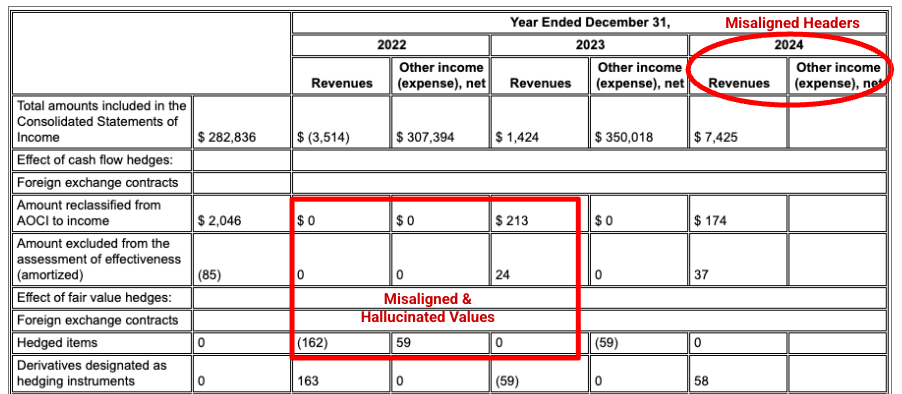
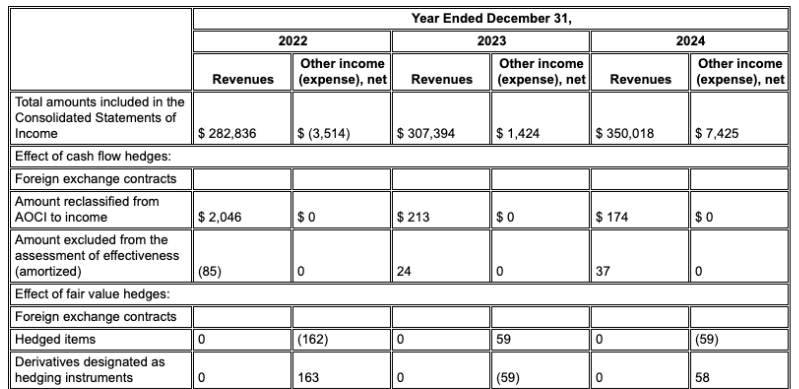
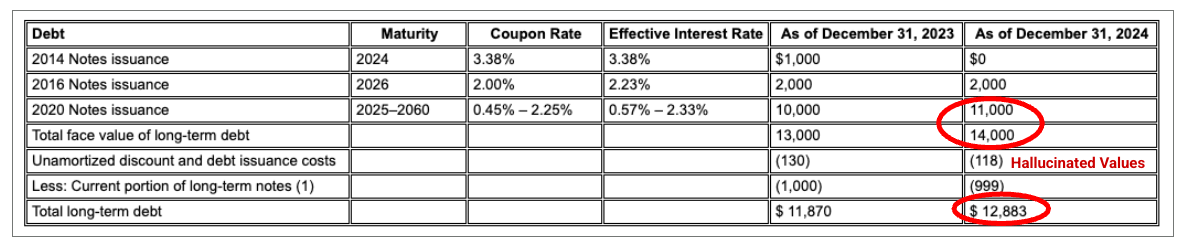
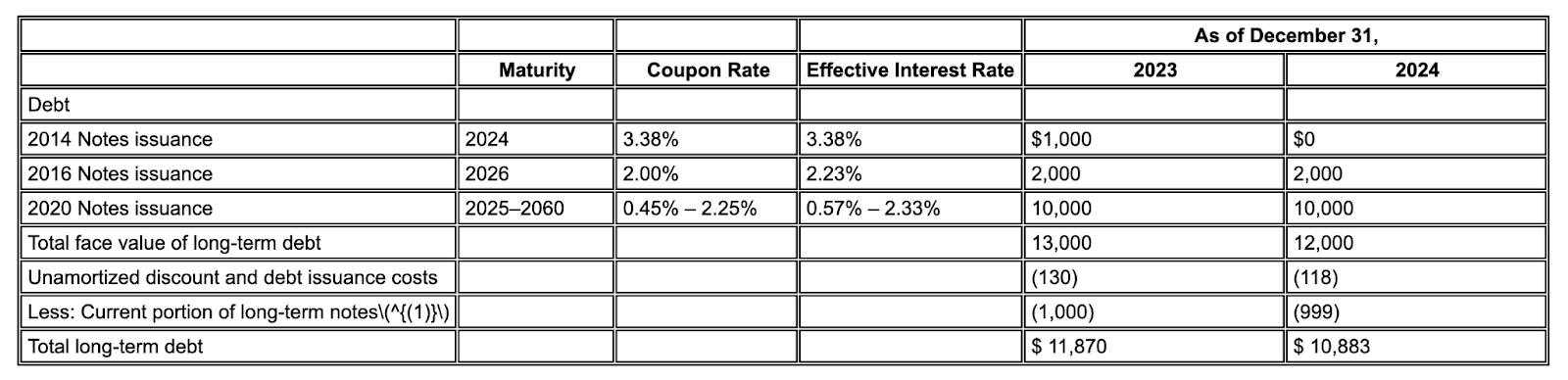
Example: In this Alphabet 10-K filing, a competitor's parser fails to correctly align headers and cells, misinterpreting the financial data. Gemini layout parser accurately parses the entire table structure, preserving the data's integrity.
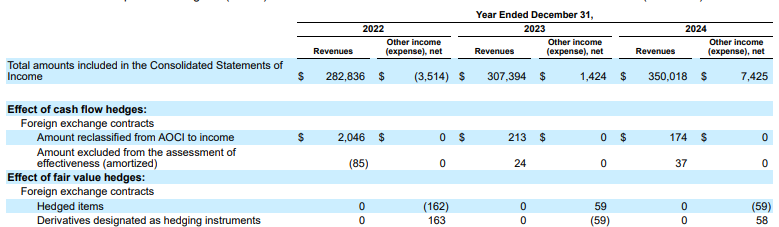
Figure 1. The source of this input document is "Alphabet 2024 SEC Form 10-K", page 72.
Competitor parser doesn't properly detect cell and column alignment and hallucinates values.
Gemini layout parser aligns columns correctly, and provides accurate values.
Reduced hallucinations
Unlike pure LLM-based parsers that try to read text that isn't there, Gemini layout parser's foundation in advanced OCR grounds it in the document's actual content. This leads to significantly fewer hallucinations.
Example: In this 10-K excerpt, a competitor model hallucinates and inserts incorrect text. Gemini layout parser provides a clean, accurate extraction of only the text present on the page.
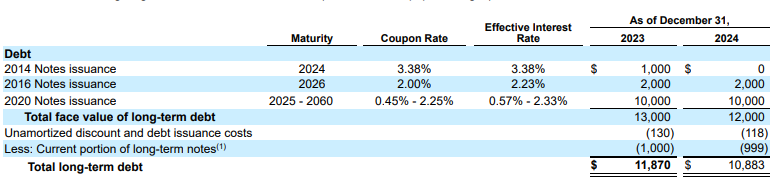
Figure 2. Input Document (Alphabet 2024 10k p75)
Competitor models will hallucinate values.
Gemini layout parser correctly identifies values in images and tables.
Layout-aware chunking
Standard parsers often create chunks removed from their original context, separating a paragraph from its heading. Gemini layout parser understands the document's hierarchy. It creates context-aware chunks that include content from ancestral headings and table headers. A retrieved chunk contains not just the text, but also the structural context needed for an accurate LLM response.
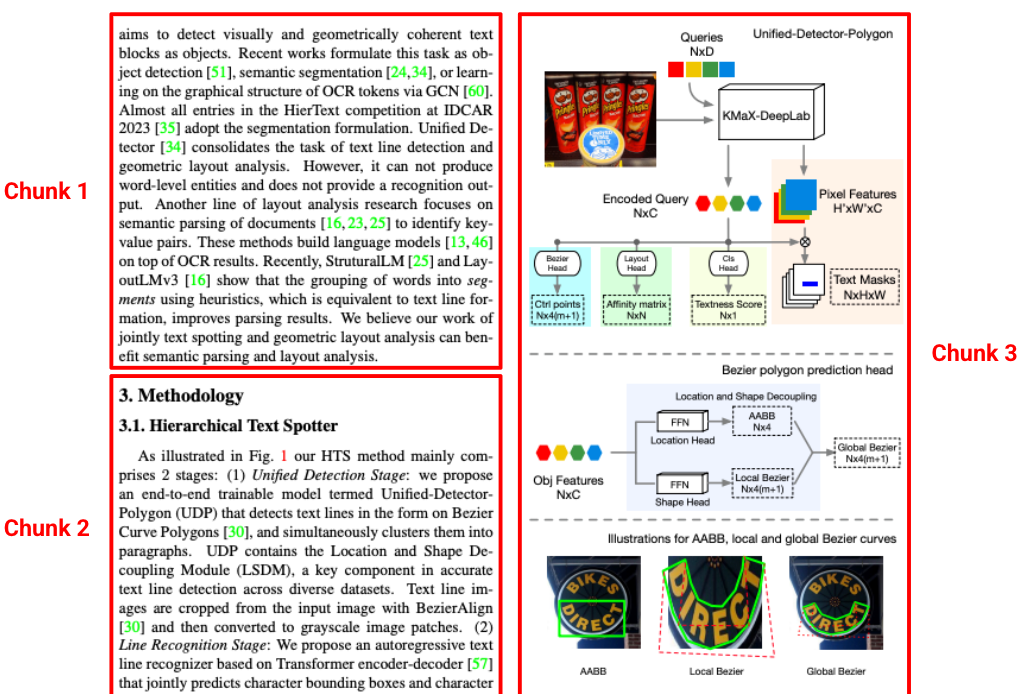
Figure 3. The source of this image is from "Hierarchical Text Spotter for Joint Text Spotting and Layout Analysis", by Shangbang Long, Siyang Qin, Yasuhisa Fujii, Alessandro Bissacco, and Michalis Raptis.
Layout annotation
Layout parser annotation can identify if there are images or tables in parsed documents. When found, they're annotated as a descriptive block of text with the information depicted in the image and table.
For example, when processing a bank report, the parser doesn't just see an image. It generates a detailed description and extracts the data points from all three pie charts, making that data available for retrieval.
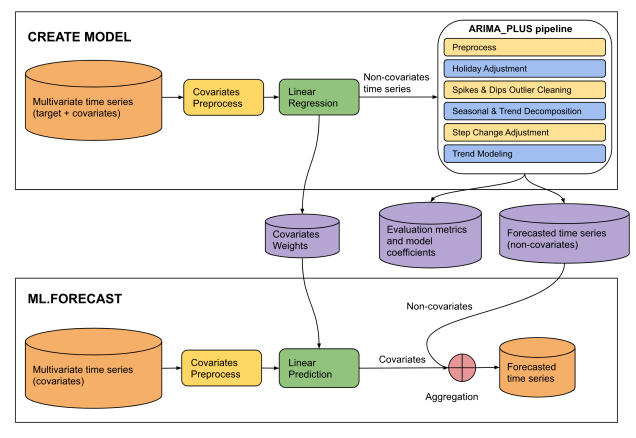
Figure 4. The source of this input is a saved PDF of "The CREATE MODEL statement for ARIMA_ PLUS_XREG models" on the Google Cloud site.
This diagram illustrates a two-phase machine learning pipeline for time series
forecasting: "CREATE MODEL" and "ML.FORECAST".

**CREATE MODEL Phase:**

* **Input Data:** The process begins with multivariate time series (target +
covariates).
* **Covariates Preprocess:** The covariates from the multivariate time series
undergo covariates preprocess.
* **Linear Regression:** The preprocessed covariates are fed into a linear
regression model. The output of this step is non-covariates time series.
* **ARIMA_PLUS pipeline:** The "Non-covariates time series" then enters an
"ARIMA_PLUS pipeline".
* **Outputs of CREATE MODEL:** The results from the ARIMA_PLUS pipeline, along
with data from the linear regression step, generate three outputs: covariates
weights, evaluation metrics and model coefficients and forecasted time series
(non-covariates).

**ML.FORECAST Phase:**

* **Input Data:** This phase starts with "Multivariate time series (covariates)".
* **Covariates Preprocess:**
* **Linear Prediction:** The preprocessed covariates are fed into a linear
prediction step.
* **Aggregation:** The covariates (predicted contribution from covariates)
are then combined with the forecasted time series (non-covariates) obtained
from the CREATE MODEL phase.
* **Final Output:** The result of the aggregation is the forecasted time
series, which is the final prediction of the target variable.

**Overall Flow:**

The diagram shows a two-stage forecasting approach. In the CREATE MODEL stage,
a model is built to separate the target time series into components influenced
by covariates and components that are not. The non-covariate component is then
processed and forecasted using an ARIMA_PLUS pipeline. The covariate component's
relationship with the target is captured by linear regression weights. In the
ML.FORECAST stage, these learned components are combined with future covariate
data to produce a final forecast.
Limitations
The following limitations apply:
- Online processing:
- Input file size maximum of 20 MB for all file types
- Maximum of 15 pages per PDF file
- Batch processing:
- Maximum single file size of 1 GB for PDF files
- Maximum of 500 pages per PDF file
Layout detection per file type
The following table lists the elements that layout parser can detect per document file type.
| File type | MIME Type | Detected elements | Limitations |
|---|---|---|---|
| HTML | text/html |
paragraph, table, list, title, heading, page header, page footer | Be aware that parsing relies heavily on HTML tags, so CSS-based formatting might not be captured. |
application/pdf |
figure, paragraph, table, title, heading, page header, page footer | Tables spanning multiple pages might be split in two tables. | |
| DOCX | application/vnd.openxmlformats-officedocument.wordprocessingml.document |
paragraph, tables across multiple pages, list, title, heading elements | Nested tables are not supported. |
| PPTX | application/vnd.openxmlformats-officedocument.presentationml.presentation |
paragraph, table, list, title, heading elements | For headings to be identified accurately, they should be marked as such within the PowerPoint file. Nested tables and hidden slides are not supported. |
| XLSX | application/vnd.openxmlformats-officedocument.spreadsheetml.sheet |
tables within Excel spreadsheets, supporting INT,
FLOAT, and STRING values |
Multiple table detection is not supported. Hidden sheets, rows, or columns might also impact detection. Files with up to 5 million cells can be processed. |
| XLSM | application/vnd.ms-excel.sheet.macroenabled.12 |
spreadsheet with macro enabled, supporting INT,
FLOAT, and STRING values |
Multiple table detection is not supported. Hidden sheets, rows, or columns might also impact detection. |
What's next
- Review the processors list.
- Create a custom classifier.
- Use Enterprise Document OCR to detect and extract text.
- Review Send a batch process documents request to learn how to handle responses.