


コンソールでドキュメント サマライザーを構築する Google Cloud
Document AI を使用してサマライザ プロセッサを作成し、ドキュメントのコンテンツを要約できます。出力は、長さと形式に基づいてカスタマイズできます。
生成されたエンティティの JSON 出力例を次に示します。
{
  "type": "summary",
  "mentionText": " Superconductivity is a phenomenon in which a material conducts
  electricity with no resistance. It was discovered in 1911 by Dutch physicist Heike
  Kamerlingh Onnes. In 1986, a new class of materials was discovered that can superconduct
  at much higher temperatures. These materials are called high-temperature superconductors.
  They have the potential to revolutionize the way we use electricity. However,
  high-temperature superconductors are still very expensive to produce. Scientists
  are working on ways to make them more affordable.",
  "normalizedValue": {
    "text": " Superconductivity is a phenomenon in which a material conducts
    electricity with no resistance. It was discovered in 1911 by Dutch physicist
    Heike Kamerlingh Onnes. In 1986, a new class of materials was discovered that
    can superconduct at much higher temperatures. These materials are called
    high-temperature superconductors. They have the potential to revolutionize
    the way we use electricity. However, high-temperature superconductors are
    still very expensive to produce. Scientists are working on ways to make
    them more affordable."
  }
}
手順
このクイックスタートでは、ドキュメントの要約プロセッサを作成し、処理するサンプル ドキュメントをアップロードして、要約の構造を調整するカスタム プロセッサ バージョンを作成します。
このタスクを Google Cloud コンソールで直接行う際の順を追ったガイダンスについては、「ガイドを表示」をクリックしてください。
始める前に
- アカウントにログインします。 Google Cloud を初めて使用する場合は、 アカウントを作成して、実際のシナリオで Google プロダクトのパフォーマンスを評価してください。 Google Cloud新規のお客様には、ワークロードの実行、テスト、デプロイができる無料クレジット $300 分を差し上げます。
-
In the Google Cloud console, on the project selector page, select or create a Google Cloud project.
Roles required to select or create a project
- Select a project: Selecting a project doesn't require a specific IAM role—you can select any project that you've been granted a role on.
-
Create a project: To create a project, you need the Project Creator role
(
roles/resourcemanager.projectCreator), which contains theresourcemanager.projects.createpermission. Learn how to grant roles.
-
If you're using an existing project for this guide, verify that you have the permissions required to complete this guide. If you created a new project, then you already have the required permissions.
-
Verify that billing is enabled for your Google Cloud project.
Enable the Document AI, Cloud Storage APIs.
Roles required to enable APIs
To enable APIs, you need the Service Usage Admin IAM role (
roles/serviceusage.serviceUsageAdmin), which contains theserviceusage.services.enablepermission. Learn how to grant roles.-
In the Google Cloud console, on the project selector page, select or create a Google Cloud project.
Roles required to select or create a project
- Select a project: Selecting a project doesn't require a specific IAM role—you can select any project that you've been granted a role on.
-
Create a project: To create a project, you need the Project Creator role
(
roles/resourcemanager.projectCreator), which contains theresourcemanager.projects.createpermission. Learn how to grant roles.
-
If you're using an existing project for this guide, verify that you have the permissions required to complete this guide. If you created a new project, then you already have the required permissions.
-
Verify that billing is enabled for your Google Cloud project.
Enable the Document AI, Cloud Storage APIs.
Roles required to enable APIs
To enable APIs, you need the Service Usage Admin IAM role (
roles/serviceusage.serviceUsageAdmin), which contains theserviceusage.services.enablepermission. Learn how to grant roles.
必要なロール
ドキュメント サマライザーの構築に必要な権限を取得するには、プロジェクトに対するDocument AI 管理者 (roles/documentai.admin)IAM ロールを付与するよう管理者に依頼してください。ロールの付与については、プロジェクト、フォルダ、組織に対するアクセス権の管理をご覧ください。
要約プロセッサを作成する
Google Cloud コンソールを使用して、要約プロセッサを作成します。詳細については、プロセッサの作成と管理をご覧ください。
コンソールの Document AI セクションで、[Workbench] ページに移動します。 Google Cloud
[**サマライザー**] で、
[**プロセッサを作成**] を選択します。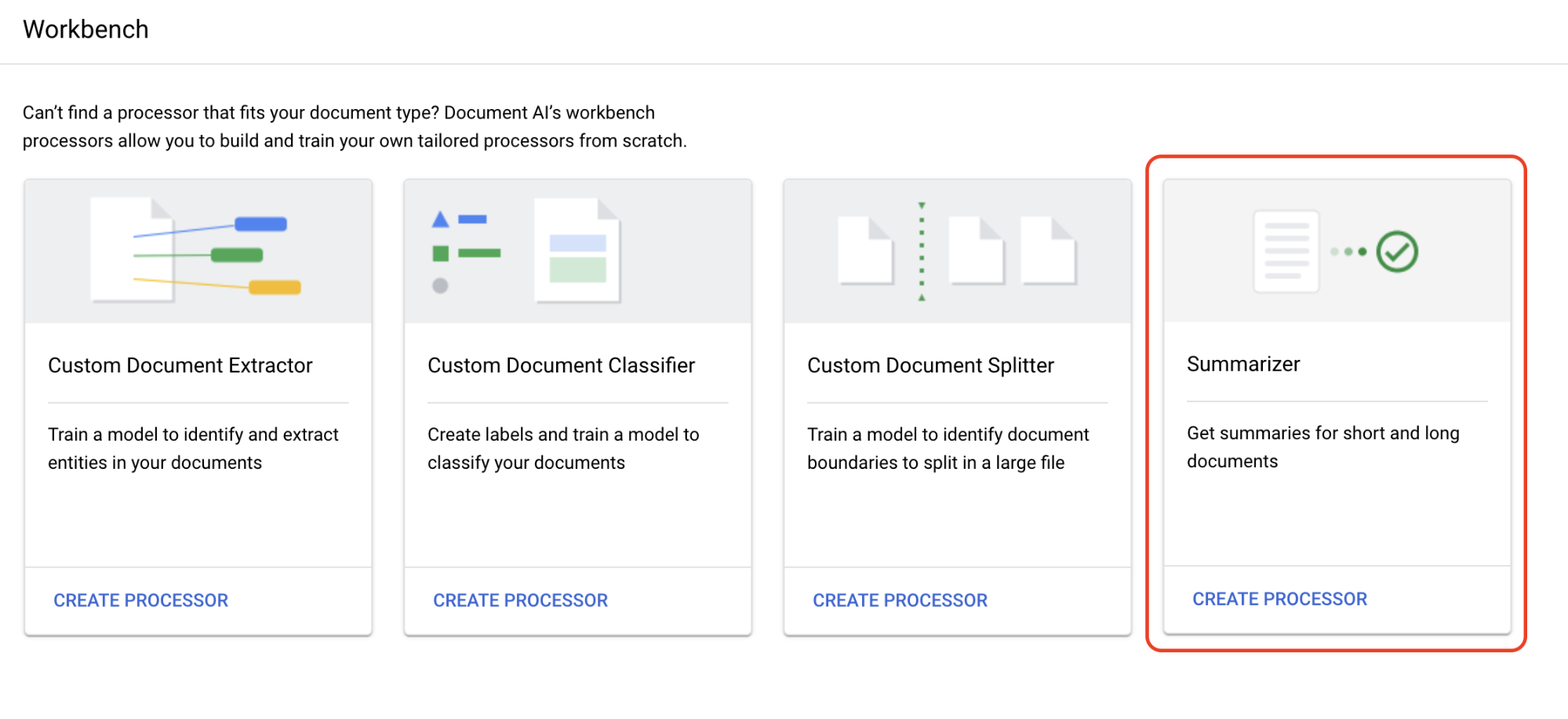
[プロセッサを作成] メニューで、プロセッサの名前を入力します(例:
quickstart-summarizer)。最も近いリージョンを選択します。
[作成] を選択します。
これでプロセッサが作成されました。
プロセッサをテストする
作成したプロセッサの [プロセッサの概要] ページが表示されます。

[**カスタマイズして構築**] タブを選択して、プロセッサをテストします。
-
超伝導に関する Wikipedia ページを含む PDF ファイルです。
[
テスト ドキュメントをアップロード ] を選択し、ダウンロードしたドキュメントを選択します。[サマリー] ページが表示されます。OCR で検出されたテキストとドキュメントのアノテーションを表示できます。
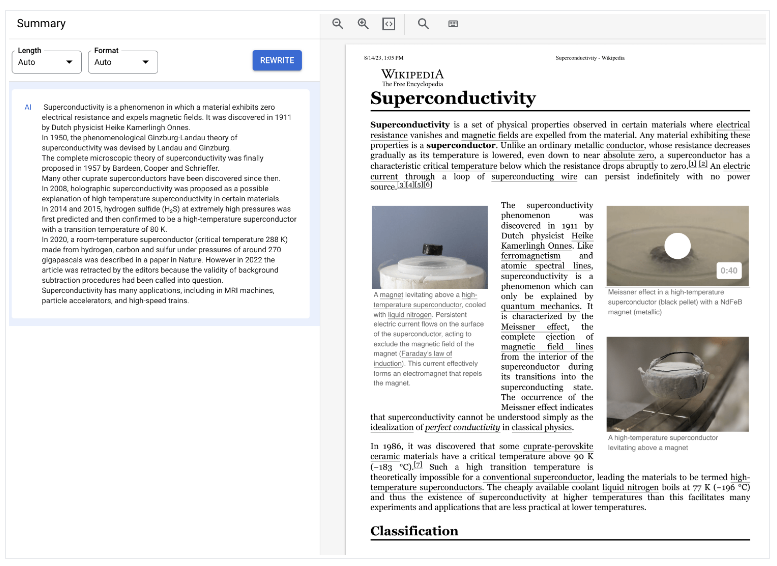
[長さと形式] をそれぞれ [中] と [箇条書き] に設定し、[書き換え] を選択して結果を確認します。[カスタマイズして構築] ページに戻ります。
プロセッサ バージョンをデプロイする
API でドキュメントを処理するときに特定の要約設定を使用する場合は、それらの設定に対応するプロセッサ バージョンを作成します。
[要約の設定] は、前のページで最後に使用した値に設定されます。[
新しいバージョンを作成 ] をクリックして、指定した [要約の設定] でプロセッサ バージョンを作成します。プロセッサ バージョンの名前(
quickstart-moderate-bulletedなど)を入力し、[バージョンを作成] を選択します。[
デプロイと使用 ] タブに移動して、デプロイのステータスを確認します。デプロイには数分かかります。デプロイされたバージョンを [
デフォルト バージョン ] として設定するか、API でドキュメントを処理するときにバージョン ID を指定できます。Document AI API を使用するには:
- 処理リクエストの送信のコードサンプルに沿って、オンラインおよびバッチ処理を使用します。
- オンライン処理とバッチ処理でサポートされるページ数については、割り当てと上限をご覧ください。
- レスポンスを処理するにあるコードサンプルに沿って、プロセッサから要約レスポンスを取得します。
- 処理リクエストの送信のコードサンプルに沿って、オンラインおよびバッチ処理を使用します。
Document AI を正しく使用して、ドキュメントからテキストを抽出し、要約できました。
クリーンアップ
このページで使用したリソースについて、 Google Cloud アカウントに課金されないようにするには、 次の手順を実施します。
不要な Google Cloud 料金が発生しないようにするには、 Google Cloud console を使用して、不要なプロセッサや プロジェクトを削除します。不要な場合は 削除します。