

This page describes how Google Distributed Cloud connected works, including information about its infrastructure, hardware, storage, and networking capabilities.
Google Distributed Cloud connected consists of the following components:
The Distributed Cloud connected infrastructure. Google or a Google-certified systems integrator (SI) delivers, deploys, and maintains the Distributed Cloud connected hardware, including remote management by a dedicated team.
The Distributed Cloud connected service. This service lets you manage your Distributed Cloud connected clusters and node pools by using the Google Cloud CLI and the Distributed Cloud Edge Container API. The Distributed Cloud connected clusters are registered in your Fleet, and you can use the Kubernetes
kubectlCLI tool to interact with them.
Distributed Cloud connected infrastructure
Google or a Google-certified SI provides, deploys, operates, and maintains the dedicated hardware that runs your Distributed Cloud connected zone. The Distributed Cloud connected nodes that execute your workloads run exclusively on this hardware.
The hardware machines are instantiated as Distributed Cloud connected nodes and grouped into node pools, which you can assign to clusters within your Distributed Cloud connected zone. You can configure your network so that workloads running on Distributed Cloud connected clusters are available only to your local users or accessible from the internet. You can also configure your network to allow only Distributed Cloud connected nodes to use local resources or to communicate with workloads, such as Compute Engine virtual machine (VM) instances and Kubernetes Pods running in a Virtual Private Cloud (VPC) network over a secure Cloud VPN network connection to a VPC network on Google Cloud.
Distributed Cloud connected management
Distributed Cloud connected nodes are not standalone resources and must remain connected to Google Cloud for control plane management and monitoring purposes. The control plane nodes run locally on your Distributed Cloud connected hardware and your workloads continue to run if your Distributed Cloud connected deployment is disconnected from Google Cloud. Workloads continue to run while disconnected from Google Cloud for up to seven days.
Google remotely manages the physical machines and that comprise your Distributed Cloud connected deployment. This includes installing software updates and security patches, and resolving configuration issues. Your network administrator can also monitor the health and performance of Distributed Cloud connected clusters and nodes and work with Google to resolve any issues.
After Google has successfully deployed the Distributed Cloud connected hardware in your designated location, your cluster administrator can begin configuring the Distributed Cloud connected cluster in a way that's similar to a conventional Kubernetes cluster. They can assign machines to node pools, and node pools to clusters, and grant application owners access as required by their roles. The cluster administrator must, however, keep in mind the processing and storage limitations of the machines in your Distributed Cloud connected deployment and plan cluster and workload configuration accordingly.
Distributed Cloud connected provides an API for configuring clusters and node pools.
Access to the Distributed Cloud connected zone
You can configure your network to allow the appropriate level of access to your Distributed Cloud connected zone, both from your local network and the internet.
You can also grant your Distributed Cloud connected zone access to Google Cloud services by connecting it to your VPC network. Distributed Cloud connected uses Cloud VPN to connect to Google service endpoints. Your network administrator must configure your network to allow this.
Distributed Cloud connected personas
The following personas are involved in the deployment and operation of your Distributed Cloud connected zone:
Field technician. Delivers, installs, and activates the Distributed Cloud connected hardware in your designated location. Your network administrator works with the field technicians to connect the hardware to your power source and connect it to your network. Depending on your order type, this is either a Google technician or a Google-certified SI technician.
Google site reliability engineer (SRE). Monitors and manages the Distributed Cloud connected hardware. This includes resolving configuration issues, installing patches and updates, and maintaining security.
Network administrator. Configures and maintains network connectivity and access control between the Distributed Cloud connected hardware and your local network. This includes configuring your routing and firewall rules to ensure that all required types of network traffic can freely flow between the Distributed Cloud hardware, Google Cloud, the clients that consume your Distributed Cloud connected workloads, internal and external data repositories, and other contributing factors. The network administrator must have access to the Google Cloud console to monitor the status of your Distributed Cloud connected machines. The network administrator also configures Distributed Cloud networking features.
Cluster administrator. Deploys and maintains Distributed Cloud connected clusters within your organization. This includes configuring permissions, logging, and provisioning workloads for each cluster. The cluster administrator assigns nodes to node pools, and node pools to Distributed Cloud connected clusters. The cluster administrator must understand the operational differences between the Distributed Cloud connected cluster and a standard Kubernetes cluster, such as the processing and storage capabilities of the Distributed Cloud connected hardware, in order to correctly configure and deploy your workloads.
Application owner. A software engineer responsible for developing and/or deploying and monitoring an application running on a Distributed Cloud connected cluster. Application owners that own applications on a Distributed Cloud connected cluster must understand the limitations on the size and location of the clusters as well as the ramifications of deploying an application at the edge, such as performance and latency.
Distributed Cloud connected hardware
Distributed Cloud connected servers is available on the following hardware platforms:
Distributed Cloud connected servers G1. A group of one or three Dell XR11 series 1U rackmount machines.
Distributed Cloud connected servers G2. A Dell XR8000 series chassis populated with one or three XR8610t machine sleds.
Distributed Cloud connected hardware typically consists of three Distributed Cloud connected server machines that connect directly to your local network through your own ToR switches. By default, you can only order Distributed Cloud connected servers in a three-machine configuration. If your business requirements call for single-machine deployments of Distributed Cloud connected servers, contact your Google field sales representative for more information.
Figure 1 depicts a typical Distributed Cloud connected server configuration.
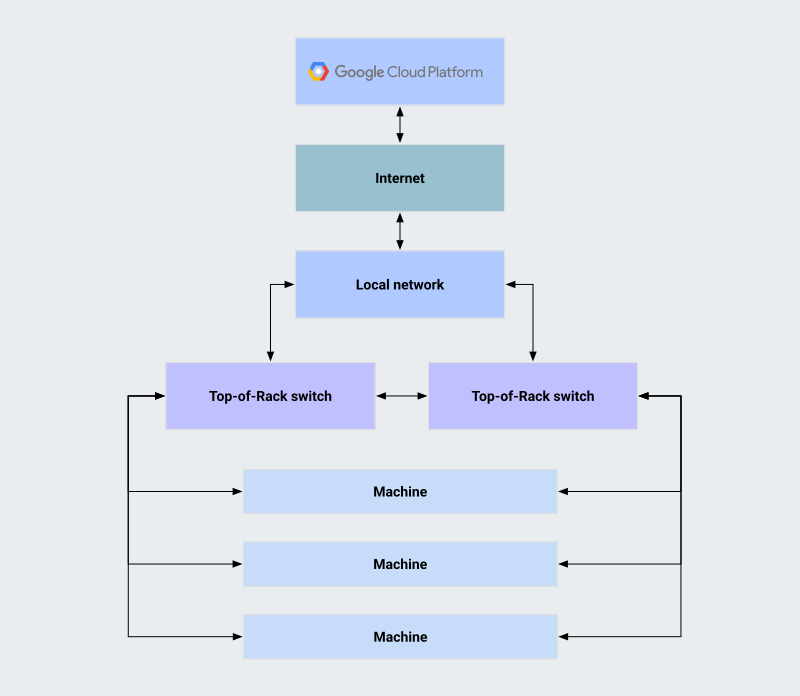
The components of a Distributed Cloud connected installation are as follows:
Google Cloud. Traffic between your Distributed Cloud connected installation and Google Cloud includes hardware management and audit logging traffic.
Internet. Encrypted management and audit logging traffic between your Distributed Cloud connected installation and Google Cloud travel over the internet. Distributed Cloud connected does not support proxied internet connections.
Local network. Your local network to which Distributed Cloud connected servers connect through your Layer 2 ToR switches.
Top-of-rack (ToR) switches. Your Layer 2 switches that connect the server machines and interface with your local network. Each Distributed Cloud connected server machine requires, at a minimum, one in-band and one out-of-band connection to a single ToR switch. Google recommends using two ToR switches and two in-band connections per machine (one per switch) for added reliability. Each Distributed Cloud connected server machine connects to your ToR switches as follows:
- Workload connectivity. Each Distributed Cloud connected server machine's primary and secondary network interfaces connects to one or both of your ToR switches for workload connectivity. These connections carry your workload traffic between the individual Distributed Cloud server machines and to and from your local network. You must place the corresponding switch ports within the same VLAN. If you need additional workload connectivity, you can trunk additional tagged VLANs to your Distributed Cloud connected servers.
- Management connectivity. Each Distributed Cloud connected server machine's Baseboard Management Controller (BMC) network interface connects to one ToR switch for management connectivity, which lets your Distributed Cloud connected servers to communicate with one another. You must configure them as 802.1q trunks and the corresponding native VLAN as the network to which the Distributed Cloud connected management network interfaces belong.
Machines. The physical Distributed Cloud connected server machines that run Distributed Cloud connected software and execute your workloads. Each physical machine is instantiated as a node within the Distributed Cloud connected cluster.
Distributed Cloud service
The Distributed Cloud connected service runs directly on the Distributed Cloud hardware. It serves as a control plane for the nodes and clusters on your Distributed Cloud connected hardware. This control plane instantiates and configures your Distributed Cloud connected zone. The specific Google Cloud data center to which your Distributed Cloud hardware connects for management is chosen according to its proximity to your Distributed Cloud connected installation.
A Distributed Cloud connected zone consists of all Distributed Cloud connected server machines deployed on your premises. You can assign machines to your Distributed Cloud connected clusters.
Your workloads continue to run even if Distributed Cloud cannot connect to Google Cloud for up to 7 days. After this period, Distributed Cloud must communicate with Google Cloud to refresh authentication tokens, storage encryption keys, and synchronize hardware management and audit logging data.
Figure 2 depicts the logical organization of Distributed Cloud connected entities.
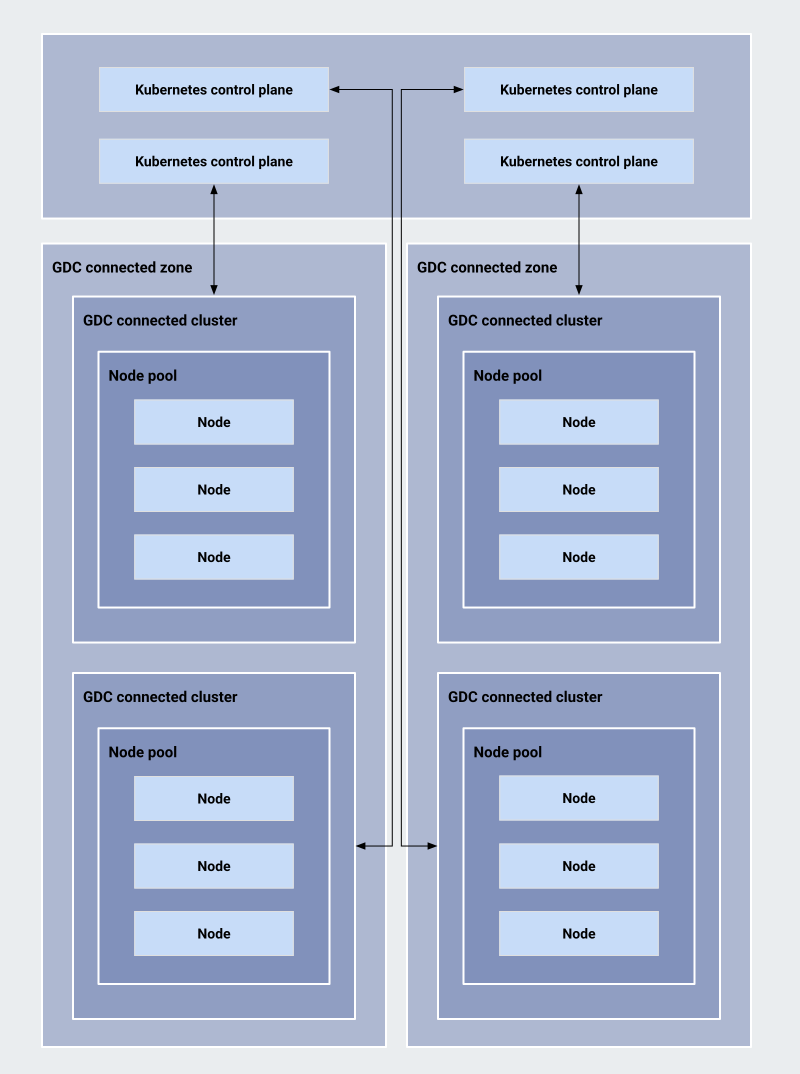
The entities are as follows:
Google Cloud region. The Google Cloud region for your Distributed Cloud connected zone is determined by the location of the Google Cloud data center that is the closest to your Distributed Cloud installation.
Kubernetes local control plane. The Kubernetes control plane for each Distributed Cloud connected cluster runs directly on your Distributed Cloud hardware. A cluster can enter survivability mode when the connection to Google Cloud is temporarily lost, allowing your workloads to continue running until the connection is restored. For more information, see Survivability mode.
Distributed Cloud zone. A logical abstraction that represents the Distributed Cloud connected hardware deployed on your premises. A Distributed Cloud zone covers all of the Distributed Cloud connected server machines deployed at your location. The physical machines in the zone are instantiated as Distributed Cloud connected machines in the Google Cloud console. The machines in a Distributed Cloud connected zone share a single network fabric or a single fault domain. Google creates your machines before delivering your Distributed Cloud connected hardware. You cannot create, delete, or modify Distributed Cloud connected machines.
Node. A node is a Kubernetes resource that instantiates a Distributed Cloud connected physical machine into the Kubernetes realm when creating a node pool, making it available to run workloads by assigning the node pool to a Distributed Cloud connected cluster.
Node pool. A logical grouping of Distributed Cloud connected nodes within a single Distributed Cloud connected zone that lets you assign Distributed Cloud nodes to Distributed Cloud clusters. For Distributed Cloud connected servers, node pools are instantiated and populated automatically.
Cluster. A Distributed Cloud connected cluster that consists of a control plane and one or more node pools.
Distributed Cloud connected Google Cloud projects
Distributed Cloud connected lets you create multiple clusters within a single Distributed Cloud connected zone. While the zone itself is associated with one specific Google Cloud project, individual clusters operating within that zone can be attached to different Google Cloud projects that are independent of the zone's project affiliation. This architecture lets you share the physical zone infrastructure across various teams or applications that might operate under separate project structures for billing or management purposes.
Storage
Distributed Cloud connected provides usable storage on each physical machine exposed through Rakuten Symcloud Storage, which acts as a local storage abstraction layer on each Distributed Cloud connected node and makes its local storage available to workloads running on other nodes. For more information, see Configure Distributed Cloud connected for Symcloud Storage.
Storage security
Distributed Cloud connected uses Linux Unified Key Setup (LUKS) to encrypt local machine storage and supports customer-managed encryption keys (CMEK) with Cloud KMS. For more information, see Security best practices.
Symcloud Storage integration
On select Distributed Cloud connected configurations, you can configure Distributed Cloud to use Rakuten Symcloud Storage, which acts as a local storage abstraction layer on each Distributed Cloud connected node and makes its local storage available to workloads running on other nodes. For more information, see Configure Distributed Cloud connected for Symcloud Storage.
Networking
This section describes the network connectivity requirements and features of Distributed Cloud connected.
Google pre-configures some of the virtual networking components for your installation before shipping the Distributed Cloud connected hardware to you. You cannot modify the pre-configured settings after the hardware is delivered.
Figure 3 depicts the topology of virtual network in a Distributed Cloud connected deployment.
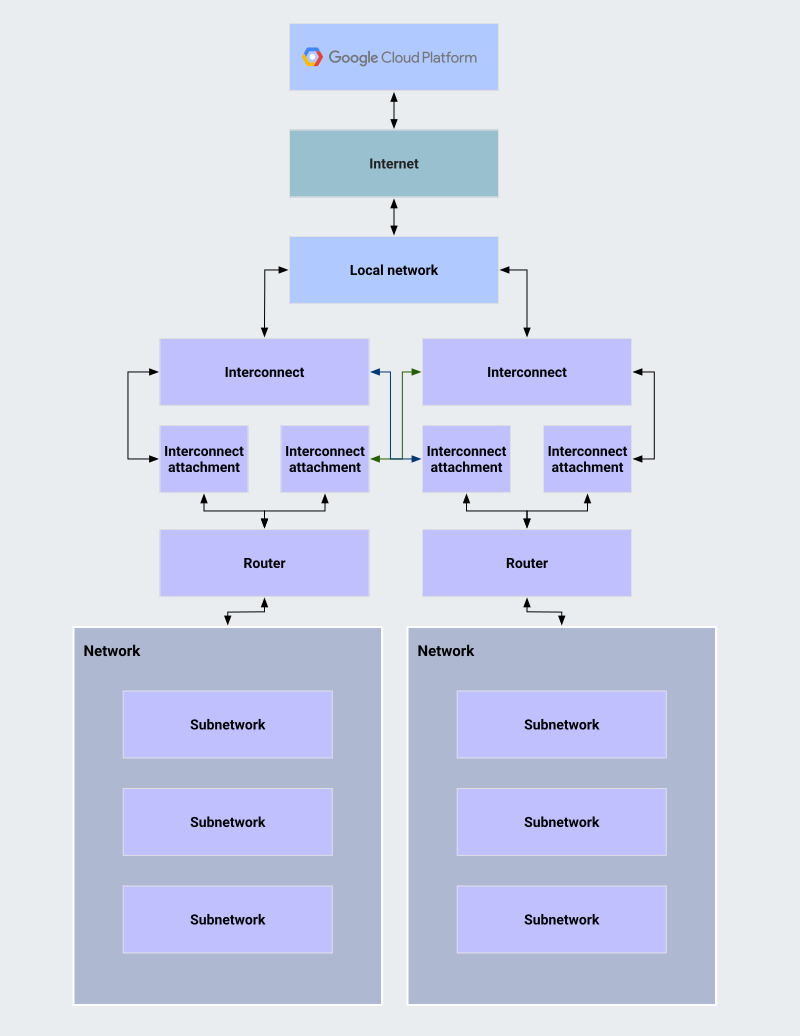
The components of the virtual network in a Distributed Cloud connected deployment are as follows:
Network. A virtual network with a private address space in your Distributed Cloud connected zone. A network is Layer 2-isolated from other virtual networks within the zone and can contain one or more subnetworks. The virtual network spans all the physical machines in your Distributed Cloud connected servers deployment. This default network is created automatically when a Distributed Cloud connected server cluster is instantiated.
Subnetwork. A Layer 2 VLAN subnetwork within a Distributed Cloud network. A subnetwork has its own broadcast domain and one or more IPv4 address ranges of your choice. Subnetworks within the same network are Layer 2-isolated. Nodes on different subnetworks within the same network can communicate with each other by using their IP addresses. Distributed Cloud connected servers only support subnetwork management using VLAN IDs.
Distributed Cloud connected networking components share similarities with their Google Cloud equivalents with the following differences:
Distributed Cloud connected networking components are local to the Distributed Cloud connected zone in which they are instantiated.
A Distributed Cloud network does not have direct connectivity to a VPC network.
By default, Distributed Cloud networks have no connectivity with each other across different Distributed Cloud connected zones. You have the option to explicitly configure cross-zone networking.
Your network administrator configures Distributed Cloud connected
networking components. Your network administrator must have the
Edge Network Admin role
(roles/edgenetwork.admin) on the target Google Cloud project, while
application developers that deploy workloads on
Distributed Cloud connected must have the
Edge Network Viewer role
(roles/edgenetwork.viewer) on the target Google Cloud project.
Connectivity to your local network
For outbound traffic to resources on your local network, Pods in a Distributed Cloud connected cluster use the default routes advertised by your peering edge routers. Distributed Cloud connected uses its built-in NAT to connect Pods to those resources.
For inbound traffic from resources on your local network, your network administrator must configure routing policies that match your business requirements to control access to Pods in each of your Distributed Cloud connected clusters. This means, at a minimum, completing the steps in Firewall configuration and configuring additional policies as required by your workloads. For example, you can set up 'allow' or 'deny' policies for individual node subnetworks or virtual IP addresses exposed by the built-in load balancer in Distributed Cloud connected. The Distributed Cloud connected Pod and Distributed Cloud connected Service CIDR blocks are not directly accessible.
Connectivity to the internet
For outbound traffic to resources on the internet, Pods in a Distributed Cloud connected cluster use the default route advertised by your routers to the Distributed Cloud connected ToR switches. This means, at a minimum, completing the steps in Firewall configuration and configuring additional policies as required by your workloads. Distributed Cloud connected uses its built-in NAT to connect Pods to those resources. You can optionally configure your own layer of NAT on top of the built-in layer in Distributed Cloud connected.
For inbound traffic, you must configure your WAN routers according to your business requirements. These requirements dictate the level of access that you need to provide from the public internet to the Pods in your Distributed Cloud connected clusters. Distributed Cloud connected uses its built-in NAT for Pod CIDR blocks and Service management CIDR blocks, so those CIDR blocks are not accessible from the internet.
Network security
Your business requirements and your organization's network security policy dictate the steps necessary to secure network traffic that flows in and out of your Distributed Cloud connected installation. For more information, see Security best practices.
Load balancing
Distributed Cloud connected supports Layer 2 load balancing based on MetalLB. For more information, see Load balancing.
High-performance networking support
Distributed Cloud connected support the execution of workloads that require the best possible networking performance. To this end, Distributed Cloud connected ships with a specialized Network Function operator and a set of Kubernetes Custom Resource Definitions (CRDs) that implement the features required for high-performance workload execution.
Virtual machine workload support
Distributed Cloud connected can run workloads in virtual machines in addition to containers. For more information, see Manage virtual machines.
To learn about how virtual machines serve as an essential component of the Google Distributed Cloud connected platform, see Extending GKE Enterprise to manage on-premises edge VMs.
GPU workload support
On select hardware configurations, Distributed Cloud connected can run GPU-based workloads on NVIDIA L4 GPUs. You must specify this requirement when ordering your Distributed Cloud connected hardware. For more information, see Manage GPU workloads.