

This document describes how to enable data lineage for your Managed Service for Apache Spark jobs either at the project or cluster level.
Data lineage is a Knowledge Catalog feature that lets you track how data moves through your systems: where it comes from, where it is passed to, and what transformations are applied to it.
Data lineage is available for all Managed Service for Apache Spark jobs
except SparkR and Spark streaming jobs, and supports BigQuery and Cloud Storage
data sources. It is included with Managed Service for Apache Spark 2.0.74+, 2.1.22+,
2.2.50+, 2.3.1+, and 3.0 image versions.
Once you enable the feature in your Managed Service for Apache Spark cluster, Managed Service for Apache Spark Spark jobs capture data lineage events and publish them to the Knowledge Catalog Data Lineage API. Managed Service for Apache Spark integrates with the Data Lineage API through OpenLineage, using the OpenLineage Spark plugin.
You can access data lineage information through Knowledge Catalog, using the following:
Before you begin
In the Google Cloud console, on the project selector page, select the project that contains the Managed Service for Apache Spark cluster for which you want to track lineage.
Enable the Data Lineage API.
Upcoming Spark data lineage changes See the Managed Service for Apache Spark release notes for the announcement of a change that will automatically make Spark data lineage available to your projects and clusters when you enable the Data Lineage API (see Control lineage ingestion for a service) without requiring additional project or cluster level settings.
Required roles
If you create a Managed Service for Apache Spark cluster using the
default VM service account,
it has the Managed Service for Apache Spark Worker
role, which enables data lineage. No additional action is necessary.
However, if you create a Managed Service for Apache Spark cluster that uses a custom service account, to enable data lineage on the cluster, you must grant a required role to the custom service account as explained in the following paragraph.
To get the permissions that you need to use data lineage with Managed Service for Apache Spark , ask your administrator to grant you the following IAM roles on your cluster's custom service account:
-
Grant one of the following roles:
- Managed Service for Apache Spark Worker (
roles/dataproc.worker) - Data Lineage Editor (
roles/datalineage.editor) - Data Lineage Producer (
roles/datalineage.producer) - Data Lineage Administrator (
roles/datalineage.admin)
- Managed Service for Apache Spark Worker (
For more information about granting roles, see Manage access to projects, folders, and organizations.
You might also be able to get the required permissions through custom roles or other predefined roles.
Enable Spark data lineage
You can enable Spark data lineage at the project or cluster level.
Enable Spark data lineage at the project level
After you enable Spark data lineage at the project level, subsequent Spark jobs that run on Managed Service for Apache Spark clusters in the project will have Spark data lineage enabled.
To enable Spark data lineage at the project level, set the following custom project metadata:
| Key | Value |
|---|---|
DATAPROC_LINEAGE_ENABLED |
true |
DATAPROC_CLUSTER_SCOPES |
https://www.googleapis.com/auth/cloud-platformSetting this VM access scope is only necessary for 2.0 image version clusters. It is automatically set on 2.1 and later image version clusters. |
You can disable Spark data lineage at the project level by setting the
DATAPROC_LINEAGE_ENABLED metadata to false.
Enable Spark data lineage at the cluster level
If you enable Spark data lineage when you create a cluster, supported Spark jobs that run on Managed Service for Apache Spark clusters will have Spark data lineage enabled. This setting overrides any Spark data lineage setting at the project level: if Spark data lineage is disabled at the project level but enabled at the cluster level, the cluster level takes precedence, and supported Spark jobs that run on the cluster will have data lineage enabled.
To enable Spark data lineage on a cluster,
create a Managed Service for Apache Spark cluster
with the dataproc:dataproc.lineage.enabled cluster property set to true.
gcloud CLI example:
gcloud dataproc clusters create CLUSTER_NAME \
    --project PROJECT_ID \
    --region REGION \
    --properties 'dataproc:dataproc.lineage.enabled=true'
You can disable Spark data lineage on a cluster
by setting the dataproc:dataproc.lineage.enabled property to false
when you create the cluster.
Disabling data lineage on a cluster: To create a cluster with lineage disabled, set
dataproc:dataproc.lineage.enabled=false. After cluster creation, you can't disable Spark data lineage on the cluster. To disable Spark data lineage on an existing cluster, you can recreate the cluster with thedataproc:dataproc.lineage.enabledproperty set tofalse.Set scope on 2.0 image version clusters: Managed Service for Apache Spark cluster VM access
cloud-platformscope is required for Spark data lineage. Managed Service for Apache Spark image version clusters created with image version2.1and later havecloud-platformenabled. If you specify Managed Service for Apache Spark image version2.0when you create a cluster, set the scope tocloud-platform.
Disable Spark data lineage on a job
If Spark data lineage is enabled on a cluster, you can disable
Spark data lineage on a job by passing the spark.extraListeners
property with an empty value ("") when you submit the job.
gcloud dataproc jobs submit spark \
    --cluster=CLUSTER_NAME \
    --project PROJECT_ID \
    --region REGION \
    --class CLASS \
    --jars=gs://APPLICATION_BUCKET/spark-application.jar \
    --properties=spark.extraListeners=''
Submit a Spark job
When you submit a supported Spark job on a Managed Service for Apache Spark cluster that was created with Spark data lineage enabled, Managed Service for Apache Spark captures and reports the data lineage information to the Data Lineage API.
gcloud dataproc jobs submit spark \
    --cluster=CLUSTER_NAME \
    --project PROJECT_ID \
    --region REGION \
    --class CLASS \
    --jars=gs://APPLICATION_BUCKET/spark-application.jar \
    --properties=spark.openlineage.namespace=CUSTOM_NAMESPACE,spark.openlineage.appName=CUSTOM_APPNAME
Notes:
- Adding the
spark.openlineage.namespaceandspark.openlineage.appNameproperties, which are used to uniquely identify the job, is optional. If you don't add these properties, Managed Service for Apache Spark uses the following default values:- Default value for
spark.openlineage.namespace: PROJECT_ID - Default value for
spark.openlineage.appName:spark.app.name
- Default value for
View lineage in Knowledge Catalog
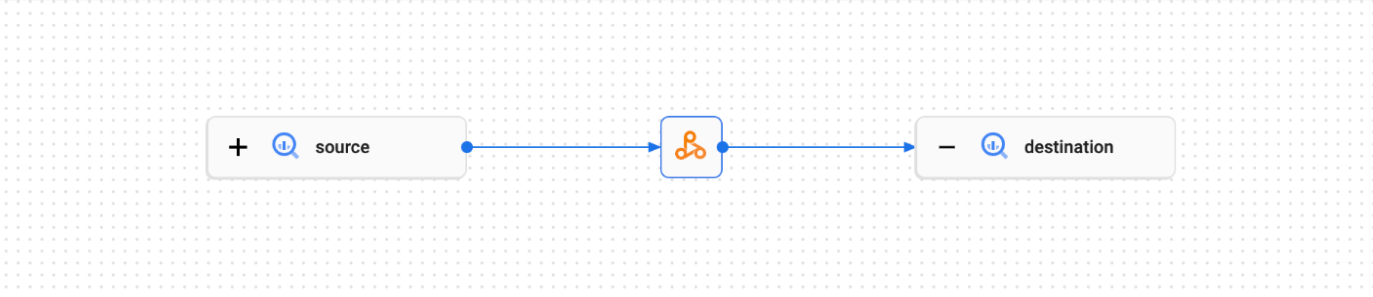
A lineage graph displays relationships between your project resources and the processes that created them. You can view data lineage information in the Google Cloud console, or retrieve it from the Data Lineage API in the form of JSON data.
PySpark example code:
The following PySpark job reads data from a public BigQuery table, and then writes the output a new table in an existing BigQuery dataset. It uses a Cloud Storage bucket for temporary storage.
#!/usr/bin/env python

from pyspark.sql import SparkSession
import sys

spark = SparkSession \
  .builder \
  .appName('LINEAGE_BQ_TO_BQ') \
  .getOrCreate()

bucket = 'gs://BUCKET`
spark.conf.set('temporaryCloudStorageBucket', bucket)

source = 'bigquery-public-data:samples.shakespeare'
words = spark.read.format('bigquery') \
  .option('table', source) \
  .load()
words.createOrReplaceTempView('words')

word_count = spark.sql('SELECT word, SUM(word_count) AS word_count FROM words GROUP BY word')

destination_table = 'PROJECT_ID:DATASET.TABLE'
word_count.write.format('bigquery') \
  .option('table', destination_table) \
  .save()
Make the following replacements:
BUCKET: The name of an existing Cloud Storage bucket
PROJECT_ID, DATASET, and TABLE: The project ID, the name of an existing BigQuery dataset, and the name of a new table to create in the dataset (the table must not exist)
You can view the lineage graph in the Knowledge Catalog UI.
What's next
- Learn more about data lineage.