

This document describes how to enable data lineage on Managed Service for Apache Spark batch workloads and interactive sessions at the project, batch workload, or interactive session level.
Overview
Data lineage is a Knowledge Catalog feature that lets you track how data moves through your systems: where it comes from, where it is passed to, and what transformations are applied to it.
Managed Service for Apache Spark workloads and sessions capture lineage events and publish them to the Knowledge Catalog Data Lineage API. Managed Service for Apache Spark integrates with the Data Lineage API through OpenLineage, using the OpenLineage Spark plugin.
You can access lineage information through Knowledge Catalog, using lineage graphs and the Data Lineage API. For more information, see View lineage graphs in Knowledge Catalog.
Availability
Data lineage, which supports BigQuery and Cloud Storage data sources, is available for workloads and sessions that run with supported Managed Service for Apache Spark runtime versions with the following exceptions and limitations:
- Data lineage is not available for SparkR or Spark streaming workloads or sessions.
Before you begin
On the project selector page in the Google Cloud console, select the project to use for your Managed Service for Apache Spark workloads or sessions.
Enable the Data Lineage API.
Upcoming Spark data lineage changes See the Managed Service for Apache Spark release notes for the announcement of a change that will automatically make Spark data lineage available to your projects, batch workloads, and interactive sessions when you enable the Data Lineage API (see Control lineage ingestion for a service) without requiring additional project, batch workload, or interactive session settings.
Required roles
If your batch workload uses the
default Managed Service for Apache Spark service account,
it has the Managed Service for Apache Spark Worker
role, which contains the permissions required by data lineage.
However, if your batch workload uses a custom service account to enable data lineage, you must grant one of the roles listed in the following paragraph, which contain the permissions required by data lineage, to the custom service account.
To get the permissions that you need to use data lineage with Managed Service for Apache Spark , ask your administrator to grant you the following IAM roles on your batch workload custom service account:
-
Grant one of the following roles:
- Managed Service for Apache Spark Worker (
roles/dataproc.worker) - Data Lineage Editor (
roles/datalineage.editor) - Data Lineage Producer (
roles/datalineage.producer) - Data Lineage Administrator (
roles/datalineage.admin)
- Managed Service for Apache Spark Worker (
For more information about granting roles, see Manage access to projects, folders, and organizations.
You might also be able to get the required permissions through custom roles or other predefined roles.
Enable Spark data lineage
You can enable Spark data lineage for your project, batch workload, or interactive session.
Enable data lineage at the project level
After you enable Spark data lineage at the project level, subsequent Spark jobs that run in a batch workload or interactive session will have Spark data lineage enabled.
To enable Spark data lineage on your project, set the following custom project metadata:
| Key | Value |
|---|---|
DATAPROC_LINEAGE_ENABLED |
true |
You can disable Spark data lineage for a project by setting the
DATAPROC_LINEAGE_ENABLED metadata to false.
Enable data lineage on a Spark batch workload
To enable data lineage on a batch workload,
set the spark.dataproc.lineage.enabled property to true when you
submit the workload. This setting overrides any Spark data lineage
setting at the project level: if Spark
data lineage is disabled at the project level but enabled for the batch workload,
the batch workload setting takes precedence.
You can disable Spark data lineage on a Spark batch workload
by setting the spark.dataproc.lineage.enabled property to false
when you submit the workload.
This example uses the gcloud CLI to submit a batch
lineage-example.py workload with Spark lineage enabled.
gcloud dataproc batches submit pyspark lineage-example.py \
    --region=REGION \
    --deps-bucket=gs://BUCKET \
    --properties=spark.dataproc.lineage.enabled=true
The following lineage-example.py code reads data from a public BigQuery
table, and then writes the output a new table in an existing BigQuery
dataset. It uses a Cloud Storage bucket for temporary storage.
#!/usr/bin/env python

from pyspark.sql import SparkSession
import sys

spark = SparkSession \
  .builder \
  .appName('LINEAGE_BQ_TO_BQ') \
  .getOrCreate()

source = 'bigquery-public-data:samples.shakespeare'
words = spark.read.format('bigquery') \
  .option('table', source) \
  .load()
words.createOrReplaceTempView('words')

word_count = spark.sql('SELECT word, SUM(word_count) AS word_count FROM words GROUP BY word')

destination_table = 'PROJECT_ID:DATASET.TABLE'
word_count.write.format('bigquery') \
  .option('table', destination_table) \
  .option('writeMethod', 'direct') \
  .save()
Replace the following:
- REGION: The region to run the workload
- BUCKET: The name of an existing Cloud Storage bucket to store dependencies
- PROJECT_ID, DATASET, and TABLE: The project ID, the name of an existing BigQuery dataset, and the name of a new table to create in the dataset (the table must not exist)
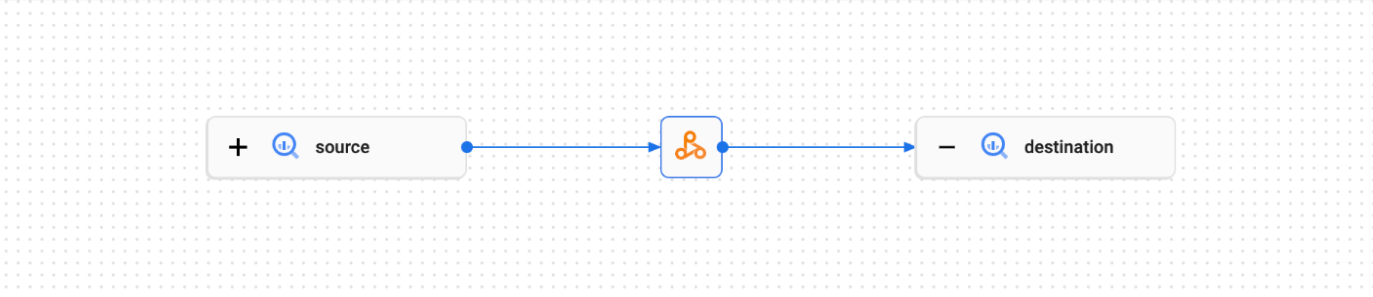
You can view the lineage graph in the Knowledge Catalog UI.
Enable data lineage on a Spark interactive session or session template
To enable data lineage on a Spark interactive session or session template,
set the spark.dataproc.lineage.enabled property to true when you
create the session or session template. This setting overrides any Spark data lineage
setting at the project level: if Spark
data lineage is disabled at the project level but enabled for the interactive session,
the interactive session setting takes precedence.
You can disable Spark data lineage on a Spark interactive session or session template
by setting the spark.dataproc.lineage.enabled property to false
when you create the interactive session or session template.
The following PySpark notebook code configures a Managed Service for Apache Spark interactive session with Spark data lineage enabled. It then creates a Spark Connect session that runs a word count query on a public BigQuery Shakespeare dataset, and then writes the output to a new table in an existing BigQuery dataset (see Create a Spark session in a BigQuery Studio notebook) .
# Configure the Dataproc Serverless interactive session
# to enable Spark data lineage.
from google.cloud.dataproc_v1 import Session

session = Session()
session.runtime_config.properties["spark.dataproc.lineage.enabled"] = "true"

# Create the Spark Connect session.
from google.cloud.dataproc_spark_connect import DataprocSparkSession

spark = DataprocSparkSession.builder.dataprocSessionConfig(session).getOrCreate()

# Run a wordcount query on the public BigQuery Shakespeare dataset.
source = "bigquery-public-data:samples.shakespeare"
words = spark.read.format("bigquery").option("table", source).load()
words.createOrReplaceTempView('words')
word_count = spark.sql(
           'SELECT word, SUM(word_count) AS word_count FROM words GROUP BY word')

# Output the results to a BigQuery destination table.
destination_table = 'PROJECT_ID:DATASET.TABLE'
word_count.write.format('bigquery') \
  .option('table', destination_table) \
  .save()
Replace the following:
- PROJECT_ID, DATASET, and TABLE: The project ID, the name of an existing BigQuery dataset, and the name of a new table to create in the dataset (the table must not exist)
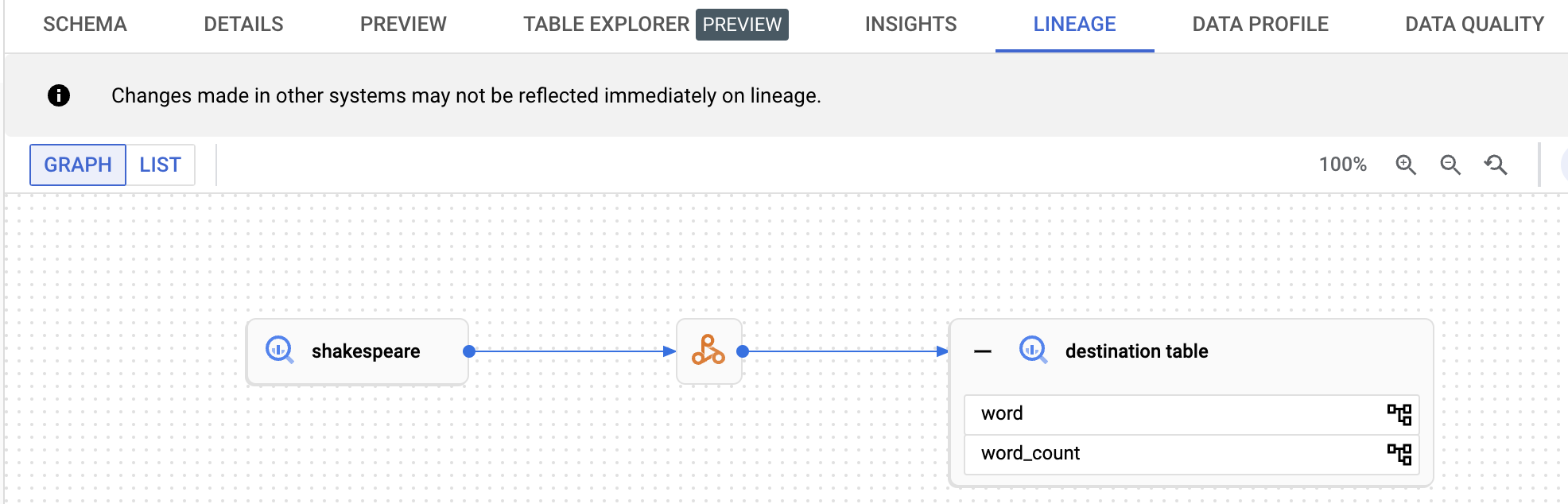
You can view the data lineage graph by clicking the destination table name listed in the navigation pane on BigQuery Explorer page, then selecting the lineage tab on the table details pane.
View lineage in Knowledge Catalog
A lineage graph displays relationships between your project resources and the processes that created them. You can view data lineage information in the Google Cloud console or retrieve the information from the Data Lineage API as JSON data.
What's next
- Learn more about data lineage.
- Try data lineage in an interactive lab: Capture and Explore Data Updates With Data Lineage and OpenLineage in Dataplex.