


將自行管理的 MySQL Metastore 遷移至 Dataproc Metastore
本頁說明如何建立 MySQL dump 檔案,並將中繼資料匯入現有的 Dataproc Metastore 服務,將外部自行管理的 MySQL 中繼儲存庫遷移至 Dataproc Metastore。
事前準備
- 登入 Google Cloud 帳戶。如果您是 Google Cloud新手,歡迎 建立帳戶,親自評估產品在實際工作環境中的成效。新客戶還能獲得價值 $300 美元的免費抵免額,可用於執行、測試及部署工作負載。
-
In the Google Cloud console, on the project selector page, select or create a Google Cloud project.
Roles required to select or create a project
- Select a project: Selecting a project doesn't require a specific IAM role—you can select any project that you've been granted a role on.
-
Create a project: To create a project, you need the Project Creator role
(
roles/resourcemanager.projectCreator), which contains theresourcemanager.projects.createpermission. Learn how to grant roles.
-
Verify that billing is enabled for your Google Cloud project.
-
In the Google Cloud console, on the project selector page, select or create a Google Cloud project.
Roles required to select or create a project
- Select a project: Selecting a project doesn't require a specific IAM role—you can select any project that you've been granted a role on.
-
Create a project: To create a project, you need the Project Creator role
(
roles/resourcemanager.projectCreator), which contains theresourcemanager.projects.createpermission. Learn how to grant roles.
-
Verify that billing is enabled for your Google Cloud project.
-
啟用 Dataproc Metastore API。
啟用 API 時所需的角色
如要啟用 API,您需要服務使用情形管理員 IAM 角色 (
roles/serviceusage.serviceUsageAdmin),其中包含serviceusage.services.enable權限。瞭解如何授予角色。
必要的角色
如要取得建立 Dataproc Metastore 及匯入 MySQL Metastore 所需的權限,請要求管理員授予您下列 IAM 角色:
-
如要建立服務並匯入中繼資料,請按照下列步驟操作:
- 專案的 Dataproc Metastore 編輯者 (
roles/metastore.editor) - 專案的 Dataproc Metastore 管理員 (
roles/metastore.admin)。
- 專案的 Dataproc Metastore 編輯者 (
- 如要使用 Cloud Storage 物件 (SQL dump 檔案) 進行匯入:
如要進一步瞭解如何授予角色,請參閱「管理專案、資料夾和組織的存取權」。
這些預先定義的角色具備建立 Dataproc Metastore 和匯入 MySQL Metastore 所需的權限。如要查看確切的必要權限,請展開「Required permissions」(必要權限) 部分:
所需權限
如要建立 Dataproc Metastore 並匯入 MySQL Metastore,您必須具備下列權限:
-
建立服務:
metastore.services.create在專案中。 -
如要匯入中繼資料:
metastore.imports.create專案。 -
如要使用 Cloud Storage SQL dump 檔案進行匯入:
-
storage.objects.getDataproc Metastore 服務代理程式。例如:service-CUSTOMER_PROJECT_NUMBER@gcp-sa-metastore.iam.gserviceaccount.com -
storage.objects.get使用者帳戶。
-
建立 Dataproc Metastore 服務
下列操作說明示範如何建立 Dataproc Metastore 服務,以便將 SQL dump 檔案遷移至該服務。
控制台
在 Google Cloud 控制台中,開啟「建立服務」頁面:
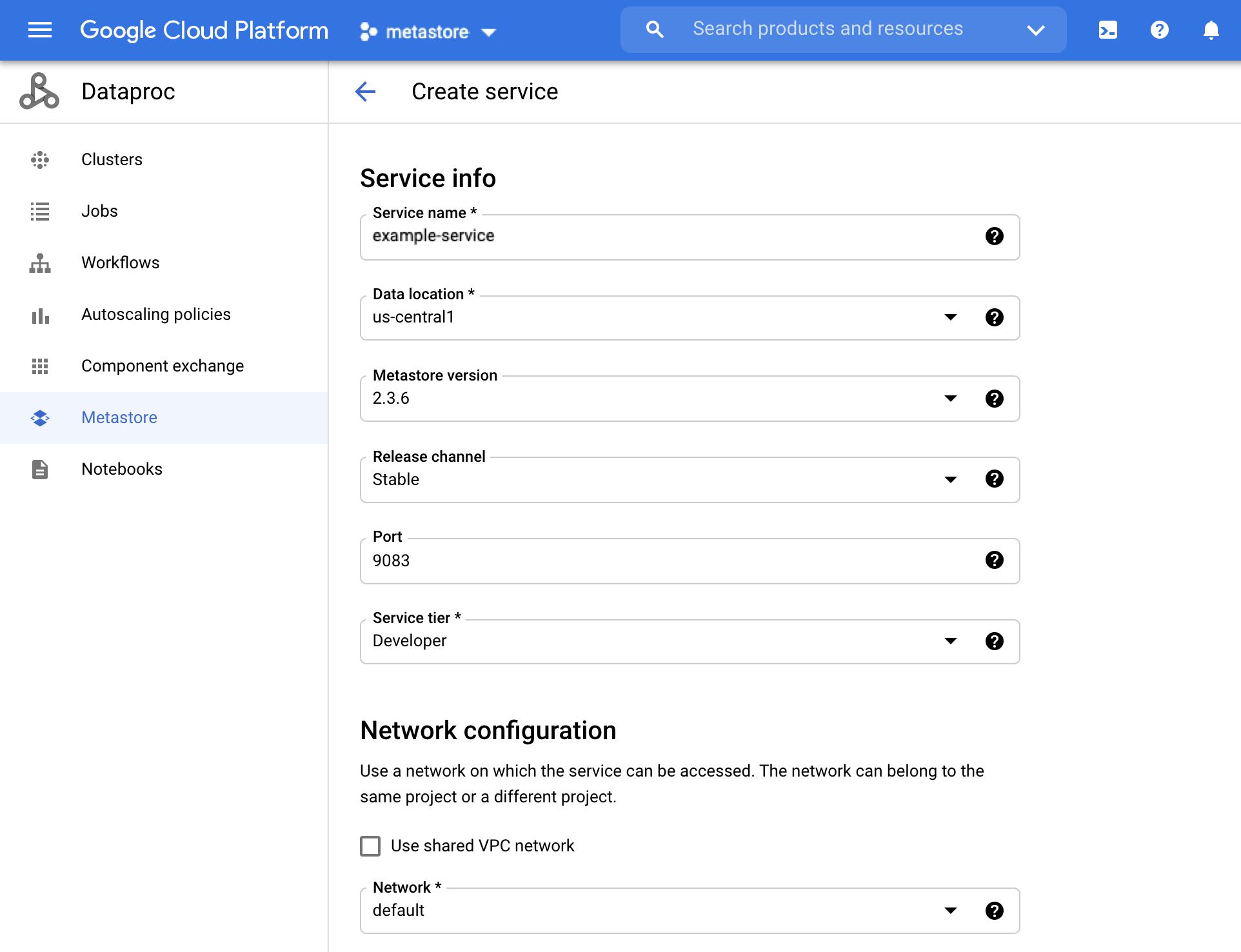
Dataproc Metastore 建立服務頁面 在「Service name」(服務名稱) 欄位中輸入
example-service。選取「資料位置」。 如要瞭解如何選取區域,請參閱「Cloud 據點」一文。
其他服務設定選項請使用系統提供的預設值。
如要建立並啟動服務,請按一下「Submit」(提交) 按鈕。
新服務會顯示在服務清單中。
gcloud
執行下列 gcloud metastore services create 指令來建立服務:
 gcloud metastore services create example-service \
     --location=LOCATION
將 LOCATION 替換為您打算建立服務的 Compute Engine 區域。確認該區域支援 Dataproc Metastore。
REST
按照 API 操作說明,使用 API Explorer 建立服務。
為遷移作業做好準備
您現在必須準備儲存在 Hive metastore 資料庫中的中繼資料,方法是建立 MySQL dump 檔案並放入 Cloud Storage bucket,以供匯入。
如需遷移前準備步驟,請參閱「準備匯入檔案」。
匯入中繼資料
準備好 dump 檔案後,請將其匯入 Dataproc Metastore 服務。
如要將中繼資料匯入 example-service 服務,請參閱「將檔案匯入 Dataproc Metastore」一文。
建立及附加 Managed Service for Apache Spark 叢集
將中繼資料匯入 Dataproc Metastore example-service 服務後,建立並附加 Managed Service for Apache Spark 叢集,使用該服務做為 Hive 中繼存放區。
清除所用資源
為了避免系統向您的 Google Cloud 帳戶收取本頁面所用資源的費用,請按照下列步驟操作。
- 前往 Google Cloud 控制台的「Manage resources」(管理資源) 頁面。
- 如果您要刪除的專案已附加至某個機構,請展開「名稱」欄中的「機構」清單。
- 在專案清單中選取要刪除的專案,然後點選「Delete」(刪除)。
- 在對話方塊中輸入專案 ID,然後按一下 [Shut down] (關閉) 以刪除專案。
或者,您也可以刪除本教學課程中使用的資源:
刪除 Dataproc Metastore 服務。
控制台
在 Google Cloud 控制台中,開啟 Dataproc Metastore 頁面:
勾選服務名稱左側的方塊,選取
example-service。在「Dataproc Metastore」頁面頂端,按一下「Delete」即可刪除服務。
在對話方塊中,按一下「刪除」即可確認刪除。
服務清單中不會再顯示該服務。
gcloud
執行下列
gcloud metastore services delete指令,刪除服務:gcloud metastore services delete example-service \ --location=LOCATION將
LOCATION替換為您建立服務的 Compute Engine 區域。REST
按照 API 操作說明,使用 API Explorer 刪除服務。
系統會立即刪除所有項目。