

This document provides an overview of Knowledge Catalog (formerly Dataplex Universal Catalog) metadata change feeds. These metadata change feeds let you track metadata changes in your Knowledge Catalog instance in near real-time and build event-driven workflows based on those changes.
How metadata change feeds work
In Knowledge Catalog, an entry represents a data asset, such as a BigQuery table, and an aspect is a set of related metadata fields attached to an entry that describes it. When an entry or aspect is created, updated, or deleted, Knowledge Catalog publishes a notification message to a Pub/Sub topic that you specify. These notifications, also called a metadata change feed, contain information about the change. This includes when the change happened, what resource changed, and the type of change. For more information about entries and aspects, see About metadata management in Knowledge Catalog.
The following architecture diagram shows how Knowledge Catalog captures metadata changes (create, update, delete) and pushes them to Pub/Sub for downstream event-driven workflows.
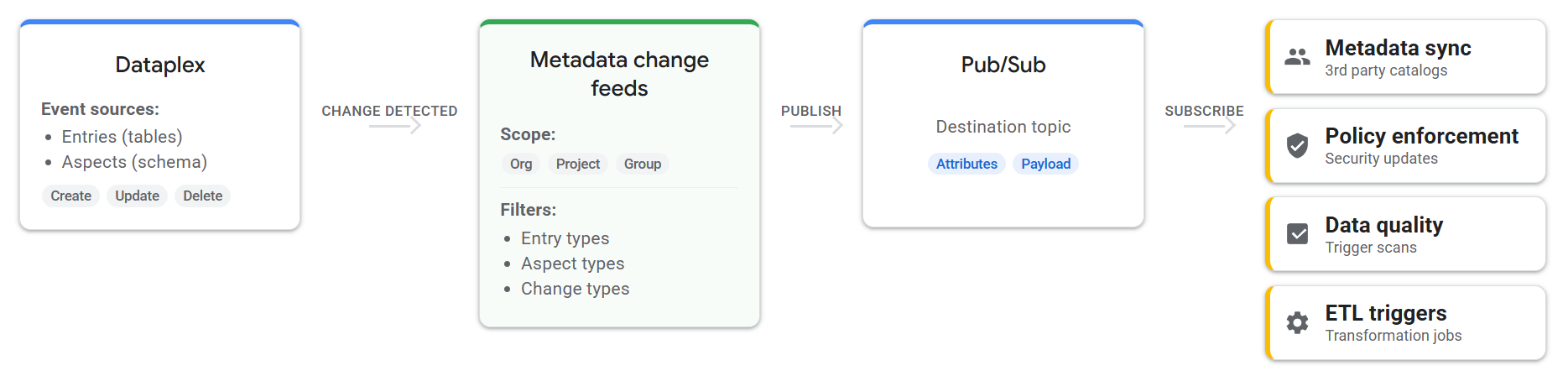
To control which changes generate notifications, you can configure a metadata
change feed to monitor specific resources. You do this by specifying a scope,
such as your entire organization, specific projects, or specific entry groups.
While scope lets you define which resources to monitor, you can use filters to
further refine when Knowledge Catalog sends notifications. For example,
you might want to receive notifications only when tables of type
bigquery-table are updated, but not when they're created or deleted. To do
this, you can apply one or more filters to your metadata change feed based on
entry type, aspect type, or change type (CREATE, UPDATE, or DELETE).
For example, an online retail company uses BigQuery to manage product
inventory in a dedicated project. To monitor only schema changes in their
inventory tables, they create a metadata change feed with the project as scope,
and apply filters for entry_type=bigquery-table and change_type=UPDATE. If
the schema of a critical table, such as product_stock, updates, this change
generates an UPDATE notification that matches the metadata change feed's
filter. The metadata change feed then sends a notification to a
Pub/Sub topic. An automated workflow subscribed to this
Pub/Sub topic can immediately pause downstream reporting pipelines
and alert the inventory management team to prevent decisions based on
inconsistent data.
Metadata change feed use cases
You can use metadata change feeds for various purposes, including:
- Metadata sync: continuously sync Knowledge Catalog metadata changes to an external or third-party data catalog or search index.
- Policy enforcement: automatically apply or update security policies when a data classification aspect changes on an entry.
- Data quality automation: trigger a data quality scan or alert the data owner when the schema of a table changes.
- ETL/ELT triggering: start a data transformation job when a new table entry is created or updated.
- Auditing: log all metadata changes to an audit table for compliance purposes.
Core concepts and configuration
A metadata change feed is a Knowledge Catalog resource that monitors
metadata changes (create, update, delete) for entries and aspects, and sends
notifications to a Pub/Sub topic. In the API, this resource is
called metadataFeeds (projects/PROJECT_ID/locations/LOCATION/metadataFeeds/FEED_ID).
You configure a metadata change feed by defining its scope, filters, and destination. When a metadata change occurs that matches the metadata change feed's scope and filters, Knowledge Catalog publishes a notification message to the destination Pub/Sub topic.
Metadata change feed configuration
You can configure a metadata change feed by defining the following:
Scope: the set of resources to monitor for changes, such as your entire organization, specific projects, or specific entry groups. In the API, you specify the resource name. The following example shows the resource name format for an entry group:
projects/PROJECT_ID/locations/LOCATION/entryGroups/ENTRY_GROUP_ID.Filters: criteria to filter which changes generate notifications based on entry type, aspect type, or change type (
CREATE,UPDATE, orDELETE). In the API, you specify the resource name. The following example shows the resource name format for an entry type:projects/PROJECT_ID/locations/global/entryTypes/ENTRY_TYPE. If you don't specify any filters, then all change types (CREATE,UPDATE, andDELETE) within the feed's scope generate notifications.Destination: the Pub/Sub topic where Knowledge Catalog publishes notification messages. In the API, you specify the topic name. The following example shows the resource name format for a Pub/Sub topic:
projects/PROJECT_ID/topics/TOPIC_ID.
The following example shows a metadata change feed configured to monitor
projects PROJECT_ID_1 and PROJECT_ID_2 for CREATE events,
sending notifications to TOPIC_ID:
{
  "scope": {
    "projects": [
      "projects/PROJECT_ID_1",
      "projects/PROJECT_ID_2"
    ]
  },
  "filter": {
    "changeTypes": [
      "CREATE"
    ]
  },
  "pubsubTopic": "projects/PROJECT_ID_PUBSUB/topics/TOPIC_ID"
}
For instructions on how to create and manage metadata change feeds, see Receive notifications with metadata change feeds.
Notification message format
When a metadata change triggers a notification, Knowledge Catalog publishes a message to the specified Pub/Sub topic. The change event detail is captured in a Pub/Sub message. The message consists of attributes for filtering, and a data payload with details of the change.
For more information about consuming these messages, see Consume notification messages.
Attributes
The attributes enable filtering messages within the topic. You can filter messages on subscription using Pub/Sub subscription filters.
The following fields are provided in the attributes:
timestamp: The timestamp of when the change happened.entry_name: The resource name of the entry, in the formatprojects/PROJECT_ID/locations/LOCATION/entryGroups/ENTRY_GROUP_ID/entries/ENTRY_ID.feed_name: The resource name of the metadata change feed, in the formatprojects/PROJECT_ID/locations/LOCATION/metadataChangeFeeds/FEED_ID.entry_type: The resource name of the entry type, in the formatprojects/PROJECT_NUMBER/locations/LOCATION/entryTypes/ENTRY_TYPE_ID. For more information, see Entry types.entry_change_type: The type of change:CREATED,UPDATED, orDELETED.
The following example shows the attributes for an entry creation event:
{
  "feed_name": "projects/PROJECT_ID/locations/LOCATION/metadataFeeds/FEED_ID",
  "entry_change_type": "CREATE",
  "timestamp": "2026-02-03T23:12:03.054469Z",
  "entry_type": "projects/PROJECT_NUMBER/locations/global/entryTypes/ENTRY_TYPE_ID"
}
Data payload
The data payload of the Pub/Sub message is a JSON string that contains details about the change.
The following is an example of a data payload:
{
  "entryName": "projects/PROJECT_ID/locations/LOCATION/entryGroups/ENTRY_GROUP_ID/entries/ENTRY_ID",
  "fullyQualifiedName": "bigquery:PROJECT_ID.DATASET_ID.TABLE_ID",
  "updatedAspects": [
    "projects/PROJECT_NUMBER/locations/global/aspectTypes/updated-aspect-type"
  ],
  "createdAspects": [
    "projects/PROJECT_NUMBER/locations/global/aspectTypes/created-aspect-type"
  ],
  "deletedAspects": [
    "projects/PROJECT_NUMBER/locations/global/aspectTypes/deleted-aspect-type"
  ]
}
VPC Service Controls considerations
Metadata change feeds are VPC Service Controls (VPC-SC) compliant.
If a metadata change feed is organization-scoped, only projects within the metadata change feed's VPC Service Controls perimeter generate notifications.
If a metadata change feed is project- or entry-group-scoped, all specified projects or entry groups must reside in the same VPC Service Controls perimeter as the metadata change feed; otherwise, metadata change feed creation fails.
Quotas and limitations
For information about quotas related to metadata change feeds, see Knowledge Catalog quotas and limits.
Review the following limitations for metadata change feeds:
Delivery: metadata change feeds deliver notifications on an "at least once" basis. You must handle potential duplicate messages in your subscriber.
Ordering: Knowledge Catalog doesn't guarantee the order of message delivery.
Latency: metadata change feed notifications are near real-time.
Activation delay: a newly created or updated metadata change feed configuration can take up to 10 minutes to become active due to caching in the backend.
Payload: the initial notification message contains only change signatures. For example, entry name, entry type, change type, and a list of changed aspect types or keys, and doesn't contain the actual changed data (the aspect payload). You must call the Dataplex API (
GetEntry) to retrieve the current state of the entry or aspect if needed.Generic storage aspects: metadata change feeds don't support generic storage aspects.
Pricing
There are no direct charges for Knowledge Catalog metadata change feeds. However, you incur costs for the resources used, such as Pub/Sub message delivery, storage, and data egress. See Pub/Sub pricing.