

You can migrate PostgreSQL databases to Cloud SQL for PostgreSQL instances with Database Migration Service. This page provides an overview of the key Database Migration Service features for homogeneous PostgreSQL to Cloud SQL for PostgreSQL migrations:
Supported source and destination lists all PostgreSQL source offerings supported by Database Migration Service.
Data flow for standard migrations provides an end-to-end overview of how your data moves during the continuous migration process.
Quick-start migrations describes a unique migration flow that leverages
pgnativereplication and significantly simplifies networking configuration for PostgreSQL workloads.Monitoring gives an introduction to logs and metrics that can help you observe the progress and health of your migration job.
Supported source and destination databases
You can use Database Migration Service to migrate between the same PostgreSQL version, or from earlier versions of PostgreSQL to later versions supported in Cloud SQL.
The following table lists all supported PostgreSQL source and destination database offerings. For the full list of exact versions and cross-version support, see Supported sources and versions.
| Source databases | Destination databases |
|---|---|
| Amazon RDS | Cloud SQL for PostgreSQL |
| Amazon Aurora | |
| Microsoft Azure Database for PostgreSQL Flexible Server Flexible Server | |
| Cloud SQL for PostgreSQL | |
| Self-managed PostgreSQL
(on premises or on any cloud VM that you fully control) |
Data flow for standard migrations
For homogeneous PostgreSQL migrations to Cloud SQL, Database Migration Service connects to the destination Cloud SQL for PostgreSQL instance and then manages the migration process on its behalf. It's the destination instance that establishes the connection to your source instance, while Database Migration Service orchestrates and monitors the continuous replication flow.
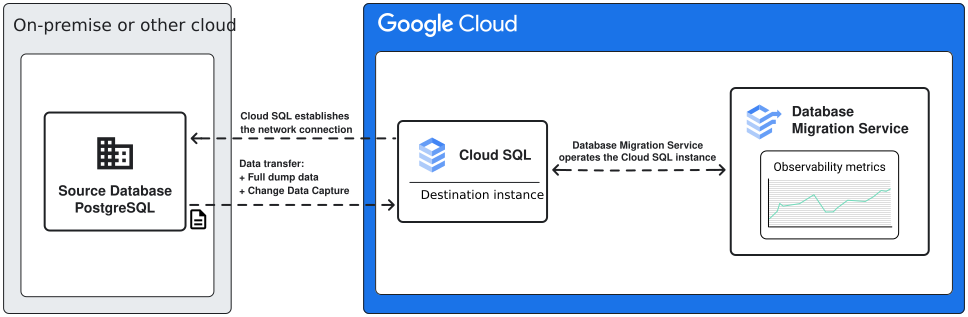
Standard continuous migrations use PostgreSQL logical decoding and the pglogical extension
to stream data changes from the source instance to the destination instance in near real time.
Your data is first loaded from an initial snapshot dump, and then
continuously updated based on change data capture (CDC) stream information.
For a detailed walkthrough of all migration phases, see Migration types and phases.
Quick-start migrations
Database Migration Service provides quick-start migrations to help you migrate PostgreSQL workloads to Cloud SQL for PostgreSQL with minimal manual setup. In a quick-start migration, Database Migration Service automates the configuration of the migration path by provisioning a Private Service Connect-enabled destination instance and orchestrating connectivity to your private source database through Private Service Connect network attachments.
Key capabilities of quick-start migrations include:
- Automated setup: Database Migration Service automates database flag configuration, user provisioning, and connection profile setup.
- Simplified networking: Connect securely to private source databases without managing complex VPNs or public IP allowlists.
- Pre-migration validation: Built-in verification checks ensure your source environment is fully prepared before data replication begins.
For more information, see About quick-start migrations and the Quick-start migrations guide.
Monitoring
Database Migration Service provides extensive logging and observability capabilities to help you monitor migration progress. These features include real-time diagnostics for replication delay, as well as detailed Cloud Monitoring metrics for Cloud SQL for PostgreSQL destination instance health and migration job state.
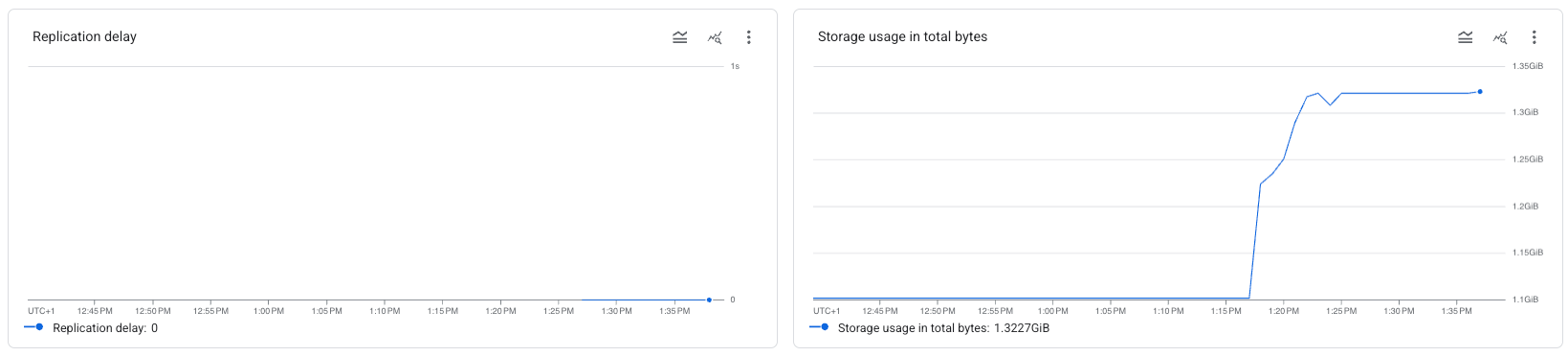
For more details, see Migration job metrics.
What's next
To learn more about PostgreSQL data and feature support in Database Migration Service, see Known limitations.
To get a complete, step-by-step migration walkthrough, see Get started with Cloud SQL for PostgreSQL migrations.