


Managed Airflow(第 3 代) | Managed Airflow(第 2 代) | Managed Airflow(旧版第 1 代)
本页介绍如何使用 KubernetesPodOperator 将 Kubernetes pod 从 Managed Service for Apache Airflow 部署到作为 Managed Service for Apache Airflow 环境一部分的 Google Kubernetes Engine 集群。
KubernetesPodOperator 会在您的环境的集群中启动 Kubernetes Pod。相比之下,Google Kubernetes Engine Operator 在指定集群中运行 Kubernetes Pod,该集群可以是与您的环境无关的独立集群。您还可以使用 Google Kubernetes Engine Operator 来创建和删除集群。
如果您需要以下内容,KubernetesPodOperator 是一个不错的选择:
- 无法通过公共 PyPI 代码库获得的自定义 Python 依赖项。
- 无法通过现有 Managed Airflow 工作器映像获得的二进制依赖项。
准备工作
如果使用 CNCF Kubernetes 提供程序 5.0.0 版,请按照 CNCF Kubernetes 提供程序部分中记录的说明操作。
Managed Airflow(第 2 代)不提供 Pod 亲和性配置。如果您想使用 Pod 亲和性,请改用 GKE 操作员在其他集群中启动 Pod。
Managed Airflow(第 2 代)中的 KubernetesPodOperator 简介
本部分介绍了 KubernetesPodOperator 在 Managed Airflow(第 2 代)中的运作方式。
资源使用情况
在 Managed Airflow(第 2 代)中,您的环境的集群会自动扩缩。使用 KubernetesPodOperator 运行的额外工作负载会独立于您的环境进行扩缩。
您的环境不受资源需求增加的影响,但环境的集群会根据资源需求进行扩缩。
您在环境的集群中运行的额外工作负载的价格遵循 Managed Airflow(第 2 代)价格模式并使用 Managed Airflow 计算 SKU。
Managed Airflow(第 2 代)使用 Autopilot 集群,引入了计算类的概念:
受管 Airflow 仅支持
general-purpose计算类。默认情况下,如果未选择任何类别,则在使用 KubernetesPodOperator 创建 Pod 时,系统会假定为
general-purpose类别。每个类都与特定的属性和资源限制相关联,您可以在 Autopilot 文档中了解相关信息。例如,在
general-purpose类中运行的 Pod 最多可以使用 110 GiB 的内存。
对项目资源的访问权限
Managed Airflow(第 2 代)使用启用了 Workload Identity Federation for GKE 的 GKE 集群。在 composer-user-workloads 命名空间中运行的 Pod 可以访问项目中的 Google Cloud 资源,而无需进行额外配置。您环境的服务账号用于访问这些资源。
如果您想使用自定义命名空间,则与此命名空间关联的 Kubernetes 服务账号必须映射到 Google Cloud 服务账号,以针对向 Google API 和其他服务发出的请求启用服务身份验证。如果您在环境的集群中以自定义命名空间运行 Pod,则不会创建 Kubernetes 服务账号与Google Cloud 服务账号之间的 IAM 绑定,并且这些 Pod 无法访问 Google Cloud 项目的资源。
如果您使用自定义命名空间,并希望 Pod 能够访问Google Cloud 资源,请按照 Workload Identity Federation for GKE 中的指南操作,并为自定义命名空间设置绑定:
- 在您的环境集群中创建单独的命名空间。
- 在自定义命名空间 Kubernetes 服务账号和您环境的服务账号之间创建绑定。
- 将您的环境的服务账号注释添加到 Kubernetes 服务账号。
- 使用 KubernetesPodOperator 时,请在
namespace和service_account_name参数中指定命名空间和 Kubernetes 服务账号。
最少的配置工作量
为了创建 KubernetesPodOperator,只需要 Pod 的 name、要使用的 image 和 task_id 参数。/home/airflow/composer_kube_config 包含用于向 GKE 进行身份验证的凭据。
其他配置
此示例展示了您可以在 KubernetesPodOperator 中配置的其他参数。
如需了解详情,请参阅以下资源:
如需了解如何使用 Kubernetes Secret 和 ConfigMap,请参阅使用 Kubernetes Secret 和 ConfigMap。
如需了解如何将 Jinja 模板与 KubernetesPodOperator 搭配使用,请参阅使用 Jinja 模板。
如需了解 KubernetesPodOperator 参数,请参阅 Airflow 文档中的运算符参考。
使用 Jinja 模板
Airflow 支持在 DAG 中使用 Jinja 模板。
您必须在操作节点 (operator) 中声明必需的 Airflow 参数(task_id、name 和 image)。如以下示例所示,您可以搭配使用 Jinja 和所有其他参数生成模板,包括cmds、arguments、env_vars 和 config_file。
示例中的 env_vars 参数是从名为 my_value 的 Airflow 变量设置的。示例 DAG 从 Airflow 中的 vars 模板变量获取其值。Airflow 具有更多变量,可用于访问不同类型的信息。例如,您可以使用 conf 模板变量来访问 Airflow 配置选项的值。如需了解详情以及 Airflow 中可用的变量列表,请参阅 Airflow 文档中的模板参考。
在不更改 DAG 或创建 env_vars 变量的情况下,示例中的 ex-kube-templates 任务会因变量不存在而失败。在 Airflow 界面中或使用 Google Cloud CLI 创建此变量:
Airflow 界面
转到 Airflow 界面。
在工具栏中,选择 Admin > Variables。
在 List Variable 页面上,点击 Add a new record。
在 Add Variable 页面上,输入以下信息:
- Key:
my_value - Val:
example_value
- Key:
点击保存。
gcloud
输入以下命令:
gcloud composer environments run ENVIRONMENT \
    --location LOCATION \
    variables set -- \
    my_value example_value
将
ENVIRONMENT替换为环境的名称。LOCATION替换为环境所在的区域。
以下示例演示了如何将 Jinja 模板与 KubernetesPodOperator 搭配使用:
使用 Kubernetes Secret 和 ConfigMap
Kubernetes Secret 是包含敏感数据的对象。Kubernetes ConfigMap 是包含键值对形式的非机密数据的对象。
在 Managed Airflow(第 2 代)中,您可以使用 Google Cloud CLI、API 或 Terraform 创建 Secret 和 ConfigMap,然后通过 KubernetesPodOperator 访问它们。
关于 YAML 配置文件
使用 Google Cloud CLI 和 API 创建 Kubernetes Secret 或 ConfigMap 时,您需要提供 YAML 格式的文件。此文件必须遵循与 Kubernetes Secret 和 ConfigMap 相同的格式。Kubernetes 文档提供了许多 ConfigMap 和 Secret 代码示例。如需开始使用,您可以参阅使用 Secret 安全地分发凭据页面和 ConfigMaps。
与 Kubernetes Secret 中相同,在 Secret 中定义值时,请使用 base64 表示法。
如需对值进行编码,您可以使用以下命令(这是获取 base64 编码值的方法之一):
echo "postgresql+psycopg2://root:example-password@127.0.0.1:3306/example-db" -n | base64
输出:
cG9zdGdyZXNxbCtwc3ljb3BnMjovL3Jvb3Q6ZXhhbXBsZS1wYXNzd29yZEAxMjcuMC4wLjE6MzMwNi9leGFtcGxlLWRiIC1uCg==
本指南后面的示例中使用了以下两个 YAML 文件示例。Kubernetes Secret 的 YAML 配置文件示例:
apiVersion: v1
kind: Secret
metadata:
  name: airflow-secrets
data:
  sql_alchemy_conn: cG9zdGdyZXNxbCtwc3ljb3BnMjovL3Jvb3Q6ZXhhbXBsZS1wYXNzd29yZEAxMjcuMC4wLjE6MzMwNi9leGFtcGxlLWRiIC1uCg==
另一个演示如何包含文件的示例。与上一个示例中一样,先对文件 (cat ./key.json | base64) 的内容进行编码,然后在 YAML 文件中提供此值:
apiVersion: v1
kind: Secret
metadata:
  name: service-account
data:
  service-account.json: |
    ewogICJ0eXBl...mdzZXJ2aWNlYWNjb3VudC5jb20iCn0K
ConfigMap 的 YAML 配置文件示例。您无需在 ConfigMap 中使用 base64 表示法:
apiVersion: v1
kind: ConfigMap
metadata:
  name: example-configmap
data:
  example_key: example_value
管理 Kubernetes Secret
在 Managed Airflow(第 2 代)中,您可以使用 Google Cloud CLI 和 kubectl 创建 Secret:
获取有关环境集群的信息:
运行以下命令:
gcloud composer environments describe ENVIRONMENT \
    --location LOCATION \
    --format="value(config.gkeCluster)"
替换:
- 将
ENVIRONMENT替换为您的环境名称。 - 将
LOCATION替换为 Managed Airflow 环境所在的区域。
此命令的输出使用以下格式:
projects/<your-project-id>/locations/<location-of-composer-env>/clusters/<your-cluster-id>。- 将
为了获取 GKE 集群 ID,请复制
/clusters/后面的输出内容(以-gke结尾)。
使用以下命令连接到您的 GKE 集群:
gcloud container clusters get-credentials CLUSTER_ID \
  --project PROJECT \
  --region LOCATION
替换以下内容:
CLUSTER_ID:环境的集群 ID。PROJECT_ID:项目 ID。LOCATION:环境所在的区域。
创建 Kubernetes Secret:
以下命令演示了创建 Kubernetes Secret 的两种不同方法。
--from-literal方法使用键值对。--from-file方法使用文件内容。如需通过提供键值对来创建 Kubernetes Secret,请运行以下命令。此示例创建了一个名为
airflow-secrets的 Secret,其中包含一个值为test_value的sql_alchemy_conn字段。kubectl create secret generic airflow-secrets \ --from-literal sql_alchemy_conn=test_value -n composer-user-workloads如需通过提供文件内容来创建 Kubernetes Secret,请运行以下命令。此示例创建了一个名为
service-account的 Secret,其中包含一个service-account.json字段,该字段的值取自本地./key.json文件的内容。kubectl create secret generic service-account \ --from-file service-account.json=./key.json -n composer-user-workloads
在 DAG 中使用 Kubernetes Secret
此示例展示了使用 Kubernetes Secret 的两种方法:作为环境变量,以及由 Pod 装载的卷。
第一个 Secret airflow-secrets 设置为名为 SQL_CONN 的 Kubernetes 环境变量(而不是 Airflow 或 Managed Airflow 环境变量)。
第二个 Secret service-account 将包含服务账号令牌的文件 service-account.json 装载到 /var/secrets/google。
Secret 对象如下所示:
第一个 Kubernetes Secret 的名称在 secret_env 变量中定义。此 Secret 名为 airflow-secrets。deploy_type 参数指定必须将其公开为环境变量。环境变量的名称为 SQL_CONN,如 deploy_target 参数中所指定。最后,将 SQL_CONN 环境变量的值设置为 sql_alchemy_conn 键的值。
第二个 Kubernetes Secret 的名称在 secret_volume 变量中定义。此 Secret 名为 service-account。它显示为卷,如 deploy_type 参数中所指定。要装载的文件的路径 deploy_target 是 /var/secrets/google。最后,存储在 deploy_target 中的 Secret 的 key 为 service-account.json。
操作节点配置类似于如下所示:
有关 CNCF Kubernetes 提供方的信息
KubernetesPodOperator 在 apache-airflow-providers-cncf-kubernetes 提供程序中实现。
如需详细了解 CNCF Kubernetes 提供方 的版本说明,请参阅 CNCF Kubernetes 提供方 网站。
版本 6.0.0
在 CNCF Kubernetes 提供程序软件包的 6.0.0 版中,KubernetesPodOperator 默认使用 kubernetes_default 连接。
如果您在 5.0.0 版中指定了自定义连接,则该运算符仍会使用此自定义连接。如需切换回使用 kubernetes_default 连接,您可能需要相应地调整 DAG。
版本 5.0.0
与 4.4.0 版相比,此版本引入了一些向后不兼容的更改。最重要的错误与 5.0.0 版中未使用的 kubernetes_default 连接有关。
- 需要修改
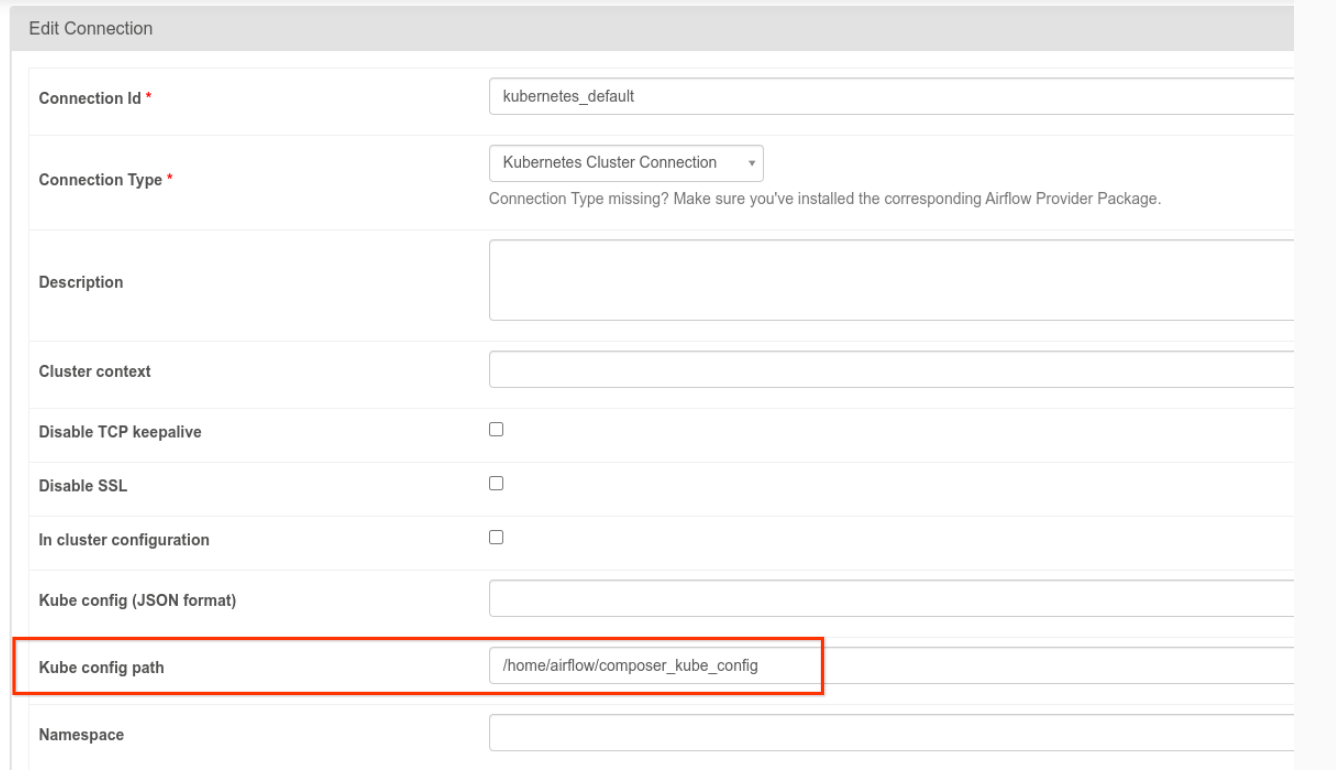
kubernetes_default连接。Kubernetes 配置路径必须设置为/home/airflow/composer_kube_config(如下图所示)。或者,必须将config_file添加到 KubernetesPodOperator 配置中(如以下代码示例所示)。
- 使用 KubernetesPodOperator 按以下方式修改任务的代码:
KubernetesPodOperator(
  # config_file parameter - can be skipped if connection contains this setting
  config_file="/home/airflow/composer_kube_config",
  # definition of connection to be used by the operator
  kubernetes_conn_id='kubernetes_default',
  ...
)
如需详细了解版本 5.0.0,请参阅 CNCF Kubernetes 提供方版本说明。
问题排查
本部分提供了一些建议,可帮助您排查 KubernetesPodOperator 的常见问题:
查看日志
在排查问题时,您可以按以下顺序查看日志:
Airflow 任务日志:
在 Google Cloud 控制台中,前往环境页面。
在环境列表中,点击您的环境名称。环境详情页面会打开。
前往 DAG 标签页。
点击 DAG 的名称,然后点击 DAG 运行,以查看详情和日志。
Airflow 调度器日志:
前往环境详情页面。
前往日志标签页。
检查 Airflow 调度程序日志。
Google Cloud 控制台中 GKE 工作负载下的 Pod 日志。这些日志包括 Pod 定义 YAML 文件、Pod 事件和 Pod 详情。
非零返回代码
使用 KubernetesPodOperator(和 GKEStartPodOperator)时,容器入口点的返回代码确定任务是否成功。返回非零代码表示失败。
常见模式是执行一个 shell 脚本作为容器入口点,以将容器内的多个操作分组到一起。
如果您要编写这样的脚本,建议您在脚本的顶部加入 set -e 命令,因而脚本中失败的命令会终止脚本并将故障传播至 Airflow 任务实例。
Pod 超时
KubernetesPodOperator 的默认超时时间为 120 秒,这会导致在较大的映像下载完成之前发生超时。您可以通过在创建 KubernetesPodOperator 时更改 startup_timeout_seconds 参数来增加超时值。
如果某个 pod 超时,您可从 Airflow 界面中查看相应任务专属的日志。例如:
Executing <Task(KubernetesPodOperator): ex-all-configs> on 2018-07-23 19:06:58.133811
Running: ['bash', '-c', u'airflow run kubernetes-pod-example ex-all-configs 2018-07-23T19:06:58.133811 --job_id 726 --raw -sd DAGS_FOLDER/kubernetes_pod_operator_sample.py']
Event: pod-name-9a8e9d06 had an event of type Pending
...
...
Event: pod-name-9a8e9d06 had an event of type Pending
Traceback (most recent call last):
  File "/usr/local/bin/airflow", line 27, in <module>
    args.func(args)
  File "/usr/local/lib/python2.7/site-packages/airflow/bin/cli.py", line 392, in run
    pool=args.pool,
  File "/usr/local/lib/python2.7/site-packages/airflow/utils/db.py", line 50, in wrapper
    result = func(*args, **kwargs)
  File "/usr/local/lib/python2.7/site-packages/airflow/models.py", line 1492, in _run_raw_task
    result = task_copy.execute(context=context)
  File "/usr/local/lib/python2.7/site-packages/airflow/contrib/operators/kubernetes_pod_operator.py", line 123, in execute
    raise AirflowException('Pod Launching failed: {error}'.format(error=ex))
airflow.exceptions.AirflowException: Pod Launching failed: Pod took too long to start
如果 Managed Airflow 服务账号缺少必要的 IAM 权限来执行手头的任务,也会出现 Pod 超时。如需验证是否属于这种情况,请使用 GKE 信息中心查看 Pod 级错误,找到特定工作负载的日志;或者使用 Cloud Logging。
无法建立新连接
GKE 集群默认启用自动升级。 如果集群中的某个节点池正在升级,您可能会看到以下错误:
<Task(KubernetesPodOperator): gke-upgrade> Failed to establish a new
connection: [Errno 111] Connection refused
如需检查您的集群是否正在升级,请在 Google Cloud 控制台中前往 Kubernetes 集群页面,然后查看您的环境的集群名称旁是否有加载图标。