


使用 SQL 单元格
本指南介绍了如何使用 SQL 单元在 Colab Enterprise 笔记本中查询数据。
概览
SQL 代码单元是一种代码单元,用于在 Colab Enterprise 笔记本中编写、修改和运行 SQL 查询。SQL 代码单元提供了一种替代 IPython Magics for BigQuery 的工作流。
功能
SQL 代码单元提供以下功能:
- 支持试运行:SQL 语句验证和查询处理的字节数估算
- 格式设置:关键字 lint 检查和语法突出显示
- BigQuery DataFrame 输出变量命名:从其他笔记本单元格中引用输出变量
- 变量替换:引用 Python 变量和 SQL 代码单元,以支持参数化和查询先前查询结果的功能
- 结果集查看器:轻量级表格结果集查看器,可针对大型结果集进行分页
- 可视化图表单元集成:SQL 单元的输出可用作可视化图表单元的输入
支持的 SQL 方言和数据源
Colab Enterprise SQL 单元支持 GoogleSQL。
您可以对 BigQuery 数据运行 SQL 查询。
限制
在规划项目时,请考虑以下限制:
- 您可以在单个 SQL 单元中运行多个 SQL 语句,但只有最后一个 SQL 语句的结果会保存到 DataFrame 中。
准备工作
- 登录您的 Google Cloud 账号。如果您是 Google Cloud新手,请 创建一个账号来评估我们的产品在实际场景中的表现。新客户还可获享 $300 赠金,用于运行、测试和部署工作负载。
-
In the Google Cloud console, on the project selector page, select or create a Google Cloud project.
Roles required to select or create a project
- Select a project: Selecting a project doesn't require a specific IAM role—you can select any project that you've been granted a role on.
-
Create a project: To create a project, you need the Project Creator role
(
roles/resourcemanager.projectCreator), which contains theresourcemanager.projects.createpermission. Learn how to grant roles.
-
Verify that billing is enabled for your Google Cloud project.
Enable the BigQuery, Compute Engine, Dataform, and Agent Platform APIs.
Roles required to enable APIs
To enable APIs, you need the
serviceusage.services.enablepermission. If you created the project, then you likely already have this permission through the Owner role (roles/owner). Otherwise, you can get this permission through the Service Usage Admin role (roles/serviceusage.serviceUsageAdmin). Learn how to grant roles.-
In the Google Cloud console, on the project selector page, select or create a Google Cloud project.
Roles required to select or create a project
- Select a project: Selecting a project doesn't require a specific IAM role—you can select any project that you've been granted a role on.
-
Create a project: To create a project, you need the Project Creator role
(
roles/resourcemanager.projectCreator), which contains theresourcemanager.projects.createpermission. Learn how to grant roles.
-
Verify that billing is enabled for your Google Cloud project.
Enable the BigQuery, Compute Engine, Dataform, and Agent Platform APIs.
Roles required to enable APIs
To enable APIs, you need the
serviceusage.services.enablepermission. If you created the project, then you likely already have this permission through the Owner role (roles/owner). Otherwise, you can get this permission through the Service Usage Admin role (roles/serviceusage.serviceUsageAdmin). Learn how to grant roles.
所需的角色
如需获得创建 Colab Enterprise 笔记本、在运行时运行笔记本代码以及在笔记本中使用 BigQuery 数据所需的权限,请让管理员向您授予项目的以下 IAM 角色:
- BigQuery User (
roles/bigquery.user) - Colab Enterprise User (
roles/aiplatform.colabEnterpriseUser)
如需详细了解如何授予角色,请参阅管理对项目、文件夹和组织的访问权限。
创建 SQL 代码单元
如需在 Colab Enterprise 中创建 SQL 单元,请执行以下操作:
-
在 Google Cloud 控制台中,前往 Colab Enterprise 我的笔记本页面。
-
在区域菜单中,选择包含笔记本的区域。
-
点击您要打开的笔记本。如果您尚未创建笔记本,请创建一个笔记本。
-
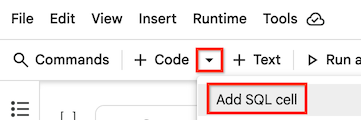
在工具栏中,如需添加 SQL 单元格,请点击 插入代码单元格选项菜单,然后选择添加 SQL 单元格。
您的 SQL 代码单元会添加到笔记本中。
输入并运行查询
-
在 SQL 单元中,输入 SQL 查询。如需简要了解支持的语句和 SQL 方言,请参阅 BigQuery 中的 SQL 简介。
您可以在表达式中引用 Python 变量,只需将变量名称用大括号 (
{ }) 括起来即可。例如,如果您在名为my_threshold的 Python 变量中指定了一个值,则可以使用类似于以下内容的查询来限制结果集:SELECT * FROM my_dataset.my_table WHERE x > {my_threshold};
-
将指针悬停在要运行的 SQL 单元上,然后点击 运行单元按钮。
 运行单元按钮。
查询的输出会自动保存为与 SQL 单元标题同名的 BigQuery DataFrame。
与结果集互动
您可以将结果集作为 BigQuery DataFrame 或 pandas DataFrame 进行交互。
您可以使用相同的 SQL 代码单元变量名称链接 SQL 语句。例如,您可以将结果集生成的 BigQuery DataFrames 用作后续查询中的表,只需将 DataFrame 名称放在大括号 ({ }) 中即可。请参阅以下示例,该示例引用了之前查询的输出,该输出已保存为名为 df 的 DataFrame:
SELECT * FROM {df};