


启用带 GPU 的默认运行时
若要在预览版期间获得支持,请发送电子邮件至 vertex-notebooks-previews-external@google.com。
本文档介绍了如何为项目中的 Colab Enterprise 用户启用具有 GPU 的默认运行时。在启用具有 GPU 的默认运行时后,用户可以通过点击笔记本中的按钮,从常规默认运行时切换到具有 GPU 的默认运行时。
本文档适用于希望为组织中的其他用户启用带 GPU 的默认运行时的 Colab Enterprise 管理员。本教程假定您了解以下内容:
- 如何管理 Colab Enterprise 运行时和运行时模板。
- 如何使用 Identity and Access Management (IAM) 控制访问权限。
概览
如需让用户切换到带 GPU 的默认运行时,管理员 (roles/aiplatform.colabEnterpriseAdmin) 或具有 aiplatform.notebookRuntimeTemplates.create 权限的用户账号必须先创建带 GPU 的默认运行时。
首次创建带 GPU 的默认运行时时,Colab Enterprise 会创建一个新的默认运行时模板,其中包含 GPU 规范。原始默认运行时不受影响,并且会一直存在,直到过期或被删除。创建带 GPU 的新默认运行时模板后,任何对项目具有 aiplatform.notebookRuntimes.assign 权限且对运行时模板具有 aiplatform.notebookRuntimeTemplates.apply 权限的用户都可以创建和使用带 GPU 的默认运行时。这些权限包含在 Colab Enterprise User (roles/aiplatform.colabEnterpriseUser) 角色中。
规格
带 GPU 的默认运行时与原始默认运行时具有不同的规范。可用的机器类型、GPU 和数据磁盘类型因区域而异,因此某些规范可能与原始默认运行时不同。
下表介绍了基于默认运行时区域的 GPU 默认运行时规范。
| 区域说明 | 默认运行时规范 |
|---|---|
| 支持 L4 GPU 的区域 |
|
| 不支持 L4 GPU 但支持 T4 GPU 的地区 |
|
| 不支持 L4 或 T4 GPU 的区域 | 不支持使用 GPU 的默认运行时。 |
加速器可用性
Colab Enterprise 支持具有以下加速器类型的默认运行时:
- L4
- T4
如需了解这些加速器的区域级可用性,请参阅使用加速器。
准备工作
- 登录您的 Google Cloud 账号。如果您是 Google Cloud新手,请 创建一个账号来评估我们的产品在实际场景中的表现。新客户还可获享 $300 赠金,用于运行、测试和部署工作负载。
-
In the Google Cloud console, on the project selector page, select or create a Google Cloud project.
Roles required to select or create a project
- Select a project: Selecting a project doesn't require a specific IAM role—you can select any project that you've been granted a role on.
-
Create a project: To create a project, you need the Project Creator role
(
roles/resourcemanager.projectCreator), which contains theresourcemanager.projects.createpermission. Learn how to grant roles.
-
Verify that billing is enabled for your Google Cloud project.
Enable the Agent Platform, Dataform, and Compute Engine APIs, if any are not already enabled.
Roles required to enable APIs
To enable APIs, you need the
serviceusage.services.enablepermission. If you created the project, then you likely already have this permission through the Owner role (roles/owner). Otherwise, you can get this permission through the Service Usage Admin role (roles/serviceusage.serviceUsageAdmin). Learn how to grant roles.-
In the Google Cloud console, on the project selector page, select or create a Google Cloud project.
Roles required to select or create a project
- Select a project: Selecting a project doesn't require a specific IAM role—you can select any project that you've been granted a role on.
-
Create a project: To create a project, you need the Project Creator role
(
roles/resourcemanager.projectCreator), which contains theresourcemanager.projects.createpermission. Learn how to grant roles.
-
Verify that billing is enabled for your Google Cloud project.
Enable the Agent Platform, Dataform, and Compute Engine APIs, if any are not already enabled.
Roles required to enable APIs
To enable APIs, you need the
serviceusage.services.enablepermission. If you created the project, then you likely already have this permission through the Owner role (roles/owner). Otherwise, you can get this permission through the Service Usage Admin role (roles/serviceusage.serviceUsageAdmin). Learn how to grant roles.
所需的角色
如需确保您的用户账号拥有在 Colab Enterprise 中启用含 GPU 的默认运行时所需的权限,请让您的管理员向您的用户账号授予项目的 Colab Enterprise Admin (roles/aiplatform.colabEnterpriseAdmin) IAM 角色。
您的管理员还可以通过自定义角色或其他预定义角色向您的用户账号授予所需的权限。
为默认运行时启用 GPU
如需为默认运行时启用 GPU,请执行以下操作:
-
在 Google Cloud 控制台中,前往 Colab Enterprise 我的笔记本页面。
-
在区域菜单中,选择包含笔记本的区域。
-
点击您要打开的笔记本。如果您尚未创建笔记本,请创建一个笔记本。
-
在笔记本中,点击连接。

-
Colab Enterprise 连接到默认运行时后,在笔记本的右上角,点击相应按钮切换到具有 GPU 的默认运行时。例如,如果您的笔记本位于支持 L4 加速器的区域,请点击切换到 L4。
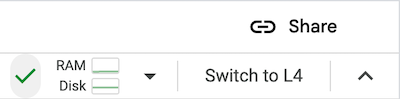
Colab Enterprise 会创建一个新的带 GPU 的默认运行时,然后连接到该运行时。项目中的其他用户可以切换到带 GPU 的默认运行时。
针对默认运行时关闭 GPU
如需关闭切换到带 GPU 的默认运行时的功能,您必须删除名为 Default with GPU 的运行时模板。请参阅删除运行时模板。
限制
带 GPU 的默认运行时仅在支持特定加速器可用性的区域中提供。请参阅加速器可用性。
您必须先将笔记本连接到默认运行时,然后才能切换到带 GPU 的默认运行时。