

This document explains the lifecycle of a cluster node in Cluster Director.
A node in a cluster transitions through various states from its creation to its deletion. Understanding these states lets you do the following:
Manage resources and costs: understand when Cluster Director provisions and stops dynamic nodes to run queued jobs and reduce unnecessary charges.
Minimize disruptions: anticipate planned host maintenance events.
Troubleshoot errors: identify why a node fails to boot, restart, or resume.
To check the current state of a node, view the details of your cluster.
Node states
The following diagram shows the different states that Cluster Director can set a node to:
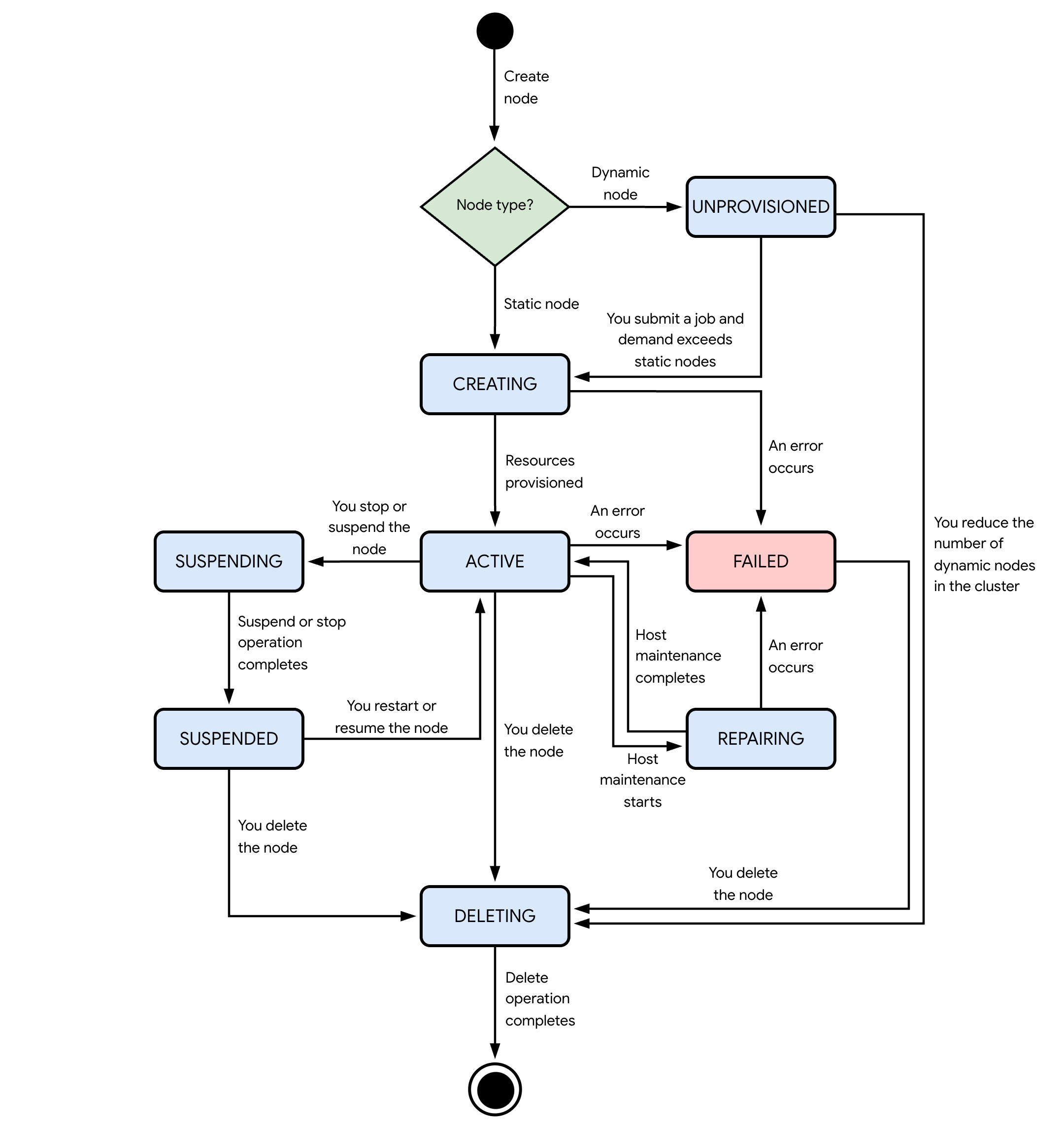
The states shown in the preceding diagram are as follows:
Unprovisioned state
When Cluster Director creates a dynamic node, the node starts in the
UNPROVISIONED state. From this state, a dynamic node can transition to one of
the following states:
CREATING: when you submit a job that requires more compute resources than the ones in your static nodes, Cluster Director attempts to allocate resources to create the dynamic node.DELETING: when you reduce the dynamic node count in the cluster by modifying or deleting it, the delete operation for the node starts.
Creating state
When a node is in the CREATING state, Cluster Director attempts to
allocate resources to boot, restart, or resume your node.
From this state, the node can transition to one of the following states:
ACTIVE: when Cluster Director allocates resources for your node, the node boots up and starts running.FAILED: the node encounters a host error.
Active state
When a node is in the ACTIVE state, the node is healthy, running, and ready
to run Slurm jobs.
From this state, the node can transition to one of the following states:
SUSPENDING: you stop or suspend the node.REPAIRING: planned or unplanned host maintenance for the node starts.UNPROVISIONED: Slurm deletes the node after it has been in theidlestate for some time, or Cluster Director deletes the node after you reduce the number of dynamic nodes in the cluster.DELETING: a delete operation starts after one of the following occurs:The reservation that you used to create the node has reached its end time. Cluster Director deletes the node if it was created by using the reserved resources for a future reservation in calendar mode, or if you configured the node to be deleted when the reservation reaches its end time.
You manually delete the node.
You reduce the static node count (
staticNodeCount) or maximum dynamic node count (maxDynamicNodeCount) in a nodeset.You delete the cluster.
FAILED: the node encounters a host error.
Suspending state
When a node is in the SUSPENDING state, Cluster Director is stopping or
suspending the node. You can only suspend nodes that use N2 machine types. For
more information, see
Suspend, stop, or reset Compute Engine instances.
From this state, when the stop or suspend operation completes, the node
transitions to the SUSPENDED state.
Suspended state
When a node is in the SUSPENDED state, the stop or suspend operation
completes.
From this state, the node transitions to one of the following states:
CREATING: when you resume or restart the node.DELETING: when you delete the node or the cluster.
Repairing state
When a node is in the REPAIRING state, Cluster Director stops the node
to perform host maintenance on the node's underlying Compute Engine
infrastructure. Only GPU nodes enter this state. Nodes that use N2 machine
types keep running during maintenance as Cluster Director
live migrates them.
From this state, the node transitions to one of the following states:
ACTIVE: when host maintenance completes, the node restarts. Cluster Director helps ensure that the resources needed to restart the node are available.FAILED: the node encounters a host error.
Failed state
When a node is in the FAILED state, the node is unhealthy or encountered a
host error. To help you troubleshoot the issue, Cluster Director provides
details about the error in
Logs Explorer,
or in the stateMessage field when you use the Google Cloud CLI or REST API.
From this state, when you delete the node or cluster, the node transitions to
the DELETING state.
Deleting state
When a node is in the DELETING state, Cluster Director is deleting the
node and releasing its resources. A node enters the DELETING state after one
of the following occurs:
The reservation that you used to create the node has reached its end time. Cluster Director deletes the node if it was created by using the reserved resources for a future reservation in calendar mode, or if you configured the node to be deleted when the reservation reaches its end time.
You manually delete the node.
You reduce the static node count (
staticNodeCount) or maximum dynamic node count (maxDynamicNodeCount) in a nodeset.You delete the cluster.
When the deletion operation ends, Cluster Director permanently deletes the node and all of its attached resources.
Pricing for clusters and nodes
When you create a cluster, you incur charges for the underlying Google Cloud resources that your cluster uses:
Nodes: you incur charges for vCPUs, memory, and any attached GPUs when the node is running, which is when the node is in the
ACTIVEstate. For any disks and external IP addresses that are attached to the node, you incur charges for these resources as long as the node exists, regardless of the node state. For more information, see Virtual machines pricing.Networking resources: you incur charges for data transfer (egress) and any additional networking features that your cluster uses. For more information, see All networking pricing.
Storage resources: you incur charges for the storage resources that your cluster uses, as long as those resources exist. For more information, see the following:
For more information, review the pricing for Cluster Director.