

为什么要自动执行域名验证?
虽然 Cloud Channel API 可让您大规模配置 Google Workspace 授权,但客户仍需执行以下操作才能启用服务。
- 接受服务条款
- 验证域名所有权
- 设置 MX 记录
新创建的客户首次访问管理控制台 (admin.google.com) 时,系统会引导他们完成要求流程。
如果您对域名的 DNS 记录拥有程序化访问权限(例如,如果您将域名转售给客户),则可以自动执行第 2 步和第 3 步,以提高激活率,因为这些步骤通常需要转售客户具备技术知识。
此 Codelab 介绍了如何使用 Site Verification API 实现此自动化。
准备工作
请务必完成 API 设置 Codelab,以设置 Google Cloud 项目并创建服务帐号来调用 Cloud Channel API。
了解渠道服务操作。
我们建议您在此 Codelab 中使用测试 Partner Sales Console。
此 Codelab 还假定您已完成 Workspace 端到端配置 Codelab。
概览
验证 Google Workspace 授权的域名涉及多个 API 调用。
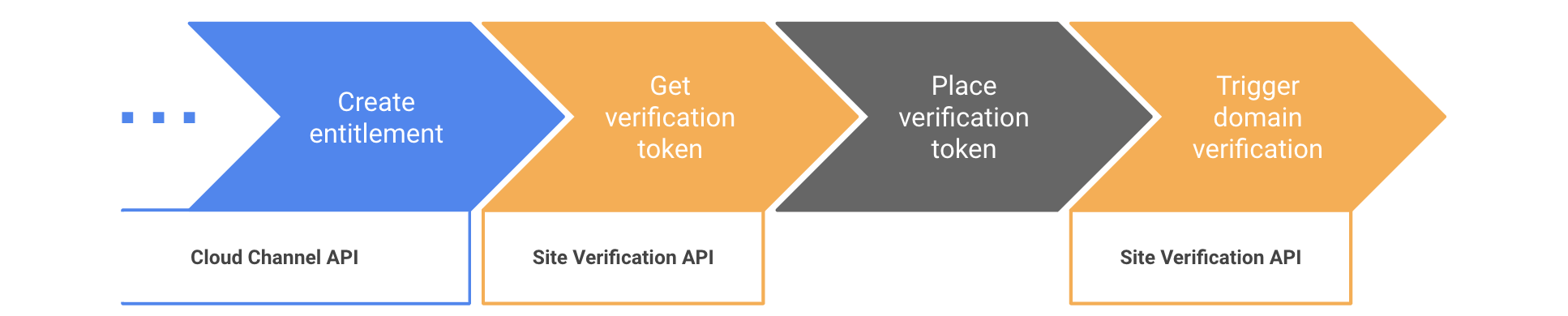
Site Verification API 并非特定于转销商。域名验证是各种 Google 产品(Search Console、Google Ads 等)中使用的信号。此处介绍的流程依赖于将转销商域名的超级管理员设置为域名的“所有者”,并将客户的第一个管理员设置为共同所有者。如需详细了解这些概念,请访问 Site Verification API 使用入门 页面。
第 1 步:准备使用 Site Verification API
- 前往 Google Cloud 控制台的 API 库部分,然后启用 Site Verification API。
- 使用转销商域名的超级管理员账号前往
网域级委托页面
。
- 在包含您的服务帐号的行中,点击修改 。
- 在 OAuth 授权范围 字段中输入
https://www.googleapis.com/auth/siteverification。 - 点击授权 。
- 安装 Site Verification API 客户端库。
第 2 步:获取验证令牌
此 Codelab 将重点介绍最常见的域名验证方式:使用 TXT DNS 记录。Site Verification API 支持
其他验证方法。
如需检索您将作为 TXT 记录放置的令牌,您需要
获取 type=INET_DOMAIN 和 verificationMethod=DNS_TXT 的令牌。
在以下代码中,使用您的信息填写这些变量。
jsonKeyFile: 创建服务账号时生成的 JSON 密钥文件的路径 。resellerAdminUser:转销商域名超级管理员的电子邮件地址。customerDomain:最终客户的域名。如果您在测试 Partner Sales Console 上运行此 Codelab,请确保域名遵循域名命名惯例。
C#
使用以下导入:
using Google.Apis.Auth.OAuth2;
using Google.Apis.Services;
using Google.Apis.SiteVerification.v1;
using Google.Apis.SiteVerification.v1.Data;
创建 API 客户端并提取令牌:
// Set up credentials with user impersonation
ICredential credential = GoogleCredential.FromFile(jsonKeyFile)
                             .CreateScoped("https://www.googleapis.com/auth/siteverification")
                             .CreateWithUser(resellerAdminUser);

// Create the API service
var verificationService = new SiteVerificationService(new BaseClientService.Initializer{
    HttpClientInitializer = credential,
});

// Fetch the token
var request = new SiteVerificationWebResourceGettokenRequest {
  VerificationMethod = "DNS_TXT",
  Site = new SiteVerificationWebResourceGettokenRequest.SiteData {
    Type = "INET_DOMAIN",
    Identifier = customerDomain
  }
};
var response = verificationService.WebResource.GetToken(request).Execute();
string token = response.Token;
Console.WriteLine("Site Verification token: " + token);
Go
使用以下导入:
import (
  "context"
  "fmt"
  "os"

  "golang.org/x/oauth2/google"
  "google.golang.org/api/option"
  "google.golang.org/api/siteverification/v1"
)
创建 API 客户端并提取令牌:
ctx := context.Background()

// Set up credentials with user impersonation
jsonKey, _ := os.ReadFile(jsonKeyFile)
jwt, _ := google.JWTConfigFromJSON(jsonKey, "https://www.googleapis.com/auth/siteverification")
jwt.Subject = resellerAdminUser
tokenSource := jwt.TokenSource(ctx)

// Create the API Service
verificationService, _ := siteverification.NewService(ctx, option.WithTokenSource(tokenSource))

// Fetch the token
req := &siteverification.SiteVerificationWebResourceGettokenRequest{
  Site: &siteverification.SiteVerificationWebResourceGettokenRequestSite{
    Type:       "INET_DOMAIN",
    Identifier: customerDomain,
  },
  VerificationMethod: "DNS_TXT",
}
res, _ := verificationService.WebResource.GetToken(req).Do()
token := res.Token
fmt.Println("Site verification token: " + token)
Java
使用以下导入:
import com.google.auth.http.HttpCredentialsAdapter;
import com.google.auth.oauth2.GoogleCredentials;
import com.google.auth.oauth2.ServiceAccountCredentials;
import com.google.api.client.googleapis.javanet.GoogleNetHttpTransport;
import com.google.api.client.json.jackson2.JacksonFactory;
import com.google.api.services.siteVerification.SiteVerification;
import com.google.api.services.siteVerification.SiteVerificationScopes;
import com.google.api.services.siteVerification.model.SiteVerificationWebResourceGettokenRequest;
import com.google.api.services.siteVerification.model.SiteVerificationWebResourceGettokenResponse;
import com.google.api.services.siteVerification.model.SiteVerificationWebResourceResource;
import java.io.FileInputStream;
import java.util.Arrays;
创建 API 客户端并提取令牌:
// Set up credentials with user impersonation
FileInputStream jsonKeyFileSteam = new FileInputStream(JSON_KEY_FILE);
GoogleCredentials credentials = ServiceAccountCredentials.fromStream(jsonKeyFileSteam)
                                    .createScoped("https://www.googleapis.com/auth/siteverification")
                                    .createDelegated(RESELLER_ADMIN_USER);

// Create the API service
SiteVerification verificationService = new SiteVerification.Builder(
    GoogleNetHttpTransport.newTrustedTransport(),
    JacksonFactory.getDefaultInstance(),
    new HttpCredentialsAdapter(credentials)).build();

// Fetch the token
SiteVerificationWebResourceGettokenRequest request =
    new SiteVerificationWebResourceGettokenRequest()
        .setVerificationMethod("DNS_TXT")
        .setSite(new SiteVerificationWebResourceGettokenRequest.Site()
            .setType("INET_DOMAIN")
            .setIdentifier(CUSTOMER_DOMAIN));
SiteVerificationWebResourceGettokenResponse response =
    verificationService.webResource().getToken(request).execute();
String token = response.getToken();
System.out.println("Site Verification token: " + token);
Node.js
使用以下导入:
const {google} = require('googleapis');
创建 API 客户端并提取令牌:
// Set up credentials with user impersonation
const authJWT = new JWT({
  keyFile: jsonKeyFile,
  scopes: ['https://www.googleapis.com/auth/siteverification'],
  subject: resellerAdminUser,
});

// Create the API service
const verificationService = google.siteVerification({version: 'v1', auth: authJWT});

// Fetch the token
const { data } = await verificationService.webResource.getToken({
  requestBody: {
    site: {
      type: 'INET_DOMAIN',
      identifier: customerDomain,
    },
    verificationMethod: 'DNS_TXT',
  }
});
const token = data.token;
console.log(`Site Verification token: ${token}`);
PHP
创建 API 客户端并提取令牌:
// Set up credentials with user impersonation
$client = new Google_Client();
$client->setAuthConfig($JSON_KEY_FILE);
$client->setSubject($RESELLER_ADMIN_USER);
$client->setScopes('https://www.googleapis.com/auth/siteverification');

// Create the API service
$verificationService = new Google_Service_SiteVerification($client);

// Fetch the token
$request = new Google_Service_SiteVerification_SiteVerificationWebResourceGettokenRequest([
  'verificationMethod' => 'DNS_TXT',
  'site' => [
    'type' => 'INET_DOMAIN',
    'identifier' => $CUSTOMER_DOMAIN
  ]
]);
$response = $verificationService->webResource->getToken($request);
$token = $response->token;
print 'Site Verification token: ' . $token . PHP_EOL;
Python
使用以下导入:
from google.oauth2 import service_account
from apiclient.discovery import build
创建 API 客户端并提取令牌:
# Set up credentials with user impersonation
credentials = service_account.Credentials.from_service_account_file(
    JSON_KEY_FILE, scopes=["https://www.googleapis.com/auth/siteverification"])
credentials_delegated = credentials.with_subject(RESELLER_ADMIN_USER)

# Create the API service
verification_service = build(serviceName="siteVerification", version="v1",
    credentials=credentials_delegated)

# Fetch the token
response = verification_service.webResource().getToken(
  body={
    "site": {
      "type": "INET_DOMAIN",
      "identifier": CUSTOMER_DOMAIN
    },
    "verificationMethod": "DNS_TXT"
  }).execute()
token = response["token"]
print("Site Verification token: " + token)
第 3 步:放置验证令牌
编写代码,将令牌作为 TXT 记录添加到客户域名的 DNS 记录中。
对于新域名,这是设置
Gmail 所需的 MX 记录的好时机。
第 4 步:触发域名验证
将令牌作为 TXT 记录放置后,您可以调用 Site Verification API 来触发验证。这是通过调用
webResource.insert()实现的。
如果找不到预期令牌,调用会失败并显示 400 错误。您可以实现指数退避算法重试策略,直到调用成功,以弥补 DNS 传播延迟。
如果调用返回时没有错误,则 Site Verification API 会将该域名视为已验证,并且 webResource 的 owners 字段中的任何电子邮件地址都是经验证所有者。
验证状态可能需要大约 3 小时才能传播到客户的 Google Workspace 账号。您可以通过将客户的管理员(在您调用
provisionCloudIdentity时创建)设置为owner的webResource,强制状态
立即传播。
C#
// Set the customer's admin user as an owner to make sure the domain
// verification status is instantly propagated to the Workspace account
string[] owners = { "admin@" + customerDomain };

var resource = new SiteVerificationWebResourceResource {
  Site = new SiteVerificationWebResourceResource.SiteData {
    Type = "INET_DOMAIN",
    Identifier = customerDomain
  },
  Owners = owners
};

resource = verificationService.WebResource.Insert(resource, "DNS_TXT").Execute();
Console.WriteLine("=== Domain has been verified");
Go
// Set the customer's admin user as an owner to make sure the domain
// verification status is instantly propagated to the Workspace account
resource := &siteverification.SiteVerificationWebResourceResource{
  Site: &siteverification.SiteVerificationWebResourceResourceSite{
    Type:       "INET_DOMAIN",
    Identifier: customerDomain,
  },
  Owners: []string{"admin@" + customerDomain},
}
resource, err := verificationService.WebResource.Insert("DNS_TXT", resource).Do()
if err != nil {
  fmt.Println(err)
} else {
  fmt.Println("=== Domain has been verified")
}
Java
// Set the customer's admin user as an owner to make sure the domain
// verification status is instantly propagated to the Workspace account
SiteVerificationWebResourceResource resource =
    new SiteVerificationWebResourceResource()
        .setSite(new SiteVerificationWebResourceResource.Site()
            .setIdentifier(CUSTOMER_DOMAIN)
            .setType("INET_DOMAIN"))
        .setOwners(Arrays.asList("admin@" + CUSTOMER_DOMAIN));

resource = verificationService.webResource().insert("DNS_TXT", resource).execute();
System.out.println("=== Domain has been verified");
Node.js
// Set the customer's admin user as an owner to make sure the domain
// verification status is instantly propagated to the Workspace account
await verificationService.webResource.insert({
  verificationMethod: 'DNS_TXT',
  requestBody: {
    site: {
      type: 'INET_DOMAIN',
      identifier: customerDomain,
    },
    owners: [`admin@${customerDomain}`],
  }
});
console.log('=== Domain has been verified');
PHP
// Set the customer's admin user as an owner to make sure the domain
// verification status is instantly propagated to the Workspace account
$resource = new Google_Service_SiteVerification_SiteVerificationWebResourceResource([
  'site' => [
    'type' => 'INET_DOMAIN',
    'identifier' => $CUSTOMER_DOMAIN,
  ],
  'owners' => ['admin@' . $CUSTOMER_DOMAIN]
]);

$resource = $verificationService->webResource->insert('DNS_TXT', $resource);
print '=== Domain has been verified' . PHP_EOL;
Python
# Set the customer's admin user as an owner to make sure the domain
# verification status is instantly propagated to the Workspace account
resource = verification_service.webResource().insert(
  verificationMethod="DNS_TXT",
  body={
    "site": {
      "type": "INET_DOMAIN",
      "identifier": CUSTOMER_DOMAIN
    },
    "owners": ["admin@" + CUSTOMER_DOMAIN]
  }).execute()
print("=== Domain has been verified")