
This document describes the core components of Certificate Manager (2nd gen) and how they interact with your Google Cloud resources and external certificate authority sources.
Certificate Manager (2nd gen) lets you adopt features incrementally. You can start by monitoring your existing certificate inventory and then add automated issuance or trust management as your needs grow.
Core components
Certificate Manager (2nd gen) has the following core components:
- Certificate directory: A unified list of all detected and manually uploaded certificates in your project.
- Overview dashboard: A monitoring tool that summarizes your certificate environment, including expiration alerts and security trends.
- Issuance configurations: Reusable policies that define how Certificate Manager (2nd gen) generates and manages automated certificate renewals.
- Trust configurations: Definitions for trust anchors, such as root CA certificates, that workloads use for mutual TLS (mTLS) to verify identities.
Architecture overview
The following diagram shows how these components interact with each other:
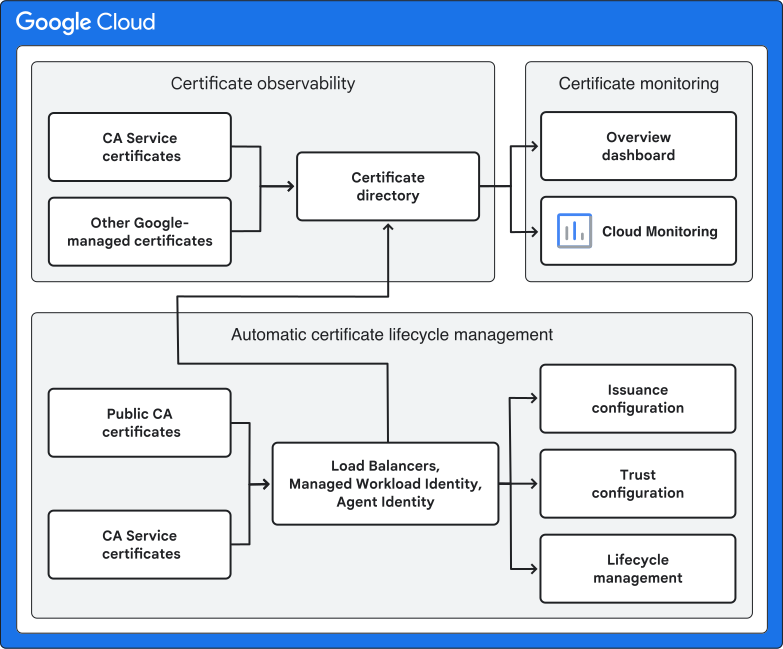
The certificate inventory adds certificates from CA Service and integrated Google Cloud resources. You can use the overview dashboard to monitor certificate health, and automate lifecycle management by configuring issuance and trust settings. The following sections describe each component in detail.
Certificate observability
Certificate Manager (2nd gen) automatically monitors your environment and populates the certificate directory from the following sources:
- Integrated Google Cloud services: Certificates used by services like managed workload identity and Cloud Load Balancing (including uploaded and classic certificates).
- Certificate Authority Service: Certificates issued by your Enterprise tier private CA pools.
Certificate monitoring
The overview dashboard uses the data from the certificate directory to summarize the health and security posture of your environment. You can use the dashboard to perform the following tasks:
- Identify expiring certificates: Prioritize renewals by seeing which certificates are nearing expiration across all services.
- Audit security posture: Monitor the distribution of cryptographic algorithms and key lengths to ensure compliance with security standards.
- Track issuance trends: Gain insights into certificate usage and issuance over time.
Automated certificate lifecycle management
You can automate the management of your certificates by configuring issuance and trust settings:
- Issuance configurations: Define parameters like lifetime, key algorithm, and rotation window. When an issuance configuration is associated with a resource, Certificate Manager (2nd gen) automatically generates and renews the certificate.
- Trust configurations: Distribute trust anchors to your applications to secure workload-to-workload communication using mutual TLS (mTLS). This approach ensures applications trust only approved certificates.
What's next
- Compare Certificate Manager versions
- View certificate directory
- Monitor your certificates
- Create issuance configuration
- Create trust configuration